

Key Takeaways
- •One size doesn't fit all: "Best project management software" needs different criteria than "best free project management for freelancers"
- •Query modifiers reveal priorities: Words like "cheap," "enterprise," "beginner" tell you exactly what to weight heavily
- •Mismatched criteria frustrate readers: Recommending enterprise tools for a "best free" query destroys trust
- •Create targeted pages: Rather than one mega-comparison, create intent-specific pages with appropriate criteria
Review criteria must match search intent to serve readers effectively. A query for "best CRM for small business" implies different priorities than "best enterprise CRM"—yet many comparison pages use identical evaluation frameworks for both. This mismatch frustrates readers who find recommendations that don't fit their actual needs.
This guide covers how to analyze query intent and adjust your evaluation criteria accordingly. We'll explore common intent categories, how to weight criteria for each, and how to structure content that serves specific audience segments rather than everyone poorly.
Common Intent Categories#
Query modifiers reveal what readers prioritize. Understanding these patterns helps you build criteria frameworks that actually match user needs.
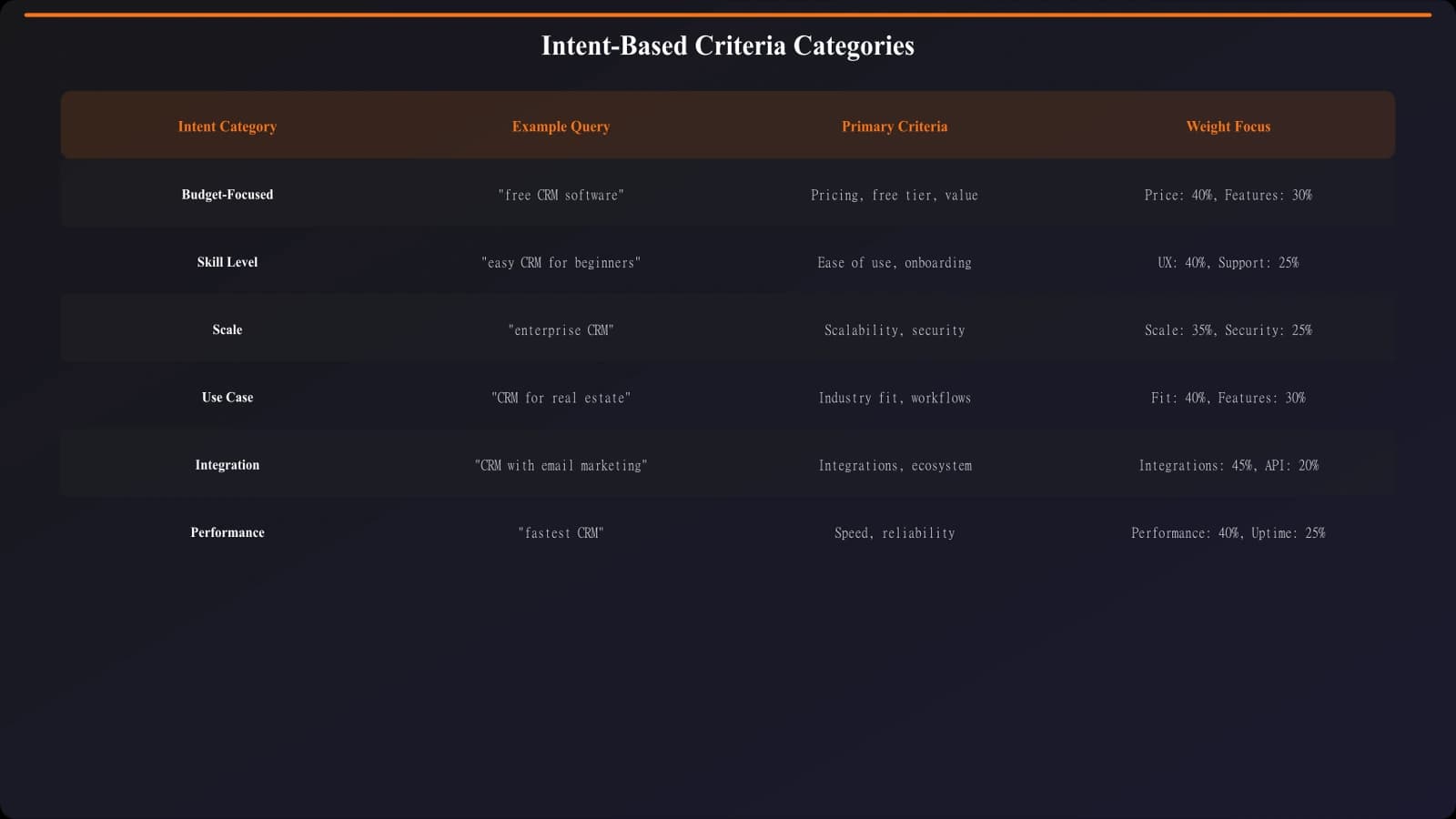
Figure 1: Intent categories and their primary evaluation criteria
| Intent Category | Example Modifiers | Primary Criteria Focus | |
|---|---|---|---|
| Budget-Focused | "free," "cheap," "affordable," "budget" | Price, free tier quality, value | |
| Skill-Based | "beginner," "easy," "simple," "no-code" | Learning curve, onboarding, docs | |
| Scale-Based | "enterprise," "small business," "startup" | Scalability, team features, pricing model | |
| Use-Case | "for developers," "for marketing," "for sales" | Category-specific features | |
| Quality-Focused | "best," "top," "professional" | Overall quality, reliability, support |
Budget-Focused Intent#
When queries include "free," "cheap," or "affordable," price becomes the primary filter. But budget intent isn't just about low cost—it's about value within constraints.
- 1Free tier quality (35%)How useful is the free version? What limitations exist?
- 2Price-to-value ratio (25%)What do you get per dollar compared to alternatives?
- 3Hidden costs (15%)Are there transaction fees, overage charges, required add-ons?
- 4Core functionality (15%)Does it accomplish the main task despite budget constraints?
- 5Upgrade path (10%)Is there a reasonable path when needs grow?
Don't Ignore Quality
Skill-Level Intent#
Queries with "beginner," "easy," or "simple" prioritize low learning curves. Enterprise-strength features become liabilities if they create complexity beginners can't navigate.
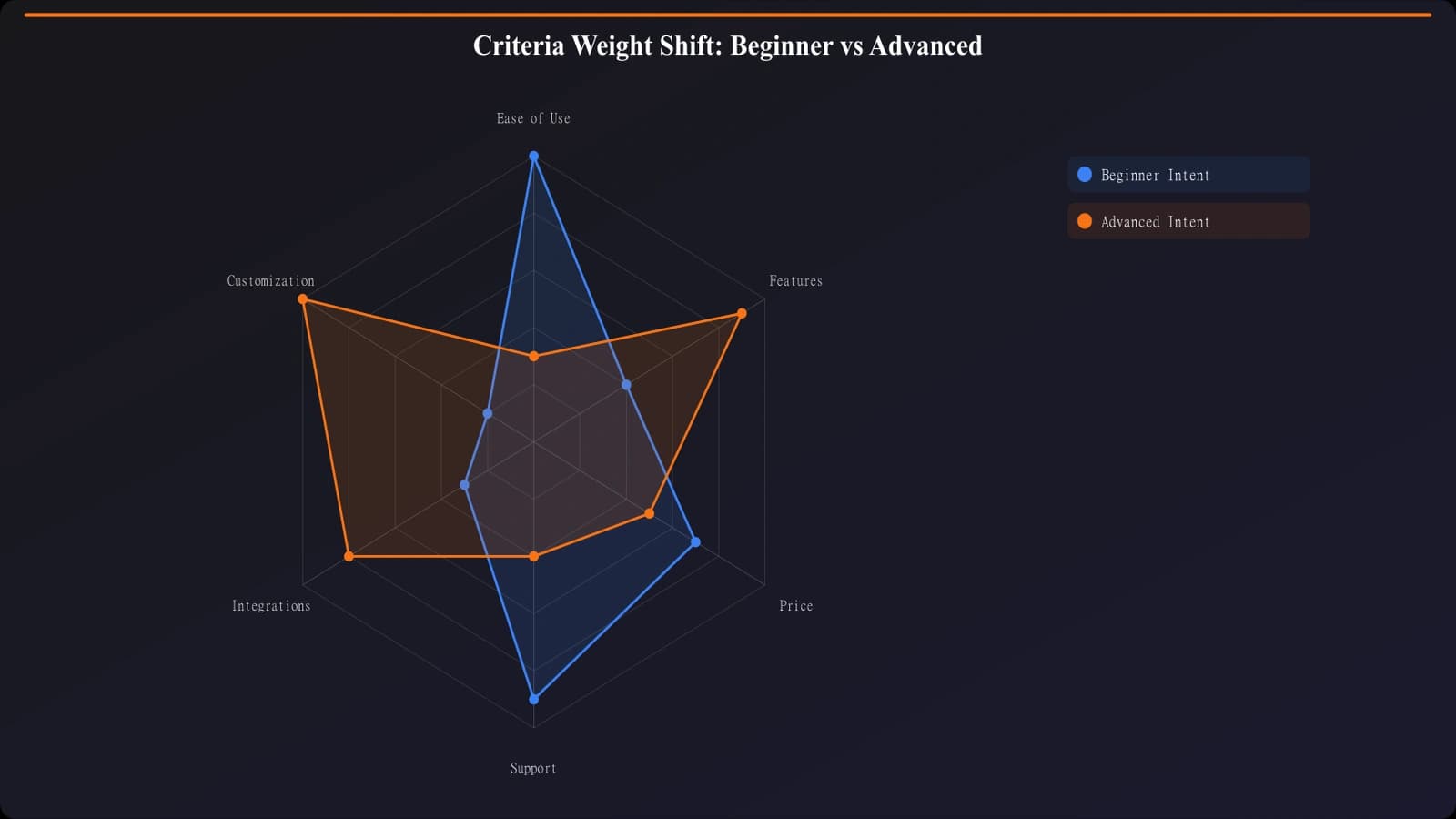
Figure 2: Criteria weight shifts between beginner and advanced intent
Scale-Based Intent#
Enterprise queries need different criteria than small business or startup queries. What works for a 10-person company fails at 1,000, and vice versa.
| Criterion | Startup Weight | SMB Weight | Enterprise Weight | |
|---|---|---|---|---|
| Price | 35% | 25% | 15% | |
| Ease of Setup | 25% | 20% | 10% | |
| Scalability | 10% | 15% | 25% | |
| Security/Compliance | 5% | 15% | 25% | |
| Support/SLAs | 10% | 15% | 20% | |
| Features | 15% | 10% | 5% |
Use-Case Intent#
When queries specify a use case ("for developers," "for marketing teams"), generic criteria fail. Evaluate based on category-specific needs.
Do
- ✓Research what the specified audience actually needs
- ✓Include criteria specific to that use case
- ✓Feature tools popular within that community
- ✓Use language and examples relevant to them
Don't
- ✕Apply generic criteria to specialized queries
- ✕Ignore community preferences and standards
- ✕Recommend tools the audience can't use
- ✕Assume all audiences have identical priorities
Content Strategy for Intent#
Rather than one comparison page trying to serve everyone, create intent-targeted pages with appropriate criteria. This serves readers better and captures more specific queries.
- Map query variations for your category
- Group queries by intent type
- Create criteria frameworks for each intent
- Build separate pages for high-volume intent variations
- Link between pages for users whose intent changes
- Use intent-appropriate language and examples
One "best [tool]" page often gets outranked by specific intent pages. "Best free CRM" and "best CRM for small business" might each outperform a generic "best CRM" because they match intent precisely.
Frequently Asked Questions#
How do I know which intents to target?
Use keyword research tools to find query variations. Look for modifiers (free, cheap, enterprise, beginner) and their search volumes. Prioritize high-volume intents first.
Should I have different top picks for different intents?
Often, yes. The best tool for beginners is rarely the best for enterprises. Don't force the same winner across intent-mismatched pages.
What if a tool is good for multiple intents?
Feature it in multiple pages, but emphasize different aspects. On a beginner page, highlight ease of use; on an enterprise page, highlight scalability.
How many intent variations should I create?
Start with the 3-5 highest-volume variations. Add more based on search data and performance. Don't create pages for intents without meaningful search volume.
Conclusion#
Intent-matched criteria create best-of pages that actually serve reader needs. Rather than applying one-size-fits-all evaluation to every query, analyze what specific audiences prioritize and weight your criteria accordingly. The result is content that satisfies search intent and builds trust through relevant recommendations.
- Analyze query modifiers: Budget, skill, scale, and use-case words reveal priorities
- Adjust weights: Same criteria, different weights for different intents
- Create targeted pages: Intent-specific content outperforms generic pages
- Match recommendations: Top picks should fit the specific intent
- Link between intents: Help readers whose needs differ from their initial query
Sources & References
- Moz. Search Intent Classification (2024)
- Search Engine Journal. User Intent and Content Strategy (2024)

Product Manager at BestPage. Pioneer in AEO research since 2024, exploring the convergence of SEO and GEO (Generative Engine Optimization). Led multiple AI-powered content optimization projects that achieved 300%+ citation increases in ChatGPT and Perplexity.