
Image SEO: Alt Text, Names, and Placement

Key Takeaways
- •Descriptive Names: Use hyphens and keywords in file names before upload
- •Alt Text: Describe the image content, not just “image of...”
- •Compression: Optimize file size without sacrificing visible quality
- •Placement: Put images near relevant text for context signals
Introduction: Images as SEO Opportunity#
Images do more than break up text—they're an SEO opportunity. Properly optimized images can rank in Google Images, improve page experience signals, and help search engines understand your content.
This guide covers the essentials: naming conventions, alt text best practices, compression techniques, and strategic placement within your content.
Image Search Traffic
Google Images is the second-largest search engine. For visual products or tutorials, image search can drive significant traffic—but only if images are properly optimized.
File Naming Conventions#
Image file names are one of the first signals Google uses to understand what an image shows. Rename files before uploading.
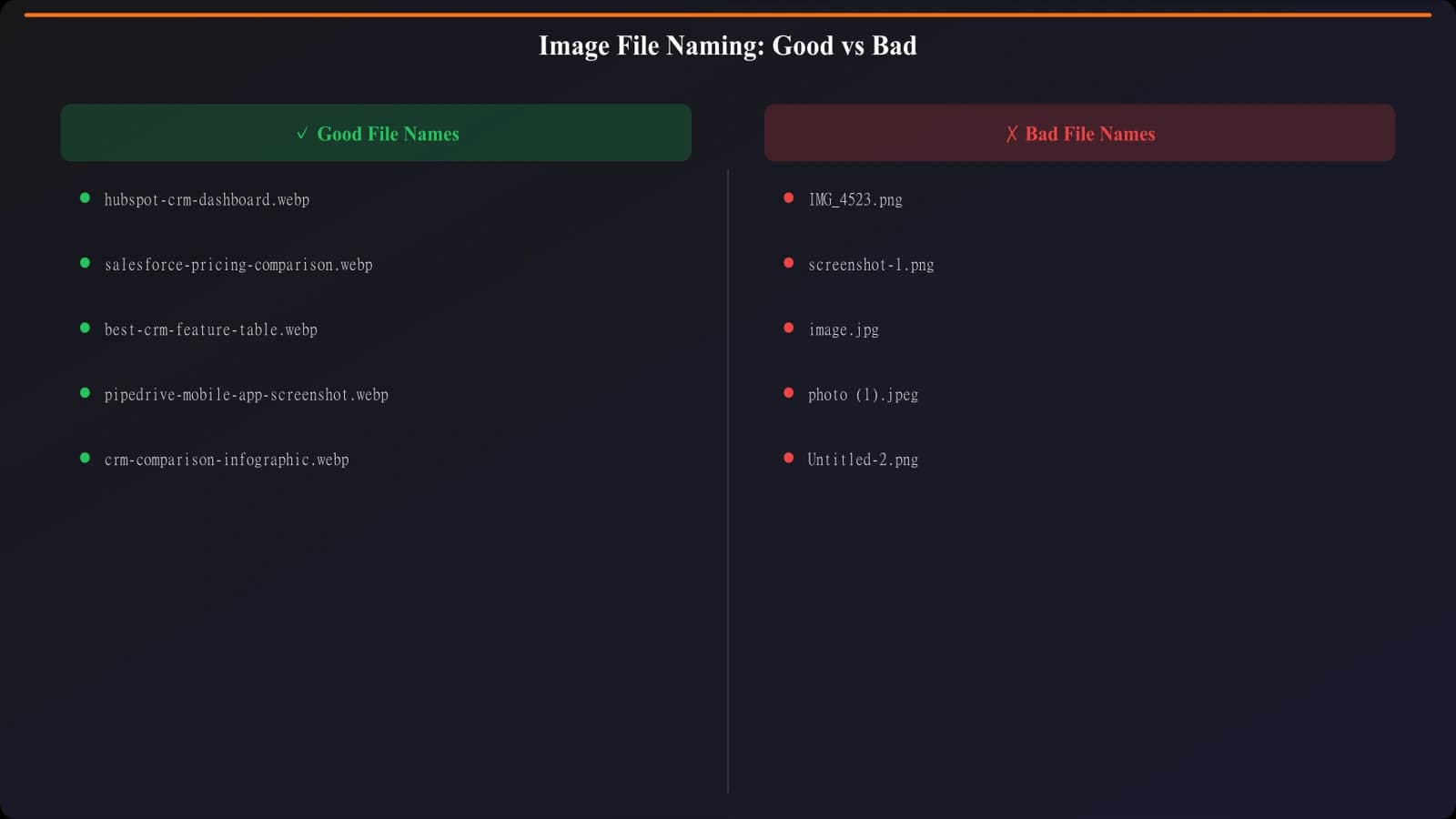
Figure 1: File naming best practices
File Naming Rules
- Be descriptive: “blue-running-shoes-nike.jpg” not “IMG_1234.jpg”
- Use hyphens: Separate words with hyphens, not underscores or spaces
- Include keywords: Natural, relevant keywords in the file name
- Keep it short: 3-5 descriptive words is usually enough
- Lowercase: Use all lowercase for consistency
Good File Names
- seo-audit-checklist.png
- chocolate-chip-cookies.jpg
- tesla-model-3-interior.webp
- before-after-website-redesign.png
Bad File Names
- IMG_20250115.jpg
- screenshot.png
- final_v2_FINAL.jpg
- image1.png
Writing Effective Alt Text#
Alt text (alternative text) serves two purposes: accessibility for screen readers and context for search engines. Both require clear, descriptive text.
The Alt Text Formula
Good alt text answers: “What is in this image and why is it here?”
- 1Describe the subject: What or who is in the image?
- 2Include context: Why is this image in the article?
- 3Add keywords naturally: If relevant, include target keywords
- 4Keep it concise: 125 characters or less typically
Alt Text Examples
Good:
alt="Bar chart comparing SEO tool pricing for 2026"

Bad:
alt="chart"
alt="image of a chart showing data"
alt="SEO tools SEO pricing SEO comparison best SEO"

Good:
alt="Woman typing on laptop while reviewing analytics dashboard"

Bad:
alt="woman laptop"
alt="stock photo of person working"
Image Compression and Formats#
Large images slow page load times, hurting both user experience and rankings. Compress images without visible quality loss.
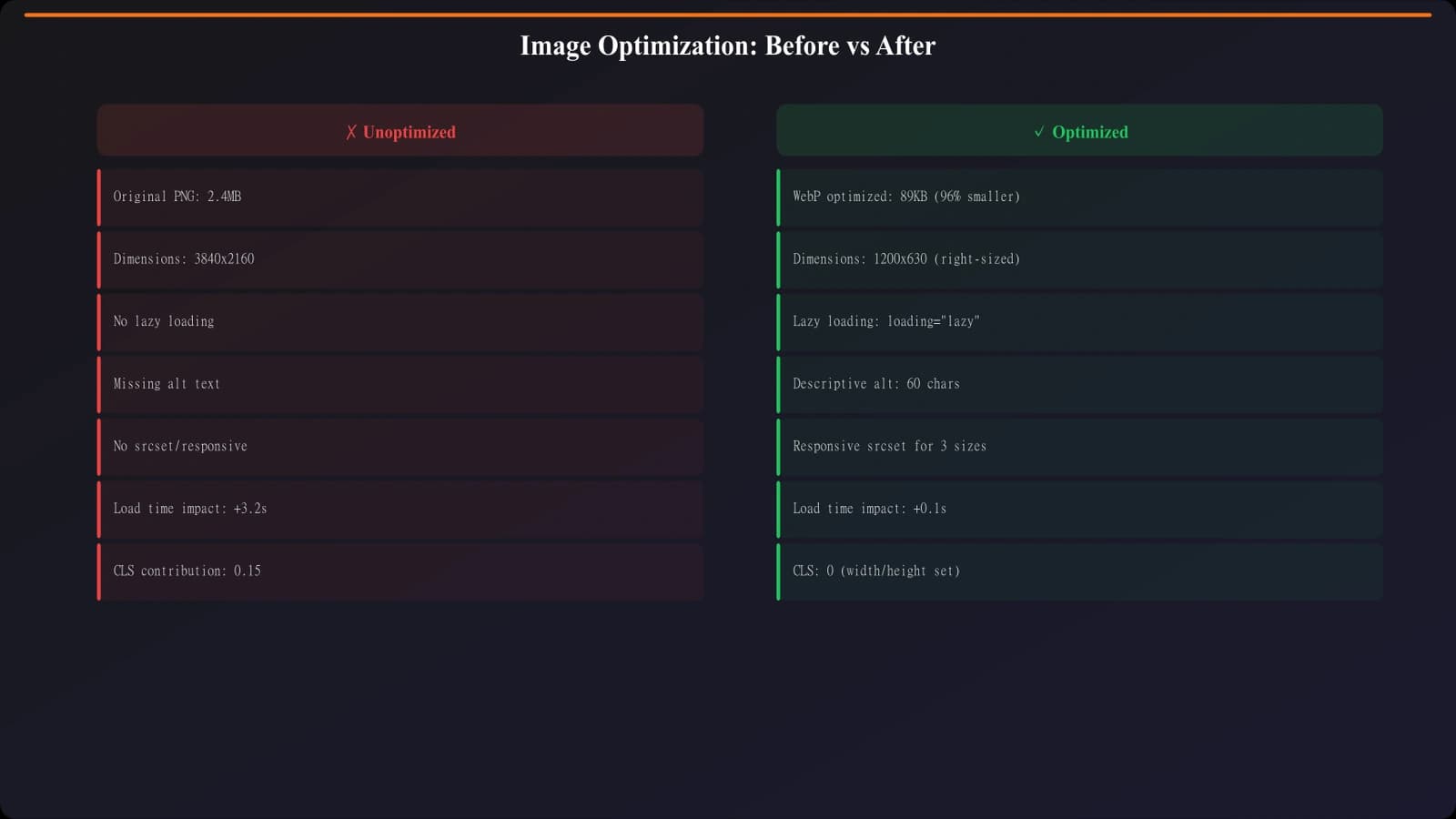
Figure 2: Impact of image compression on file size
Format Selection Guide
- WebP: Best overall choice—30% smaller than JPEG with same quality
- JPEG: Photos and complex images with many colors
- PNG: Graphics with transparency or text that needs sharpness
- SVG: Icons, logos, and simple graphics (infinitely scalable)
- AVIF: Newest format, best compression, limited support
Compression Tools
- TinyPNG/TinyJPG: Free web-based compression
- Squoosh: Google's free image optimizer with format conversion
- ImageOptim: Mac app for batch compression
- ShortPixel: WordPress plugin for automatic optimization
Target File Sizes
- Hero images: Under 200KB
- In-content images: Under 100KB
- Thumbnails: Under 30KB
- Icons: Under 10KB (or use SVG)
Strategic Image Placement#
Where you place images affects both user experience and how search engines understand image context.
Placement Principles
- Near relevant text: Images should be close to the content they illustrate
- After headings: Place images after H2/H3 to illustrate the section topic
- Break up long text: Use images to create visual breathing room
- Above the fold: Include at least one image visible without scrolling
Types of Images to Include
- Diagrams: Visualize processes, comparisons, or structures
- Screenshots: Show tools, examples, or step-by-step instructions
- Charts/graphs: Present data visually
- Original photos: Add authenticity (avoid generic stock)
- Infographics: Summarize key points for sharing
“The best images don't just decorate—they explain, demonstrate, or prove something the text alone cannot.”
Related Reading#
Explore these related topics: Schema Markup Basics for Blogs, Content Refresh Workflow, and EEAT Signals You Can Add Today.
Conclusion: Images as Assets#
Every image is an SEO opportunity. With proper file naming, descriptive alt text, optimized file sizes, and strategic placement, images contribute to rankings rather than just decorating pages.
Create an image optimization checklist for your workflow: rename before upload, write meaningful alt text, compress to target sizes, and place images near relevant content. Small habits compound into significant SEO gains.

Product Manager at BestPage. Pioneer in AEO research since 2024, exploring the convergence of SEO and GEO (Generative Engine Optimization). Led multiple AI-powered content optimization projects that achieved 300%+ citation increases in ChatGPT and Perplexity.