
Schema Markup Basics for Blogs

Key Takeaways
- •Rich Results: Schema can trigger enhanced SERP appearances (stars, FAQs, etc.)
- •Key Types: Article, FAQ, Breadcrumb, and Author are most valuable for blogs
- •JSON-LD: Google's recommended format for structured data
- •Validation: Always test with Google's Rich Results Test before deploying
Introduction: What is Schema Markup?#
Schema markup (or structured data) is code you add to your pages to help search engines understand your content better. It provides explicit signals about what your page is about, who wrote it, and what type of content it contains.
When implemented correctly, schema can trigger rich results—enhanced search listings with stars, FAQs, images, or other eye-catching elements that boost click-through rates.
Schema and AI Search
As AI search engines like ChatGPT, Perplexity, and Google SGE become more prevalent, structured data helps these systems understand and cite your content accurately.
Essential Schema Types for Blogs#
Not all schema types are equally valuable. Focus on these high-impact types for blog content.

Figure 1: Schema types and their corresponding rich results
1. Article / BlogPosting Schema
The foundational schema for any blog post. Helps Google understand it's an article and provides metadata.
{
  "@context": "https://schema.org",
  "@type": "Article",
  "headline": "Your Article Title",
  "description": "Brief description",
  "image": "https://example.com/image.jpg",
  "author": {
    "@type": "Person",
    "name": "Author Name"
  },
  "datePublished": "2026-01-15",
  "dateModified": "2026-01-15"
}
2. FAQ Schema
Adds expandable FAQ results directly in the SERP. Great for question-rich content.
- When to use: Articles with clear Q&A sections
- Benefit: Takes up more SERP real estate, improves CTR
- Limit: Keep to 5-10 high-quality questions
3. Breadcrumb Schema
Shows your site's hierarchy in search results (Home > Blog > Category > Post).
- When to use: All pages with clear navigation hierarchy
- Benefit: Helps users understand page context
- Implementation: Usually handled by CMS or built into templates
4. Author / Organization Schema
Establishes authorship and helps with E-E-A-T signals.
- Author: Name, credentials, social profiles, image
- Organization: Company name, logo, social profiles
- Benefit: Builds trust and may influence knowledge panels
High-Value Schema
- Article / BlogPosting
- FAQ
- HowTo
- Breadcrumb
Supporting Schema
- Person (Author)
- Organization
- WebPage
- ImageObject
How to Implement Schema Markup#
Google recommends JSON-LD format, which is added in the <head> or <body> of your page.
JSON-LD Format
<script type="application/ld+json">
{
  "@context": "https://schema.org",
  "@type": "FAQPage",
  "mainEntity": [
    {
      "@type": "Question",
      "name": "What is schema markup?",
      "acceptedAnswer": {
        "@type": "Answer",
        "text": "Schema markup is structured data..."
      }
    }
  ]
}
</script>
Implementation Options
- 1Manual: Add JSON-LD directly to page templates (most control)
- 2CMS plugins: Yoast, Rank Math, or other SEO plugins auto-generate
- 3Google Tag Manager: Deploy schema without touching code
- 4AI tools: Schema generators that create JSON-LD from content
Common Schema Mistakes to Avoid#
Schema errors can prevent rich results or even trigger manual actions. Avoid these pitfalls.
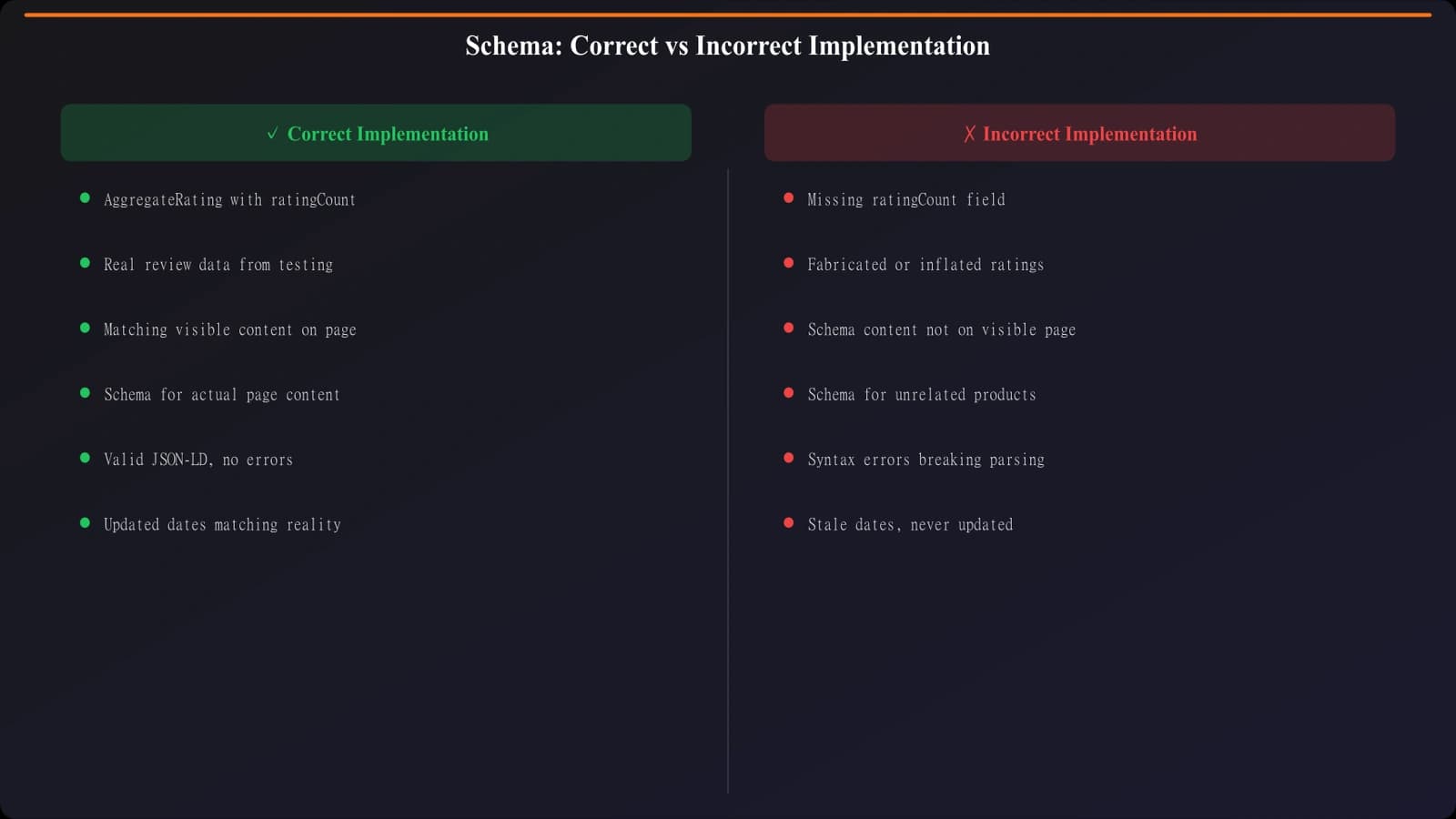
Figure 2: Common schema errors and how to fix them
Mistakes to Avoid
- Invisible content: Schema must describe content visible on the page
- Keyword stuffing: Don't add irrelevant keywords to schema fields
- Fake reviews: Never add ReviewSchema for content that isn't a genuine review
- Missing required fields: Each schema type has required properties
- Wrong schema type: Using Product schema for blog posts, etc.
- Duplicate schema: Multiple conflicting schema blocks for the same thing
- Outdated dates: Leaving old dateModified when content is refreshed
“Schema is a promise to Google. If your schema says FAQ but there's no FAQ on the page, you're breaking that promise.”
Testing and Validation#
Always validate schema before deploying to production.
Essential Testing Tools
- Rich Results Test: search.google.com/test/rich-results
- Schema Markup Validator: validator.schema.org
- Google Search Console: Enhancements reports show schema issues
Validation Checklist
- No errors or warnings in Rich Results Test
- Preview shows expected rich result appearance
- All required fields are populated
- Schema content matches visible page content
- URLs and images are valid and accessible
Related Reading#
Explore these related topics: EEAT Signals You Can Add Today, Search Intent: Match Content to Queries, and Image SEO: Alt Text, Names, and Placement.
Conclusion: Schema as Communication#
Schema markup is how you communicate explicitly with search engines. It removes ambiguity about what your content is, who created it, and how it should be understood.
Start with the essentials: Article schema for every post, FAQ schema where appropriate, Breadcrumb for navigation, and Author for E-E-A-T. Test thoroughly, avoid common mistakes, and monitor Search Console for issues.

Product Manager at BestPage. Pioneer in AEO research since 2024, exploring the convergence of SEO and GEO (Generative Engine Optimization). Led multiple AI-powered content optimization projects that achieved 300%+ citation increases in ChatGPT and Perplexity.