
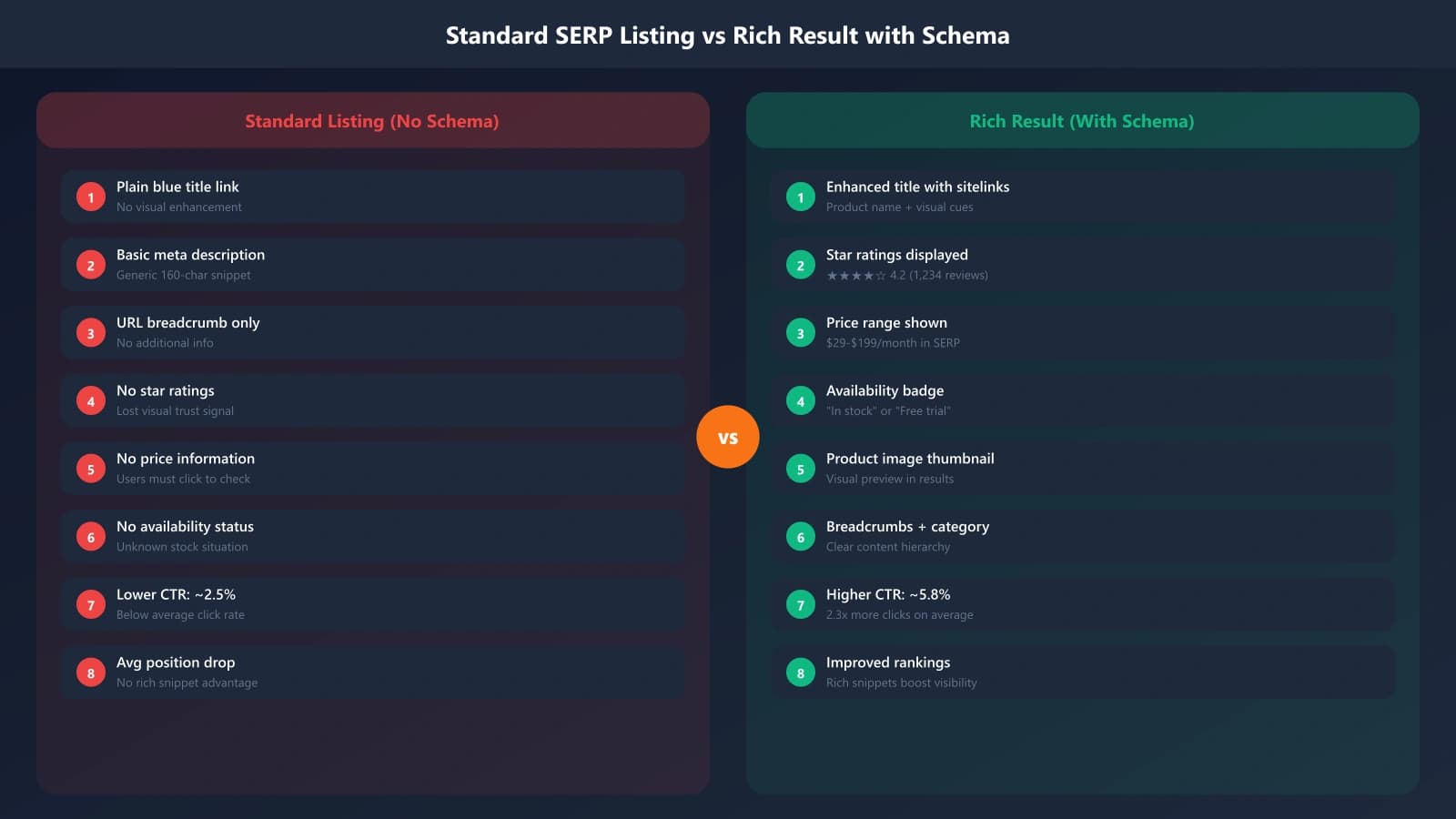
When someone searches for product comparisons, rich results make certain listings stand out. Star ratings appear next to titles. Price ranges display directly in search results. Availability status shows without clicking. These visual enhancements come from structured data—schema markup that tells search engines exactly what your content contains.
For e-commerce comparison pages, proper schema does more than win clicks. It also helps AI systems parse your product data more accurately, potentially improving citations in AI search results. The investment in schema implementation pays dividends across both traditional and AI-powered search.
This guide covers the essential schema types for e-commerce comparison pages: how to implement them, common mistakes to avoid, and how to validate your markup before deployment.
Core Schema Types for Comparisons
E-commerce comparison pages benefit from several interconnected schema types. Understanding how they work together is essential for proper implementation.
Product Schema
The Product schema type describes individual products in your comparison. Each product entry should include its own Product markup with key properties:
Essential Product properties:
• name: The product name exactly as displayed
• description: A brief description of the product
• image: URL to the product image
• brand: The manufacturer or brand (as Organization or Brand type)
• sku: Product identifier if available
• offers: Nested Offer with pricing information
The Product schema forms the foundation. Without it, you can't add pricing (Offer) or ratings (AggregateRating) in a way Google recognizes for rich results.
Offer Schema
Offer schema nests inside Product to describe pricing and availability. This is where your price-related rich results come from:
Essential Offer properties:
• price: The numeric price value
• priceCurrency: Currency code (USD, EUR, etc.)
• availability: Stock status (InStock, OutOfStock, PreOrder)
• url: Link to where the product can be purchased
• priceValidUntil: When this price expires (important for accuracy)
• seller: The merchant offering this product
For comparison pages, you might list products available from multiple sellers. Use AggregateOffer when showing a price range across sellers, or multiple Offer entries for specific merchants.
AggregateRating Schema
AggregateRating enables the star ratings that dramatically improve click-through rates. This schema aggregates individual reviews into summary statistics:
Essential AggregateRating properties:
• ratingValue: The average rating (e.g., 4.5)
• bestRating: Maximum possible (usually 5)
• worstRating: Minimum possible (usually 1)
• ratingCount: Number of ratings contributing to the aggregate
• reviewCount: Number of written reviews if different from ratingCount
Important caveat: for comparison pages that aggregate reviews from elsewhere, Google's guidelines require that the reviews be about items sold or directly provided by your site. Third-party review aggregation is increasingly restricted.
ItemList for Comparison Structure
Beyond individual product markup, ItemList schema wraps your entire comparison, signaling the ranked or ordered nature of your content.
ItemList Structure
ItemList tells search engines this page contains a list of items in a specific order. For “best products” comparisons, this order often represents your ranking:
ItemList implementation pattern:
1. Create ItemList as the page-level schema
2. Set itemListElement as an array of ListItem entries
3. Each ListItem contains position (1, 2, 3...) and item (the Product)
4. Nest complete Product schemas within each ListItem
This structure explicitly tells search engines which product is first in your ranking, which is second, and so on. It can influence how AI systems interpret your recommendations.
Combining Schema Types
Real-world implementation combines these types into a nested structure. A complete comparison page might have Article schema for the page itself, ItemList containing the ranked products, Product schema for each item in the list, Offer nested within each Product, and AggregateRating if you have review data.
The nesting hierarchy matters. Improper nesting—like putting AggregateRating at the page level instead of the product level—can invalidate your markup or prevent rich results.
Generate Schema-Rich Comparison Pages
Create e-commerce listicles with proper structured data built in for rich results.
Try for Free
Implementation Guidelines
Moving from schema concepts to working implementation requires attention to technical details.
JSON-LD Implementation
Use JSON-LD format for schema—it's Google's preferred method and easiest to maintain. Place the script in your page's head section or before the closing body tag:
JSON-LD placement:
• Add within a script tag with type=“application/ld+json”
• Can be static or dynamically generated
• Multiple JSON-LD blocks are valid on one page
• Keep Article schema separate from ItemList/Product for clarity
Validation and Testing
Before deployment, validate your schema implementation:
- Schema.org Validator: Check syntax and structure validity
- Google Rich Results Test: See which rich results you qualify for
- Search Console: Monitor for structured data errors post-deployment
- Manual SERP check: Search for your page and verify rich results appear
Common validation errors include missing required properties, incorrect data types (string vs number), invalid URLs, and mismatched nesting. Fix all errors before expecting rich results.
Common Mistakes to Avoid
Schema implementation for comparison pages has several pitfalls.
Data Accuracy Issues
The most damaging mistakes involve inaccurate data. Prices in schema that don't match visible prices, ratings that can't be verified, and availability claims that aren't current all risk penalties. Always pull schema data from the same source as your visible content.
Rich Result Eligibility
Not all comparison pages qualify for all rich results. Review stars require actual reviews you collected or can verify. Product rich results require products you sell or can link to for purchase. Some rich result types are category-specific.
Affiliate comparison pages face particular scrutiny. Google increasingly distinguishes between first-party product pages and third-party aggregators. Implement schema conservatively and monitor Search Console for warnings.
Maintenance Neglect
Prices change. Products go out of stock. Ratings update. Schema that was accurate at deployment becomes inaccurate over time. Build schema generation into your content update workflow—when you update pricing or availability, the schema should update automatically.
Building Rich Result Success
E-commerce schema implementation is technical work that pays substantial dividends. Rich results improve click-through rates, structured data improves AI parsing, and the discipline of accurate data benefits overall content quality.
Start with the core schema types: Product, Offer, and ItemList. Add AggregateRating only when you have legitimate review data. Validate before deployment and monitor Search Console after. Build automation to maintain accuracy over time.
For broader schema strategies, see Schema for Best-Of Rankings. For local service schema, see Local Comparison Trust Signals.

Product Manager at BestPage. Pioneer in AEO research since 2024, exploring the convergence of SEO and GEO (Generative Engine Optimization). Led multiple AI-powered content optimization projects that achieved 300%+ citation increases in ChatGPT and Perplexity.