
E-commerce has a natural advantage for programmatic SEO: you already have structured product data. Specs, prices, images, descriptions—all the raw material needed to generate comparison content at scale.
The challenge is building pages that genuinely help shoppers rather than just inflating your page count. “Product A vs Product B” pages that simply display two product cards side-by-side don't add value—they add index bloat and risk thin content penalties.
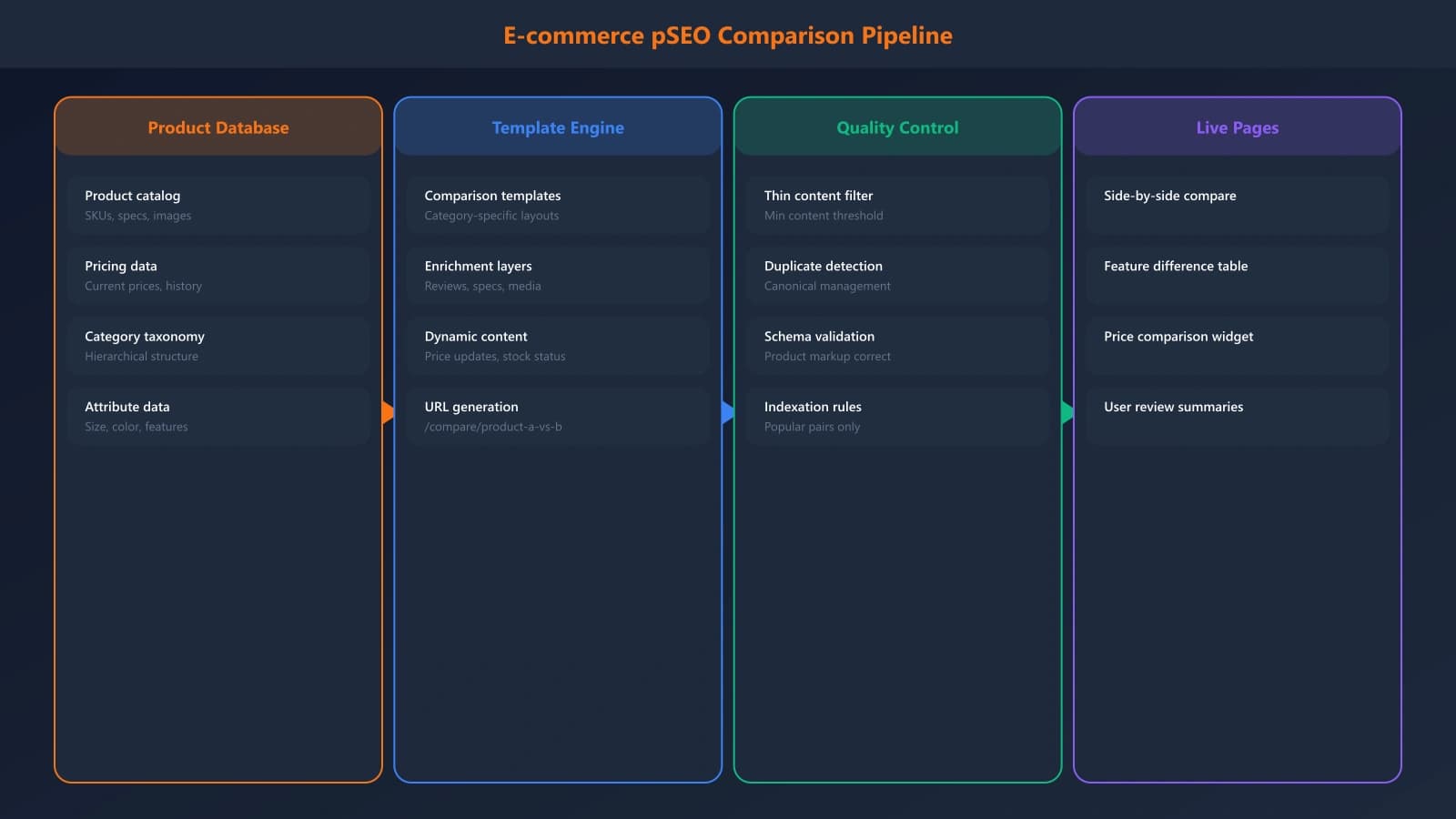
This playbook covers how to build e-commerce comparison pages at scale while maintaining quality. We'll cover data requirements, template architecture, value-add strategies, and indexation management.
Data Foundation
Programmatic content is only as good as the data feeding it. Before building templates, ensure your product data can support meaningful comparisons.
Minimum Viable Data
Each product in your comparison matrix needs consistent, comparable data points. At minimum:
- Core specs — The technical attributes shoppers compare (size, weight, capacity, speed, etc.)
- Pricing — Current prices, historical prices if available
- Availability — In-stock status, shipping times
- Images — High-quality product photos, ideally consistent angles
- Reviews — Your own ratings or aggregated customer ratings
- Category/taxonomy — How products relate to each other
If any of these are missing or inconsistent, you'll generate pages with obvious gaps—empty comparison cells or mismatched data types. Clean your data before scaling.
Value-Add Enrichment
Beyond basic product data, enrichment creates unique value that justifies each page's existence:
- Editorial commentary — Brief, product-specific insights
- Use case mapping — Which product fits which buyer
- Pros/cons — Specific advantages and drawbacks
- Cross-category context — How this product relates to alternatives
This enrichment can be manual (for top products) or AI-generated (for long-tail) but should feel specific and helpful, not generic template text.
Comparison Page Types
Not all comparison pages are alike. Different page types serve different search intents and require different templates.
Product vs Product
The classic head-to-head: “iPhone 15 vs Samsung Galaxy S24.” These work best for products that are genuinely compared frequently. Don't generate every possible product pair—focus on realistic shopping decisions.
Strong indicators a comparison pair is worth generating:
- Same category and price range
- Search volume for the comparison query
- Both products actively in stock
- Meaningful differences to highlight
Best-Of Category Pages
“Best Running Shoes Under $100” or “Best Laptops for Students.” These aggregate products by attribute or use case. They require category-level templates rather than product-pair templates.
Key success factors:
- Clear, specific selection criteria (not just “best laptops” but “best laptops for [specific need]”)
- Genuine curation—not just everything in the category
- Ordering based on actual evaluation, not just price or popularity
Alternatives Pages
“Products like [Anchor Product]” or “[Brand] Alternatives.” These capture searches from people who know what they want but are exploring options.
These require understanding of product similarity—not just same category, but genuinely comparable in the ways that matter to buyers.
Avoiding Thin Content at Scale
The biggest risk with PSEO is generating pages that don't earn their place in the index. Here's how to avoid that.
The Unique Value Test
Before publishing any programmatically generated page, ask: what value does this page provide that a user couldn't get from visiting the individual product pages?
Valid answers include:
- Side-by-side spec comparison that's not available elsewhere
- Editorial verdict on which product suits which buyer
- Price tracking or deal alerts specific to this comparison
- Aggregated review insights comparing user experiences
If your comparison page is literally just two product cards next to each other, it fails this test.
Template Variation
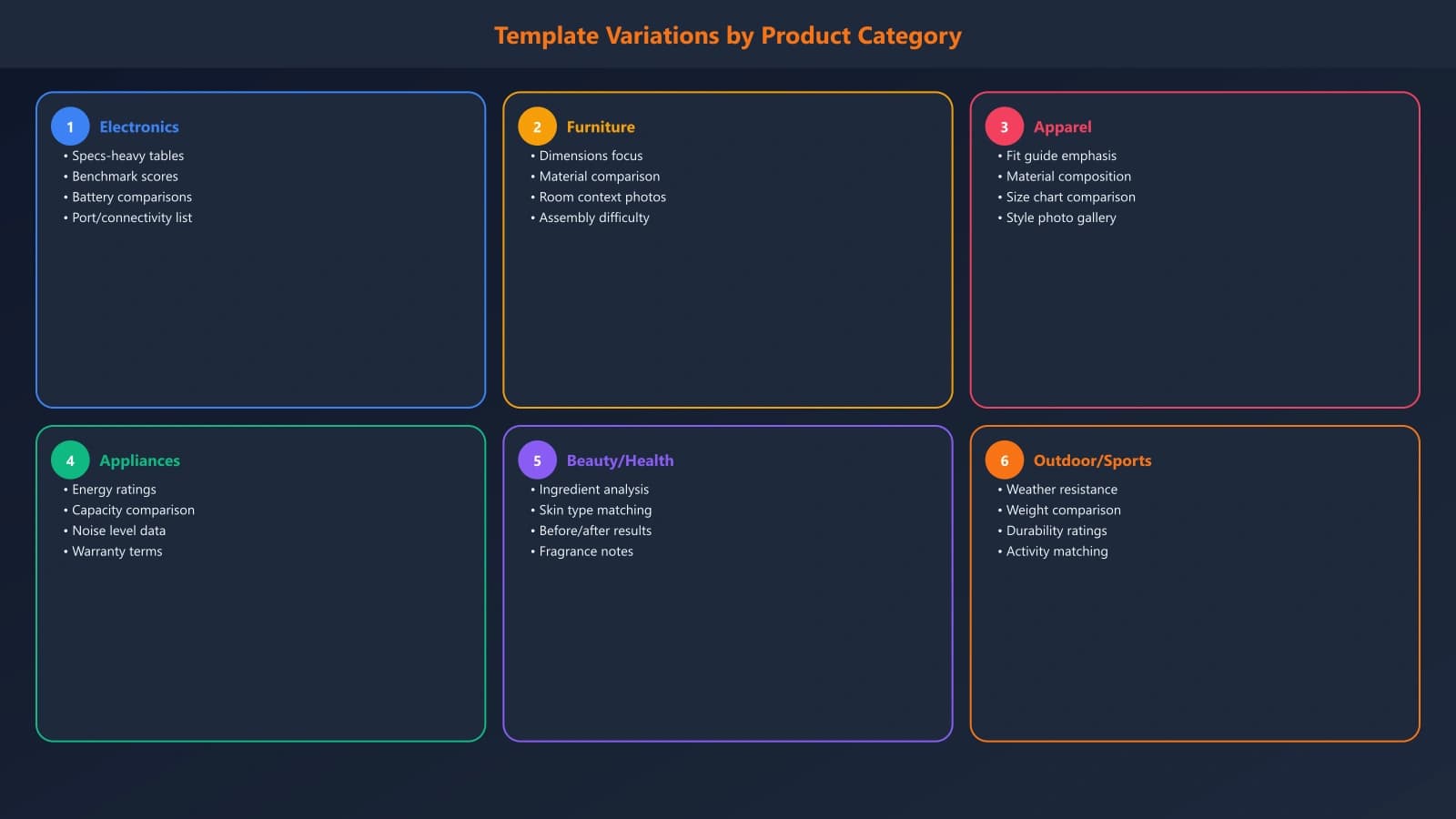
Having one template that outputs 10,000 pages creates obvious patterns. Vary your templates:
- Different layouts for different product categories
- Variable content sections based on available data
- Category-specific comparison criteria
- Conditional blocks that only appear when relevant
Scale Comparison Pages the Right Way
Generate product comparisons with built-in quality controls and unique value per page.
Try for Free
Indexation Strategy
Not every possible comparison page should be indexed. Smart indexation prevents index bloat while capturing valuable traffic.
Crawl Budget Considerations
Search engines allocate limited crawl budget to your site. If you generate 50,000 comparison pages but only 5,000 deserve indexing, you're wasting 90% of your crawl budget on pages that won't rank.
Prioritize indexation based on:
- Search volume for the comparison query
- Page quality (data completeness, unique content)
- Commercial value (high-margin product comparisons)
- Freshness (comparisons of current products)
Strategic Noindex
Use noindex for pages that serve user navigation but shouldn't consume index space:
- Comparisons between products with minimal differences
- Low-search-volume long-tail comparisons
- Out-of-stock or discontinued product comparisons
- Pages with significant data gaps
These pages can still exist for users who navigate to them, but they won't dilute your indexed content quality.
For comprehensive indexation guidance, see Indexation Management for PSEO.
Building Sustainable E-commerce PSEO
E-commerce PSEO works when you think of it as scaling value, not just scaling pages. Your product data is an asset—comparison pages should transform that data into genuinely useful shopping tools.
The framework is straightforward: solid data foundation, templates that add value, variation that prevents patterns, and indexation that focuses crawl budget on your best pages. Execute on each layer and you can build thousands of pages that earn traffic rather than penalties.
Start small—a single category, a hundred comparisons—and prove the model works before scaling. Monitor performance, iterate on templates, and only expand when quality is demonstrated.

Product Manager at BestPage. Pioneer in AEO research since 2024, exploring the convergence of SEO and GEO (Generative Engine Optimization). Led multiple AI-powered content optimization projects that achieved 300%+ citation increases in ChatGPT and Perplexity.