
Here's a counterintuitive truth about programmatic SEO: generating more pages doesn't always mean more traffic. If you index thousands of pages without quality control, you might actually hurt your site's overall performance. Google interprets a flood of thin content as a signal that your site lacks quality standards.
Smart PSEO operators understand this. They generate many pages but selectively index only the ones that deserve to compete in search. The rest still exist—for internal navigation, for edge-case users, for data completeness—but they're excluded from indexation so they don't dilute the site's perceived quality.
This guide covers how to think about indexation decisions, the technical mechanisms for controlling what gets indexed, and the monitoring systems you need to track indexation health. For the broader technical SEO context, see our pillar guide on Technical SEO for PSEO Sites.
Why Selective Indexation Matters
Let's be direct about why this matters. Google has limited resources for crawling and indexing your site. Every low-quality page you index:
- Consumes crawl budget that could go to better pages
- Contributes to a perception of overall site quality
- Potentially cannibalizes rankings from your stronger pages
- Creates more surface area for quality algorithm penalties
Conversely, a tight index of exclusively high-quality pages sends strong signals. Google sees that every page on your site meets quality thresholds. Your rankings benefit not just from individual page quality but from site-wide trust.
The practical implication: you should generate all the pages your users might need, but index only the subset that deserves to rank. The rest serves as supporting infrastructure—helpful for users who navigate to them, invisible to search engines.
Indexation Decision Criteria
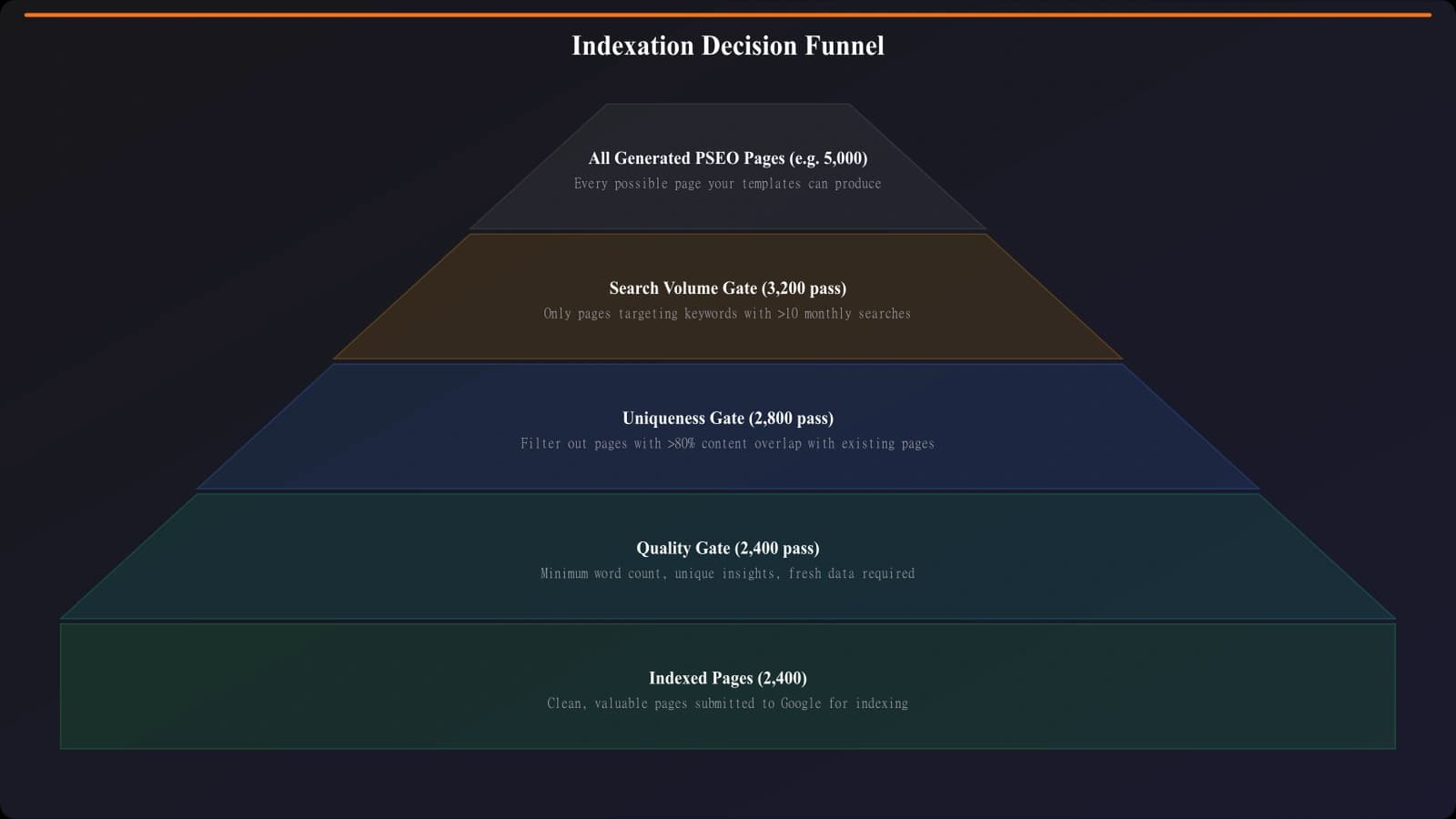
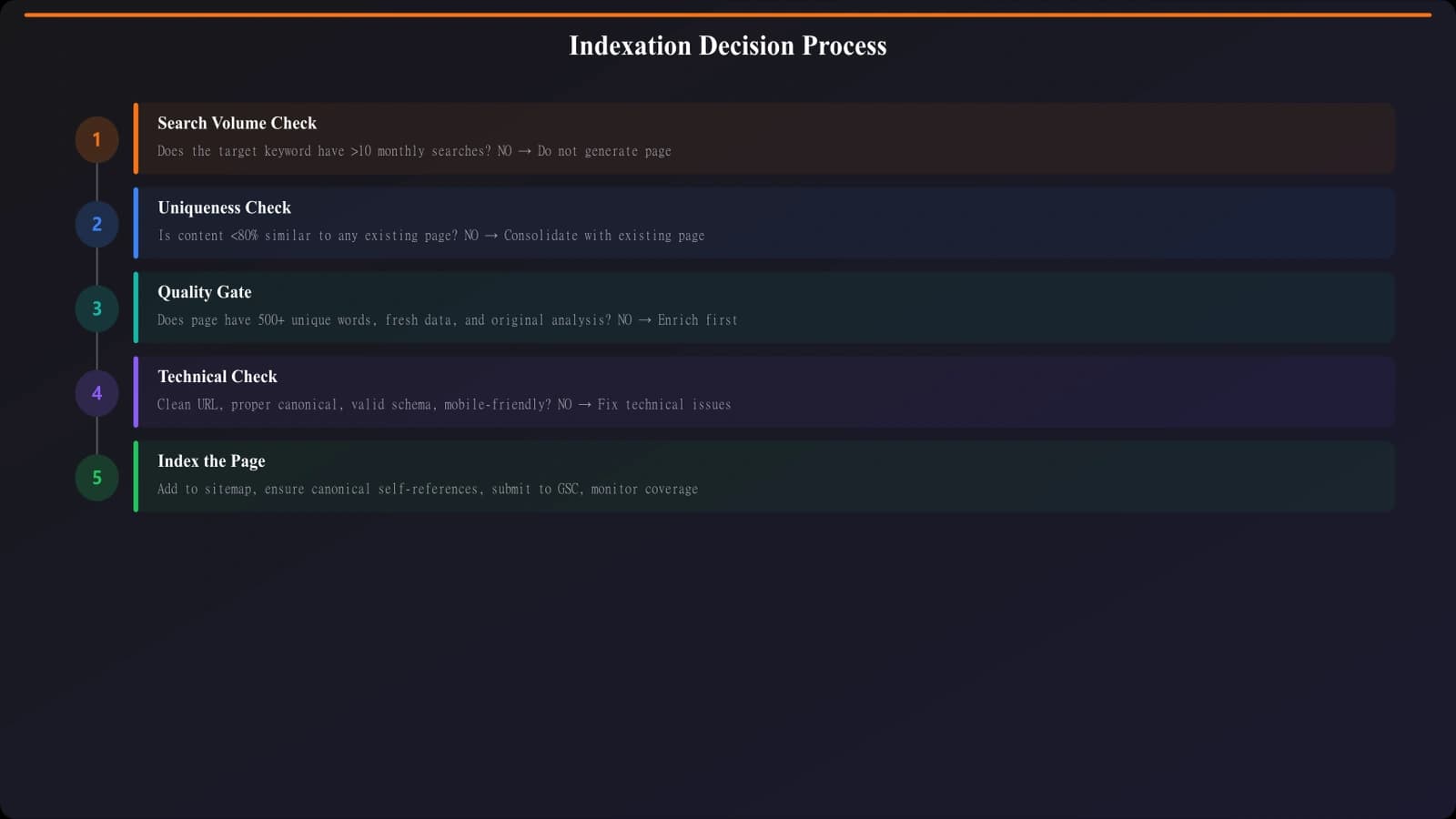
Build your indexation logic around clear, measurable criteria. Here's a framework that works for most PSEO sites.
Search Volume Gate
Pages targeting keywords with zero or negligible search volume rarely justify indexation. If nobody searches for it, why compete for rankings? Set a minimum threshold—commonly 10-50 monthly searches—below which pages are noindexed by default.
Exception: pages that serve navigational or internal purposes regardless of search volume. A hub page linking to all your listicles might have no direct search volume but serves important structural purposes. Index it for its internal value.
Uniqueness Gate
Pages that are too similar to other pages on your site create duplication problems. Measure similarity—if a new page is more than 60-70% overlapping with an existing indexed page, reconsider whether it adds enough unique value.
| Similarity Level | Recommended Action |
|---|---|
| 0-40% overlap | Index—clearly distinct content |
| 40-60% overlap | Review manually—may need differentiation |
| 60-80% overlap | Noindex or consolidate—too similar |
| 80%+ overlap | Don't generate—canonical to existing page |
Quality Gate
Even pages with search volume and unique content might not meet quality thresholds. Quality gates check for:
- Data completeness: Is all critical data populated? Pages with missing pricing, features, or descriptions may not be worth indexing.
- Content depth: Does the page provide genuine value? A comparison with two products and sparse descriptions fails this check.
- Accuracy verification: Has the data been validated? Unverified data shouldn't compete in search.
Technical Implementation
You have several mechanisms for controlling indexation. Each has different implications—use the right tool for each situation.
Meta Robots Tags
The most common approach. Add a meta robots tag with “noindex” directive to pages that shouldn't be indexed. The page remains crawlable (so links pass value) but won't appear in search results.
Use when: You want the page to exist and be crawlable, but not indexed. Common for pagination, filter variations, and lower-quality variants.
Robots.txt Disallow
Prevents crawling entirely. Pages blocked by robots.txt won't be crawled or indexed (though they might still appear in results if linked from elsewhere, showing just the URL without content).
Use when: You want to prevent crawling to conserve crawl budget. Common for infinite URL patterns, parameter combinations, and development/test pages. But use carefully—over-blocking can backfire.
Canonical Tags
Doesn't prevent indexation directly, but consolidates signals to a preferred version. If Page B canonicals to Page A, Google may choose to index only Page A.
Use when: Multiple URLs serve similar content and you want to consolidate. Common for parameter variations, sorted versions, and regional duplicates.
Choosing the Right Mechanism
| Scenario | Mechanism | Why |
|---|---|---|
| Low-quality page that users might visit | Meta noindex | Page exists, passes link value, but doesn't index |
| Infinite parameter combinations | Robots.txt | Prevent crawl waste on URLs that shouldn't exist |
| Sorted/filtered version of main page | Canonical | Consolidate signals to main version |
| Pagination beyond page 2 | Meta noindex | Allow crawling for discovery, prevent indexing |
| Truly duplicate content | Redirect or don't generate | Eliminate the duplicate entirely |
Control Your Indexation Intelligently
Generate comparison pages with built-in quality gates and smart indexation rules.
Try for Free
Staged Indexation Rollouts
When launching a new PSEO section, consider staged rollouts rather than indexing everything at once.
Phase 1: Quality proof. Index only your 20-50 highest-quality, highest-opportunity pages first. Monitor rankings, traffic, and engagement. Prove that your content quality meets standards before expanding.
Phase 2: Gradual expansion. If Phase 1 performs well, expand to the next tier—maybe another 100 pages. Continue monitoring. Any quality signals degrading?
Phase 3: Full rollout. Once you've validated quality at scale, index the full set of pages that pass your quality gates.
This approach reduces risk. If your templates have issues, you find out after indexing 50 pages, not 500. Fixing a small batch is manageable; fixing site-wide problems while rankings tank is stressful.
Monitoring Indexation Health
You need ongoing visibility into what's actually indexed versus what you intended to index.
Search Console Coverage
Google Search Console's Index Coverage report shows how many pages are indexed, excluded, and why. Check this regularly for PSEO sites:
- “Indexed, not submitted in sitemap” — Pages getting indexed that you didn't intend. Could be orphaned URLs or crawl paths you didn't expect.
- “Crawled - currently not indexed” — Google saw the page but chose not to index. If this includes pages you wanted indexed, there's a quality or canonicalization issue.
- “Excluded by noindex” — Confirmation that your noindex directives are being respected.
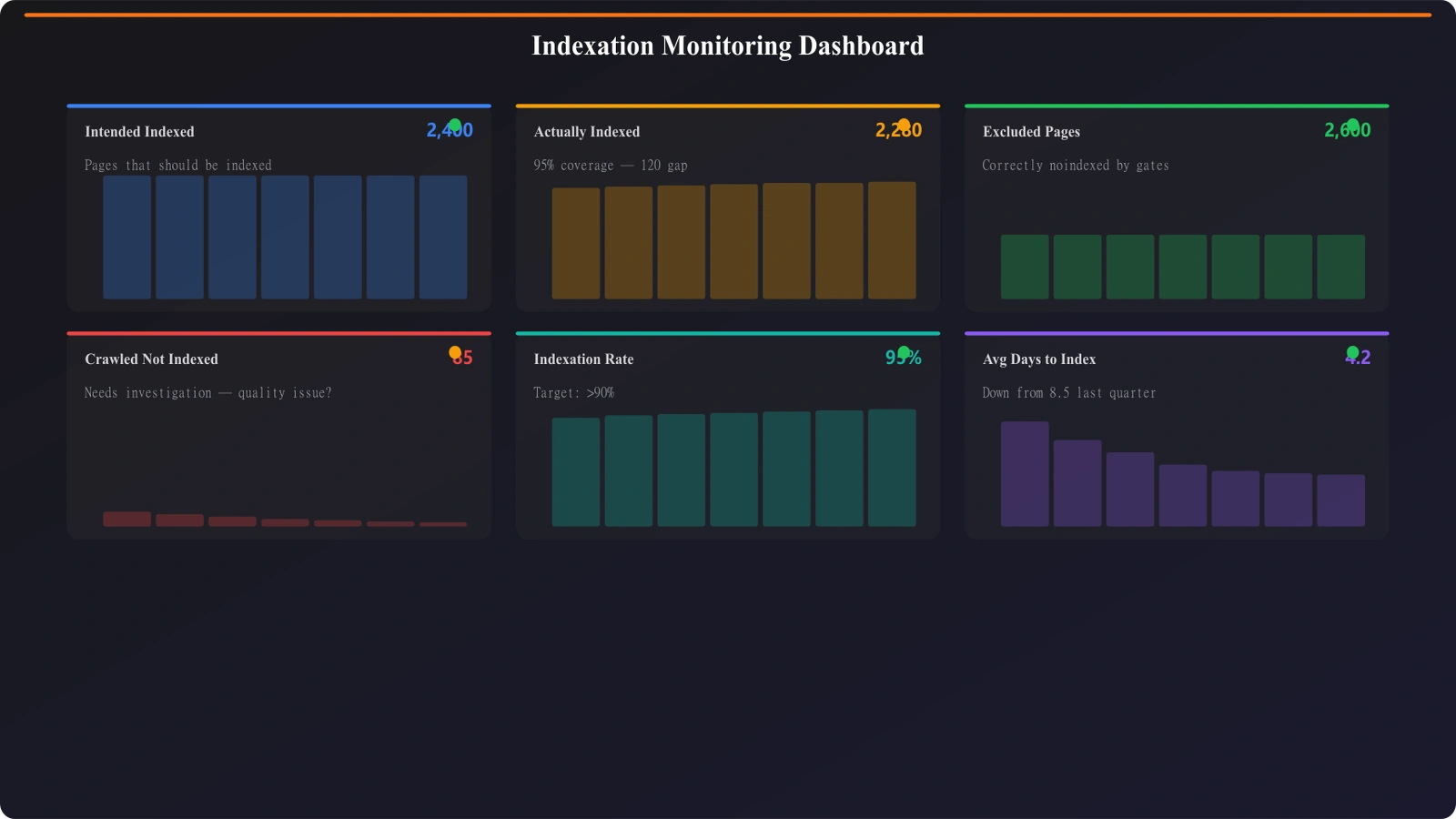
Tracking Intended vs. Actual Indexation
Build internal reporting that compares your intended indexation (based on your quality gates) to actual indexation (from Search Console or site: queries). Discrepancies indicate problems:
- Intended indexed, actually not: Google isn't finding or valuing these pages. Check crawlability and quality.
- Intended noindex, actually indexed: Your noindex isn't working. Check implementation.
- Unknown pages indexed: URL patterns you didn't generate are being crawled. Investigate the source.
Common Indexation Mistakes
A few patterns consistently cause indexation problems on PSEO sites.
Indexing everything by default. The eager approach—generate and index everything, let Google sort it out. This floods your index with thin content and often triggers quality issues site-wide.
Noindexing too aggressively. The opposite extreme—setting thresholds so high that barely anything gets indexed. You miss legitimate opportunities and underutilize your content investment.
Set-and-forget configuration. Indexation rules that made sense at launch don't account for evolving content. As you add products, categories, and pages, review whether your rules still apply.
Ignoring Google's signals. If Google consistently won't index pages you think deserve indexation, that's feedback. Don't fight it—investigate why and fix the underlying issue.
Using robots.txt for quality control. Robots.txt blocks crawling, not indexation. If pages are linked from elsewhere, they might still appear in results (just with no description). Use meta noindex for quality control.
Building Your Indexation Strategy
Indexation management is about quality control at scale. You're not hiding content—you're focusing search engine attention on the content that deserves to compete for rankings.
Start with clear criteria: search volume thresholds, uniqueness requirements, quality gates. Build these into your generation pipeline so decisions happen automatically. Use the right technical mechanism for each situation. Monitor continuously to catch discrepancies.
The sites that win at PSEO aren't always the ones with the most pages. They're the ones with the tightest quality control. A focused index of excellent pages outperforms a bloated index of mediocre ones.
For the complete technical SEO context that indexation fits into, see our pillar guide on Technical SEO for PSEO Sites. And for layout and conversion optimization of the pages you do index, check out High-Converting Comparison Page Layouts.

Product Manager at BestPage. Pioneer in AEO research since 2024, exploring the convergence of SEO and GEO (Generative Engine Optimization). Led multiple AI-powered content optimization projects that achieved 300%+ citation increases in ChatGPT and Perplexity.