
You've built the templates. You've got the data. You're ready to publish 500 comparison pages. But here's the question nobody asks until it's too late: will Google actually crawl and index all of them?
Programmatic SEO creates technical challenges that don't exist for traditional sites. When you're publishing at scale—hundreds or thousands of pages—every technical SEO mistake gets multiplied. A small inefficiency becomes a massive crawl budget drain. A minor duplicate content issue becomes a site-wide quality signal problem. Performance overhead that's invisible on 10 pages becomes crippling on 1,000.
This guide covers the technical foundations that PSEO sites need to get right. We're not rehashing basic technical SEO here—we're focusing on what's specifically different and important when you're operating at programmatic scale.
Think of this as the infrastructure layer beneath your content strategy. Without solid technical foundations, even brilliant content won't rank because Google can't properly crawl, understand, or serve it.
Site Architecture for Scale
Your site architecture—how pages are organized and linked—becomes critically important at PSEO scale. Poor architecture creates crawl inefficiencies, dilutes page authority, and confuses both users and search engines.
URL Structure
URLs for programmatic pages need to be clean, hierarchical, and consistent. Here's what works:
| Pattern | Example | Use Case |
|---|---|---|
| Category listicle | /best/crm-software/ | Best-of pages for categories |
| Filtered listicle | /best/crm-software/for-startups/ | Audience-specific variants |
| Comparison | /compare/hubspot-vs-salesforce/ | Head-to-head comparisons |
| Alternatives | /alternatives/salesforce/ | Alternatives pages |
The key principles: use folders to establish hierarchy, keep URLs readable, include the primary keyword where natural, and be consistent across all programmatic pages. Once you establish a pattern, stick with it.
Avoid query parameters for programmatic content (/compare?a=hubspot&b=salesforce). These are harder to index, harder for users to remember, and create canonicalization challenges.
Internal Linking at Scale
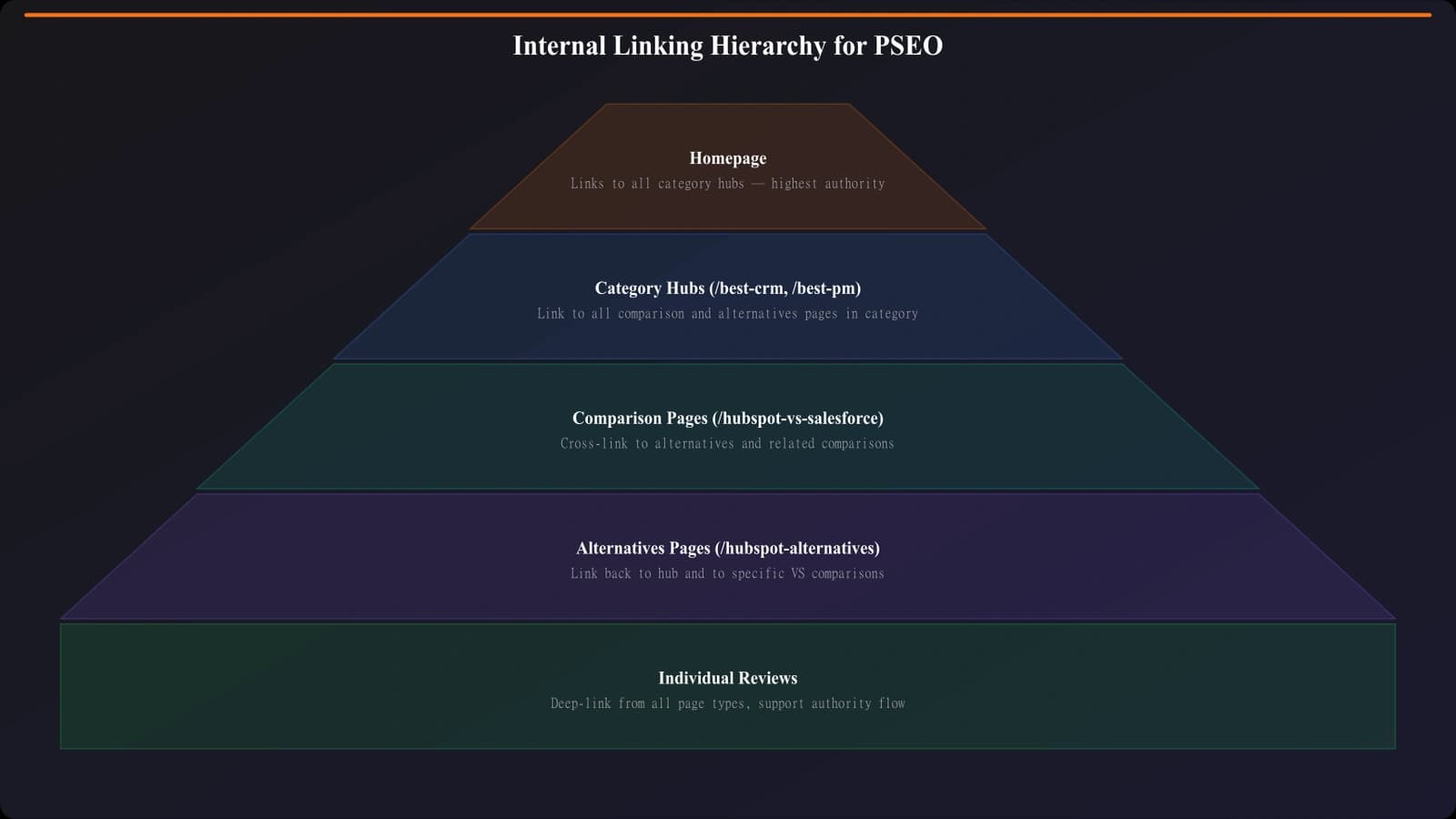
Internal linking becomes both more powerful and more complex at PSEO scale. You have hundreds of pages that could potentially link to each other—used well, this creates a strong interconnected structure. Used poorly, it creates chaos.
Build internal linking into your templates systematically. Each page should link to related category pages, complementary comparisons, and relevant alternatives. But don't just link randomly—design linking patterns that reflect user journeys.
For example: a “Best CRM Software” listicle should link to specific comparison pages for its top picks. Those comparison pages should link back to the category listicle. Alternatives pages should link to both. This creates natural navigation paths while distributing authority.
Taxonomy and Categories
How you organize pages into categories affects both user experience and crawl efficiency. Your taxonomy should be neither too flat (everything at root level) nor too deep (five levels of nesting).
For most PSEO sites, a two-level hierarchy works well: page type and content category. Example: /best/[category]/, /compare/[products]/, /alternatives/[product]/. This keeps every page within two clicks of the homepage while maintaining logical organization.
Create category hub pages that aggregate your programmatic content. A /best/ page linking to all your listicles helps Googlebot discover content efficiently and signals the relationship between pages.
Crawl Budget Management
Crawl budget—how many pages Googlebot will crawl on your site in a given timeframe—becomes a real constraint at PSEO scale. If you have 2,000 pages and Google only crawls 100 per day, it takes three weeks just to see each page once. That's assuming no recrawls of already-indexed content.
Prioritizing What Gets Crawled
You need to signal to Googlebot which pages matter most. Several mechanisms help:
XML sitemaps should include all indexable pages with accurate lastmod dates. Update lastmod only when content actually changes—don't artificially refresh it hoping to trigger recrawls. Google watches for that pattern.
Sitemap segmentation helps for large sites. Instead of one massive sitemap, create separate sitemaps by content type or category. This makes it easier to track indexation by section and gives you more granular control.
Internal linking priority affects crawl distribution. Pages linked from your homepage and other high-authority pages get crawled more frequently. Structure your linking so important pages are closer to the root.
Eliminating Crawl Waste
Every page Googlebot crawls that shouldn't be indexed is wasted crawl budget. At scale, these add up quickly.
Common crawl waste sources on PSEO sites:
- Thin parameter variations: /best/crm/?sort=price shouldn't be a separate crawl
- Pagination leaking: /best/crm/page/2/ through /page/50/ eating budget
- Filter combinations: Faceted navigation creating thousands of near-duplicate URLs
- Development/staging pages: Non-production content accidentally exposed
- Low-quality programmatic pages: Pages generated but not worth indexing
Address each systematically. Use robots.txt to block parameter URLs and pagination beyond what's useful. Noindex filter combinations that create minimal unique value. Audit for accidental exposures regularly.
Indexation Strategy
Not every programmatic page deserves indexation. This sounds counterintuitive—why generate pages you don't want indexed? But the reality is nuanced.
Some pages exist for user navigation but shouldn't compete in search. Pagination pages. Filter result pages. Very long-tail variants with near-zero search volume. Indexing these dilutes your site's perceived quality and wastes the authority that could flow to pages that matter.
Deciding What to Index
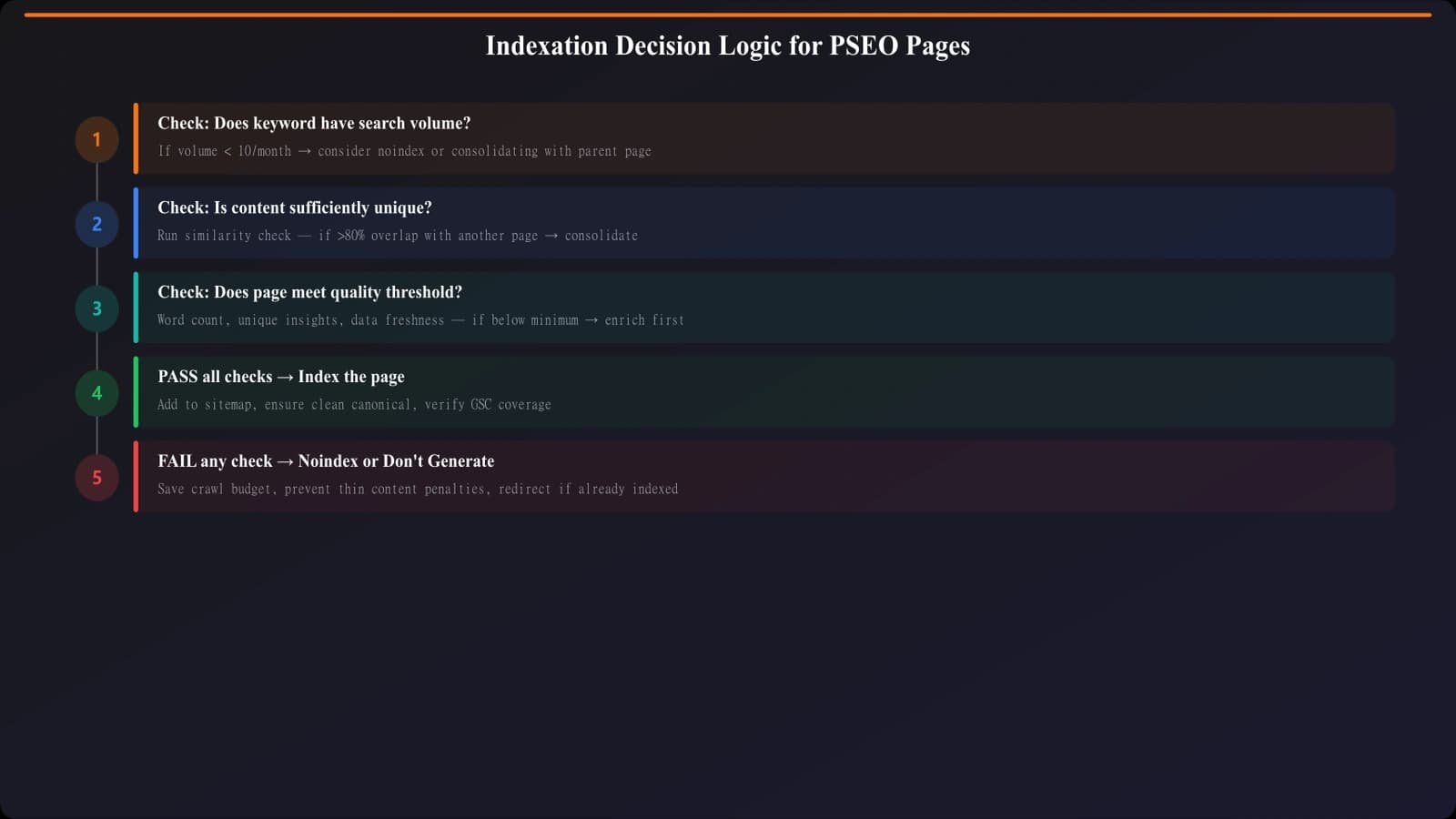
Build indexation logic into your PSEO system. Before generating a page, evaluate whether it deserves indexation:
| Signal | Index | Noindex |
|---|---|---|
| Search volume | 10+ monthly searches | <10 monthly searches |
| Content uniqueness | Substantially unique | Minimal variation from similar page |
| Page type | Core listicles, comparisons | Paginated pages, filter results |
| Data completeness | Full data available | Partial or missing critical data |
Implement noindex via meta robots tags for pages that shouldn't rank but should still be crawlable (for internal linking purposes). Use robots.txt disallow only for pages that truly shouldn't be crawled at all.
For comprehensive guidance on indexation decisions, see our detailed article on Indexation Management for PSEO.
Build Technically Sound PSEO Sites
Generate comparison pages with proper technical SEO baked in—clean URLs, smart linking, optimized performance.
Try for Free
Managing Duplicate and Similar Content
PSEO inherently creates similarity between pages. Your “Best CRM for Startups” page and “Best CRM for Small Businesses” page probably share significant content—maybe the same products, similar descriptions, overlapping recommendations.
This isn't necessarily a problem, but it needs management. Google distinguishes between legitimate similar pages (different intents deserve different pages) and duplicative thin content (same page with minor variations).
Creating Meaningful Differentiation
Every indexed page should offer unique value that justifies its existence. For variant listicles, this means:
Different product sets. “Best CRM for Enterprise” shouldn't feature the same products as “Best CRM for Startups.” If your data can't support different recommendations, consider whether both pages should exist.
Audience-specific framing. Even when products overlap, the analysis should differ. Enterprise features matter for one page; pricing and simplicity matter for the other. The content should genuinely reflect the different audience needs.
Sufficient content variation. If two pages are 80% identical, that's a problem. Aim for at least 40-50% unique content on each page through tailored introductions, different comparison criteria, and audience-specific recommendations.
Canonical Tags
Use canonical tags to consolidate near-duplicates when they must exist (e.g., for user experience) but shouldn't all compete in search.
Common pattern: canonical the filtered version to the main category page. /best/crm-software/?sort=price canonicals to /best/crm-software/. The filtered page exists for users who want sorting, but doesn't compete for rankings.
Be careful with cross-page canonicals at scale. Canonicalizing hundreds of variant pages to a single page sends a strong signal that those variants have no unique value—make sure that's actually true before doing it.
Performance at Scale
Page speed matters for all sites, but PSEO sites face unique performance challenges. When pages are generated dynamically from databases, every millisecond of query time multiplies across thousands of page loads.
Rendering Strategies
How you render programmatic pages dramatically affects performance:
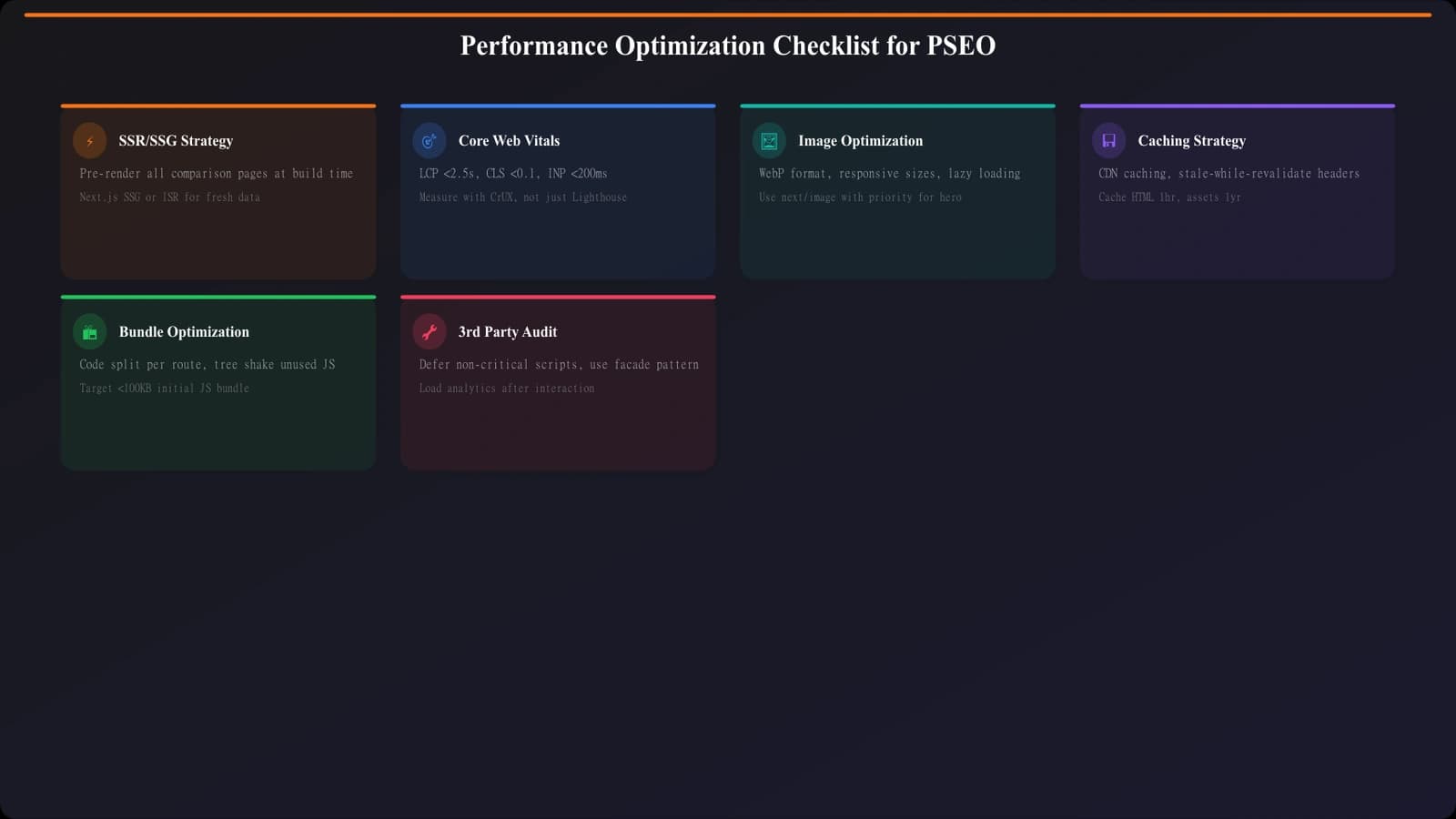
Static generation (pre-rendering pages at build time) gives the best performance. Pages are just HTML files—no database queries at request time. This works well for content that changes infrequently. Rebuild when data updates.
Server-side rendering with caching balances freshness and performance. Generate pages on request but cache aggressively. Cache invalidation becomes the complexity—you need to know when data changes and bust relevant caches.
Incremental static regeneration (ISR) offers a middle ground. Generate static pages but rebuild them periodically in the background. Users always get cached versions while fresh builds happen asynchronously.
For most PSEO sites, static generation or ISR makes sense. The content doesn't need real-time freshness—regenerating daily or when data changes is usually sufficient.
Core Web Vitals Optimization
PSEO templates often include images, tables, and interactive elements that can hurt Core Web Vitals. Common issues:
- LCP (Largest Contentful Paint): Product images loading slowly. Use proper sizing, lazy loading, and modern formats (WebP).
- CLS (Cumulative Layout Shift): Images and embeds without dimensions causing layout shifts. Always specify width and height.
- FID/INP (Interaction responsiveness): Heavy JavaScript on comparison tables. Minimize client-side rendering for content-heavy pages.
Test your template with Lighthouse on a representative page. Fix issues at the template level so improvements apply across all programmatic pages.
Structured Data and Schema
Schema markup helps search engines understand your programmatic content. For comparison pages, several schema types are relevant.
Relevant Schema Types
ItemList for listicle pages—marks up the ordered list of products. This can trigger carousel-style results and helps Google understand the page as a curated list.
Product schema for individual products within comparisons. Include name, description, offers (pricing), and reviews if you have aggregated ratings.
Review/AggregateRating if you provide ratings or scoring. Be careful here—ratings should be based on genuine evaluation methodology, not arbitrary numbers. Google penalizes fake or manipulated review markup.
Article or WebPage as the top-level schema for the page itself. Include author, datePublished, dateModified, and organization information for E-E-A-T signals.
Implementation at Scale
Build schema generation into your templates. The structured data should be produced automatically from your data layer—same data that powers your visible content.
Validate schema on a sample of pages using Google's Rich Results Test. At scale, you can't manually test every page, so validate your templates thoroughly and monitor Search Console for schema errors across the site.
Monitoring Technical Health
At PSEO scale, you need systematic monitoring. Problems that would be obvious on a 20-page site can hide among 2,000 pages.
Key Metrics to Track
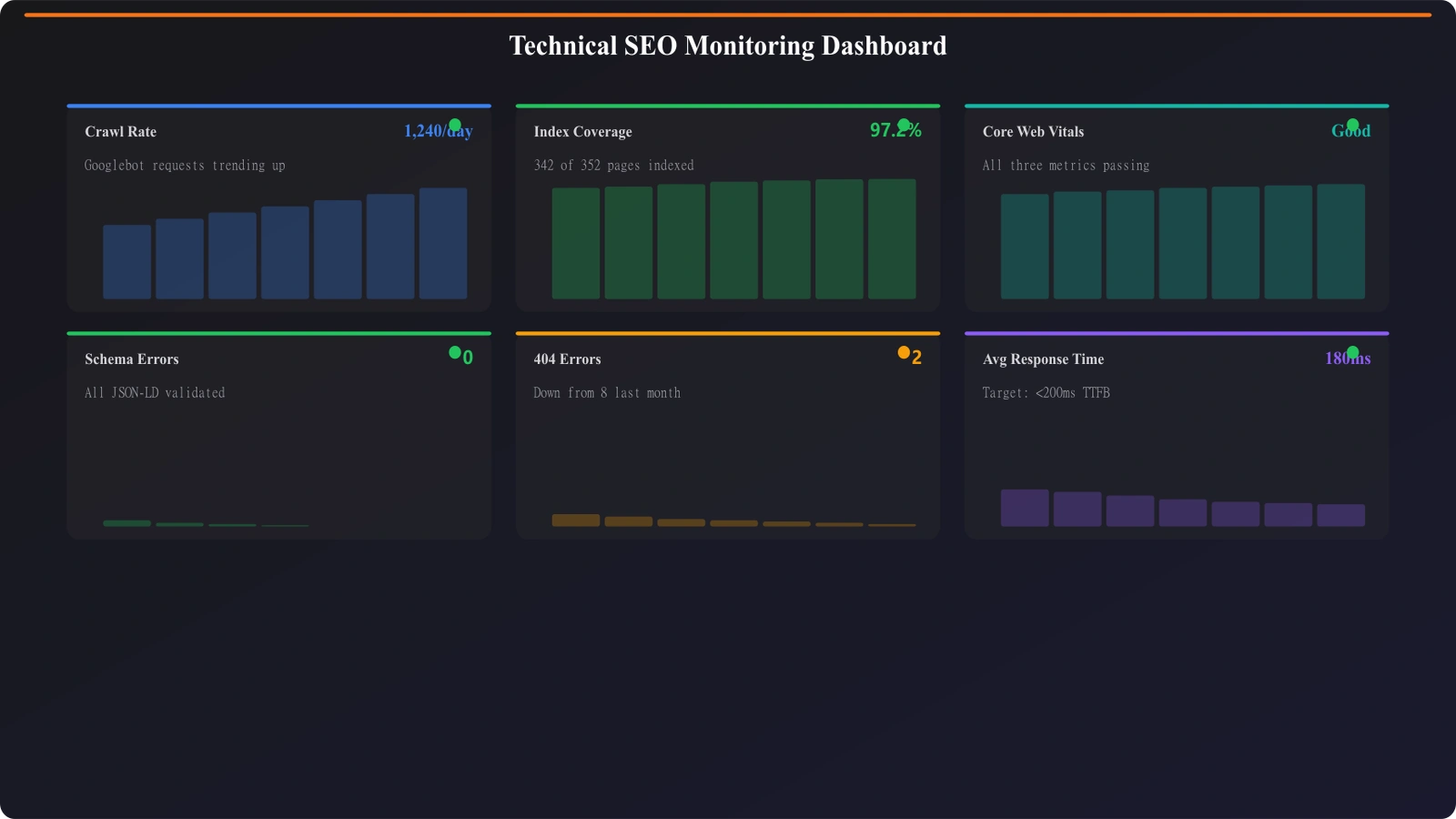
Set up dashboards for these metrics at minimum:
- Crawl stats from Search Console: pages crawled per day, crawl request trends, response code distribution
- Indexation coverage: total indexed pages vs. submitted pages, exclusion reasons
- Core Web Vitals: track at template level, not just individual pages
- Schema validation: error and warning counts from Rich Results reports
- 404s and redirects: broken internal links, redirect chains
Trend these over time. A sudden spike in crawl errors or drop in indexed pages is an early warning of technical issues.
Automated Technical Audits
Run regular automated audits using tools like Screaming Frog, Sitebulb, or cloud-based crawlers. At scale, you won't catch issues manually.
Focus audits on: broken links, redirect chains, missing meta tags, duplicate titles/descriptions, canonical issues, and schema validation. Set up alerts for when metrics exceed thresholds.
Common Technical Mistakes
A few patterns consistently cause problems on PSEO sites. Avoid these:
Publishing before testing. Launching 500 pages without testing the template on a sample is asking for site-wide issues. Always validate on a small set first.
Ignoring robots.txt at scale. A misconfigured robots.txt can block your entire programmatic section. Test after every change.
Infinite URL patterns. Dynamic parameters that create unlimited URL combinations (every filter combo, every sort order, every pagination depth) can trap crawlers and waste budget endlessly.
Orphan page proliferation. Generating pages that aren't linked from anywhere. If you can't navigate to a page, neither can Googlebot discover it efficiently.
One-time setup mentality. Technical SEO at scale requires ongoing maintenance. What works at 500 pages may break at 2,000. Monitor and adapt continuously.
Building a Solid Technical Foundation
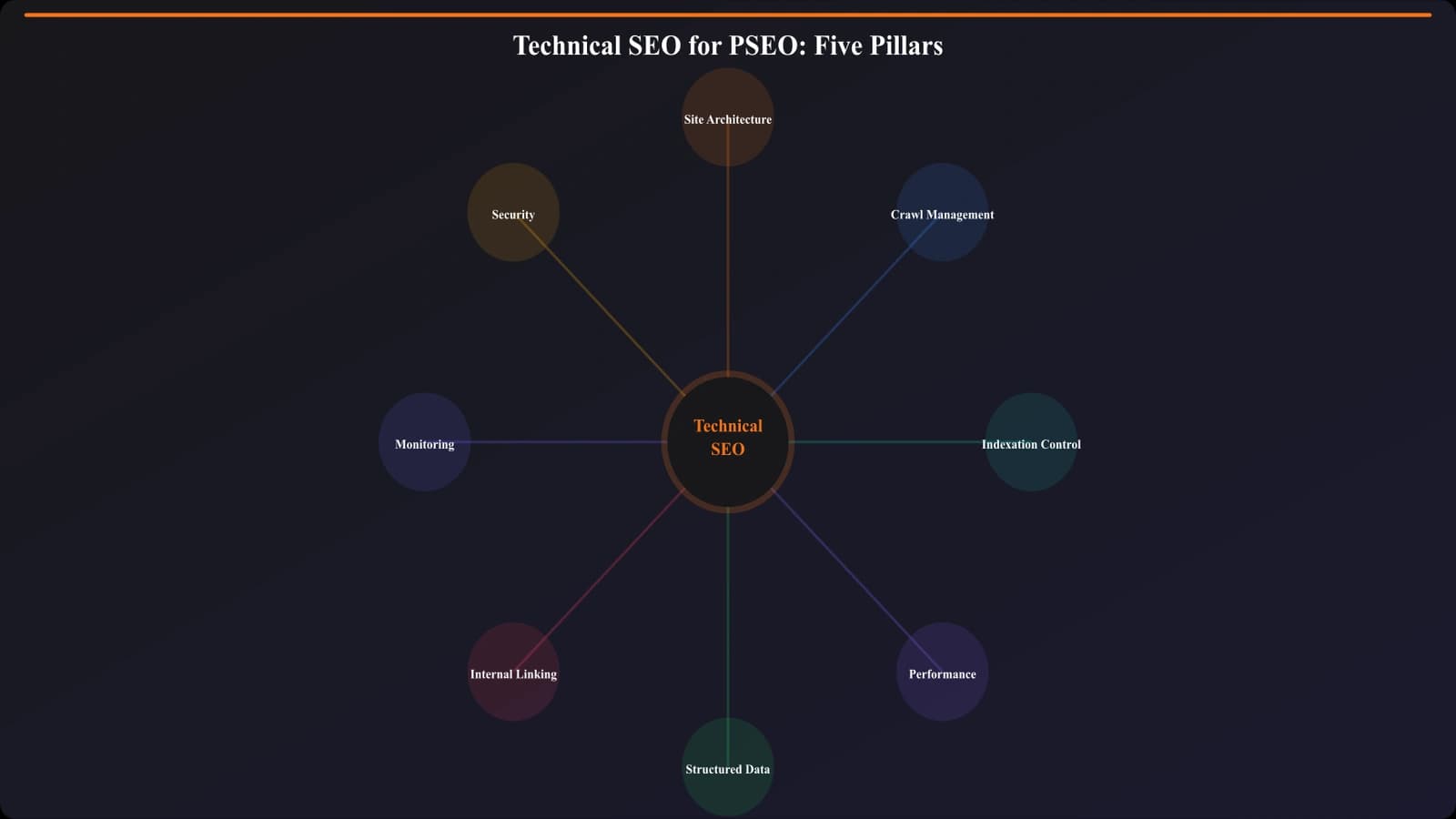
Technical SEO for PSEO sites isn't optional—it's foundational. Without proper architecture, crawl management, indexation strategy, performance optimization, and structured data, your programmatic content won't reach its potential regardless of how good the content itself is.
The work isn't glamorous. It's infrastructure. But like all good infrastructure, when it works, nobody notices—your pages just rank, load fast, and serve users well. When it breaks, everything breaks.
Start with the fundamentals: clean URLs, logical hierarchy, efficient crawl paths. Add indexation controls so you're not indexing every variation. Optimize performance at the template level. Implement schema correctly. Then monitor continuously.
For specific guidance on indexation decisions, see our detailed guide on Indexation Management. For CRO optimization of your templates, explore High-Converting Comparison Page Layouts and CTA Placement Data. And for the complete production workflow that this technical foundation supports, see PSEO Production Systems.

Product Manager at BestPage. Pioneer in AEO research since 2024, exploring the convergence of SEO and GEO (Generative Engine Optimization). Led multiple AI-powered content optimization projects that achieved 300%+ citation increases in ChatGPT and Perplexity.