
You've seen the success stories. A SaaS company publishes 500 comparison pages and watches organic traffic triple. An affiliate site builds 2,000 “best X for Y” listicles and dominates their niche. It looks almost magical from the outside—how do they produce that much content without an army of writers?
The answer isn't a bigger team. It's a better system. Programmatic SEO—PSEO—is about building production infrastructure that can generate high-quality pages at scale. Not generic, cookie-cutter pages that Google ignores. Genuinely useful content that ranks because it actually helps people make decisions.
But here's what most guides won't tell you: the “programmatic” part is actually the easy bit. Anyone can spin up a template and generate 1,000 pages. The hard part is building a system that produces pages worth ranking. Pages that convert visitors. Pages that don't get slapped by the next core update because they're thin or duplicative.
That's what this guide is about. We're going to walk through the complete end-to-end workflow for building a PSEO production system that actually works. Not theory—actual implementation steps you can follow. By the end, you'll have a framework for producing comparison content at scale without sacrificing the quality that makes content rank in the first place.
The Foundation: Why Most PSEO Efforts Fail
Before we get into the how, let's talk about why most programmatic SEO projects fail. Understanding the failure modes will help you avoid them as you build your own system.
The most common mistake is treating PSEO as a shortcut rather than an investment. Teams see “programmatic” and think “automated.” They think “automated” means “no effort required.” So they build a basic template, plug in some data, generate 500 pages, and wonder why none of them rank.
Here's the reality: PSEO requires more upfront effort than traditional content, not less. You're building infrastructure. The payoff comes from scale, but only after you've invested heavily in getting the system right. Skimp on the foundation and you end up with hundreds of pages that do nothing except waste your crawl budget.
The second failure mode is ignoring keyword cannibalization. When you're producing pages at scale, it's incredibly easy to create multiple pages targeting the same intent. “Best CRM for startups” and “Top CRM software for new businesses” might seem like different keywords, but Google sees them as the same thing. Now your pages are competing against each other instead of against competitors.
Third, teams underestimate the data problem. Programmatic content is only as good as the data feeding it. If your product data is outdated, incomplete, or inconsistent, every page you generate will inherit those flaws. Bad data at scale just means bad content at scale.
And finally, the most insidious failure: launching and forgetting. PSEO isn't set-and-forget. Products change. Pricing updates. New competitors emerge. A page that was accurate six months ago might be completely wrong today. Without a maintenance system, your content quality degrades over time until Google stops trusting it entirely.
Phase 1: Data Sourcing and Management
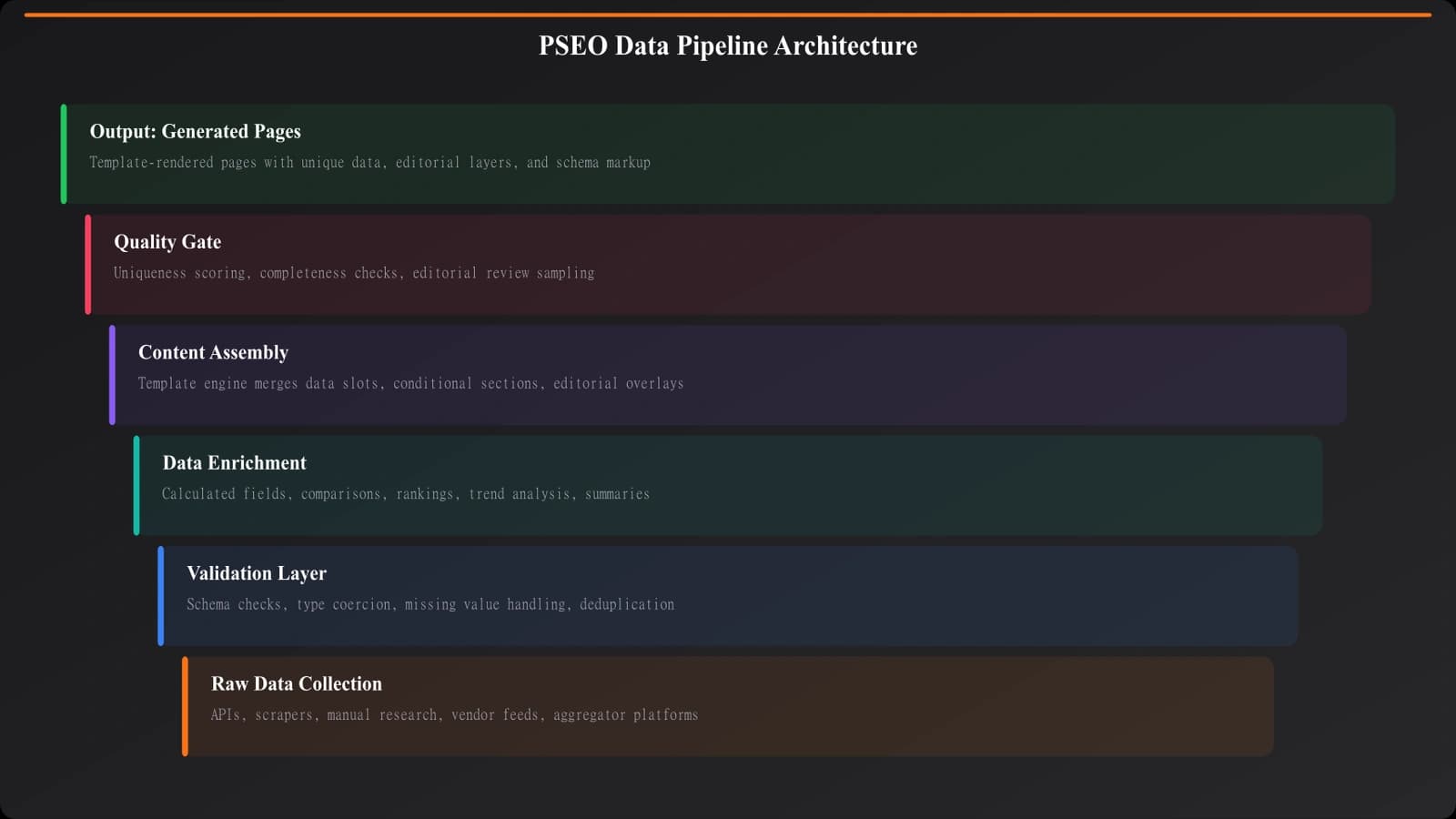
Every PSEO project lives or dies by its data. Before you write a single template, you need a robust system for gathering, validating, and maintaining the information that will power your pages.
Types of Data You'll Need
For comparison content, you typically need several categories of data. Product information is the obvious one—names, descriptions, pricing, features. But you also need category data (what categories each product belongs to), competitive positioning (how products compare on specific attributes), and metadata (launch dates, company information, market positioning).
The challenge is that this data lives in different places and updates at different frequencies. Pricing might change weekly. Features might change monthly. Company information might change yearly. Your data system needs to handle these different refresh cycles.
Collection Methods
You have several options for collecting product data, each with tradeoffs.
Manual research gives you the highest accuracy but doesn't scale. It's appropriate for your initial dataset and for verifying automated collection, but you can't manually maintain data for 500+ products.
API integrations are ideal when available. If products you're covering have public APIs or you can partner with them, you get real-time accurate data. But most products don't offer the data you need via API.
Web scraping can scale, but it's fragile. Websites change their structure, and suddenly your scraper breaks. You also need to be mindful of terms of service and rate limiting.
Aggregator platforms like G2, Capterra, or Product Hunt can provide structured data, though you'll need to verify accuracy and freshness. These can be good starting points that you enhance with primary research.
In practice, most PSEO systems use a hybrid approach: initial manual research to establish a baseline, automated collection where possible, and regular manual audits to verify accuracy.
Validation and Quality Control
Every piece of data entering your system should pass validation checks. At minimum, you need completeness checks (are all required fields populated?), format validation (is the pricing in a consistent format?), and freshness tracking (when was this data last verified?).
Build automated alerts for data quality issues. If a product suddenly has no pricing data, something's wrong. If a scraper returns dramatically different values than last time, flag it for review. The goal is catching problems before they become published content.
Phase 2: Keyword Clustering and Planning
With clean data in hand, the next phase is figuring out what pages to actually build. This is where keyword clustering becomes essential—and where most PSEO projects create their cannibalization problems.
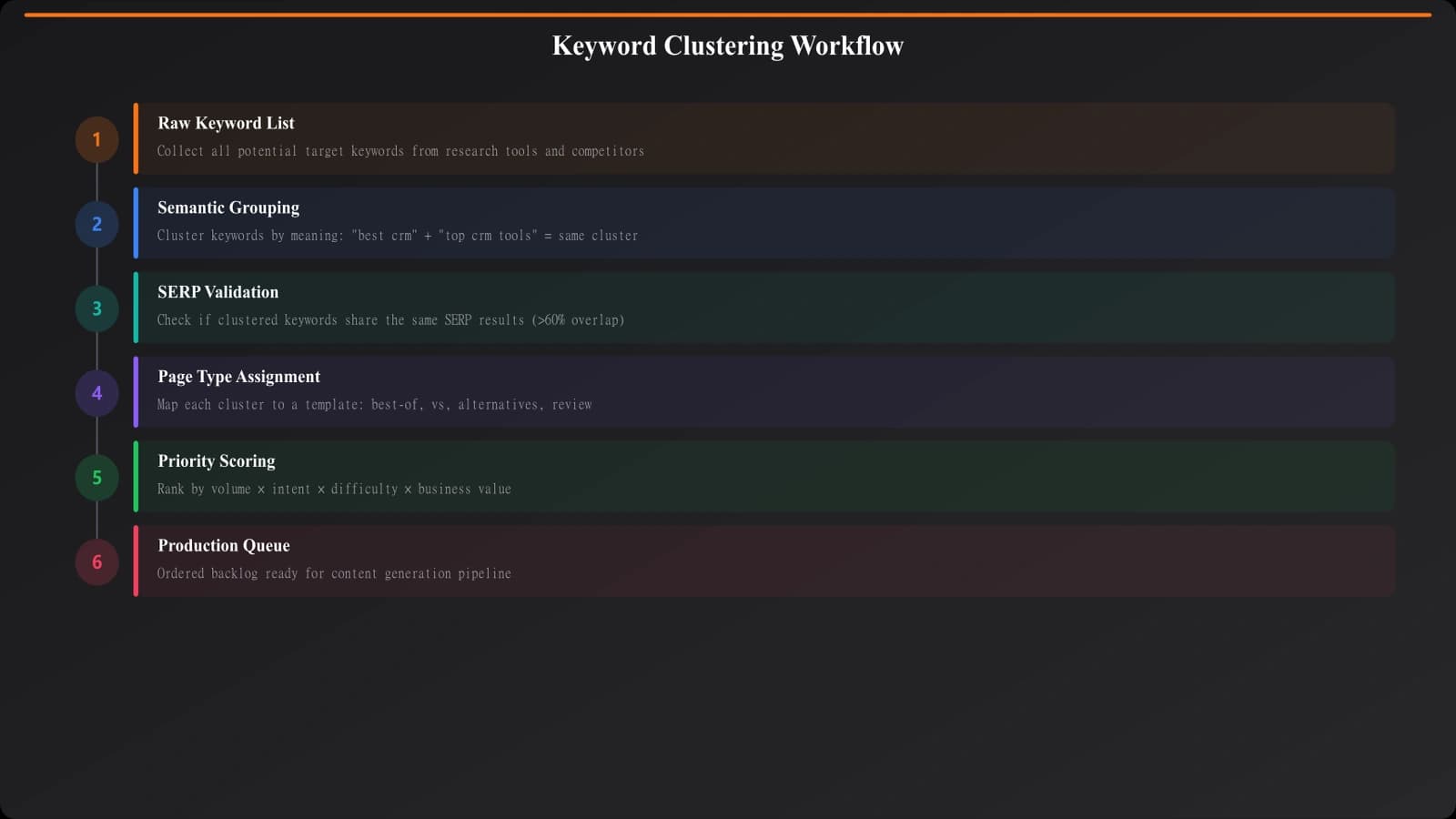
The goal of clustering is to group keywords that should be served by the same page. “Best project management software,” “top project management tools,” and “project management software 2026” all have the same intent. They should be one page, not three.
The Clustering Process
Start by exporting all your target keywords. For PSEO, you'll typically have a pattern like “best [category] [modifier]” or “[product] alternatives.” Export every variation you're considering targeting.
Next, group by semantic similarity. Tools like Ahrefs, SEMrush, or specialized clustering tools can help automate this. The basic principle: if two keywords would be satisfied by the same content, they belong in the same cluster.
Then validate with SERP analysis. Pull the top 10 results for the top keyword in each cluster. If the same pages rank for all keywords in your cluster, you've validated the grouping. If different pages rank, you might need to split the cluster.
For a deeper dive on avoiding cannibalization across large page sets, our guide on Keyword Clustering for PSEO covers the methodology in detail.
Mapping Clusters to Page Types
Not every keyword cluster should become the same type of page. You need to map each cluster to the appropriate format—listicle, comparison, alternatives page, or something else.
The mapping follows intent signals in the keywords. Clusters dominated by “best” and “top” modifiers typically want listicles. Clusters with “vs” and specific product names want comparisons. Clusters with “alternatives” or “like [product]” want alternatives pages.
Document this mapping explicitly. You should end up with a spreadsheet or database that shows: cluster ID, primary keyword, secondary keywords, assigned page type, and target URL. This becomes your production queue.
Phase 3: Template Architecture
Now we get to the part everyone thinks about first: the templates that generate your pages. But by now you understand why we started with data and keywords. Templates without solid foundations produce garbage.
Core Principles for PSEO Templates
The first principle is meaningful variation. If every page looks identical except for the product names plugged in, you haven't created unique content—you've created a thin template. Google can identify this pattern, and it won't rank well.
Meaningful variation comes from data-driven differences. If one product excels at pricing but lacks integrations, the template should emphasize pricing. If another product has extensive integrations, the emphasis shifts. The template should flex based on the actual attributes of what it's describing.
The second principle is modular construction. Build templates as collections of components that can be included or excluded based on data availability. If you don't have pricing data for a product, don't show a broken pricing section—exclude it entirely. This keeps pages looking polished even when data is incomplete.
The third principle is human-quality prose. The generated content should read like it was written by a person, not assembled by a robot. This means investing in natural language generation or AI-assisted writing that produces varied sentence structures and genuine analysis.
Build PSEO Systems That Scale
Generate hundreds of comparison pages with built-in quality controls and meaningful variation.
Try for Free
Essential Template Components
For comparison content specifically, your template typically needs these core components:
A dynamic introduction that contextualizes the comparison based on the category and audience. Not a generic opener, but something that speaks to why someone would be researching these specific options.
Individual product sections with consistent structure but variable content. Each product gets a description, key features, pricing, pros/cons—but the actual content of these sections varies based on what makes each product distinct.
A comparison mechanism appropriate to the page type. For listicles, this might be ranking criteria. For head-to-head comparisons, it's feature tables and verdict sections. For alternatives pages, it's how each alternative differs from the anchor product.
Decision support content that helps readers choose. Buyer guides, use case recommendations, quick picks for different scenarios. This is where you add genuine value beyond just listing options.
And finally, trust signals—methodology sections, data freshness indicators, author attribution. At scale, maintaining trust is critical.

Phase 4: Content Generation at Scale
With templates ready and data flowing, it's time to actually generate pages. This phase is about orchestrating the production process efficiently while maintaining quality.
The Generation Workflow
Don't try to generate everything at once. A staged rollout lets you catch problems before they scale. Start with a pilot batch—maybe 20-50 pages from your highest-priority clusters. Review these carefully. Are they accurate? Do they read naturally? Do they actually help users make decisions?
Iterate on your templates based on pilot feedback. You'll almost certainly find edge cases you didn't anticipate—products that don't fit the template well, data gaps that cause awkward sections, prose that sounds repetitive. Fix these before scaling.
Once you're confident in quality, expand to the next tier. Generate the next 100 pages, spot-check a sample, and continue if everything looks good. This progressive rollout dramatically reduces the risk of publishing hundreds of problematic pages.
AI-Augmented Content
Modern PSEO increasingly uses AI models to enhance generated content. The key is using AI for what it does well while maintaining human oversight for what it doesn't.
AI excels at natural language variation—taking structured data and turning it into readable prose that doesn't sound robotic. It can generate introductions, product descriptions, and analysis that feel human-written.
But AI shouldn't be trusted for factual accuracy. Use AI to write about your verified data, not to invent information. The facts come from your data pipeline; AI just presents them naturally.
Our piece on LLM-Friendly Writing for Listicles explores how to structure content that both AI tools and humans find natural and useful.
Technical Implementation
From an implementation standpoint, you have several options. Static site generation works well for content that changes infrequently—generate HTML files during build and serve them fast. Dynamic generation with caching works better for frequently-updated content or very large page counts.
Whatever approach you choose, think about rebuild efficiency. When a product's pricing changes, you shouldn't need to regenerate every page—just the ones that include that product. Build dependency tracking into your system so updates are surgical, not wholesale.
Phase 5: Quality Control Systems
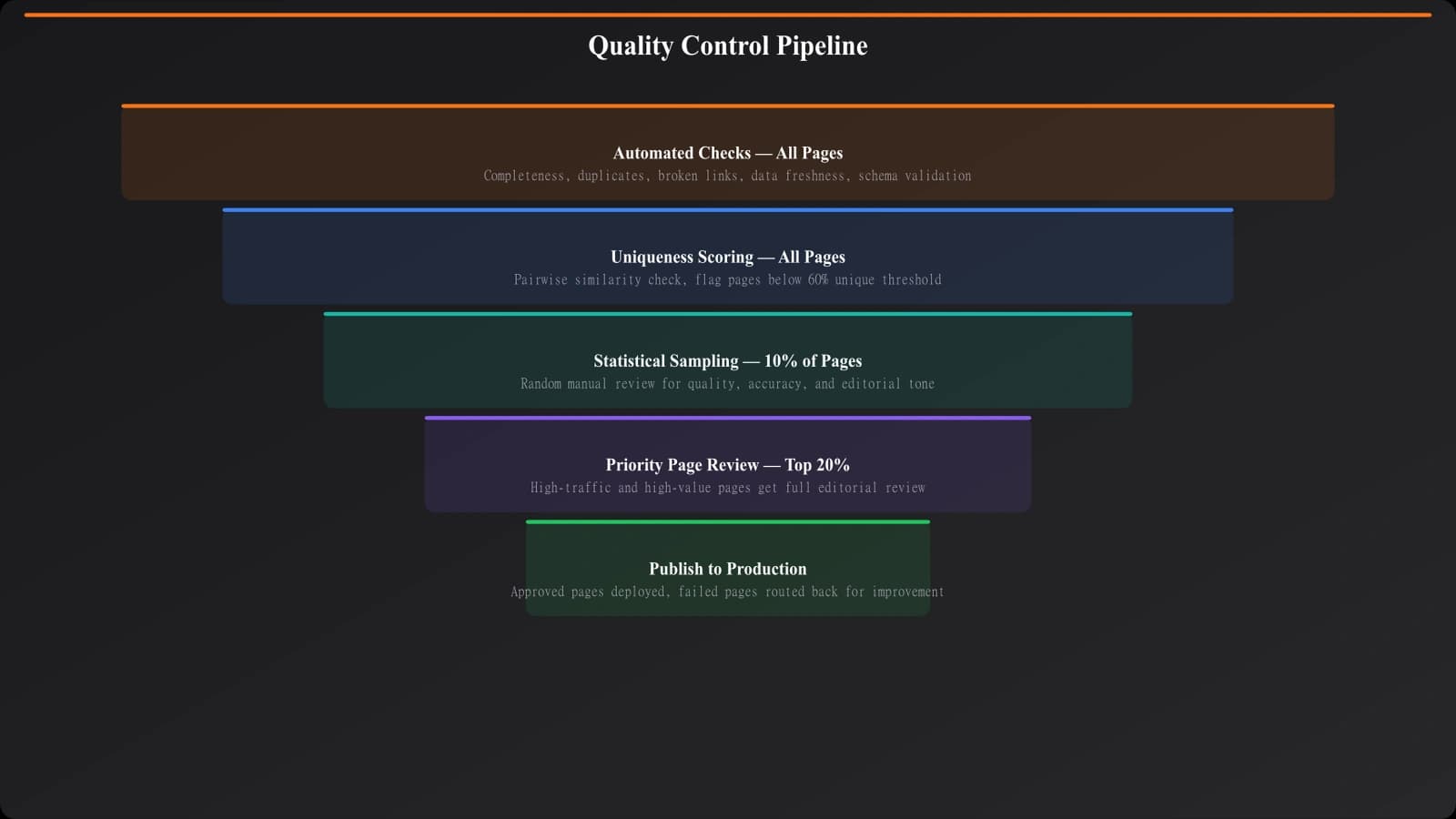
This is where PSEO projects often cut corners—and where cutting corners kills results. Quality control at scale requires automation, but automation alone isn't enough. You need layered checks.
Automated Quality Checks
Build automated validation into your generation pipeline. These should run on every page before it goes live:
- Completeness validation: Does the page have all required sections? Are there broken product cards or empty comparison tables?
- Duplicate detection: Is this page too similar to another page you've already generated? Similarity thresholds help catch cannibalization early.
- Link validation: Do all internal links work? Do external links point to valid destinations?
- Data freshness: Is any data on this page more than X days old? Flag stale pages for review.
- Length thresholds: Is the page too short (potentially thin content) or too long (potentially bloated)?
Pages that fail automated checks shouldn't publish automatically. Route them to a review queue for manual assessment.
Manual Review Sampling
Even with perfect automation, you need human eyes on content regularly. Implement a sampling system: randomly select 5-10% of generated pages for manual review. This catches issues that automated checks miss—awkward phrasing, factually questionable claims, or content that just “feels off.”
Track what manual reviewers find. If they consistently catch the same type of issue, that's a signal to add a new automated check. Over time, your automated checks should improve based on human feedback.
Phase 6: Ongoing Maintenance
Publishing is not the finish line. For PSEO to work long-term, you need systems for keeping content accurate and relevant as the world changes around it.
Data Refresh Cycles
Different data types need different refresh frequencies. Pricing tends to change frequently—monthly or even weekly checks make sense. Feature sets change less often—quarterly verification is usually sufficient. Company information changes rarely—annual audits work.
Build automated data refresh into your pipeline. Scrapers should run on schedule, API integrations should sync regularly, and freshness timestamps should update accordingly. When data changes, affected pages should regenerate automatically.
Content Updates Beyond Data
Data isn't the only thing that goes stale. Your templates themselves might need updating as formats evolve, as Google's expectations change, or as you learn what performs better. Build versioning into your template system so you can roll out improvements across all pages efficiently.
Watch for new competitors entering categories you cover. If a hot new project management tool launches and your “best project management software” page doesn't include it, that page is already outdated. Build monitoring for new entrants and have a process for adding them to your database.
Performance-Based Prioritization
Not all pages deserve equal maintenance attention. Pages that drive significant traffic and conversions should get priority updates. Pages that never rank might need more fundamental changes—or might not be worth maintaining at all.
Build dashboards that show page performance alongside content freshness. A page with great traffic but stale data is a high-priority update. A page with no traffic and fresh data might need a strategic rethink, not a data refresh.
Common Pitfalls and How to Avoid Them
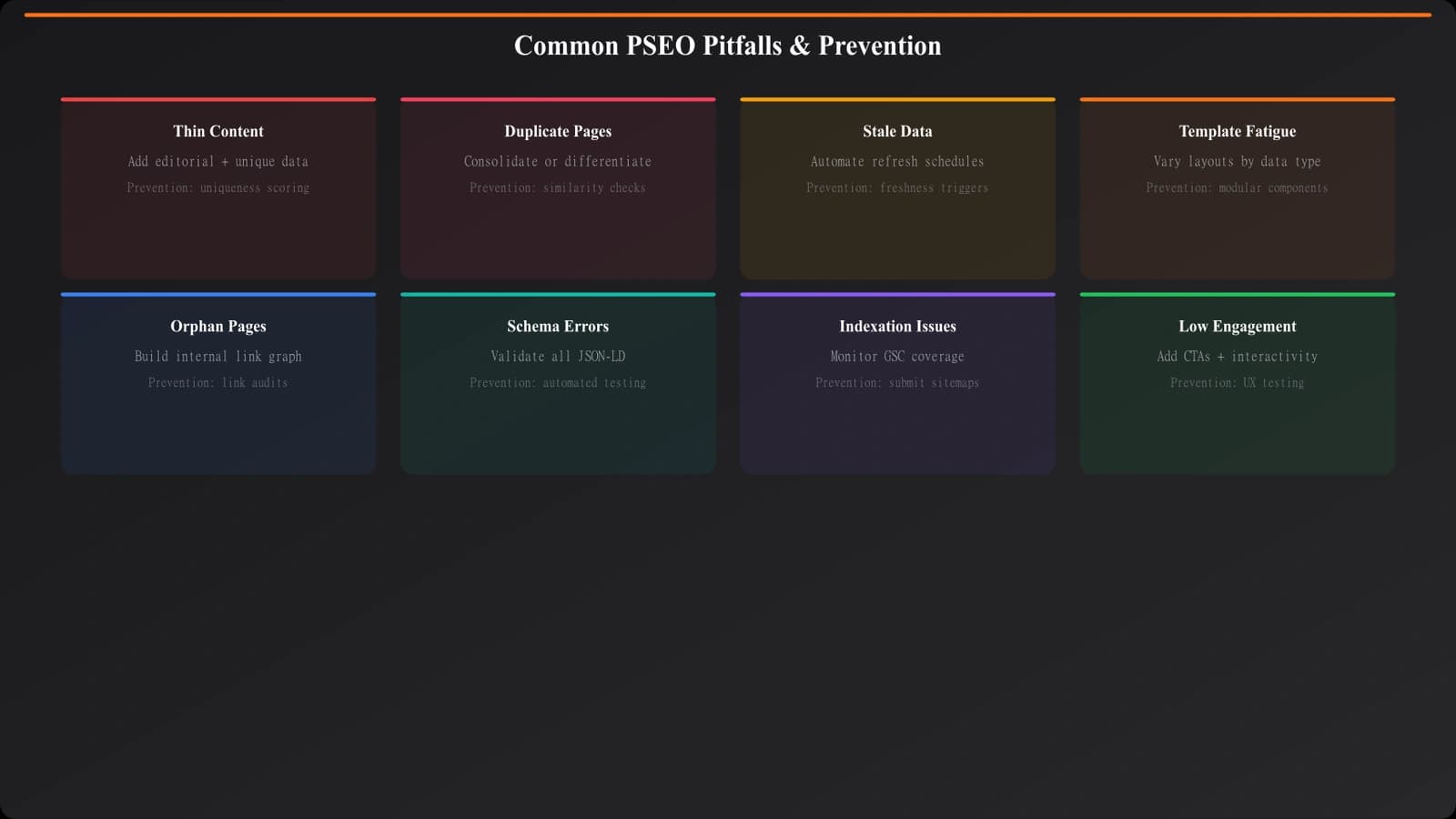
Let me share some specific mistakes I've seen PSEO projects make, so you can sidestep them.
Over-Templating Creates Thin Content
When templates are too rigid, every page ends up looking nearly identical. Google recognizes this pattern and devalues it. The fix is building flexibility into templates—conditional sections, variable lengths, data-driven emphasis. Two pages about different products should feel distinct, not like mad-libs with different nouns plugged in.
Accumulating Data Debt
It's tempting to launch with incomplete data and “fix it later.” But data debt compounds. Every day your pages show outdated pricing or missing features, you're building distrust. Users notice. Google notices. Don't launch pages until their data is complete and verified.
Forgetting Unique Value
The most dangerous PSEO trap is generating content that exists only because you can, not because it helps anyone. Before generating any page, ask: what would a human who created this page include that we're not? Original research? Expert opinions? Hands-on testing? Find your unique value and build it into the template.
Ignoring User Experience
Programmatic doesn't mean ugly. Pages generated at scale should still load fast, look professional, and be easy to use. Mobile responsiveness, clear navigation, readable typography—these matter just as much for programmatic pages as for hand-crafted ones. Maybe more, because you can't manually polish each one.
Scaling Your System
Once your production system is working well, you'll want to scale it—more categories, more products, more page types. Here's how to think about expansion.
Scale horizontally before vertically. It's easier to add new categories using your existing template architecture than to dramatically increase complexity within one category. If your listicle template works for CRM software, extending it to project management software is relatively straightforward. Inventing a completely new page type is not.
Watch for system bottlenecks as you scale. Data collection that worked for 100 products might break at 1,000. Quality control sampling rates that caught issues at 50 pages might miss them at 500. Regularly audit whether your processes scale with your ambitions.
And be realistic about maintenance burden. Every page you generate is a page you'll need to maintain. If you're already struggling to keep 200 pages fresh, don't generate 500 more. Solve the maintenance problem first.
Building Your Production System
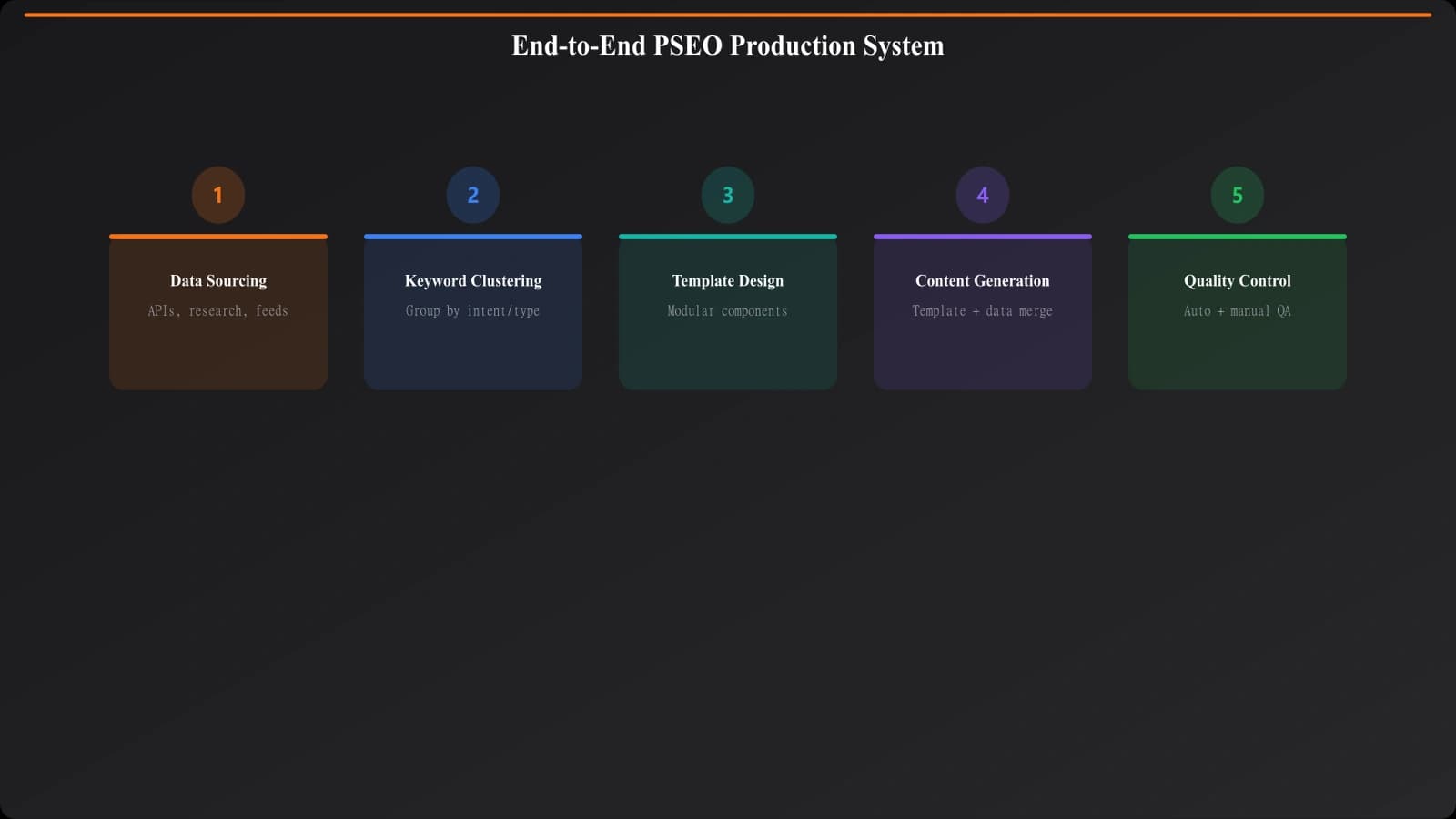
Let's bring this all together. A functional PSEO production system has six interconnected phases: data sourcing, keyword clustering, template design, content generation, quality control, and ongoing maintenance. Skip any phase and the whole system weakens.
The upfront investment is significant. You're building infrastructure, not just writing content. But the payoff is a content engine that can produce valuable pages at a scale impossible for traditional content teams to match.
Here's my recommendation for getting started: begin with a single, well-defined category. Build the complete system for that category—data pipeline, keyword map, template, QC checks, maintenance process. Get it working smoothly. Learn what breaks and what scales. Only then expand to additional categories.
The companies dominating comparison search results didn't get there by accident. They built production systems. Now you know how to build yours.
For specific guidance on template design for different content types, see our guides on Listicle Template Design and Comparison Page Templates. And for data collection strategies that scale, check out Data Collection at Scale.

Product Manager at BestPage. Pioneer in AEO research since 2024, exploring the convergence of SEO and GEO (Generative Engine Optimization). Led multiple AI-powered content optimization projects that achieved 300%+ citation increases in ChatGPT and Perplexity.