
Imagine you've built the perfect comparison page template. Beautiful design, helpful structure, great conversion rate. You scale it to 200 categories. Traffic grows. Revenue grows. And then someone points out that half your pricing data is wrong.
This happens more than anyone wants to admit. Comparison content lives and dies by data accuracy. Get the facts wrong—even unintentionally—and you've damaged trust, potentially misled buyers, and given Google a reason to doubt your expertise. No template can overcome bad data.
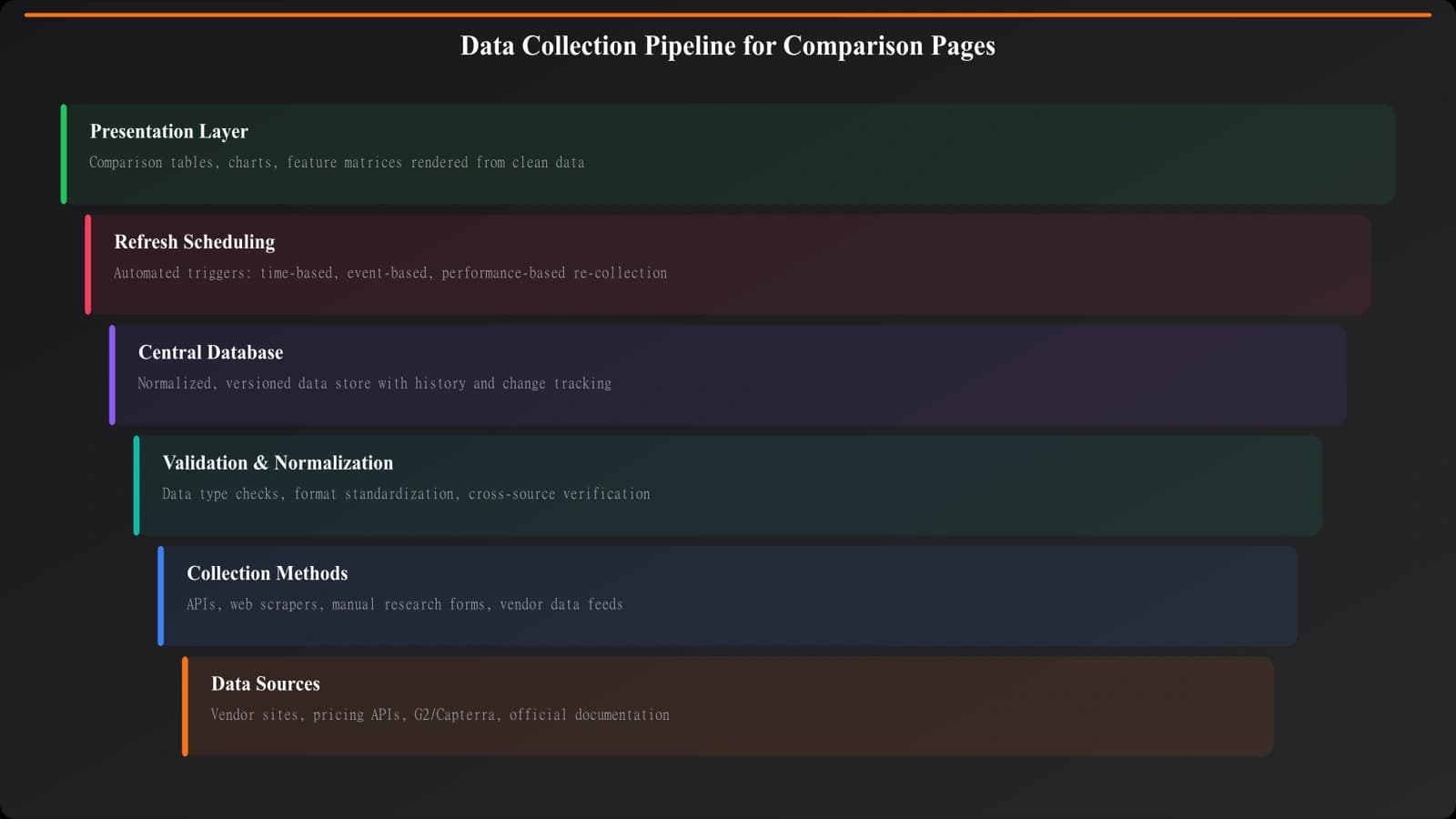
The challenge compounds at scale. Manually researching one product is tedious but manageable. Keeping 500 products current across 50 data points each? That's a systems problem. You need infrastructure—collection mechanisms, validation checks, refresh cycles—that makes accuracy sustainable, not heroic.
This guide covers the framework for building that infrastructure. We're focusing on the data layer that powers comparison content, complementing the template architecture covered in our PSEO Production System guide.
Understanding Your Data Needs
Before building collection systems, you need to understand what data actually matters for comparison content. Not all data is equally important, and trying to collect everything leads to maintenance nightmares.
Start by categorizing your data into tiers based on how critical it is to your content's value.
Tier 1: Deal-breakers. This is information that, if wrong, would actively mislead readers and damage trust. Pricing is the obvious example. Current availability matters too—recommending a product that's been discontinued is embarrassing. Core functionality descriptions fall here as well. If you say a tool does X and it doesn't, you've failed your readers.
Tier 2: Decision-relevant. Information that matters for the comparison but where minor inaccuracies won't cause harm. Feature lists, integration counts, supported platforms, company size indicators. Readers use this to differentiate options, but getting it 90% right is acceptable while you verify the rest.
Tier 3: Context. Helpful background that adds depth but isn't central to the comparison. Company history, founding year, headquarters location, funding status. Nice to have, lower priority to keep current.
Your collection and validation rigor should match these tiers. Tier 1 data needs the most robust systems and frequent verification. Tier 3 can be more relaxed.
Collection Methods and Trade-offs
There's no single best way to collect product data. Every method has strengths and limitations. Most successful data systems combine multiple approaches strategically.
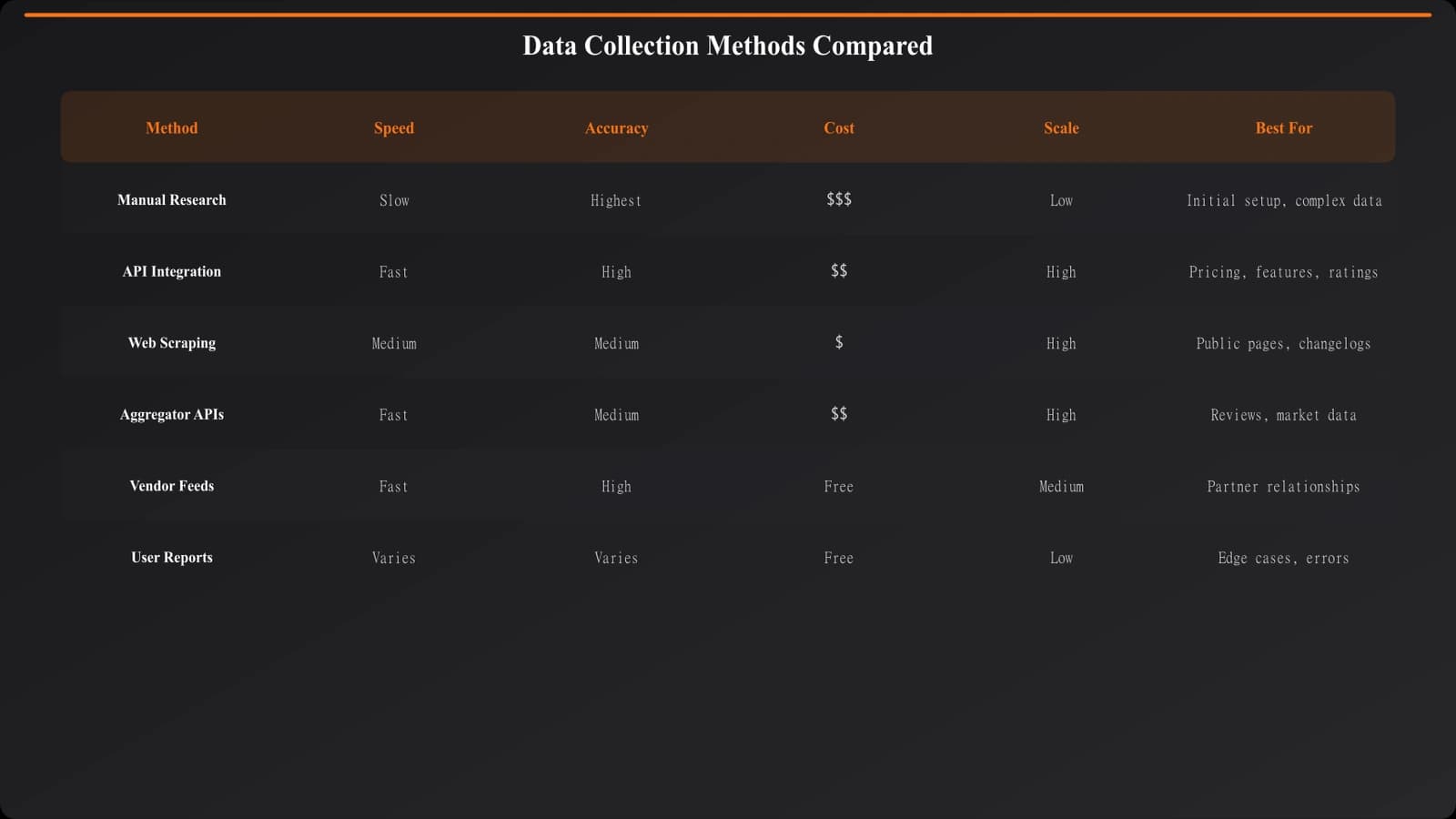
Manual Research
The most accurate method is having humans visit product websites, read documentation, and record information. No misinterpretation by scrapers, no stale cached data, just eyes-on verification.
The obvious problem: it doesn't scale. Manually researching 500 products initially is feasible. Keeping them updated? That's a full-time job, maybe several. Manual research works best for initial data population and periodic verification of critical fields—but it can't be your only method at scale.
API Integration
When products offer public APIs with the data you need, this is ideal. APIs provide structured, authoritative data directly from the source. They update automatically as the source changes. Integration once, benefit forever.
Reality check: most products don't expose the data you need via API. And when they do, the data often isn't what you'd naturally compare—it's structured for their use cases, not yours. API integration works for specific high-value products where it's available, but won't cover your full dataset.
Web Scraping
Automated extraction from product websites can scale data collection significantly. Scrapers visit pricing pages, feature lists, documentation, and extract structured information.
The challenges are real, though. Websites change layouts, breaking your scrapers. Anti-bot measures can block automated access. Interpreting unstructured content (is that price monthly or annual?) requires sophisticated parsing. And scraping sits in a legal gray zone for some sites.
Scraping works best as a first-pass data source that gets validated through other means. Don't publish scraped data without verification, especially for Tier 1 fields.
Aggregator Platforms
Review platforms like G2, Capterra, and Product Hunt aggregate product information you could leverage. They've already done much of the research work.
Considerations: their data might also be stale. Their categorizations might not match yours. And depending on how you use it, there might be licensing implications. Aggregators are useful starting points but shouldn't be your sole source.
Building Validation Layers
Collection is half the problem. The other half is ensuring what you collected is actually correct. Validation should happen at multiple stages, catching different types of errors.
Format validation happens immediately on ingestion. Is the price in a parseable format? Is the feature list actually a list? Are required fields populated? This catches obvious data corruption but doesn't verify accuracy—just structure.
Consistency validation compares new data against existing records. Did the price just change by 500%? That's probably a parsing error, not an actual price change. Did a product suddenly lose half its features? Flag it for review. Dramatic changes deserve human attention.
Cross-source validation compares data from different collection methods. If your scraper says one thing and the aggregator says another, which is right? Discrepancies trigger investigation rather than automatic acceptance.
Human spot-checking randomly samples data for manual verification. Even if automated checks pass, periodically have humans verify samples. This catches systematic errors your automated checks might miss.
Keep Your Data Accurate Automatically
Generate comparison pages with built-in data validation and freshness monitoring.
Try for Free
Designing Refresh Cycles
Data isn't static. Prices change. Features launch. Companies pivot. Your data collection needs to be ongoing, not one-time.
The right refresh frequency depends on the data type and your category. Pricing in SaaS changes frequently—monthly checks aren't unreasonable. Feature sets change less often—quarterly verification might suffice. Company information rarely changes—annual review is often enough.
Build refresh scheduling into your pipeline. Automated jobs should re-collect at appropriate intervals based on data type. More frequent refreshes for volatile data, less frequent for stable data.
But don't just refresh blindly. Compare new data against existing and only update when you're confident the change is real. A scraper that misparses a page shouldn't automatically overwrite correct data with garbage.
Consider event-triggered refreshes too. If a product announces a major update, trigger immediate re-collection. If your comparison page suddenly drops in rankings, maybe the data went stale. Build awareness of signals that should trigger out-of-cycle verification.
A Practical Collection System
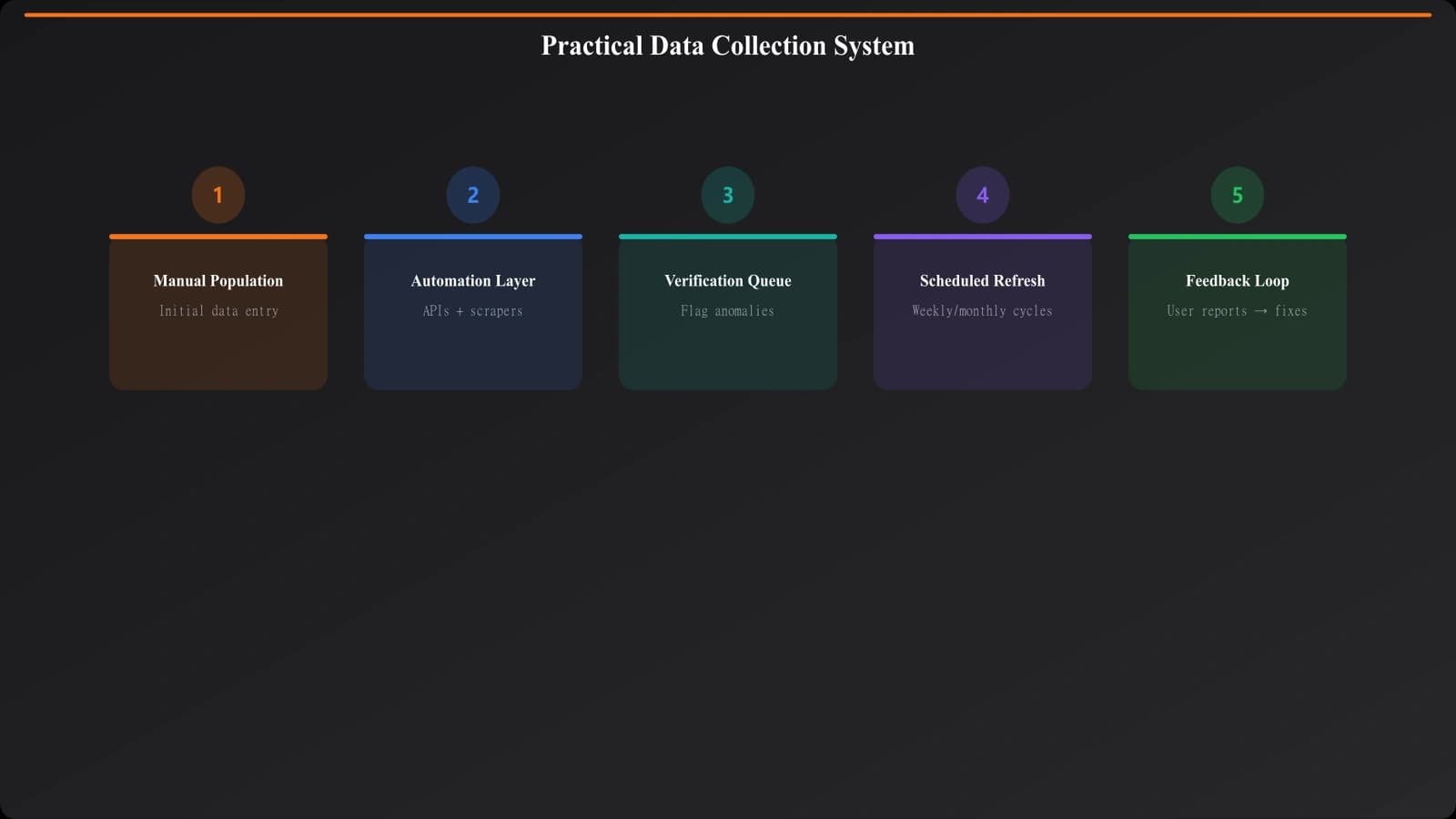
Let me walk you through what a working data collection system actually looks like in practice. This isn't theoretical—it's the kind of setup that powers successful programmatic comparison sites.
Initial population phase. Start with manual research for your first 50-100 products. Yes, it's slow. But you're also learning what data matters, what's hard to find, what formats work. This informs your automation strategy.
Automation layer. Build scrapers for common data points that live in predictable locations—pricing pages, feature lists, integration directories. Run these against your manual dataset to calibrate accuracy. Refine until automated collection matches manual research 90%+ of the time.
Verification workflow. New products enter a verification queue. Automated collection runs first, then human review confirms accuracy before publishing. This catches the edge cases automation misses.
Ongoing maintenance. Scheduled refresh jobs run based on data type. Alerts fire when validation detects anomalies. Monthly spot-checks verify samples. Quarterly reviews assess overall data quality.
Feedback loops. When users report inaccuracies (and they will), feed that back into your system. Was it a collection error or a recent change? Either way, learn from it to improve.
Mistakes That Undermine Data Quality
A few patterns consistently cause problems in data collection systems.
Trusting automation too much. Scrapers fail silently. They return old cached data, partial results, or completely wrong information—and your logs say “success.” Never assume automated collection worked. Always validate.
Neglecting data decay. Initial data quality is high. Six months later, 30% is outdated. A year later, half might be wrong. Without active maintenance, your content quality degrades invisibly until suddenly users complain and rankings drop.
Inconsistent formatting. “$10/month,” “$10 per month,” “$10/mo,” and “10 USD monthly” all mean the same thing but parse differently. Normalize data formats on ingestion. Your templates should receive clean, consistent data—not handle formatting edge cases.
No audit trail. When data changes, you should know what it changed from, when, and why. Without history, you can't debug problems, verify accuracy, or understand your data quality over time.
Ignoring scope creep. You started with 10 data points per product. Now you're tracking 50. Each new field is maintenance burden. Be ruthless about what you actually need. More data isn't better if you can't keep it accurate.
Building for Sustainable Accuracy
The unsexy truth about comparison content at scale: the data work never ends. It's not a project you complete; it's a capability you build and maintain. The sites that dominate comparison search results aren't just good at templates—they're fanatical about data accuracy.
Start with understanding what data actually matters for your comparison value proposition. Build collection systems appropriate to each data tier. Layer validation to catch errors before they become published inaccuracies. Design refresh cycles that prevent decay. And stay humble—assume your data is probably wrong somewhere, and build systems to find and fix those errors continuously.
This is the foundation your templates build on. Get it right, and your comparison content can scale without sacrificing the accuracy that makes it trustworthy. Get it wrong, and no amount of template sophistication will save you.
For the broader production workflow that this data work plugs into, see our pillar guide on PSEO Production Systems. And for the templates that consume this data, explore Listicle Template Design and Comparison Page Templates.

Product Manager at BestPage. Pioneer in AEO research since 2024, exploring the convergence of SEO and GEO (Generative Engine Optimization). Led multiple AI-powered content optimization projects that achieved 300%+ citation increases in ChatGPT and Perplexity.