
Here's a scenario you might recognize. You build a template for your “Best CRM Software” page, and it works beautifully. Great layout, solid structure, good conversion rate. So you duplicate it for “Best Project Management Tools.” Then “Best Email Marketing Platforms.” Then fifty more categories.
Six months later, you notice something troubling. All your pages look... identical. Same introduction pattern. Same section order. Same number of items. Same everything, really, just with different product names plugged in. And your rankings are slipping.
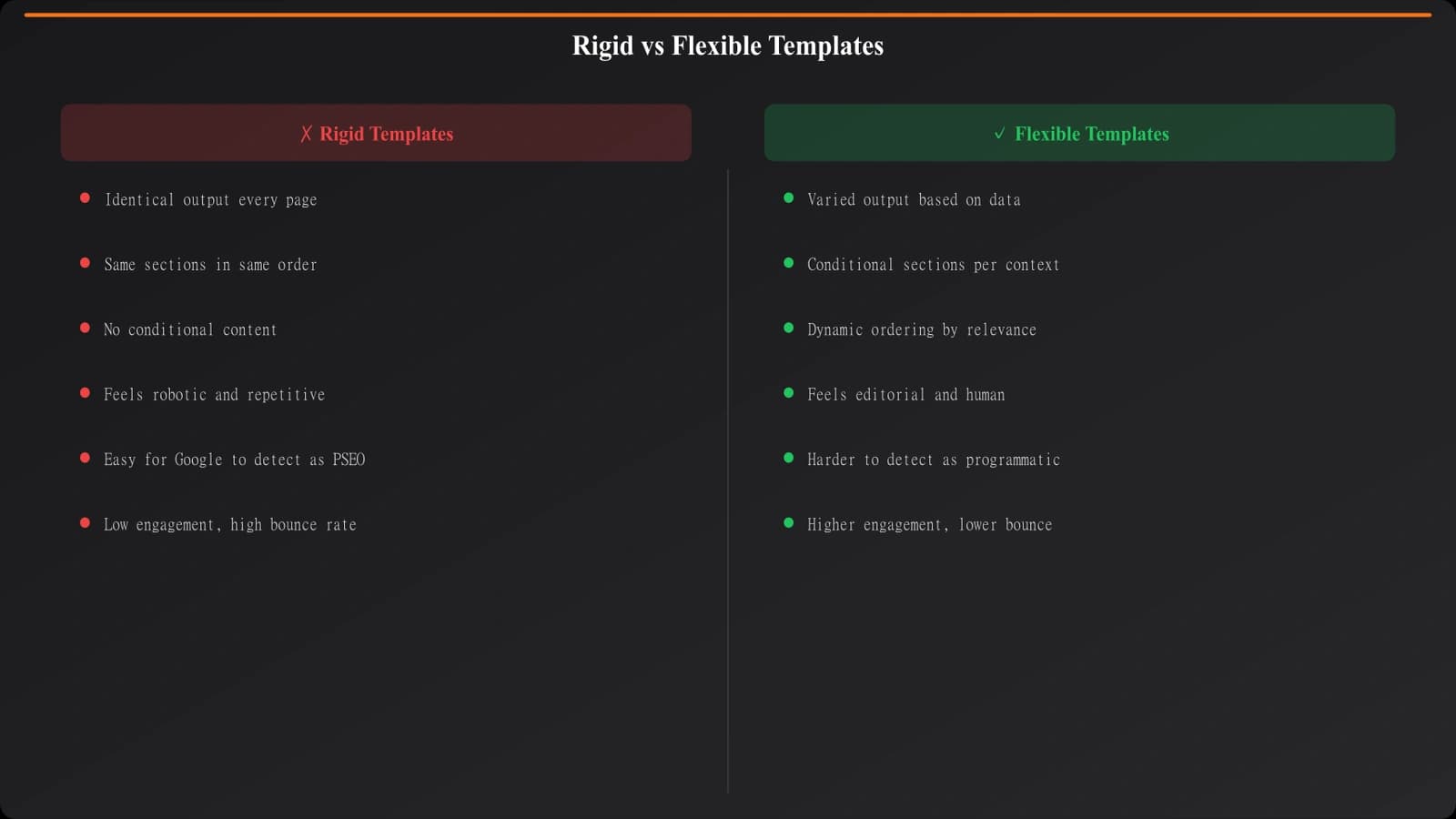
This is the template trap. It's incredibly common in programmatic SEO, and it kills rankings faster than almost any other mistake. Google's gotten remarkably good at identifying templated content that adds no unique value. And when your template is too rigid, that's exactly what you're producing—interchangeable pages that exist only because your system made it easy to create them.
The solution isn't abandoning templates. Templates are essential for scale. The solution is designing templates that produce genuinely different pages for each category, while still maintaining production efficiency. That's what this guide is about.
For the complete production workflow that these templates fit into, see our pillar guide on PSEO Production Systems. This piece focuses specifically on the template design component.
The Uniqueness Challenge
Let's be honest about what we're up against. When you're generating pages from a template, you're starting with sameness. The template defines structure, flow, and often significant amounts of boilerplate text. That's the whole point—consistency and efficiency.
But Google doesn't reward consistency. Google rewards usefulness. And a page that looks like five hundred other pages on your site doesn't feel useful, even if the data is different. Users notice too. They land on your CRM page, then click to your project management page, and think “wait, haven't I seen this before?”
The challenge is injecting meaningful variation while maintaining production efficiency. If you have to manually customize each page, you've lost the scale benefits. But if every page is cookie-cutter, you've lost the quality that makes pages rank.
The answer lies in template architecture. Build the right kind of template, and variation happens automatically as a function of your data. Build the wrong kind, and no amount of manual tweaking will save you.
Modular Template Architecture
The fundamental shift is thinking of templates not as documents but as component systems. Instead of designing a fixed page layout, you design independent modules that combine differently based on context.
Think of it like building with LEGO. Each brick has a defined purpose and interface, but they can combine in countless configurations. Your template components should work the same way—standardized interfaces, flexible combinations.
Core Modules for Listicles
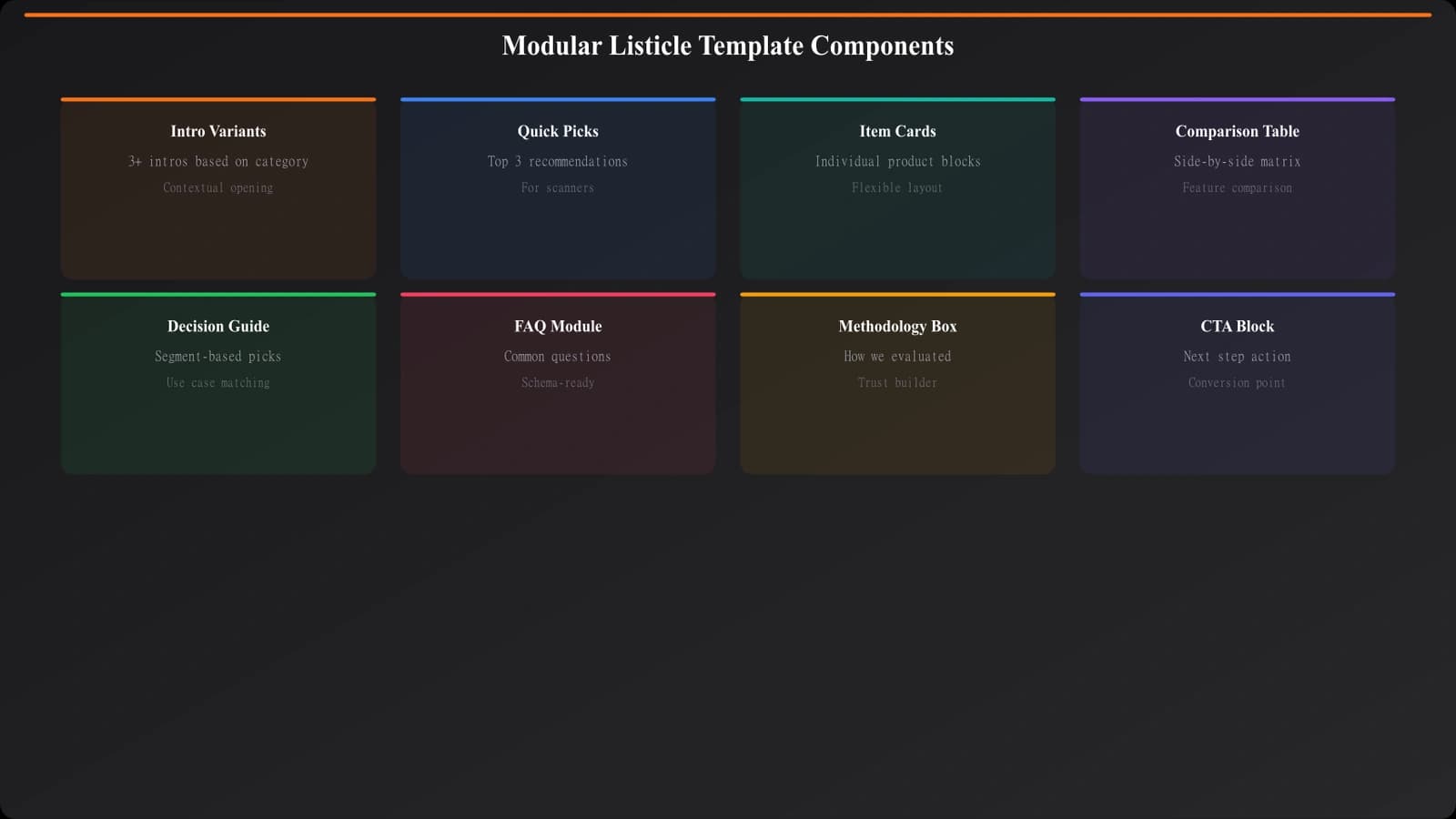
A well-designed listicle template typically has these module categories:
Introduction modules that vary based on category maturity and user sophistication. A listicle for a well-known category (“best CRM software”) needs different framing than an emerging category (“best AI meeting assistants”). Build multiple intro patterns and select based on category metadata.
Quick picks modules for users who want recommendations without reading everything. These vary based on how many items you're featuring and what segmentation makes sense (best overall, best budget, best enterprise, etc.).
Item modules that render each product in your list. These are where most of your data-driven variation happens. More on these shortly.
Comparison modules that present data across products—tables, charts, feature grids. Whether you include these and how they're structured should depend on what data you have.
Decision support modules that help readers choose—buyer guides, FAQ sections, methodology explanations. These can be category-specific.
Trust modules that establish credibility—methodology disclosures, data freshness, author attribution. These are more consistent across pages but still need context-awareness.
Data-Driven Variation
Here's where template design gets interesting. The variation between your pages shouldn't come from manual customization—it should emerge naturally from your data.
Take item modules. A rigid template might always show the same sections: description, features, pricing, pros/cons. But what if some products don't have public pricing? What if some products have standout features worth highlighting more prominently?
A data-driven approach handles this elegantly. Define what data fields you might show, then conditionally include or exclude based on availability and relevance. If pricing data exists, show the pricing section. If it doesn't, skip it entirely—don't show an empty section or a “contact for pricing” placeholder for every product.
Conditional Section Logic
Every section in your template should have conditions attached. Not just “is data available,” but “does including this section add value for this particular page?”
Some examples of conditional logic that creates meaningful variation:
- Show comparison table only if at least 3 items have comparable data points
- Include integration section only for categories where integrations matter (SaaS tools, not physical products)
- Display pricing comparison only if pricing is publicly available for majority of items
- Feature “best for beginners” callout only in complex categories with steep learning curves
- Include FAQ section only if you have category-specific FAQs (not generic ones)
This logic lives in your template, not in manual page configuration. The result: pages automatically adapt to their content, becoming longer or shorter, more or less detailed, based on what makes sense.
Design Smarter Listicle Templates
Generate best-of pages with intelligent templates that adapt to your data automatically.
Try for Free
Varying the Content Itself
Structural variation through modules is half the battle. The other half is ensuring the actual prose varies meaningfully from page to page.
Templated content often fails because the non-data text is identical everywhere. “Looking for the best [category]? We've reviewed the top options so you don't have to.” That sentence on 500 pages is a red flag for search engines.
The solution is building variation into your text generation, not just your structure. This can work at several levels.
Synonym rotation at the phrase level. Instead of always saying “top options,” rotate through “leading solutions,” “best choices,” “strongest contenders.” Not random—seeded by category so it's consistent within a page but varies across pages.
Category-aware framing in your prose. A page about B2B software should sound different than a page about consumer tools. Technical categories deserve more specification-heavy language. Consumer categories benefit from benefit-focused copy.
AI-generated variation for longer prose sections. Use language models to generate intros, transition text, and analysis that sounds human-written. Feed them your structured data and let them produce natural-sounding copy that's unique to each page.
The key is making variation systematic, not manual. If someone has to manually rewrite the intro for each page, your process doesn't scale. If your template automatically generates varied intros based on category context, you've solved the problem.
Designing Item Cards That Flex
Let's zoom in on item cards—the modules that display each product or option in your list. These are where listicle templates often feel most templated, because showing products requires consistent formatting.
The trap is designing item cards with fixed sections. Name, description, features, pricing, pros, cons—same order, same layout, every time. The result is pages that feel like they were stamped from a mold.
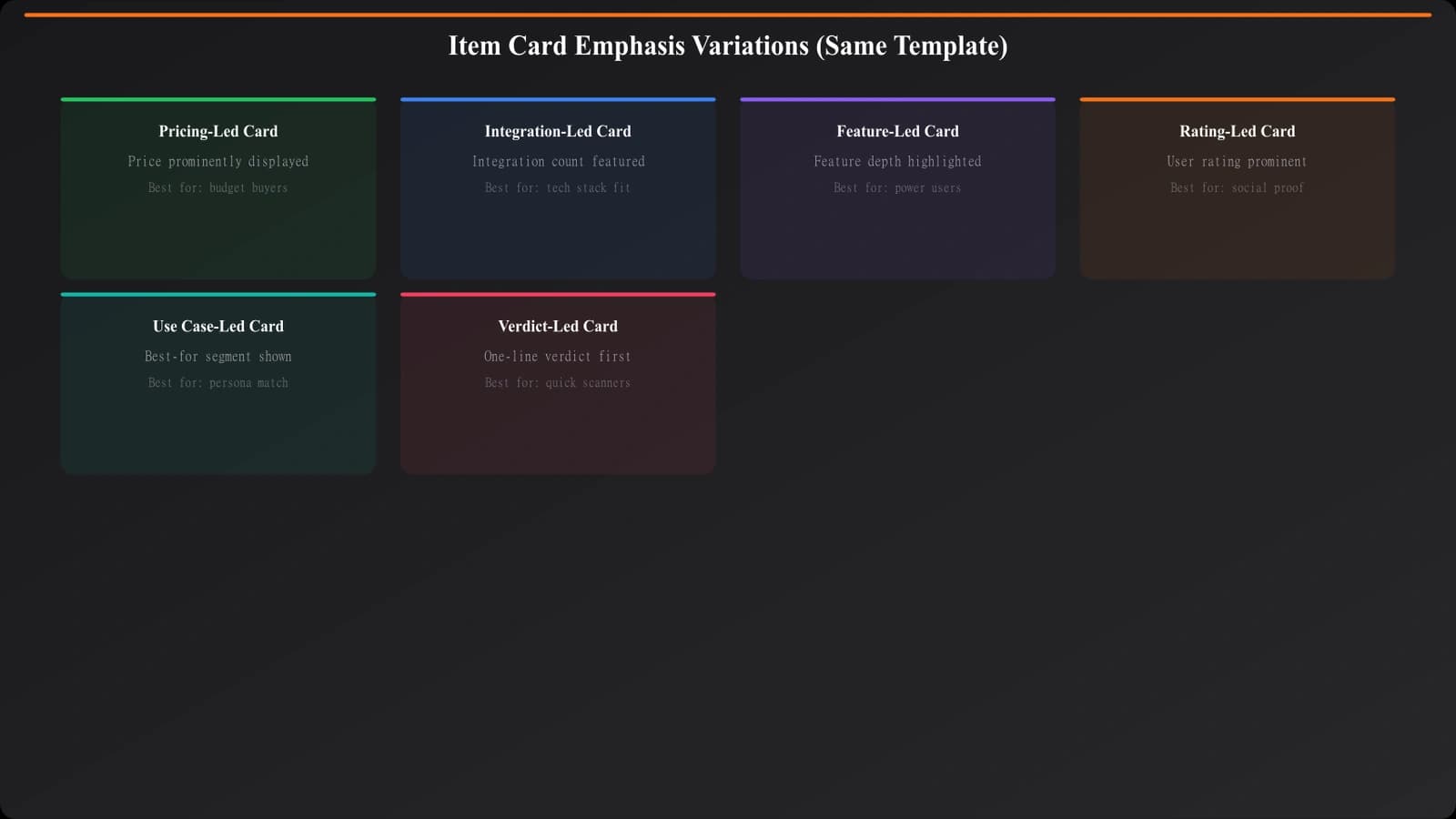
Better approach: design item cards with flexible emphasis. Every card might include the same types of information, but which elements get prominence should vary based on the product's strengths.
If a product's main differentiator is pricing, lead with pricing prominently. If it's features, expand the feature section and compress pricing. If it's integrations, highlight the integration ecosystem. Let your data tell the template what to emphasize.
This doesn't mean chaos—readers still need to compare products easily. But it means each item card tells its own story rather than filling in blanks. Product A might feel pricing-focused. Product B might feel integration-focused. Same template, different execution.
Avoiding the Thin Content Trap
No discussion of listicle templates is complete without addressing thin content. Google's helpful content updates specifically target programmatic pages that exist only for SEO without adding real user value.
How do you know if your template produces thin content? Ask yourself: if I removed all the data and just looked at the template's “wrapper” text, would it be valuable? If your wrapper is generic fluff that could apply to any category, you're probably thin.
The antidote is building genuine value into your template layers:
Expert analysis beyond raw data presentation. Don't just list features—explain when each feature matters. Don't just show pricing—contextualize whether it's competitive for the category.
Synthesis and comparison that requires understanding, not just data retrieval. Which products are best for which use cases? What are the tradeoffs between options? This analysis should feel like it came from someone who actually knows the space.
Original research or testing where possible. Even one unique data point per category—that others don't have—adds genuine differentiation. Maybe you survey users. Maybe you test performance. Whatever it is, make it something your template can incorporate.
Decision frameworks that genuinely help users choose. Not generic “consider your needs” advice, but specific guidance based on category nuances.
Testing and Iterating
Templates aren't set-and-forget. You should continuously test and improve based on what actually performs.
Start by establishing baselines. For each template version, track ranking performance, traffic, engagement metrics, and conversions across the pages it generates. This gives you data to measure improvements against.
Test variations systematically. Change one thing at a time—maybe a new intro module variant, or a different item card layout. Roll it out to a subset of pages and compare performance.
Pay attention to which categories perform best and worst. Underperforming categories might need template adjustments specific to them, or might indicate data quality problems rather than template issues.
User feedback is invaluable too. What questions do people ask after reading your pages? What do they click on? What do they ignore? This behavioral data should inform template iterations.
Building Templates That Last
The best listicle templates don't feel like templates at all. When someone lands on your page, they see content that feels crafted for that specific category, even though your system generated it programmatically. That's the goal.
Getting there requires upfront investment in template architecture. You're not just designing a layout—you're designing a system that makes intelligent decisions about how to present each unique category. Modular components. Conditional logic. Data-driven emphasis. AI-augmented prose. These all work together.
Start with your highest-value category. Build the template thoroughly, with all the flexibility mechanisms we've discussed. Launch, measure, iterate. Only expand to additional categories once you're confident the template produces genuinely valuable pages.
For comparison-style pages that need different treatment than ranked listicles, see our companion guide on Comparison Page Templates. And remember—great templates are only part of the equation. They need great data behind them. Our guide on Data Collection at Scale covers that piece.

Product Manager at BestPage. Pioneer in AEO research since 2024, exploring the convergence of SEO and GEO (Generative Engine Optimization). Led multiple AI-powered content optimization projects that achieved 300%+ citation increases in ChatGPT and Perplexity.