
Tables are the backbone of comparison content. They present product features, pricing, ratings, and specifications in a format that humans can scan quickly. But AI systems often struggle to extract this data accurately—not because tables are inherently difficult, but because most tables are poorly structured for machine reading.
When AI systems encounter a well-structured table, they can extract specific data points and cite them in responses. “According to [source], Product A costs $49/month while Product B costs $79/month.” When they encounter a poorly structured table, they either skip it entirely or misinterpret the data.
This guide provides templates and patterns for creating tables that AI systems can actually read. We'll cover HTML structure, header formatting, cell content patterns, and schema markup that maximizes extractability.
Why AI Struggles with Tables
Understanding why tables fail helps you build tables that succeed.
Common Table Parsing Failures
| Problem | What Happens | AI Impact |
|---|---|---|
| Missing or ambiguous headers | AI can't determine what columns represent | Data extracted without context, often unusable |
| Merged cells | Cell-to-header relationships become unclear | Wrong values attributed to wrong categories |
| Icons or images for data | AI sees blank or alt text, not the meaning | Check marks become invisible, ratings lost |
| Inconsistent formatting | Same data type displayed differently across rows | AI can't compare values reliably |
| Missing semantic HTML | No thead, tbody, th elements | AI treats all cells as equivalent |
How AI Reads Tables
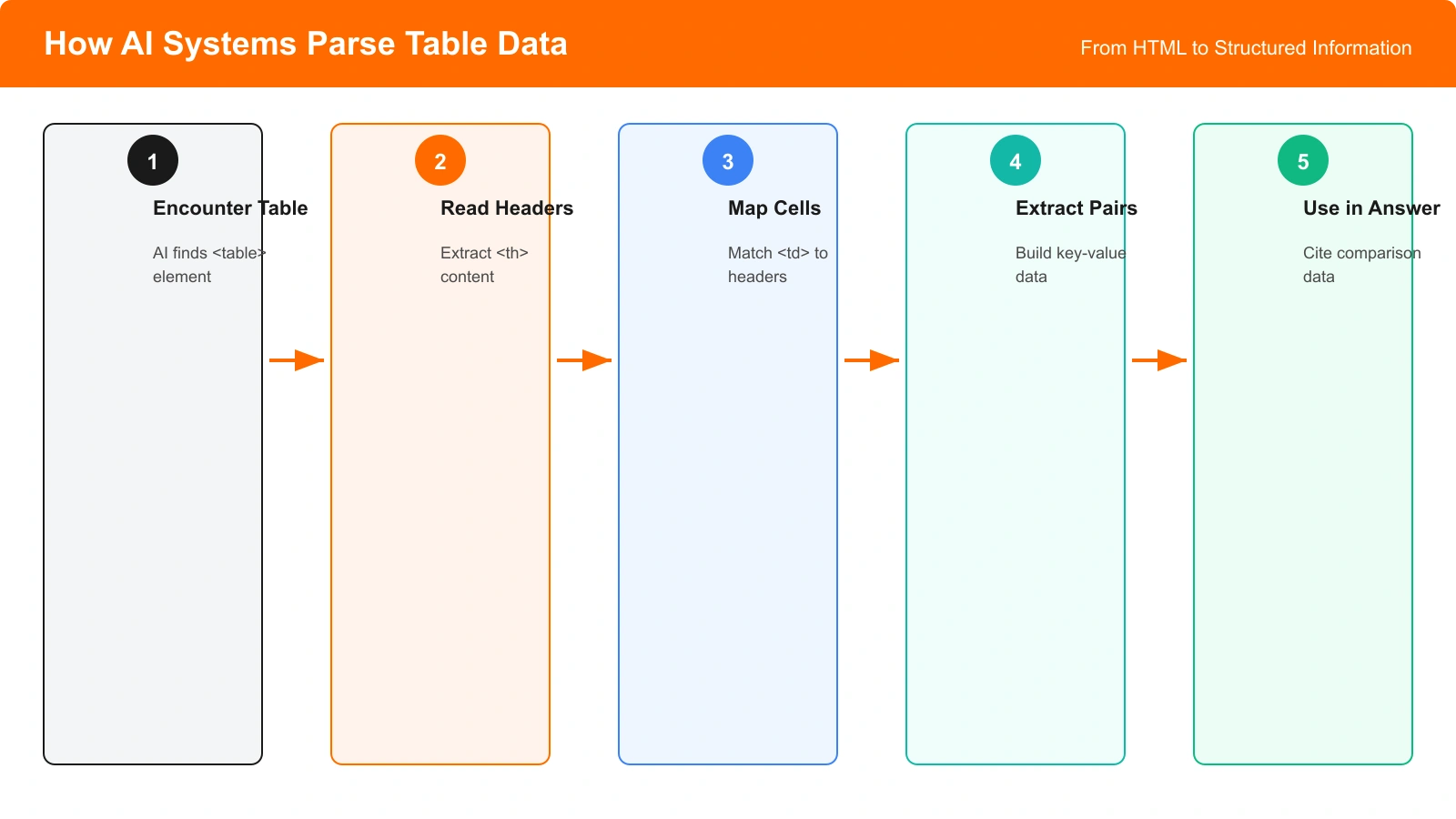
AI systems follow a general process when extracting table data:
- Identify table boundaries: Find the table element and its extent
- Parse headers: Determine what each column represents
- Match cells to headers: Associate each cell with its column header
- Extract entity relationships: Connect row identifiers (products) to their attributes (features, prices)
- Normalize values: Interpret values in a consistent format
Any breakdown in this process leads to extraction failures. Your table structure should support each step.
Proper HTML Table Structure
Semantic HTML is the foundation of AI-readable tables.
Required HTML Elements
| Element | Purpose | AI Benefit |
|---|---|---|
| <table> | Container for tabular data | Signals this is structured data, not layout |
| <thead> | Groups header rows | AI knows these are column labels, not data |
| <tbody> | Groups data rows | Separates content from headers clearly |
| <th> | Header cells | Identifies what each column/row represents |
| <td> | Data cells | Contains the actual values |
| scope attribute | Defines header direction (col/row) | Clarifies whether header applies to column or row |
Basic Table Template
Here's the minimum viable structure for an AI-readable comparison table:
- Use
<thead>to wrap your header row - Use
<th scope="col">for column headers - Use
<tbody>to wrap data rows - Use
<th scope="row">for row headers (like product names) - Use
<td>for data cells
Patterns to Avoid
- Tables for layout: Only use tables for actual tabular data
- Nested tables: Creates ambiguity about which table is being parsed
- CSS-only “tables”: Divs styled to look like tables aren't recognized as tables
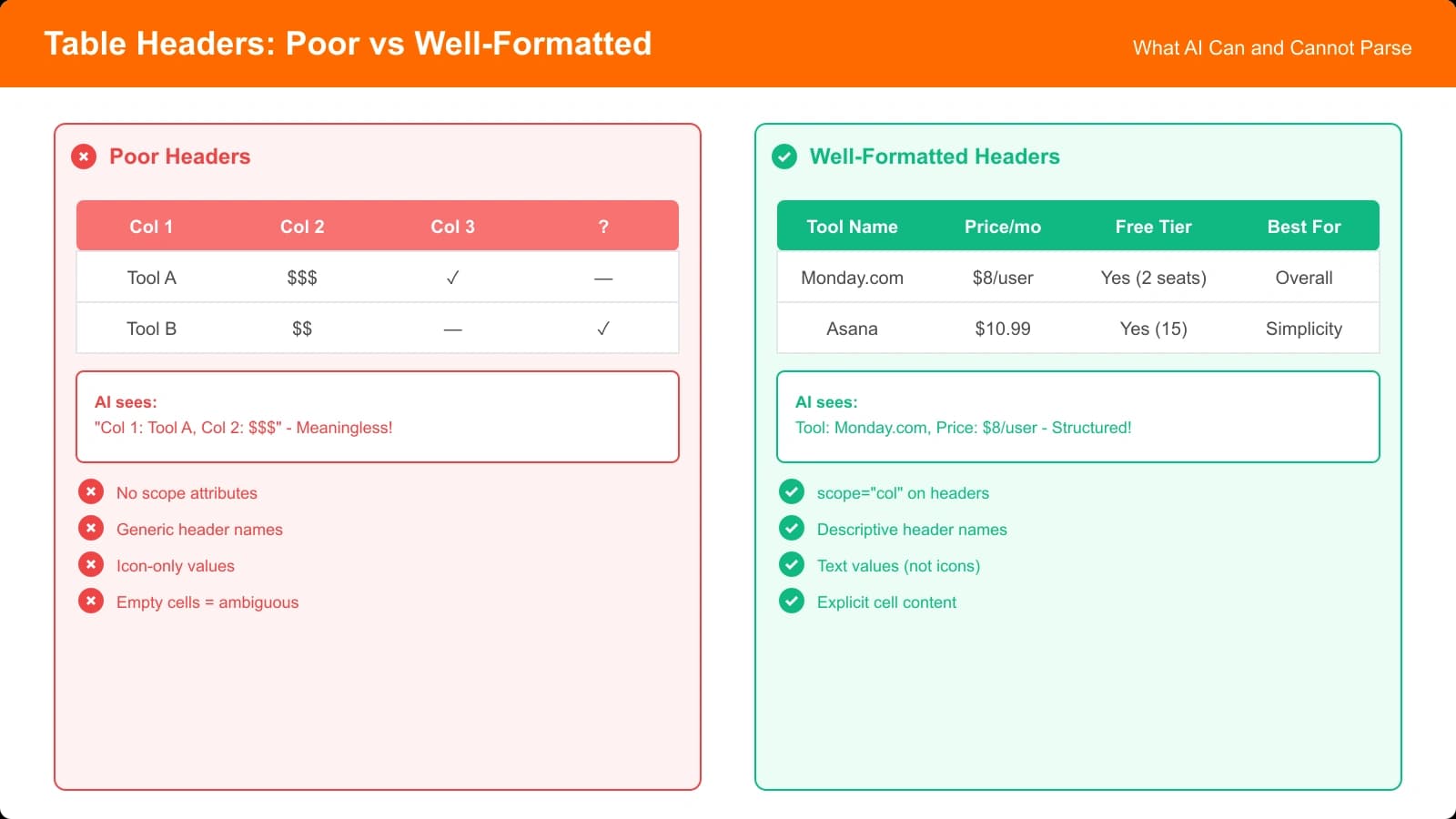
- Missing headers: Every column needs a clear text header
Header Best Practices
Headers are the most critical element for AI comprehension. Get these right and extraction improves dramatically.
Writing Clear Headers
| Bad Header | Good Header | Why It Matters |
|---|---|---|
| Price | Monthly Price (USD) | Specifies billing period and currency |
| Features | Key Features Included | Clarifies this is an inclusion list |
| Score | Overall Rating (1-10) | Specifies the scale being used |
| Support | Customer Support Channels | Clarifies what aspect of support |
| Integrations | Number of Integrations | Indicates this is a count, not a list |
Header Formatting Rules
- Be specific: Include units, scales, and context
- Be consistent: Use the same format across all tables on your site
- Use plain text: Avoid icons, abbreviations, or jargon in headers
- Keep headers visible: Don't hide headers or replace with icons
- One concept per column: Don't combine multiple attributes in one column
Build AI-Readable Comparison Tables
Create comparison content with properly structured tables that AI systems can parse and cite.
Try for Free
Cell Content Formatting
How you format individual cell values affects extractability.
Value Formatting by Type
| Data Type | Bad Format | Good Format |
|---|---|---|
| Price | 49 | $49/month |
| Boolean (yes/no) | ✓ / ✗ | Yes / No (with hidden text for icons) |
| Rating | ★★★★☆ | 4.0 out of 5 |
| Count | 50+ | 50+ integrations |
| Missing data | (empty cell) | Not available or N/A |
Handling Icons and Visual Indicators
If you use icons (checkmarks, X marks, stars), always include accessible text:
- Alt text for images: Every icon image needs descriptive alt text
- Screen reader text: Add visually hidden text for CSS icons
- Tooltip text: Title attributes provide additional context
- Adjacent text: Consider including text alongside icons
Maintaining Consistency
- Same units across rows: If one price is “$49/month,” all should use that format
- Same terminology: Don't mix “Yes,” “Included,” and “Available”
- Same precision: If one rating is “4.5,” don't write another as “4”
- Explicit nulls: Always indicate when data is unavailable
Schema Markup for Tables
Structured data helps AI systems understand table semantics.
Product Comparison Schema
For product comparison tables, use Product schema with explicit properties:
- @type: Product for each item in the table
- name: Product name from row header
- offers: Price information with currency and billing period
- aggregateRating: Rating with scale and review count
- brand: Manufacturer or provider
ItemList Schema for Rankings
When your table represents a ranked list:
- @type: ItemList for the table container
- itemListElement: Array of products in rank order
- position: Explicit ranking position for each item
- description: Why each item is ranked where it is
Why Schema Helps
| Without Schema | With Schema |
|---|---|
| AI guesses “49” is a price | AI knows it's a price of $49/month |
| AI doesn't know ranking order | AI knows item 1 is the top pick |
| Ratings lack context | Ratings have explicit scale and source |
| Product relationships unclear | Categories and brands are explicit |
Implementation Checklist
Use this checklist when building or auditing comparison tables:
- HTML structure: Verify thead, tbody, th, td elements are used correctly
- Header clarity: Each header includes units, scales, and context
- Scope attributes: Column headers have scope=“col”, row headers have scope=“row”
- Cell formatting: Values include units and are formatted consistently
- Icon accessibility: All icons have text alternatives
- Empty cells: Missing data is explicitly labeled (N/A, Not available)
- No merged cells: Or if necessary, use colspan/rowspan correctly
- Schema markup: Product or ItemList schema matches table content
- Caption or summary: Table has a caption explaining what it compares
- Test extraction: Try asking an AI to extract data from your table
Tables are powerful content for comparison pages, but only when AI systems can actually read them. The patterns in this guide ensure your tables work as hard for AI visibility as they do for human readability.
For related guidance on table troubleshooting, see our guide on Why AI Can't Parse Your Table (And How to Fix It). For schema markup implementation, check out Structured Data for Listicles: The 2026 Guide.

Product Manager at BestPage. Pioneer in AEO research since 2024, exploring the convergence of SEO and GEO (Generative Engine Optimization). Led multiple AI-powered content optimization projects that achieved 300%+ citation increases in ChatGPT and Perplexity.