
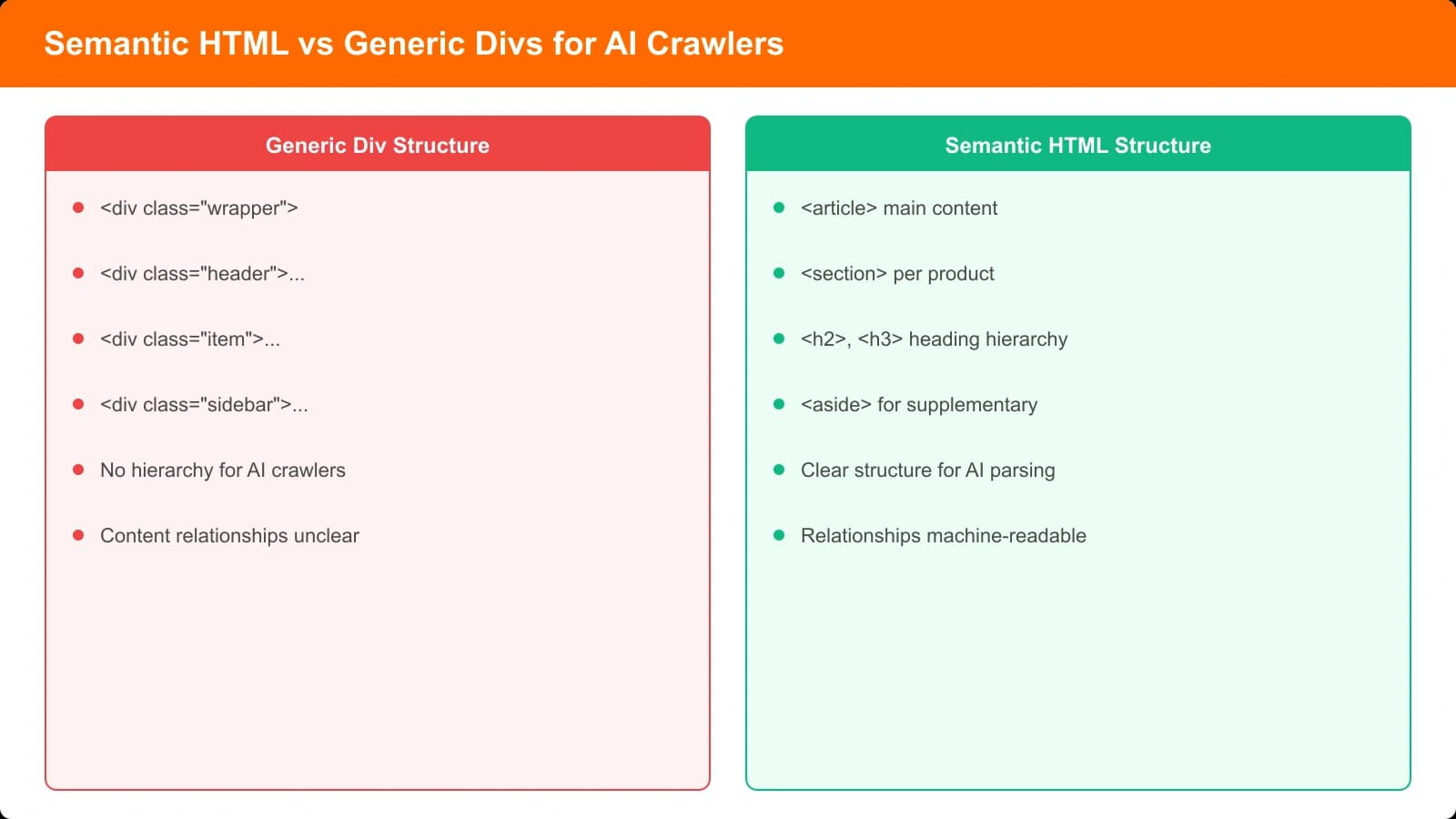
AI crawlers don't see your page the way users do. They see the HTML structure underlying your content. When that structure is semantic and well-organized, AI systems can accurately identify what's a heading versus body text, what's a list of options versus a paragraph, what's the main content versus sidebar noise.
When the structure is messy—divs with styling classes instead of semantic elements, heading levels that skip around, lists that are really just styled paragraphs—AI systems struggle to parse your content correctly. They might extract the wrong information, miss key content entirely, or misattribute statements.
For comparison pages, where AI systems specifically try to extract product information, recommendations, and structured data, semantic HTML becomes even more critical. This guide covers the semantic patterns that help AI crawlers understand your listicles and comparison content.
Heading Hierarchy That Makes Sense
Headings are the primary way AI systems understand your content's structure. They outline the document, indicate what's important, and signal relationships between sections.
Logical Nesting
Heading levels should nest logically. H1 is your page title. H2s are main sections. H3s are subsections within H2s. Don't skip levels—an H4 shouldn't appear without a preceding H3.
For listicles, a common pattern looks like:
- H1: Best CRM Software (2026)
- H2: Quick Picks / Our Recommendations
- H2: Product Name 1
- H3: Features
- H3: Pricing
- H3: Pros & Cons
- H2: Product Name 2
- ...
- H2: How We Chose These Products
- H2: Frequently Asked Questions
This structure tells AI systems exactly how your content is organized: the page is about CRM software, it evaluates multiple products, each product has several evaluation dimensions, and there's supporting content about methodology.
Descriptive Heading Text
Headings should be descriptive, not clever. “Features” is clearer than “What's Under the Hood.” “Pricing” is better than “The Bottom Line.” AI systems extract meaning from heading text, so optimize for clarity.
For product headings specifically, include the product name. “HubSpot CRM” rather than just “Top Pick” or “#1 Choice.” This helps AI correctly attribute the section content to the right product.
Semantic Container Elements
HTML5 provides semantic elements that communicate meaning beyond just div containers. Using them correctly helps AI distinguish between content types.
The Article Element
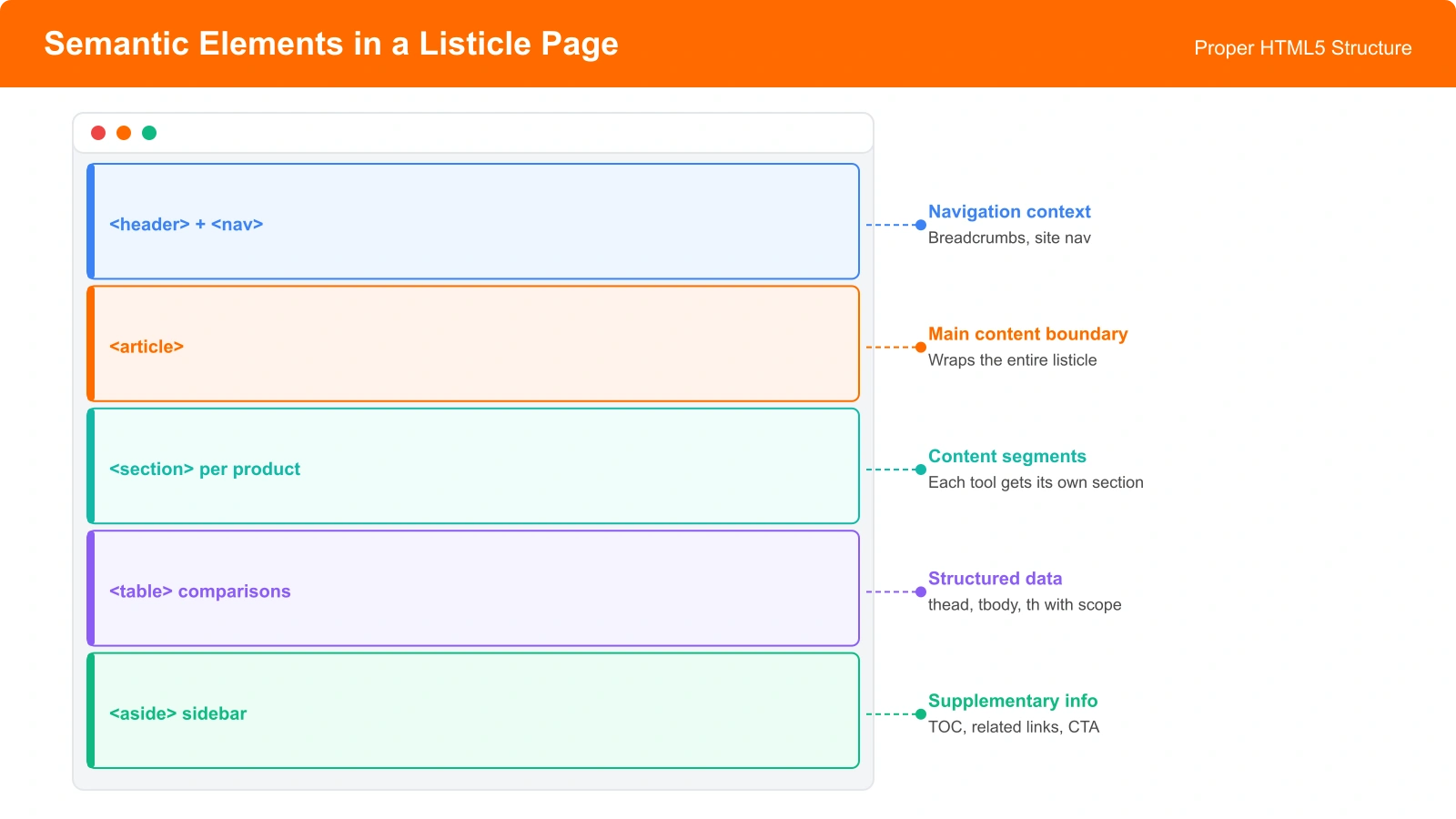
Wrap your main content in an article element. This signals that the contained content is a self-contained composition—exactly what a comparison article is. Don't put navigation, sidebars, or footers inside the article.
For listicles specifically, the article contains your introduction, all product evaluations, methodology, and conclusion. Everything that is “the content” as opposed to “the page chrome.”
Section Elements
Use section to group related content within your article. Each major part of your listicle—quick picks, individual product reviews, methodology—can be its own section. This provides additional structure within the article.
Sections should have headings. A section without a heading is usually a sign you should use a different element or that your content grouping needs reconsideration.
Aside for Supplementary Content
Sidebars, related content boxes, and tangentially related information should use aside. This tells AI systems that this content is supplementary to the main article, not part of the core comparison.
Common listicle asides: “Related comparisons,” “Quick links,” table of contents, newsletter signups. Keeping these in aside prevents AI from confusing supplementary content with your actual product evaluations.
| Element | Use For | AI Interpretation |
|---|---|---|
| article | Main content wrapper | Self-contained, citable content |
| section | Grouped content within article | Logical content grouping |
| aside | Supplementary information | Related but not core content |
| nav | Navigation sections | Ignore for content extraction |
| header/footer | Page/article headers and footers | Metadata, not main content |
Generate Semantically Correct Comparison Pages
Create listicles with proper HTML structure that AI systems can parse accurately.
Try for Free
Lists and Tables
AI systems pay special attention to lists and tables—they often contain the structured information AI is trying to extract. Using proper markup for these elements is essential.
Semantic List Markup
When content is actually a list, use list elements: ul for unordered lists, ol for ordered lists. Don't fake lists with styled divs or paragraphs with bullet characters.
For listicles, your product rankings should typically be ol—the order matters. Pros and cons can be ul—they're a set of items without inherent order. Feature lists are usually ul unless they're ranked by importance.
List item content matters too. Each li should contain a coherent point. Don't put entire paragraphs in list items if they'd be better as regular prose.
Table Structure
Comparison tables are common in listicles and provide perfect structured data for AI extraction. Use proper table semantics:
- thead for header rows
- tbody for data rows
- th for header cells (with scope attribute)
- td for data cells
- caption for the table title (optional but helpful)
Headers are especially important. A th cell in the first row tells AI “this column contains [header text].” Without proper th markup, AI might not understand what each column represents.
Special-Purpose Elements
A few other semantic elements are particularly useful for comparison content.
figure and figcaption for images with context. Don't just drop img tags—wrap them in figure with a figcaption explaining what the image shows. AI uses captions to understand visual content.
blockquote for quotations. If you're citing user reviews or external sources, use blockquote with cite attribute. This helps AI understand the quote isn't your own statement.
time for dates with datetime attribute. “Last updated January 2026” is ambiguous; a time element with proper datetime format is unambiguous.
mark for highlighted text when you want to call attention to specific text while preserving semantic meaning. Different from styling bold/italic for emphasis.
Common Semantic Mistakes
These patterns actively hurt AI comprehension of your content.
Heading soup. Using headings for styling rather than structure. A large, bold text that isn't actually a section heading shouldn't be an h2—it should be a styled paragraph.
Div-itis. Nesting endless divs with class names instead of using semantic elements. Div has no semantic meaning; use it only when no semantic element applies.
Fake lists. Styled paragraphs with bullet icons instead of actual ul/li. AI systems often miss these “lists” entirely.
Missing table structure. Tables without thead/th make column meanings unclear. AI might interpret a price column as product names if headers aren't marked.
Article inside article. Nesting article elements (like for product cards) is technically valid but often confusing. Use section or generic div for sub-components of your main article.
Building AI-Friendly Markup
Semantic HTML is foundational—more fundamental than schema markup or specialized optimization. If your basic HTML structure is sound, AI systems start with an accurate understanding of your content. If it's not, even perfect schema can't fully compensate.
For comparison pages, focus on these priorities: logical heading hierarchy that outlines your content, semantic containers (article, section, aside) that distinguish content types, proper list and table markup that preserves structured information, and special-purpose elements where appropriate.
This foundation then supports the higher-level markup covered in our guides on Structured Data for Listicles and JSON-LD Templates for Best-Of Pages. Start with clean semantics; layer structured data on top.

Product Manager at BestPage. Pioneer in AEO research since 2024, exploring the convergence of SEO and GEO (Generative Engine Optimization). Led multiple AI-powered content optimization projects that achieved 300%+ citation increases in ChatGPT and Perplexity.