
Voice search doesn't return ten blue links. It returns one answer—spoken aloud. For comparison queries, whoever's content gets read wins the entire voice search market for that query.
Speakable schema is how you signal to voice assistants which parts of your content work for audio. It's not magic—implementing it doesn't guarantee voice results. But it gives you a structured way to identify content suitable for being read aloud, which influences how voice systems interpret and use your pages.
This guide covers speakable implementation for listicle content specifically—what to mark, how to write for voice, and how speakable fits into your broader AI optimization strategy.
What Speakable Schema Does
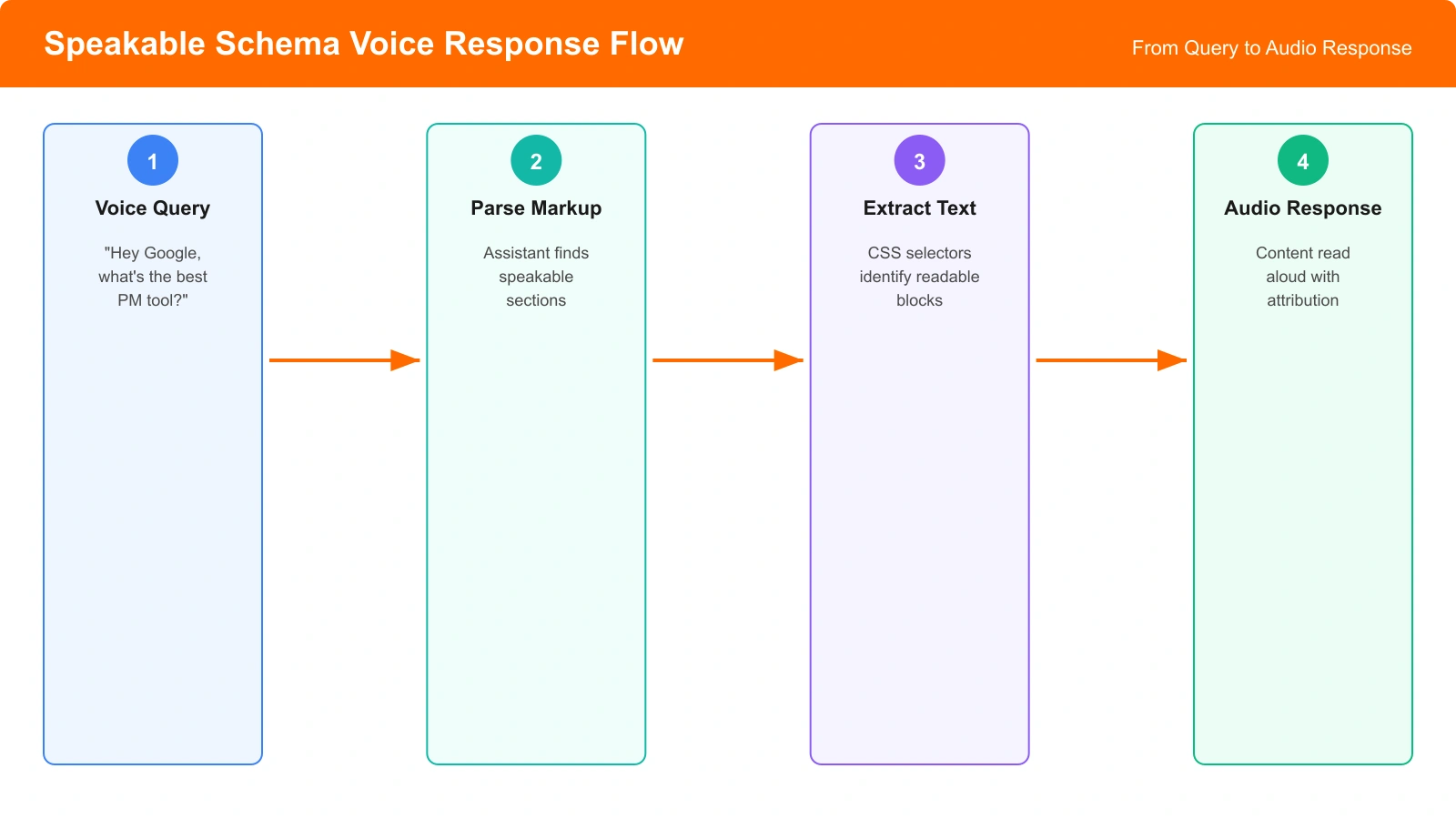
Speakable is a schema.org property that identifies sections of a page appropriate for text-to-speech conversion. You're essentially telling voice assistants: “If you're going to read anything from this page, read these parts.”
The schema uses CSS selectors or XPath to point to specific page elements. When a voice assistant considers your page for a spoken response, it prioritizes the content you've marked as speakable over other page text.
For listicles, speakable solves a specific problem: your page might have 3,000 words comparing 10 products, but a voice response needs 2-3 sentences. Speakable lets you identify which 2-3 sentences best represent your recommendation.
What to Mark as Speakable
Not everything on your listicle is suitable for voice. The content you mark should be self-contained, concise, and immediately useful when heard without visual context.
Your Quick Verdict
The clearest speakable candidate: your top-line recommendation. When someone asks “What's the best CRM software?” the answer should be speakable.
Write verdict content specifically for voice:
“HubSpot is our top pick for CRM software in 2026. It offers the best balance of features and usability for growing businesses, with a free tier that lets you start without commitment.”
Notice what makes this work for voice: it states the recommendation, gives a brief reason, and works without any visual context. Someone hearing this gets a complete, actionable answer.
Category-Specific Picks
If your listicle segments recommendations (best for small business, best for enterprise, best free option), each segment's summary is a speakable candidate.
“For small businesses, we recommend Pipedrive. It's the most intuitive option under $30 per month and handles sales pipelines without enterprise complexity.”
Multiple speakable sections let voice assistants choose the most relevant response based on query context.
What NOT to Mark
Some content doesn't work for voice, even if it's important on the page:
- Feature lists — “Includes email integration, reporting, mobile app, API access” sounds like a data dump when spoken
- Price comparisons — Tables and numbers don't translate well to audio
- Detailed pros/cons — Too long for voice responses
- Methodology explanations — Voice users want answers, not process
Implementation Approach
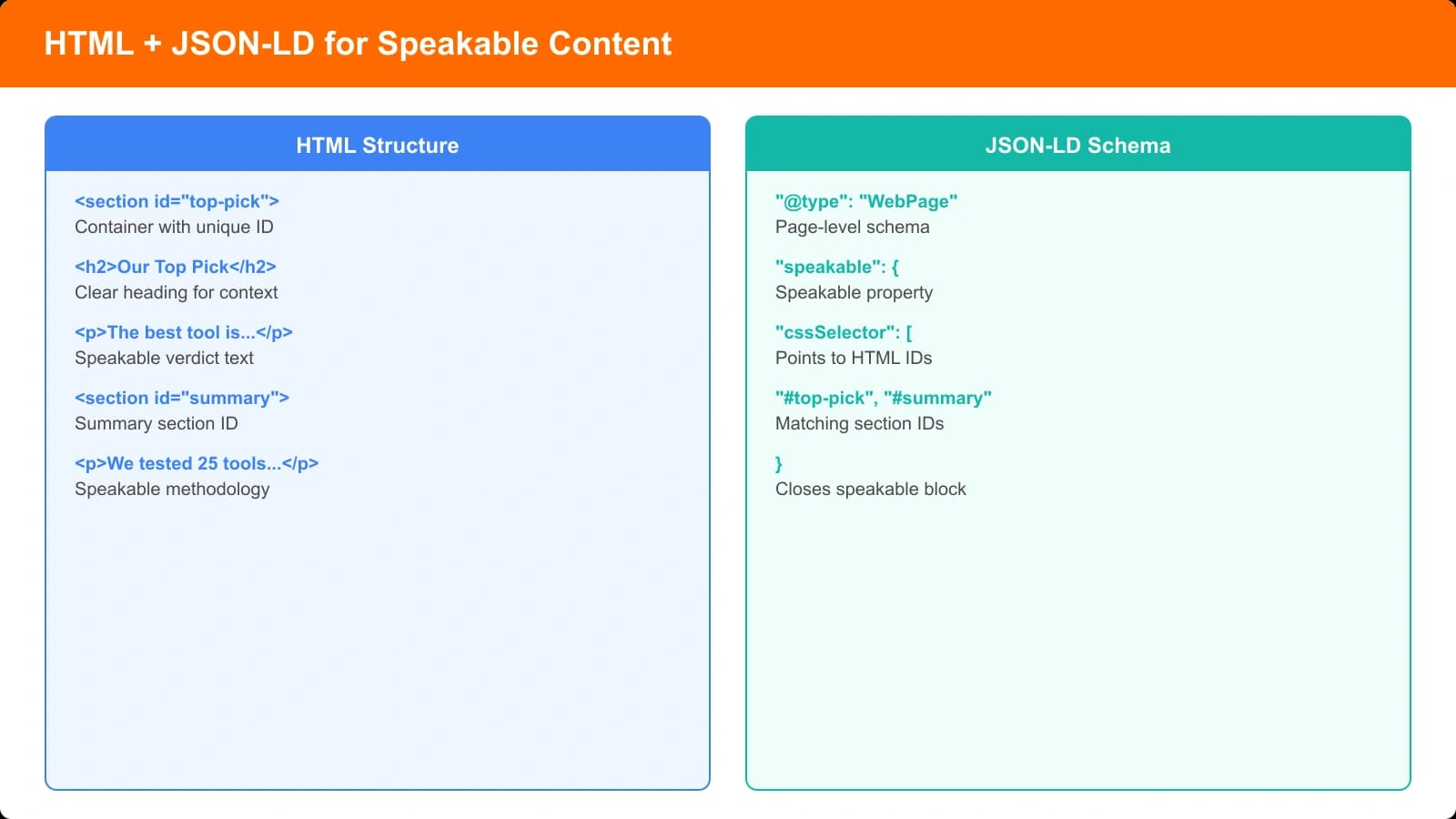
Speakable uses the Speakable type within your existing Article or WebPage schema. You specify which sections are speakable using CSS selectors.
Schema Structure
The speakable property contains a SpeakableSpecification with cssSelector pointing to page elements. Structure your HTML to make selection easy—give your verdict sections clear IDs or classes.
Key properties:
- @type: SpeakableSpecification — Required type
- cssSelector — CSS selectors for speakable elements (e.g., “#quick-verdict”, “.top-pick-summary”)
You can include multiple cssSelector values to mark several sections as speakable. Voice assistants choose the most appropriate based on query context.
Structuring Your HTML
Make speakable content easy to select:
Wrap your verdict in a semantic element with a clear identifier. The ID or class becomes your CSS selector. Keep this element self-contained—everything inside should work when read independently.
Common patterns:
- A dedicated “verdict-summary” div at the top of your content
- Each product's one-line verdict in a consistent class
- A “quick-answer” paragraph immediately after your H1
Generate Voice-Optimized Listicles
Create comparison pages with speakable schema and voice-ready verdict summaries built in.
Try for Free
Writing for Voice Responses
Content marked as speakable needs to be written differently than visual content. Voice has unique constraints.
Voice Writing Principles
Front-load the answer. Voice users can't skim. Put the recommendation first, then the reasoning. “HubSpot is the best CRM because...” not “When considering factors like...”
Avoid references. “As shown in the table below” means nothing in voice. Speakable content should be completely self-contained.
Read it aloud. Literally speak your speakable content. Does it sound natural? Does it answer the question? If it sounds awkward spoken, rewrite it.
Include the product name. Voice responses lose context fast. “It's great for small businesses” is unclear without seeing what “it” refers to. “Pipedrive is great for small businesses” works.
Getting Started with Speakable
Speakable is a forward-looking investment. Voice search continues growing; AI assistants increasingly speak responses rather than display them. Having speakable implemented now means you're ready as the technology matures.
Start with your highest-traffic listicles. Add speakable markup to your quick verdicts and top pick summaries. Ensure that content follows voice writing principles—concise, self-contained, answer-first.
Speakable is one piece of the broader AI optimization picture. For the complete framework, see our pillar guide on Answer Engine Optimization for Comparisons. For writing patterns that work for both voice and text AI, see Direct Answer Patterns for Listicles.

Product Manager at BestPage. Pioneer in AEO research since 2024, exploring the convergence of SEO and GEO (Generative Engine Optimization). Led multiple AI-powered content optimization projects that achieved 300%+ citation increases in ChatGPT and Perplexity.