
Developer tool marketing has a credibility problem. Engineers have spent years developing finely-tuned BS detectors, and most marketing content sets them off immediately. The “enterprise-grade” claims. The stock photos of people coding on MacBooks. The feature tables that mysteriously give the vendor checkmarks in every category.
But here's the thing: developers still need to make tool decisions. They still compare options. They still search for “[Tool A] vs [Tool B]” and “best API for [use case].” The opportunity is real—you just have to approach it differently than you would for a general B2B audience.
Our SaaS Comparison Page Playbook covers the general framework. This article adapts those principles specifically for developer tools, APIs, and technical infrastructure—the categories where your audience will notice and punish typical marketing approaches.
How Developers Evaluate Differently
Before we get into tactics, let's understand what makes technical buyers different. This isn't about stereotypes—it's about decision criteria.
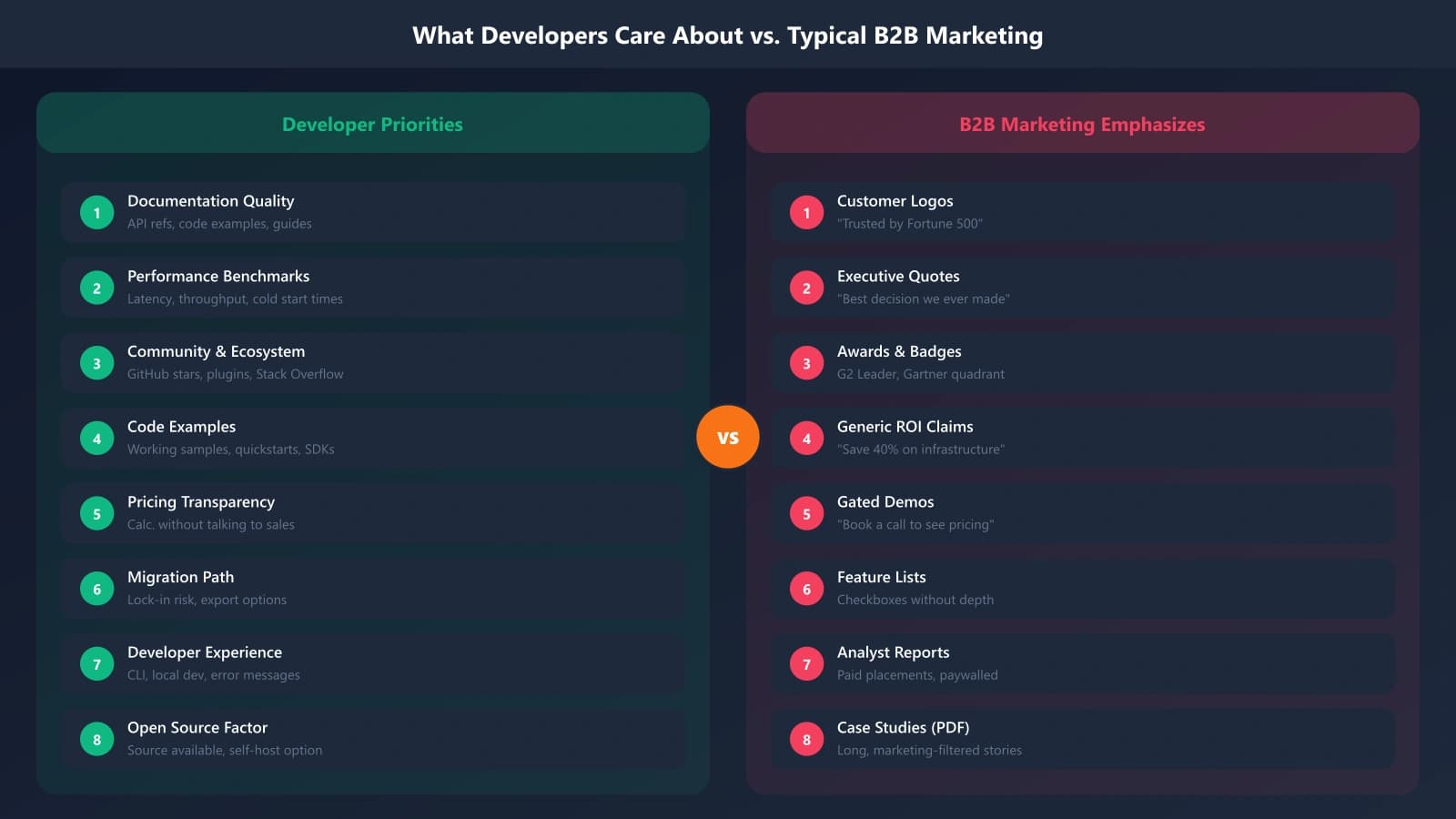
What Developers Actually Care About
When a developer evaluates a tool, their mental checklist looks roughly like this:
- Will this actually work for my use case? Not in marketing-speak—in technical specifics.
- What's the integration complexity? Hours? Days? Weeks? What are the gotchas?
- How's the documentation? Can I figure things out without contacting support?
- What happens when it breaks? Debugging experience, error messages, observability.
- Who else is using this? Not logo grids—actual community, Stack Overflow answers, GitHub activity.
- What's the long-term outlook? Is this company/project going to be around? Actively maintained?
Notice what's missing? “How impressive is the marketing?” “How many enterprises trust it?” These signals that work for general B2B buyers often have zero or negative impact on developers.
Instant Credibility Killers
Certain common marketing elements actively hurt your credibility with technical audiences:
- “World-class” or “best-in-class” — Empty superlatives with no backing
- Feature matrices with all checkmarks — Developers know no tool is best at everything
- Stock photography — Especially “developer at computer” images that show obviously fake scenarios
- Vague performance claims — “Lightning fast” without benchmarks
- Gated documentation — If I can't see the docs without a demo, I'm moving on
- Over-designed pages with too little information density — Developers want information, not experiences
The DevTools Comparison Framework
Now let's rebuild the comparison page format for technical audiences. The same core elements apply—you still need feature comparison, positioning, and CTAs—but the execution changes significantly.
Lead with Code, Not Copy
The fastest way to establish credibility with developers is to show them code. Before your marketing copy, before your feature bullets—show what using your tool actually looks like.
Effective code-first elements:
- Side-by-side code comparisons — Show the same task in your tool vs. alternatives
- Quickstart examples — How many lines to get something working?
- API response samples — Actual payloads, not descriptions
- Error handling examples — What happens when things go wrong?
Code samples should be runnable—or as close as possible. Pseudocode or obviously fake examples hurt more than they help.
Include Real Benchmarks
Performance claims need numbers. Not “10x faster”—actual benchmark results with methodology.
| Benchmark | Your Tool | Alternative A | Alternative B |
|---|---|---|---|
| Requests per second (1KB payload) | 45,000 | 38,000 | 52,000 |
| P99 latency (ms) | 12ms | 18ms | 9ms |
| Cold start time | 120ms | 850ms | 200ms |
Methodology: Benchmarks run on c5.2xlarge EC2 instance, 50 concurrent connections, 1 million total requests. Full benchmark code available at [link].
Notice what this table includes that typical marketing doesn't: a scenario where an alternative actually beats you (P99 latency). This honesty dramatically increases trust in the numbers where you do win.
Highlight Documentation Quality
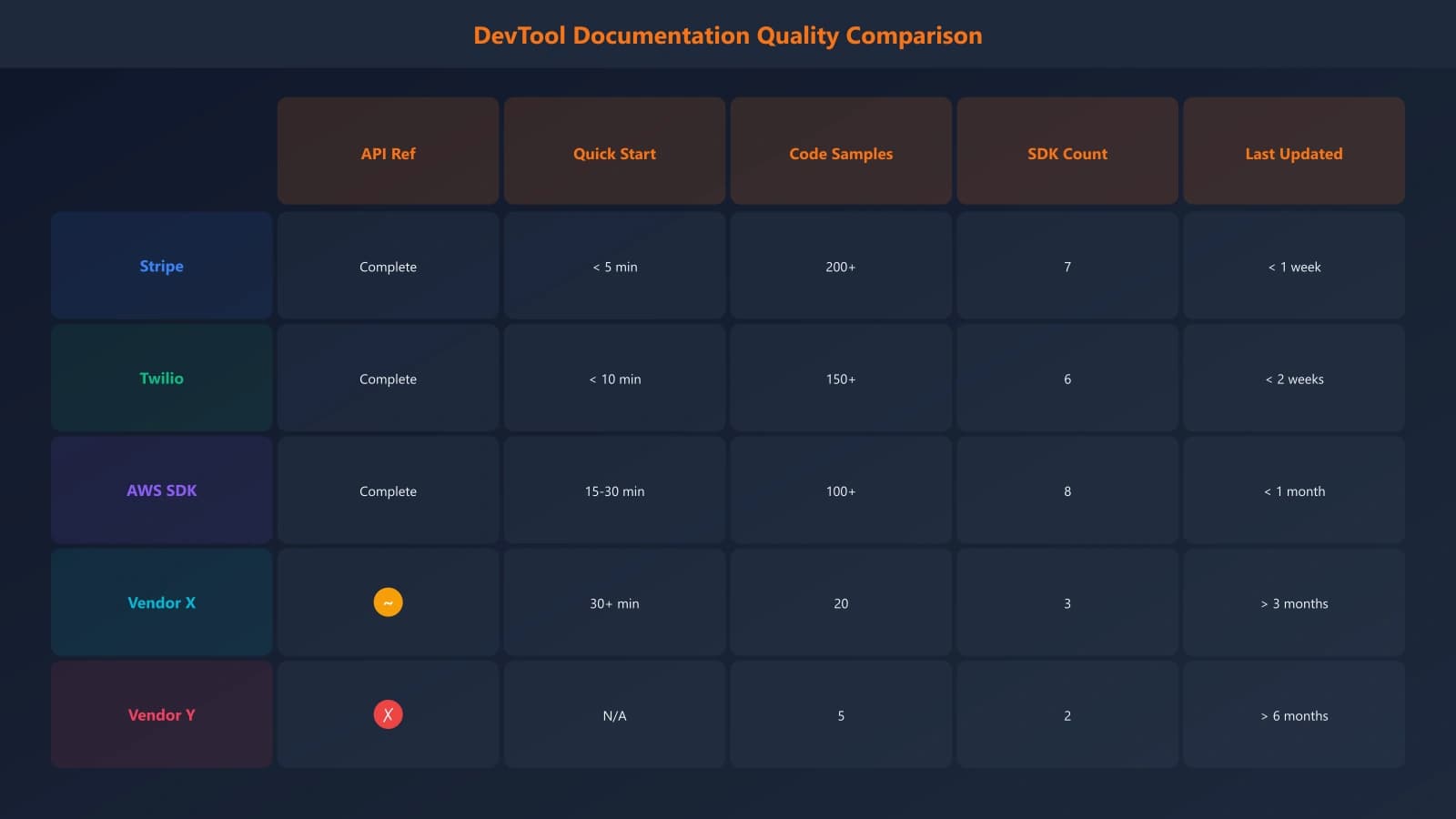
Documentation is a product feature for developer tools, and it's often the deciding factor. Address it directly in your comparison:
- Link directly to your docs from the comparison page—don't hide them
- Compare documentation scope: API reference, guides, tutorials, examples
- Mention documentation freshness: “Docs updated with every release” vs. competitors with stale docs
- Highlight community content: Stack Overflow answer count, blog posts, YouTube tutorials
Build Developer-First Comparison Pages
Generate technical comparison content with the right structure for developer audiences.
Try for Free
Use Developer Community Signals
Generic social proof (“Trusted by Fortune 500 companies”) doesn't resonate. Developer-specific signals do:
- GitHub stars and activity — But contextualize: stars aren't everything
- npm/PyPI download trends — Weekly/monthly download numbers
- Stack Overflow tag activity — Questions asked and answered
- Discord/Slack community size — Active community support
- Contributors and maintenance — Last commit, release frequency
These signals matter because they indicate whether you'll get help when stuck. A tool with 50,000 GitHub stars but no Stack Overflow answers is worrying.
Be Real About Integration
Developers want to know: how hard is this actually going to be to implement? Don't undersell integration complexity—it'll come back to bite you in support tickets and churn.
Integration honest includes:
- Realistic time estimates — “Basic integration: 2-4 hours. Full production setup: 1-2 days.”
- Prerequisites — What you need before you start
- Common gotchas — “If you're using X, you'll need to configure Y first”
- Migration complexity — Honest assessment of switching from alternatives
DevTools Comparison Structure in Practice
Let's put this together into a concrete page structure for a hypothetical API comparison:
Page Structure Template
- TL;DR verdict (3-4 sentences) — Who should use which, and why
- Code comparison — Side-by-side: same task in each tool
- Performance benchmarks — Table with methodology notes
- Feature deep-dive — Technical capabilities, not marketing features
- Documentation comparison — Scope, quality, freshness
- Pricing/costs — With realistic usage scenarios
- Integration complexity — Honest time estimates
- Community and support — Developer-specific signals
- Final verdict — Use case-specific recommendations
Content Tone Guidelines
- Direct and concise — Skip the fluffy intros
- Technical but accessible — Assume competence without requiring deep expertise
- Honest about trade-offs — Every tool has them; pretending otherwise kills trust
- Specific over vague — Numbers, examples, concrete details
- Link liberally — To docs, benchmarks, source code, community resources
Mistakes That Kill Developer Trust
Beyond the general credibility killers, here are developer-specific mistakes to avoid:
Faking Technical Depth
Using technical terminology incorrectly or inconsistently signals that your content was written by marketers, not engineers. If you can't explain something accurately, don't explain it at all—link to docs instead.
Oversimplifying Integration
“Just add one line of code!” is almost never true for production use. Developers who try and discover the real complexity will feel misled.
Ignoring Edge Cases
Your happy path comparison isn't what developers worry about. They want to know: What happens at scale? What happens when things fail? What are the limits?
No Links to Source
If you cite benchmarks, papers, or performance data without linking to sources, developers assume it's fabricated. Always provide verification paths.
Hiding Pricing
“Contact us for pricing” is a red flag for developer tools. If your pricing is complex, at least provide representative examples: “A typical team of 5 developers using X feature would pay approximately $Y/month.”
Earning Developer Trust Through Substance
Developer tool comparison pages succeed or fail based on one question: does this feel like content written to help developers make a decision, or content written to get developers to pick your product? The irony is that content that genuinely helps—even when it means acknowledging competitor strengths—actually converts better.
The framework we've covered works because it aligns with how technical buyers actually evaluate: code examples over screenshots, benchmarks over claims, documentation quality over marketing polish, and honest trade-offs over perfect checkmark matrices.
Start by auditing your existing comparison content against developer expectations. Look at it through an engineer's eyes: Where would they roll their eyes? Where would they want more detail? Where would they question your claims? Then rebuild with substance.
The devtools market is increasingly crowded. The teams winning aren't necessarily those with the best products—they're the ones who've figured out how to communicate with technical audiences authentically. Comparison content is where that communication matters most.
For the complete framework, see our SaaS Comparison Page Playbook. For trust signal details applicable to all B2B audiences, read Trust Signals That Convert B2B Software Buyers.

Product Manager at BestPage. Pioneer in AEO research since 2024, exploring the convergence of SEO and GEO (Generative Engine Optimization). Led multiple AI-powered content optimization projects that achieved 300%+ citation increases in ChatGPT and Perplexity.