
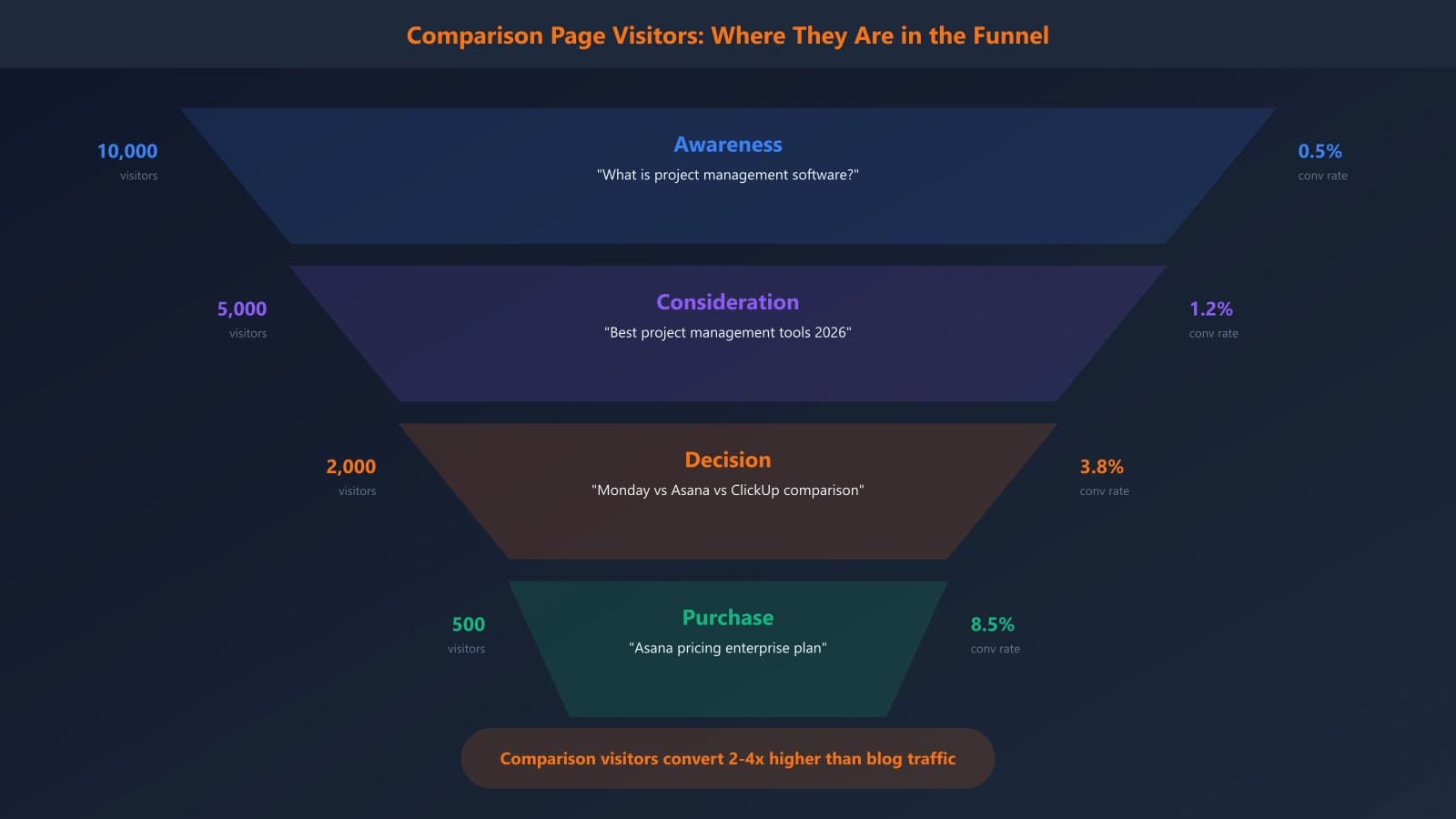
Here's a number that should wake up any SaaS marketer: comparison page visitors convert at 2-4x the rate of regular blog traffic. Someone searching “HubSpot vs Salesforce” or “Notion alternatives” isn't casually browsing—they're actively evaluating software for a purchase decision. That's about as high-intent as organic traffic gets.
Yet most SaaS companies either ignore this channel entirely, or throw up a half-hearted competitor comparison page that reads like a sales deck with a veneer of objectivity. Both approaches leave money on the table. The teams getting this right are capturing thousands of qualified prospects monthly from comparison searches alone.
I've spent the past three years studying what separates effective SaaS comparison content from the forgettable stuff. This playbook distills that into an actionable framework you can implement immediately. We'll cover everything from keyword research to page architecture to the trust signals that actually convince skeptical B2B buyers. Whether you're building your first comparison page or overhauling an existing library, you'll find the specific tactics that work in today's market.
The Comparison Page Opportunity in SaaS
Before we get tactical, let's understand why comparison pages deserve a disproportionate share of your content investment. The economics are genuinely compelling.
The Intent Economics
Not all organic traffic is created equal. A visitor from “what is CRM software” is in learning mode—they might convert eventually, but it'll take nurturing. A visitor from “HubSpot vs Pipedrive for small sales teams” is making a buying decision right now. They've already done their initial research, narrowed to a shortlist, and are looking for the decisive information that tips them one way or another.
According to research from Gartner, B2B buyers spend just 17% of their time meeting with potential suppliers. The rest is spent on independent research—including comparison content. If you're not visible during that research phase, you're missing the majority of the buying journey.
The Query Volume Reality
The volume on individual comparison queries is usually modest—maybe 500-2,000 monthly searches for a “X vs Y” term in a competitive category. But here's what changes the calculus: there are dozens or hundreds of these queries in any given SaaS category.
- “[Your product] vs [Competitor A]”
- “[Your product] vs [Competitor B]”
- “[Competitor A] vs [Competitor B]” (where you can position as the alternative)
- “[Competitor] alternatives”
- “Best [category] for [use case]”
- “[Competitor] alternatives for [specific need]”
When you systematically capture these long-tail queries, the aggregate traffic is substantial—and substantially more valuable than equivalent volume from informational content.
The Competitive Reality
Here's the uncomfortable truth: if you don't create comparison content featuring your product, someone else will. Review sites like G2 and Capterra rank for these terms. So do your competitors. So do affiliate blogs that may or may not represent your product accurately.
By building your own comparison content, you control the narrative. You choose which features to emphasize, which use cases to highlight, and how to position against alternatives. That's not spin—it's strategic communication. And it's far better than ceding that ground to entities with different incentives.
The 5-Layer Comparison Page Framework
Effective SaaS comparison pages share a consistent architecture. After analyzing hundreds of high-performing examples, I've identified five essential layers that work together to convert skeptical evaluators into confident buyers.
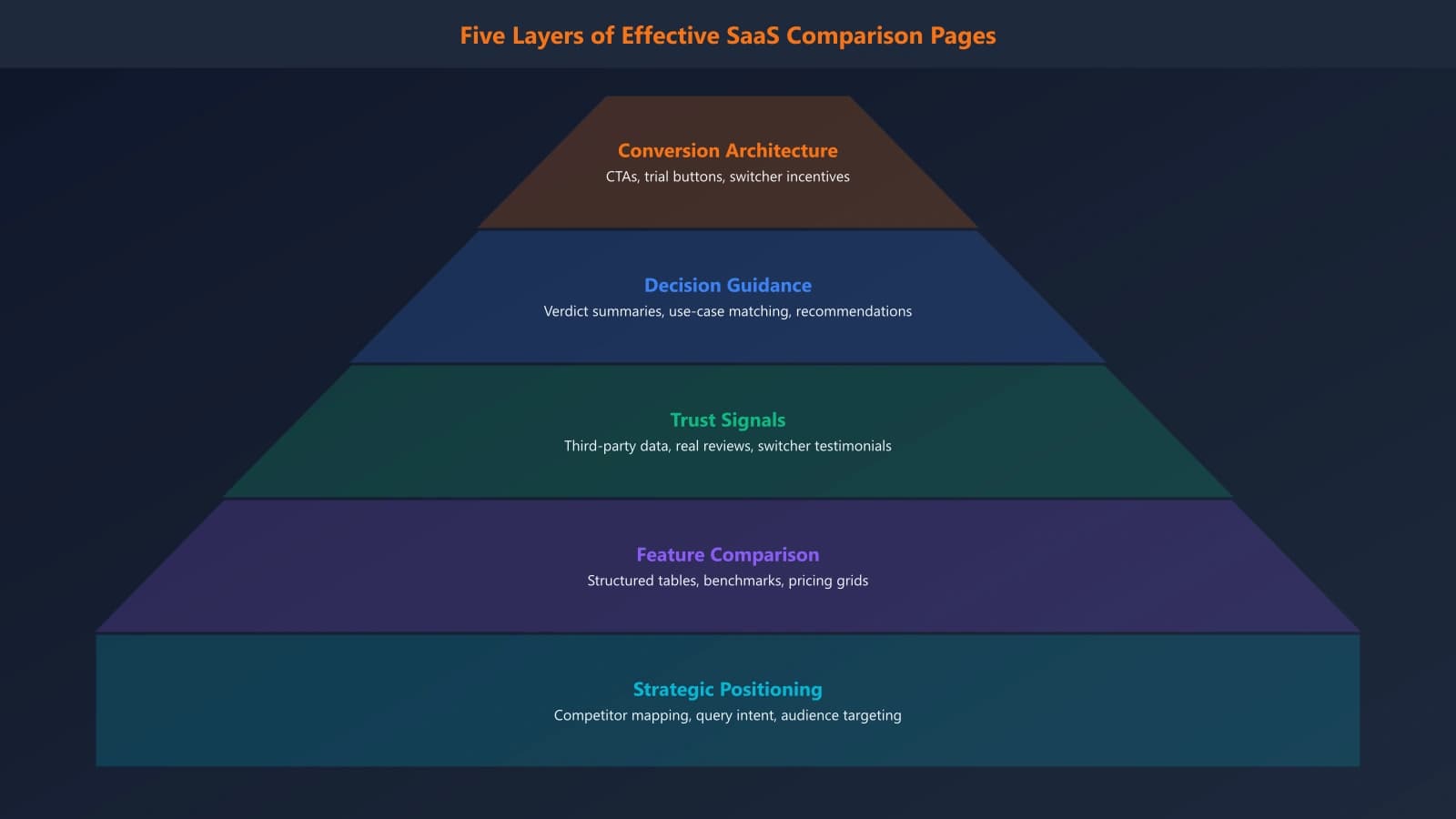
Layer 1: Strategic Positioning
Before you write a word, you need clarity on how you want to position against this specific competitor. The positioning should be audience-specific—you might position differently against an enterprise competitor than a budget alternative.
Ask yourself:
- What's our primary differentiation for prospects comparing us to this competitor?
- Who is the ideal customer that should choose us over them?
- What genuine weaknesses do we have that we should acknowledge?
- What audience might legitimately be better served by the competitor?
The last two questions are crucial. Comparison pages that only highlight your strengths come across as sales material, not helpful evaluation content. Acknowledging trade-offs builds credibility with readers who know that no product is perfect for everyone.
Layer 2: Feature Comparison Architecture
The feature comparison is the meat of most comparison pages. Done well, it provides the detailed information buyers need to make informed decisions. Done poorly, it devolves into a checklist where you conveniently have all the checkmarks.
Effective feature comparisons:
- Organize by buyer priority, not product structure—lead with what matters most to your target audience
- Go beyond yes/no—explain the nuances of how each product approaches key functionality
- Acknowledge competitor strengths—when they're genuinely better at something, say so
- Include pricing context—feature parity means nothing if the price points are dramatically different
I'll share specific templates for feature comparison tables in the implementation section below.
Layer 3: Trust Signal Integration
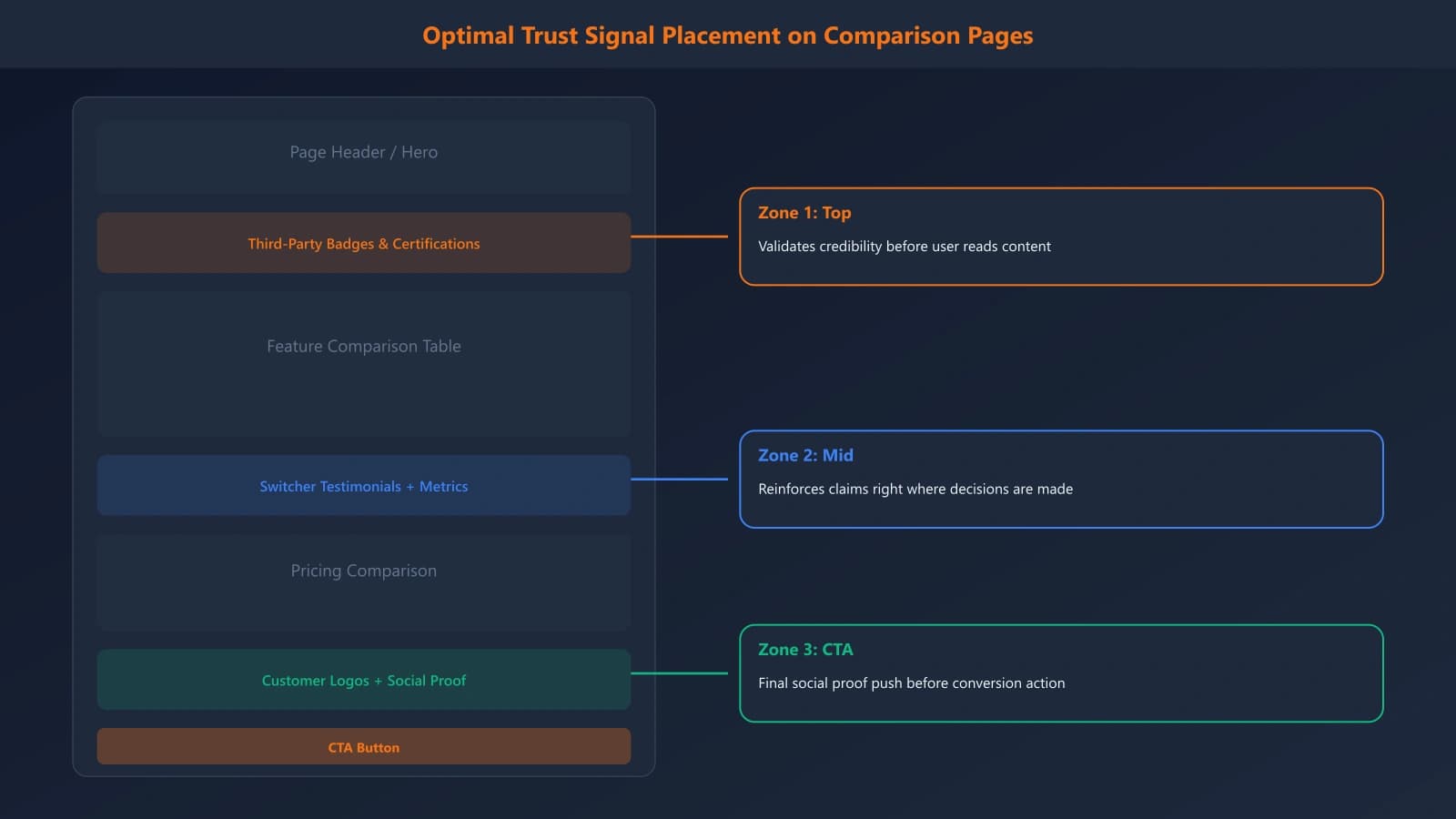
B2B buyers are naturally skeptical—especially when reading content on a vendor's own website. You need to bake trust signals throughout the page to counter that skepticism.
The trust signals that work best for comparison content:
- Customer quotes specific to the comparison: “We switched from [Competitor] because...”
- Third-party validation: G2 scores, Gartner mentions, industry awards
- Concrete metrics: Real numbers from real customers, not vague claims
- Transparent methodology: When you cite data, explain how you gathered it
For a deep dive on B2B-specific trust signals, see our guide on trust signals that convert B2B software buyers.
Layer 4: Decision Guidance
Many comparison pages present information but don't help readers process it. Decision guidance is where you actively help visitors determine which option fits their specific situation.
This includes:
- Use case segmentation: “Choose [Your Product] if...” and “Choose [Competitor] if...”
- Buyer persona matching: “Best for small marketing teams” vs “Best for enterprise sales organizations”
- Decision trees or quizzes: Interactive elements that guide visitors to the right choice
- Clear verdicts: Don't hedge—make explicit recommendations for specific contexts
Layer 5: Conversion Architecture
Comparison page visitors are ready to act—don't make them hunt for next steps. But also don't overwhelm them with aggressive CTAs that undermine the objective tone you've worked to establish.
The balance:
- Primary CTA: One clear next step (trial, demo, or comparison PDF download)
- Secondary options: Links to deeper product information, case studies, or pricing
- Competitor path: Consider linking to the competitor's site—it sounds counterintuitive, but it reinforces objectivity and confident buyers will return
Comparison Query Research: Finding Your Opportunities
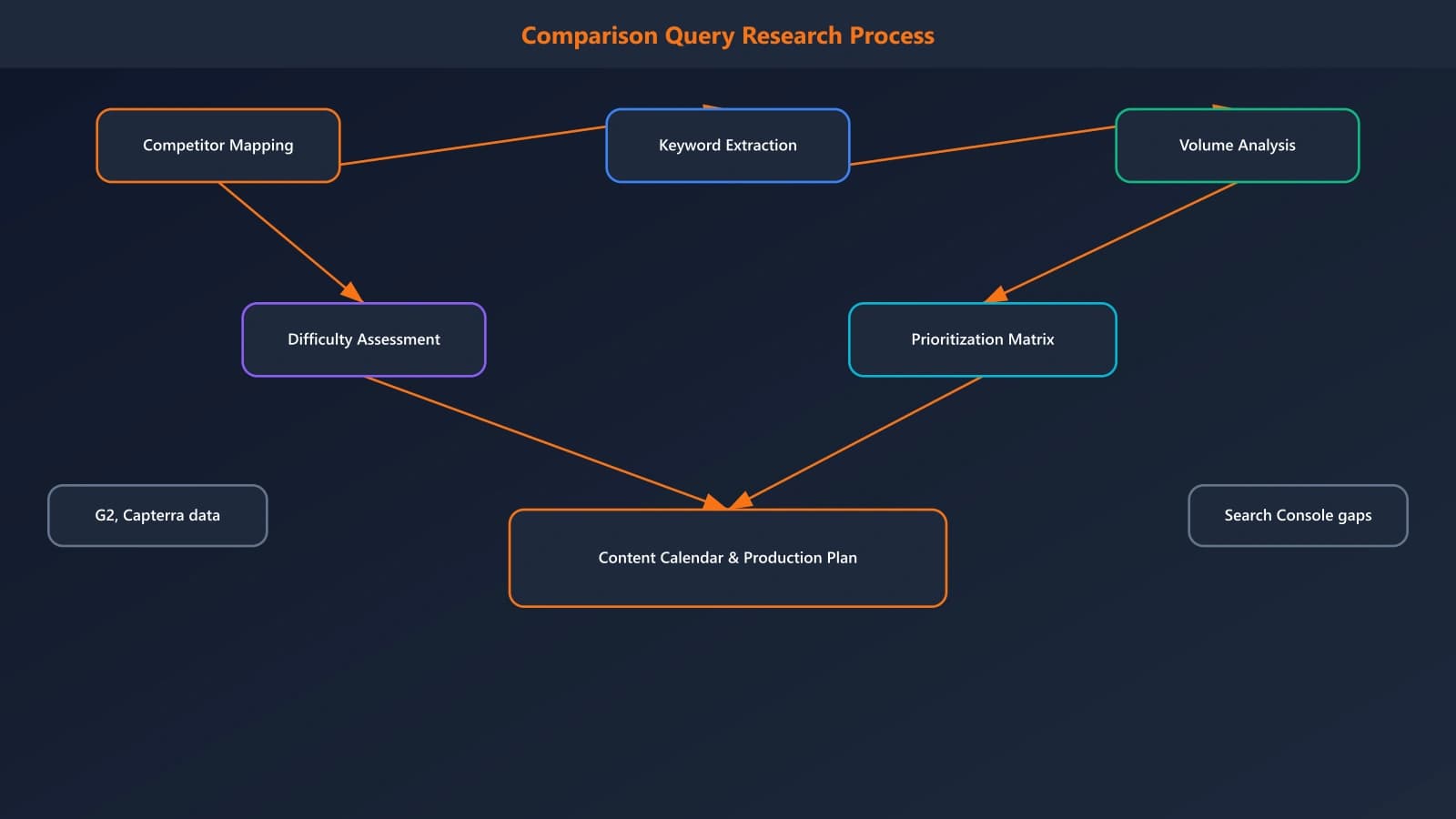
Before building pages, you need to identify which comparison opportunities deserve your investment. Not all queries are worth pursuing, and the research phase prevents wasted effort.
The Four Query Types
Comparison-related searches fall into four distinct patterns, each requiring a different page approach:
| Query Type | Example | Page Format | Priority |
|---|---|---|---|
| Direct comparison | “HubSpot vs Salesforce” | 1:1 comparison page | Highest |
| Alternative seeking | “Salesforce alternatives” | Alternatives listicle | High |
| Best-for queries | “Best CRM for startups” | Category listicle | High |
| Difference queries | “Difference between HubSpot and Salesforce” | Same as direct comparison | Medium |
Building Your Competitor Map
Start by listing every competitor you encounter in sales conversations, win/loss analyses, and market research. Then categorize them:
- Direct competitors: Same category, similar positioning, frequent head-to-head deals
- Adjacent competitors: Overlapping functionality, occasional competition
- Perception competitors: Buyers group you together even if you don't see them as competition
- Former leaders: Legacy solutions your prospects might be migrating from
For each competitor, use Ahrefs, Semrush, or similar tools to pull search volume for:
- [Your product] vs [Competitor]
- [Competitor] vs [Your product]
- [Competitor] alternatives
- [Competitor] competitors
Prioritization Framework
With your query list in hand, prioritize using these factors:
- Competitive frequency: How often do you actually compete against this company in deals?
- Search volume: Higher volume = more opportunity, but don't ignore low-volume queries if they're strategically important
- Ranking difficulty: Can you realistically rank? Check who currently owns the SERP
- Win rate: Prioritize comparisons where you have a strong win rate—these are easier to write credibly
Generate Comparison Pages at Scale
Build high-converting comparison content with AI-powered research and optimization. Get the structure right from the start.
Try for Free
Page Architecture: Templates That Convert
Now let's get into the specific page structures. I'll share templates for both 1:1 comparison pages and alternatives pages, with the key sections and their purposes.
The 1:1 Comparison Page Template
This template is for direct “X vs Y” comparison pages. Structure it as follows:
- TL;DR verdict (50-100 words) — Immediately state who should choose each option
- Quick comparison table — At-a-glance feature matrix for scanners
- Company overviews (150-200 words each) — Neutral introduction to each product
- Detailed feature comparison (800-1200 words) — Deep dive organized by category
- Pricing comparison (200-300 words) — Transparent breakdown with real numbers
- Pros and cons — Honest assessment of each product's strengths and weaknesses
- Customer reviews — Curated quotes from G2, Capterra, etc.
- Final verdict (150-200 words) — Clear recommendation with use case segmentation
- FAQ section — Common questions about the comparison
The Alternatives Page Template
For “X alternatives” pages, structure differs slightly:
- TL;DR — Top 3 alternatives with one-line positioning
- Why look for alternatives — Acknowledge legitimate reasons (pricing, features, support)
- Evaluation criteria — Explain how you assessed alternatives
- Ranked alternatives (each 200-400 words) — Include your product positioned appropriately
- Comparison table — All alternatives side-by-side
- Selection guidance — Help readers match alternatives to their needs
- Migration considerations — Practical switching advice
Feature Comparison Table Design
The feature comparison table is often the most-referenced section. Design it for both scannability and depth:
| Feature Category | Your Product | Competitor | Notes |
|---|---|---|---|
| Core Functionality | |||
| Feature 1 | ✓ Advanced | ✓ Basic | Key differentiator |
| Feature 2 | ✓ | ✓ | Parity |
| Feature 3 | ✗ | ✓ | Competitor advantage |
| Pricing | |||
| Starting price | $29/user/mo | $49/user/mo | 41% savings |
| Free tier | ✓ 5 users | ✗ | — |
Notice the structure: category headers, visual indicators (✓/✗), specific details rather than just checkmarks, and contextual notes that add value.
Trust Signals That Work for Comparison Content
Generic trust signals (“Trusted by 10,000+ companies!”) fall flat on comparison pages. Buyers here are in evaluation mode—they're actively looking for reasons to trust or distrust your claims. You need comparison-specific proof.
Switcher Testimonials
The most powerful testimonials for comparison pages come from customers who switched from the competitor you're comparing against. These directly address the question on every visitor's mind: “What happens when someone actually makes this switch?”
“We used Salesforce for three years before switching to HubSpot. The migration took two weeks, not the two months we feared. And we're saving $40,000 annually on licenses alone.”
— Marketing Director, SaaS Company (150 employees)
Actively collect these testimonials. When a customer mentions they switched from a competitor, ask if they'd share their experience for your comparison content.
Third-Party Data Integration
Reference external sources that validate your claims:
- G2/Capterra scores: “Rated 4.6/5 on G2 vs. Competitor's 4.1/5”
- Industry reports: Gartner, Forrester, or industry-specific analysts
- Technical certifications: SOC 2, GDPR compliance, industry standards
- Integration partnerships: Official partner status with platforms your audience uses
Always link to the original sources. This isn't just good practice—it signals that your claims are verifiable.
Transparent Methodology
When you make comparative claims, explain how you arrived at them:
- “Pricing information current as of January 2026, sourced from public pricing pages”
- “Feature availability verified through product documentation and hands-on testing”
- “Customer satisfaction data from G2 reviews with 100+ responses”
This transparency addresses the natural skepticism visitors have about vendor-created content.
SEO Optimization for Comparison Pages
Comparison pages have specific SEO considerations that differ from standard content optimization. Here's how to maximize organic visibility.
Title and URL Patterns
The most effective patterns for comparison pages:
- Direct comparison: “[Your Product] vs [Competitor]: [Key Difference] (2026)”
- Alternatives: “10 [Competitor] Alternatives: [Benefit] in 2026”
- URLs: /compare/your-product-vs-competitor or /alternatives/competitor-alternatives
Include the year when freshness matters (and it always matters for software comparisons). Update titles annually and refresh content to maintain rankings.
Schema Markup for Comparisons
Implement schema to help search engines understand your comparison content:
- FAQ schema for your FAQ section
- Product schema for each product compared
- Review schema if you include ratings (be careful here—follow Google guidelines)
- ItemList schema for alternatives pages
Internal Linking Strategy
Build a hub-and-spoke model for your comparison content:
- Hub page: Main comparison/alternatives landing page
- Spoke pages: Individual competitor comparisons
- Cross-links: Connect related comparisons (“Also see our HubSpot vs Pipedrive comparison”)
- Product pages: Link from feature pages to relevant comparisons
Optimizing for AI Search Visibility
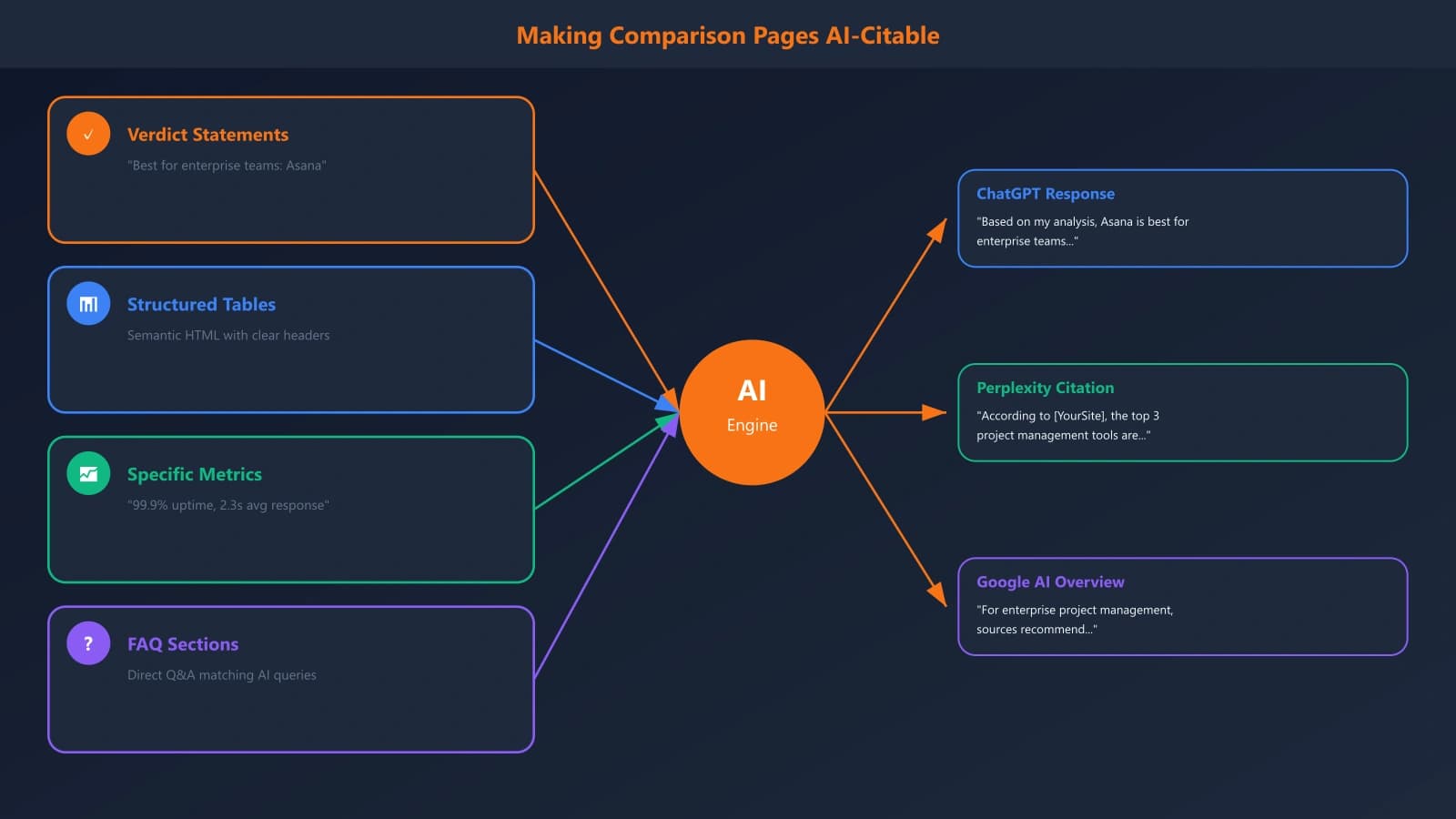
Traditional SEO isn't enough anymore. With AI Overviews, ChatGPT, and Perplexity increasingly answering comparison queries, you need to optimize for these channels too.
What Gets Cited in AI Answers
AI systems favor comparison content with specific structural patterns:
- Clear verdict statements: “[Product A] is best for [audience] because [reason]”
- Structured comparison tables: Easy-to-extract tabular data
- Specific numbers: Pricing, performance metrics, user counts
- FAQ sections: Matching how users phrase comparison questions
Our research shows that comparison pages with these elements are cited in AI responses at significantly higher rates. For the complete methodology, see our analysis of what triggers AI Overviews for comparison queries.
Entity Optimization
AI systems need to clearly identify what you're comparing. Strengthen entity signals:
- Use exact canonical product names consistently
- Include product categories and positioning in the first 100 words
- Reference official sources (product websites, company pages)
- Implement Product schema with correct identifiers
The 7 Mistakes That Kill Comparison Page Performance
Even well-intentioned comparison pages often underperform due to these common errors. Audit your existing content against this list.
Mistake 1: Obvious Bias
If every feature comparison somehow favors your product, readers see through it instantly. The most credible comparison pages acknowledge specific areas where competitors genuinely excel.
Mistake 2: Outdated Information
Competitors ship features. Prices change. What was accurate six months ago might now be wrong—and readers who catch outdated information will dismiss everything else you say.
Mistake 3: Feature Overload
Comparing 50 features creates noise, not clarity. Focus on the 10-15 features that actually differentiate products and matter to buyers. Less is more for decision-making.
Mistake 4: Missing Verdicts
Pages that present information without making recommendations fail buyers who want guidance. Take a stance—that's what evaluators are looking for.
Mistake 5: No Social Proof
Claims without evidence are just marketing. Integrate testimonials, third-party reviews, and verifiable data throughout the page.
Mistake 6: Aggressive CTAs
Visitors on comparison pages are evaluating, not ready to buy. Push too hard and you undermine the objective tone that makes comparison content work.
Mistake 7: Ignoring the Competitor
Some companies won't even name competitors—using phrases like “other solutions.” This hurts SEO and signals lack of confidence. Be direct.
Implementation Roadmap: Your First 30 Days
Let's turn this framework into action. Here's a 30-day plan to launch your first comparison content or overhaul existing pages.
Week 1: Research and Prioritization
- Map all competitors (direct, adjacent, perception)
- Pull search volume for comparison queries
- Prioritize based on competitive frequency and volume
- Select top 3-5 comparisons to create first
- Gather competitive intelligence (features, pricing, reviews)
Week 2: Template and Content Creation
- Finalize page template based on framework above
- Create your highest-priority comparison page
- Draft feature comparison tables
- Write TL;DR verdicts and decision guidance
- Collect switcher testimonials from sales/customer success
Week 3: Optimization and Launch
- Implement schema markup
- Optimize for target keywords
- Set up internal linking from product pages
- Create social promotion plan
- Launch first comparison page
Week 4: Iteration and Expansion
- Monitor initial performance (rankings, traffic, conversions)
- Gather feedback from sales team
- Begin second and third comparison pages
- Establish quarterly update calendar
- Document learnings for future pages
Building Your Comparison Content Advantage
SaaS comparison pages represent one of the highest-ROI content investments you can make. The visitors are high-intent, the content has long shelf life (with proper maintenance), and the competitive insights you develop transfer to product and sales strategy.
The framework we've covered—strategic positioning, feature comparison architecture, trust signals, decision guidance, and conversion optimization—provides the foundation. But the real advantage comes from execution and iteration. Start with your most important competitor comparison. Learn what works. Expand systematically.
Most importantly, approach this as genuinely helpful content, not just competitive positioning. When you truly help buyers make informed decisions—even when that means acknowledging competitor strengths—you build the credibility that converts skeptical evaluators into customers.
The companies winning in SaaS today aren't just building better products. They're controlling the narrative during the evaluation phase. Comparison content is how you claim that ground.
Ready to go deeper? This playbook is the foundation. For specific tactical guides, explore our supporting content:
- Trust Signals That Convert B2B Software Buyers
- DevTools Comparisons: What Technical Buyers Expect
- Enterprise Software Listicles That Actually Convert
- Integration Comparisons: The Overlooked Traffic Source

Product Manager at BestPage. Pioneer in AEO research since 2024, exploring the convergence of SEO and GEO (Generative Engine Optimization). Led multiple AI-powered content optimization projects that achieved 300%+ citation increases in ChatGPT and Perplexity.