

Consider this search query: “Best project management tool with Jira integration.” What does it tell you about the searcher? They've already standardized on Jira for something—probably dev ticketing. They're not starting from scratch. They need a tool that plays nice with their existing commitment.
This is a profoundly different buyer than someone searching “best project management tools.” They have specific constraints. They'll immediately filter out anything that doesn't integrate well with Jira. And here's the opportunity: most comparison content completely ignores this angle.
Integration-specific comparison pages are an overlooked traffic source for SaaS companies. The search volumes are modest per query, but the intent is extraordinary—and there are dozens or hundreds of these queries for any product with a healthy integration ecosystem. As part of our SaaS Comparison Page Playbook, this guide covers how to systematically capture this opportunity.
Why Integration Queries Convert So Well
Let's understand why integration-focused comparison content works before diving into execution.
The Constraint Signal
When someone includes an integration requirement in their search, they're telling you something powerful about their buying constraints. They've already made a decision about part of their stack, and they need everything else to fit around it.
This means:
- Higher intent — They're not casually browsing; they have a real project or problem
- Smaller consideration set — Many options are already eliminated by the integration requirement
- Faster decision timeline — The constraint narrows research
- Clear success criteria — Integration quality becomes the deciding factor
The Volume Reality
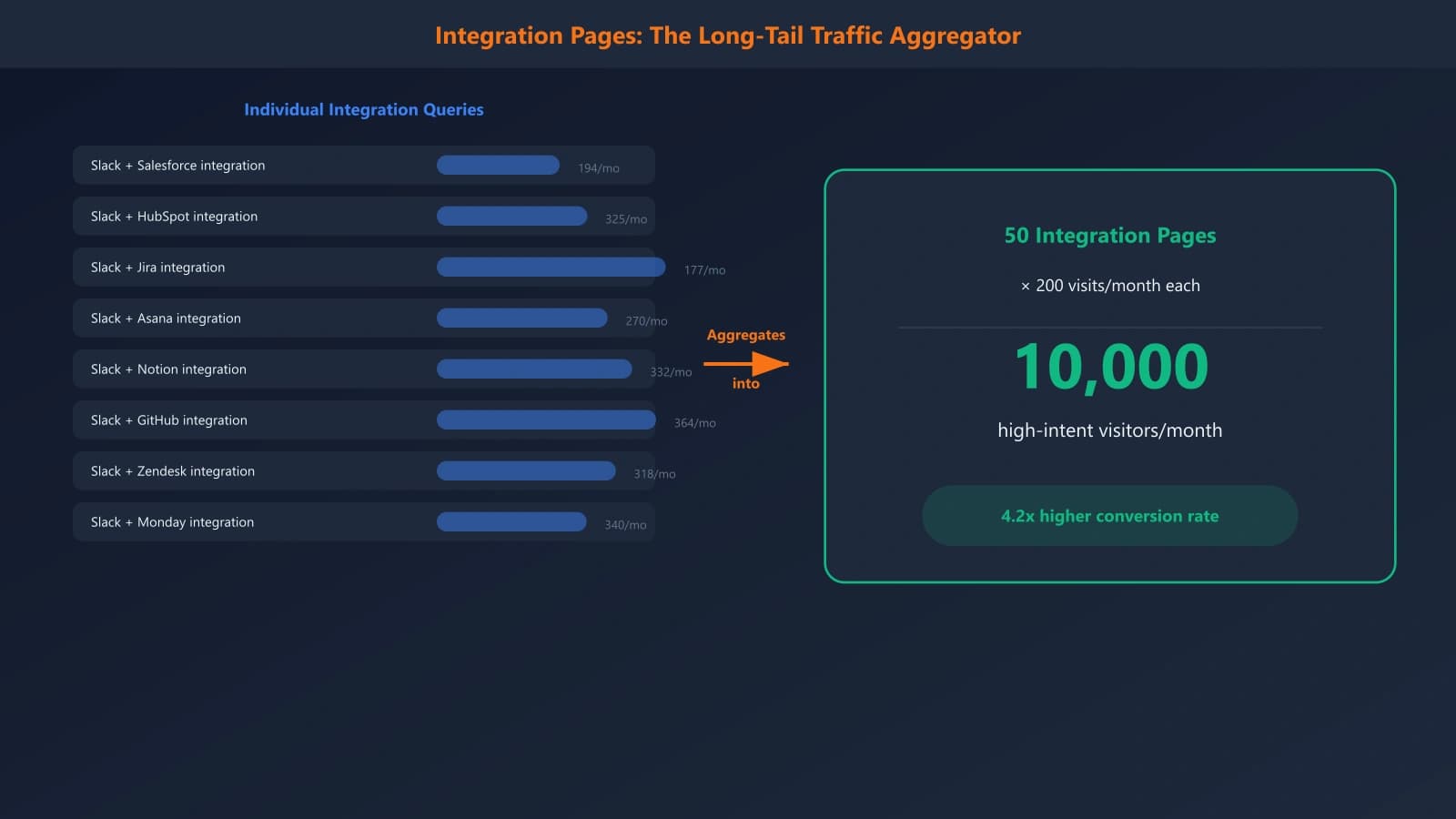
Individual integration queries have modest volume—maybe 50-500 searches per month for something like “best CRM with Shopify integration.” But the aggregate opportunity is substantial:
- If you have 50 major integrations, that's 50 potential comparison pages
- Each integration can target multiple query patterns (more on this below)
- Competition is often low because few companies systematically create this content
- Conversion rates significantly outperform generic comparison traffic
The Competitive Gap
Here's the best part: most SaaS companies create integration *landing pages* (announcing “We integrate with X!”) but not integration *comparison pages* (“Best tools that integrate with X”). They capture demand from people who already know about them, but miss the discovery opportunity.
When someone searches “best email tools for Salesforce,” they often find generic reviews or forum discussions—not purpose-built content addressing their specific constraint. That's your opportunity.
Integration Query Patterns to Target
Integration-related searches follow predictable patterns. Map these against your key integrations to build your content roadmap.
The Five Query Types
| Query Pattern | Example | Page Type |
|---|---|---|
| Best [category] for [platform] integration | “Best CRM for Shopify integration” | Category listicle filtered by integration |
| [Category] that work with [platform] | “Project management tools that work with Slack” | Same as above |
| [Platform] + [category] integration | “HubSpot email marketing integration” | Integration capabilities page |
| [Product A] vs [Product B] [platform] integration | “Mailchimp vs Klaviyo Shopify integration” | Head-to-head integration comparison |
| How to connect [platform] with [category] | “How to connect Salesforce with project management” | Integration guide with recommendations |
Integration Prioritization
You can't build pages for every integration. Prioritize based on:
- Platform popularity — More users = more integration searches
- Your integration quality — Only highlight integrations where you genuinely excel
- Strategic partnerships — Platforms you have formal relationships with
- Competitive differentiation — Integrations where you beat alternatives
- Customer request frequency — What do prospects actually ask about?
Research Process
For each priority integration, pull search volume for:
- “Best [your category] for [platform]”
- “[Platform] [your category] integration”
- “[Your category] that work with [platform]”
- “[Your product] [platform] integration”
- “[Competitor] vs [Your product] [platform]”
Use Ahrefs or Semrush to find related keywords and estimate the total opportunity per integration.
Integration Comparison Page Structure
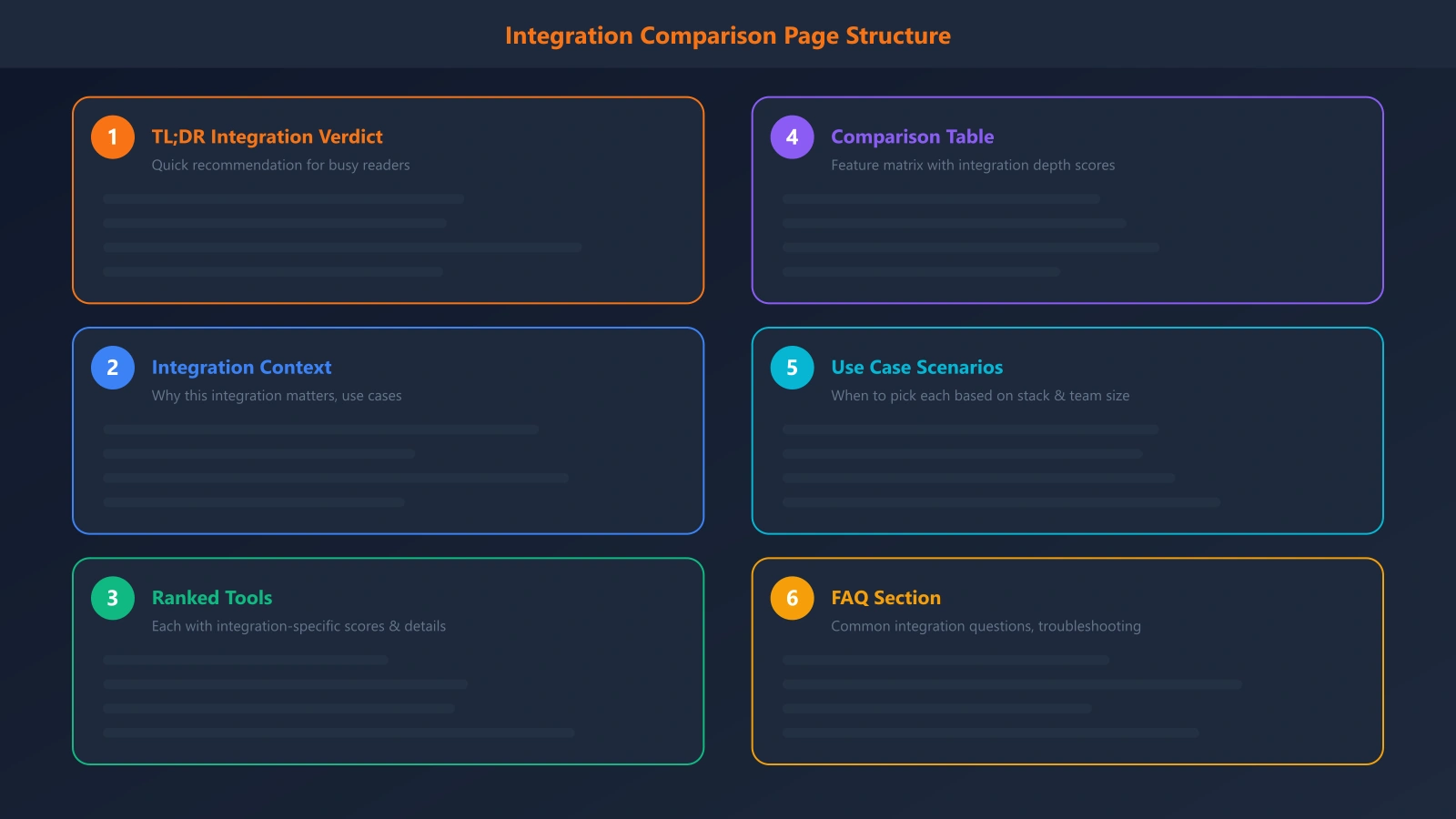
Integration comparison pages follow a similar structure to standard listicles, but with integration-specific elements woven throughout.
Page Template
- TL;DR — Top 3 picks for this integration use case
- Why [platform] integration matters — Context for the integration need
- What we evaluated — Integration depth, sync frequency, data coverage, ease of setup
- The rankings — Tools ranked by integration quality
- Integration overview
- What data syncs and how
- Setup complexity
- Limitations and gotchas
- Best for (use case matching)
- Integration comparison table — Feature matrix focused on integration capabilities
- Common use cases — Scenarios where this integration matters most
- Setup and maintenance — Honest effort estimates
- FAQ — Integration-specific questions
Integration Comparison Table
The comparison table should focus on integration-specific criteria:
| Criteria | Tool A | Tool B | Tool C |
|---|---|---|---|
| Integration type | Native | Via Zapier | Native + API |
| Sync frequency | Real-time | Every 15 min | Real-time |
| Data coverage | Contacts, deals, activities | Contacts only | Full bidirectional |
| Setup time | ~10 minutes | ~30 minutes | ~15 minutes |
| Requires paid plan? | No | Yes (Zapier) | No |
Generate Integration Comparison Content
Build integration-focused listicles that capture high-intent traffic from platform-committed prospects.
Try for Free
Creating Integration-Focused Content
Integration comparison content requires hands-on research. You can't just read feature pages—you need to actually understand how integrations work.
Research Process
For each tool you're comparing:
- Review the integration documentation — What data flows, in which direction?
- Check integration marketplace listings — User reviews, ratings, common issues
- Test if possible — Free trials let you verify claims firsthand
- Note limitations — What doesn't sync? What requires workarounds?
- Document setup complexity — Permissions required, configuration steps
Being Honest About Integration Quality
Integration quality varies wildly, even for “native” integrations. Be specific about:
- Native vs. third-party — Direct integration or through Zapier/Make/etc.
- Data direction — One-way or bidirectional sync
- Sync reliability — Real-time vs. batch, historical issues
- Feature completeness — Does it sync everything or just basics?
- Ongoing maintenance — Do integrations break with platform updates?
If a competitor has a better integration for a specific platform, acknowledge it. Readers will discover the truth anyway, and your honesty builds credibility for everything else you say.
Use Case Matching
Different integration needs require different solutions. Segment your recommendations:
- “Best for simple contact sync” — Basic integration needs
- “Best for real-time data flow” — Operational integration
- “Best for reporting and analytics” — Data consolidation needs
- “Best for automation workflows” — Trigger-based integration
This helps readers self-select to the right tool for their specific integration use case.
Mistakes to Avoid
Integration comparison content has unique pitfalls beyond standard comparison page mistakes:
Overstating Integration Depth
“Integrates with Salesforce” doesn't tell readers if it's a robust bidirectional sync or a basic data import. Be specific about what the integration actually does.
Ignoring Zapier/Make Options
Third-party integration platforms are legitimate options. Don't dismiss them—include them as alternatives and be clear about trade-offs (flexibility vs. reliability, cost, etc.).
Missing the Real Constraints
Readers searching for integration-specific content have constraints you need to address. Don't just compare general features—focus on what matters when integration quality is the deciding factor.
Outdated Integration Information
Integrations change constantly. What was buggy last year might be solid now. What worked last quarter might be deprecated. Set aggressive refresh schedules for integration content.
No Negative Space
If a popular tool doesn't integrate well with the platform you're covering, say so explicitly. Readers need to know which options to eliminate, not just which to consider.
Scaling Integration Content
If you have many integrations, you need a systematic approach to content creation.
Template-Based Production
Create a standardized template for integration comparison pages:
- Consistent section structure
- Standard comparison table format
- Reusable evaluation criteria
- Common FAQ questions adapted per integration
This allows faster production while maintaining quality consistency.
Prioritization Matrix
Score each potential integration page on:
- Search volume (1-5)
- Your integration quality (1-5)
- Competitive gap (1-5)
- Strategic importance (1-5)
Start with the highest-scoring opportunities and work down systematically.
Capturing the Integration Opportunity
Integration comparison pages represent one of the most overlooked traffic opportunities in SaaS content marketing. The search volumes are individually modest, but the intent is exceptional—and the aggregate opportunity across dozens of integration queries adds up quickly.
The approach we've covered—identifying integration query patterns, building integration-focused page structures, conducting hands-on research, and scaling systematically—lets you capture traffic from prospects who've already committed to platforms you integrate with well.
Start by auditing your integration ecosystem. Which platforms have the most users? Where is your integration genuinely strong? Where do customers frequently ask about connectivity? Those intersections are your first content priorities.
The companies winning in crowded SaaS categories aren't just competing on features—they're winning on fit. Integration comparison content lets you capture prospects searching for exactly that fit.
For the complete comparison page framework, see our SaaS Comparison Page Playbook. For related enterprise strategies, check out Enterprise Software Listicles That Actually Convert.

Product Manager at BestPage. Pioneer in AEO research since 2024, exploring the convergence of SEO and GEO (Generative Engine Optimization). Led multiple AI-powered content optimization projects that achieved 300%+ citation increases in ChatGPT and Perplexity.