

Key Takeaways
- •Buyer intent structure: Ecommerce best-of pages need clear sections matching the buyer journey—quick picks, detailed comparisons, and category-specific recommendations
- •Platform context matters: Include Shopify/WooCommerce/BigCommerce compatibility prominently—this is often the first filter for ecommerce buyers
- •ROI-focused proof: Ecommerce buyers want to see revenue impact, conversion lift, and cost-per-order metrics, not just feature lists
- •Seasonal update requirements: Align content updates with ecommerce seasons (BFCM prep, Q1 planning) for maximum relevance
Ecommerce best-of pages serve a unique audience: merchants and operators who measure everything in revenue impact. When an ecommerce manager searches "best email marketing for Shopify" or "top inventory management software," they're not looking for generic tool lists—they want solutions vetted by people who understand ecommerce-specific challenges like cart abandonment, fulfillment integration, and seasonal scaling.
This guide covers how to build ecommerce-focused best-of pages that rank in both traditional search and AI answers while driving conversions. We'll explore platform-specific structuring, proof signals that resonate with merchants, comparison frameworks, and the update cadence needed to maintain authority in the fast-moving ecommerce tool landscape.
Understanding Ecommerce Buyer Intent#
Ecommerce professionals evaluate tools differently than general business buyers. They think in terms of revenue per visitor, conversion rates, and operational efficiency. Your best-of page needs to speak this language from the first paragraph.
Ecommerce buyers typically fall into three segments, each with different evaluation criteria. Your page structure should accommodate all three while guiding them to appropriate recommendations.
New Store Owners
- Prioritize ease of setup
- Budget-conscious decisions
- Need all-in-one solutions
- Limited technical expertise
Scaling Merchants
- Focus on automation features
- Integration ecosystem matters
- Willing to pay for efficiency
- Some technical capability
Enterprise Operators
- Custom integrations required
- Volume-based pricing critical
- Support SLAs essential
- Compliance considerations
Platform-Centric Page Structure#
Unlike general SaaS comparisons, ecommerce best-of pages must account for platform dependencies. A tool that's perfect for Shopify might not even exist for WooCommerce. This reality should shape your entire content architecture.
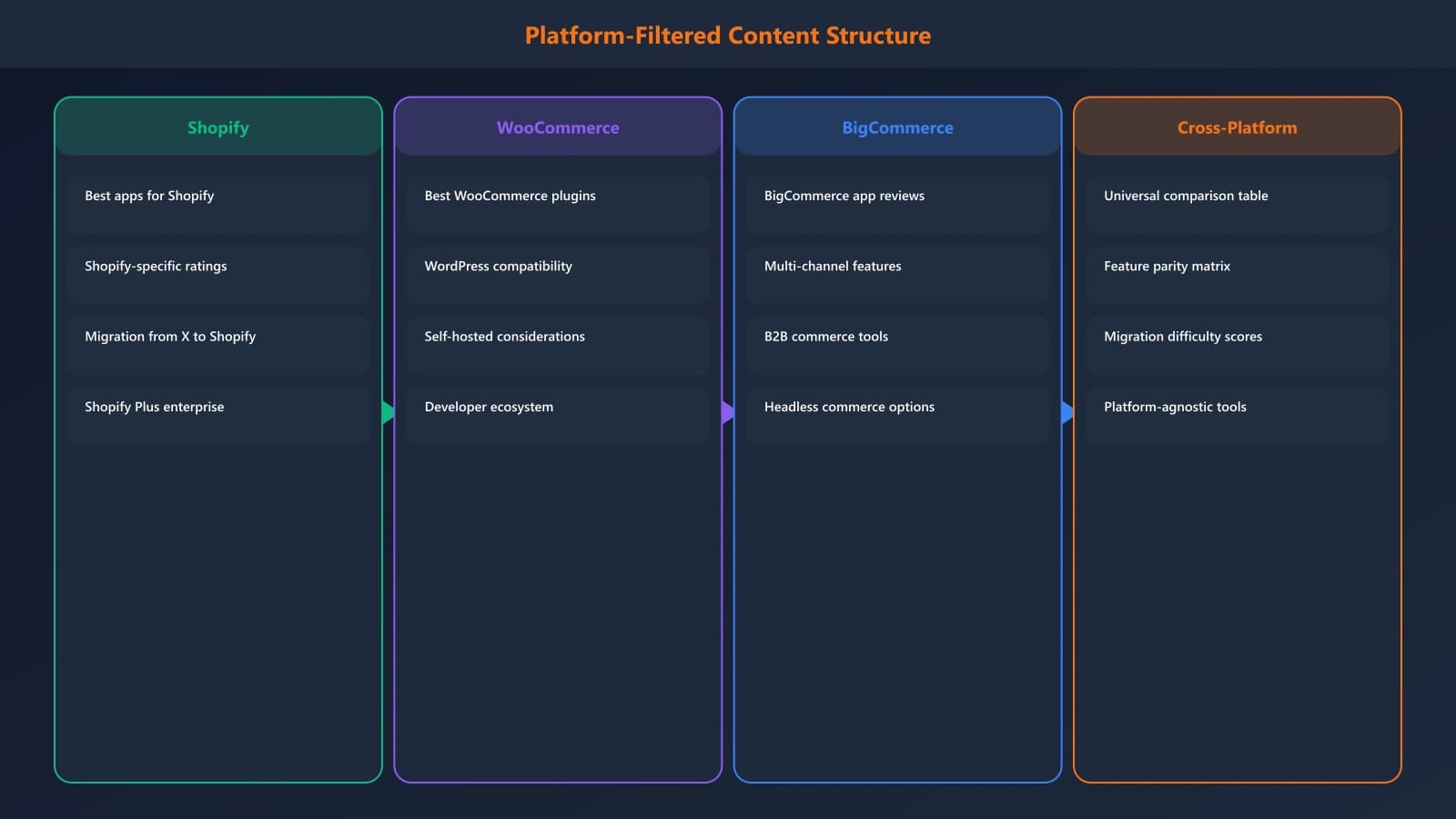
Figure 1: Platform-filtered structure for ecommerce best-of pages
Structural Approaches That Work#
| Approach | Best For | Pros | Cons | |
|---|---|---|---|---|
| Platform Tabs | Multi-platform tools | Clean UX, easy filtering | Requires JS, SEO complexity | |
| Separate Pages | SEO-focused strategy | Better rankings per platform | More content to maintain | |
| Platform Badges | Universal tools | Simple implementation | Less clear filtering | |
| Compatibility Matrix | Comprehensive comparisons | Shows all options at once | Can overwhelm readers |
SEO Strategy Tip
Proof Signals That Resonate with Merchants#
Ecommerce professionals are data-driven by nature. Generic proof signals like "easy to use" carry little weight. They want specifics: revenue impact, conversion improvements, time saved on operations.
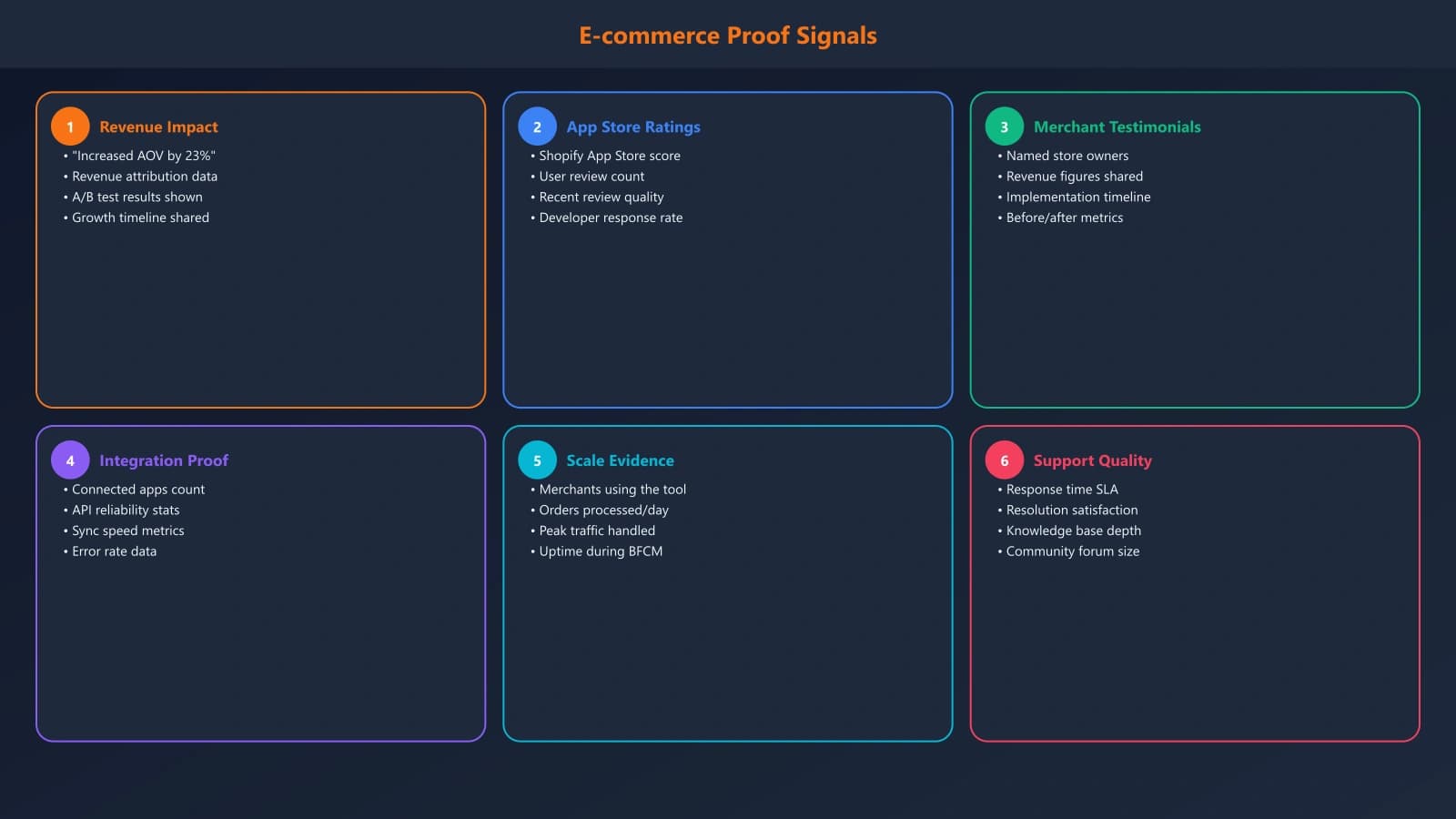
Figure 2: Effective proof signals for ecommerce audiences
The most compelling proof signals combine platform-specific data (app store ratings, install counts) with outcome metrics (revenue impact, conversion lift). This combination addresses both the "is this tool legitimate?" and "will this work for my store?" questions.
Building Ecommerce-Specific Comparison Frameworks#
Your evaluation criteria should reflect what actually matters in ecommerce operations. Generic software criteria miss crucial factors like checkout integration, inventory sync, and multi-channel support.
- 1Core Functionality (30%)Does it solve the specific ecommerce problem? Email flows, inventory tracking, shipping optimization—be specific.
- 2Platform Integration (25%)Native app quality, data sync reliability, checkout integration depth, and theme compatibility.
- 3Pricing for Ecommerce (20%)Per-order fees, email/SMS volume pricing, and how costs scale with store growth.
- 4Automation Capabilities (15%)Workflow builders, triggers based on ecommerce events, and hands-off operation potential.
- 5Support & Community (10%)Ecommerce-specific support expertise, merchant communities, and implementation resources.
Always test tools with a development store before recommending them. Nothing destroys credibility faster than recommending an app that breaks checkout or slows page load times.
Conversion Architecture for Ecommerce Audiences#
Ecommerce professionals making tool decisions often need to justify purchases to stakeholders. Your page should provide the information they need for internal pitches while making the next step obvious.
Do
- ✓Include ROI calculators or cost-per-order comparisons
- ✓Provide "best for" segments matching reader situations
- ✓Link directly to free trials with clear value propositions
- ✓Offer comparison PDFs for internal sharing
Don't
- ✕Require email signup before showing full reviews
- ✕Hide transaction fees or pricing tiers
- ✕Use generic CTAs like "Learn More"
- ✕Ignore the multi-stakeholder buying process
- Quick comparison table visible without scrolling
- Platform compatibility clearly indicated
- Pricing section with all fee types disclosed
- Use case sections (new stores, scaling, enterprise)
- Direct trial links with affiliate disclosure
- Shareable summary for team discussions
Seasonal Update Strategy for Ecommerce Content#
Ecommerce has distinct seasons that affect tool evaluation. Pre-BFCM, merchants evaluate scaling solutions. Post-holiday, they look for efficiency tools. Your update schedule should align with these buying cycles.
Ecommerce Content Calendar
New Year Tool Evaluation
Merchants set annual budgets and evaluate new solutions
Spring Refresh
Update for Q2 planning, add new entrants from spring launches
BFCM Prep
Critical update period—merchants need tools locked before October
Post-BFCM Analysis
Add performance data from peak season, update recommendations
Critical Timing
Frequently Asked Questions#
Should I create separate pages for each ecommerce platform?
Yes, if you have the resources. Platform-specific pages rank better for high-intent queries like "best Shopify email apps" and convert higher because they address platform-specific concerns. At minimum, use clear platform filtering on your main page.
How do I get access to test ecommerce tools?
Most ecommerce tools offer free trials or partner accounts for review purposes. Join platform partner programs (Shopify Partners, WooCommerce Marketplace) for extended access. Some vendors provide demo accounts specifically for reviewers.
What pricing model details matter most to ecommerce buyers?
Transaction fees are critical—even small per-order fees compound significantly at scale. Also highlight email/SMS volume pricing, revenue-based tiers, and any costs that scale with store growth. Hidden fees destroy trust.
How do I handle tools that only work on one platform?
Be explicit about platform limitations in both your summary and individual reviews. Consider platform-specific sections that only show relevant tools. Never recommend a tool without confirming platform availability.
Conclusion: Building Ecommerce Best-of Pages That Convert#
Ecommerce best-of pages succeed when they speak the merchant's language: revenue impact, operational efficiency, and platform compatibility. Generic comparison frameworks fall flat with this audience. The pages that rank and convert are those built by people who understand ecommerce-specific challenges.
- Lead with platform: Make compatibility obvious from the first section
- Show revenue impact: Use metrics merchants care about, not generic ratings
- Structure for segments: New stores, scaling merchants, and enterprise have different needs
- Time your updates: Align with ecommerce buying cycles, especially pre-BFCM
- Enable decisions: Provide shareable summaries and clear next steps
Sources & References
- BuiltWith. Ecommerce Platform Market Share Report (2024)
- Shopify. Shopify App Store Best Practices (2024)
- TrustRadius. B2B Technology Buying Report (2024)

Product Manager at BestPage. Pioneer in AEO research since 2024, exploring the convergence of SEO and GEO (Generative Engine Optimization). Led multiple AI-powered content optimization projects that achieved 300%+ citation increases in ChatGPT and Perplexity.