

Some buyers don't want your opinion on which laptop is “best.” They want to know which one has a 15.6-inch display with at least 300 nits brightness and USB-C charging. These are specification shoppers—people who know exactly what they need and just want the data to make their own decision.
Specification comparison tables serve this audience directly. Unlike feature tables that highlight key differentiators, spec tables provide comprehensive technical data for rigorous comparison. They're essential for product categories where technical specifications drive purchase decisions: electronics, appliances, tools, vehicles, and similar technical products.
But spec tables also serve a secondary purpose that many sites overlook: they capture long-tail search traffic. Users search for specific specifications all the time—“laptops with 32GB RAM under $1000,” “TVs with 120Hz refresh rate,” “cameras with 5-axis stabilization.” Well-structured spec tables can rank for these queries and deliver highly qualified traffic.
This guide covers how to create spec comparison tables that serve both purposes: helping spec-focused buyers decide and capturing technical search queries. For the broader comparison strategy, see our E-commerce Comparison Playbook.
Understanding Spec-Focused Buyers
Before designing spec tables, understand who uses them. Spec shoppers are typically more knowledgeable than average buyers. They've done research. They know what specifications matter for their needs. They don't need education—they need data.
This audience is often impatient with marketing language. They've read enough product descriptions claiming everything is “best-in-class” and “industry-leading.” They want numbers, not adjectives. A table that says “excellent battery life” is less useful to them than one that says “78 Wh, up to 12 hours video playback.”
Spec shoppers also tend to be comparison-focused. They're rarely looking at a single product—they're evaluating multiple options against their requirements. Your table should make side-by-side comparison effortless. Every spec row should clearly show how products compare, not just what each product offers.
Research from Baymard Institute shows that spec-focused buyers often have non-negotiable requirements. If a product doesn't meet a threshold—enough RAM, sufficient resolution, required connectivity—it's immediately eliminated regardless of other merits. Your spec table should make it easy to identify which products meet specific thresholds.
Selecting Which Specifications to Include
The temptation with spec tables is to include everything. Resist it. Spec overload is just as problematic as feature overload—it makes tables unwieldy and hard to scan.
Start with specifications that actually differentiate products. If every laptop you're comparing has the same processor generation, including processor generation is noise. Include specs where products meaningfully differ.
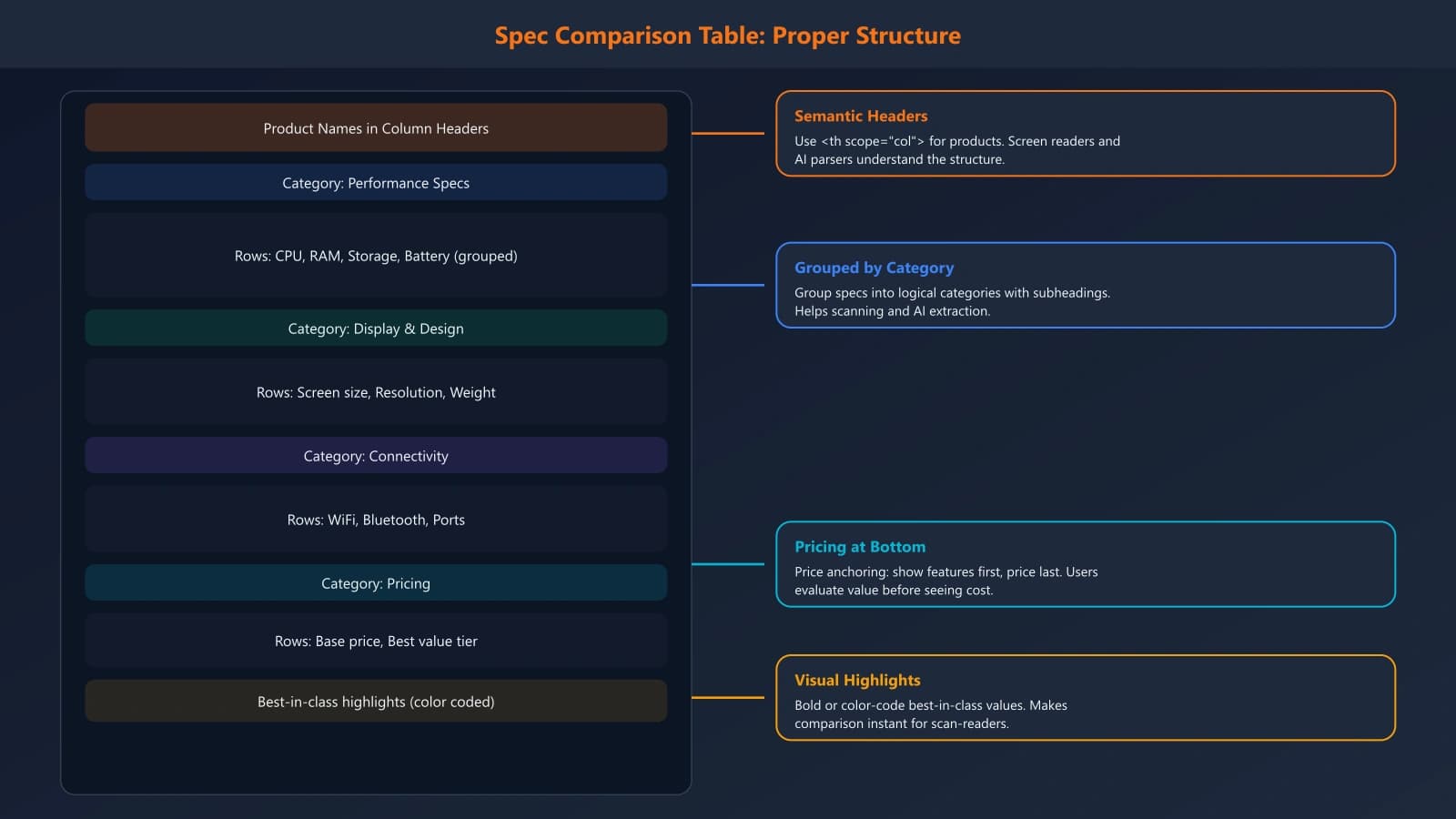
Organize specs into logical categories. For laptops, you might have Display (size, resolution, brightness, refresh rate), Performance (processor, RAM, storage), Connectivity (ports, wireless), and Physical (weight, dimensions, battery). These categories help users quickly navigate to their priority areas.
Prioritize specs that drive purchase decisions in your category. For monitors, color accuracy matters more than weight. For laptops, weight matters more than color accuracy. Know what your buyers care about and put those specs prominently.
Consider including “non-obvious” specs that casual tables miss. The warranty length, the included accessories, the power adapter wattage—these details often matter to serious buyers but are frequently omitted from comparison tables. Including them signals thoroughness.
Table Structure for Scanning and Parsing
How you structure your spec table affects both human readability and search engine parsing. The basics are straightforward: use semantic HTML table elements, not styled divs. But there's more to it.
Put product names in column headers, specifications in row headers. This is the conventional pattern that users expect. Each cell then answers “what is [Product's] [Specification]?” clearly.
Group related specifications under subheadings. Within the table, you can use spanning header rows to create sections: a row that says “Display Specifications” followed by several rows of display-related specs. This visual grouping aids scanning.
Consider limiting column count for readability. Comparing 10 products in a single table is technically possible but practically useless. Users can't meaningfully compare more than 4-5 options at once. If you have more products, consider a selection interface where users choose which to compare.
Make key cells stand out visually. If one product has notably better specs in a category—most RAM, fastest processor, longest battery—subtle highlighting helps users identify winners. Just don't overdo it; if every cell is highlighted, none stand out.
For very long spec tables, provide navigation. A sticky header that keeps product names visible as users scroll is almost essential. Jump links to different spec categories can also help users reach the section they care about.
Formatting Specifications Effectively
How you format individual specifications affects both usability and SEO. Consistency is key—spec values should follow the same format across products and across your site.
Use standard units consistently. If you're listing laptop weights, use pounds or kilograms—not both in the same table, and not switching between them arbitrarily. If your audience is international, consider showing both units (3.5 lbs / 1.6 kg).
Include full values, not just numbers. “16 GB” is more searchable than just “16.” When someone searches for “laptops with 16GB RAM,” your table cell saying “16 GB DDR5” is more likely to match than a cell containing just “16.”
Expand abbreviations where practical. Not everyone knows that “TB” means terabyte or that “mAh” indicates milliamp-hours. For less technical audiences, consider fuller descriptions: “512 GB SSD storage” rather than “512GB.”
Handle missing data gracefully. When a product doesn't have a feature or the spec isn't available, use consistent notation—“N/A” or a dash, not blank cells. Blank cells are ambiguous: does blank mean zero, not applicable, or unknown?
For specs with ranges or variations, be specific. “Up to 12 hours battery life” is less useful than “12 hours video playback / 8 hours productivity.” Specific conditions help users understand what to actually expect.
Generate Spec Tables That Rank and Convert
Build product specification tables with proper structure for both technical buyers and search engines. Capture long-tail spec queries automatically.
Try for Free
SEO Optimization for Spec Tables
Spec tables can capture valuable long-tail search traffic when optimized properly. Users frequently search for specific specifications, and a well-structured table can rank for these queries.
Semantic HTML is the foundation. Use proper table elements with scope attributes on header cells. This helps search engines understand that “16 GB” in a particular cell refers to a specific product's RAM. According to Google's documentation, well-structured tables can appear in enhanced search results.
Include text surrounding the table that provides context. A table alone is thin content; wrap it with explanatory content about what the specs mean and how to interpret them. “RAM affects how many applications you can run simultaneously. For most users, 16GB is sufficient; power users and content creators should consider 32GB.”
Target specific spec-based queries in your page title and headings. If you're comparing gaming laptops, “Gaming Laptops Compared: 16GB vs 32GB RAM, RTX 4070 vs 4080” targets specific searches that spec shoppers perform.
Consider creating filtered views of your spec table that target specific queries. A page focused on “laptops under 3 pounds with all-day battery” can show a subset of your full comparison, targeting that specific long-tail query.
Update spec tables when product lines refresh. Outdated specifications hurt both users and rankings. When a new model launches, update your table to reflect current products—don't leave discontinued models as your main comparison.
Mobile Presentation
Spec tables are challenging on mobile. They typically have many columns and rows, making them unwieldy on small screens. But mobile users still need spec access.
The horizontal scroll approach works for spec tables. Fix the specification names column on the left; let users scroll right to see different products. Include clear visual indicators that more content exists. This preserves the comparison format while fitting mobile constraints.
Another approach is transforming tables into stacked cards on mobile. Each product becomes its own card listing all specs. This sacrifices direct side-by-side comparison for better readability. For casual comparison, it works; for serious spec shoppers, horizontal scroll is usually preferred.
Some sites offer a “select products to compare” interface on mobile. Users pick 2-3 products from a list, then see only those products in the comparison table. This reduces table width to something manageable while still enabling comparison.
Test with actual mobile users. What seems like a reasonable solution on a desktop preview often fails in practice. Watch real users try to compare specs on a phone and you'll quickly learn what works and what doesn't.
Maintaining Accuracy
Spec tables require ongoing maintenance. Product specifications change, new products launch, prices fluctuate. An inaccurate spec table is worse than no table—it misleads users and damages trust.
Establish a regular review schedule. How often depends on your product category; fast-moving tech categories need monthly reviews, while slower categories might be quarterly. Mark tables with “last updated” dates so users know how current the information is.
Build data validation into your content workflow. When adding a new product, verify specs against manufacturer documentation—not other review sites that might have errors. Create a checklist of verification sources for your team.
Consider sourcing spec data from structured sources when possible. Manufacturer APIs, product feeds, or standardized databases can automate spec population and updates. Manual entry is error-prone; automation reduces mistakes.
When products are discontinued, decide whether to remove them or mark them clearly. Some comparison pages keep discontinued products for reference (helpful for users researching older products); others remove them to focus on current options. Either approach works if you're consistent and clear.
Spec Tables That Serve Both Purposes
Product specification tables occupy a unique position in comparison content. They serve the most rigorous segment of your audience—buyers who know exactly what they need and want the data to decide. They also capture long-tail search traffic from users searching for specific technical criteria.
Building effective spec tables requires balancing comprehensiveness with usability. Include enough specifications to enable thorough comparison without creating overwhelming data dumps. Format consistently to enable scanning and parsing. Structure semantically to help search engines understand your data.
Most importantly, keep them accurate. Nothing destroys credibility faster than incorrect specifications. Build verification into your workflow and maintain content actively as products evolve.
The payoff is significant: spec tables that genuinely help technical buyers decide, capture valuable search traffic, and establish your site as a thorough, reliable source for product comparison.
For the complete e-commerce comparison strategy, see our E-commerce Comparison Playbook. And for SaaS-focused comparison tables, explore our guide on SaaS feature comparison tables.

Product Manager at BestPage. Pioneer in AEO research since 2024, exploring the convergence of SEO and GEO (Generative Engine Optimization). Led multiple AI-powered content optimization projects that achieved 300%+ citation increases in ChatGPT and Perplexity.