
“Salesforce alternatives” gets 12,000+ monthly searches. “Mailchimp alternatives” gets 8,000+. Every established SaaS product has frustrated users searching for something better. Alternative pages capture this high-intent traffic—users who've already decided to explore options beyond the incumbent.
This template provides a proven structure for SaaS alternative pages. Each section includes guidance on what to include, example copy you can adapt, and notes on why the section works. Use it as a starting point for creating your own alternative pages.
The template assumes you're a SaaS company creating “[Competitor] alternatives” pages. Publishers creating neutral comparison content can adapt the structure while removing the self-promotional elements.
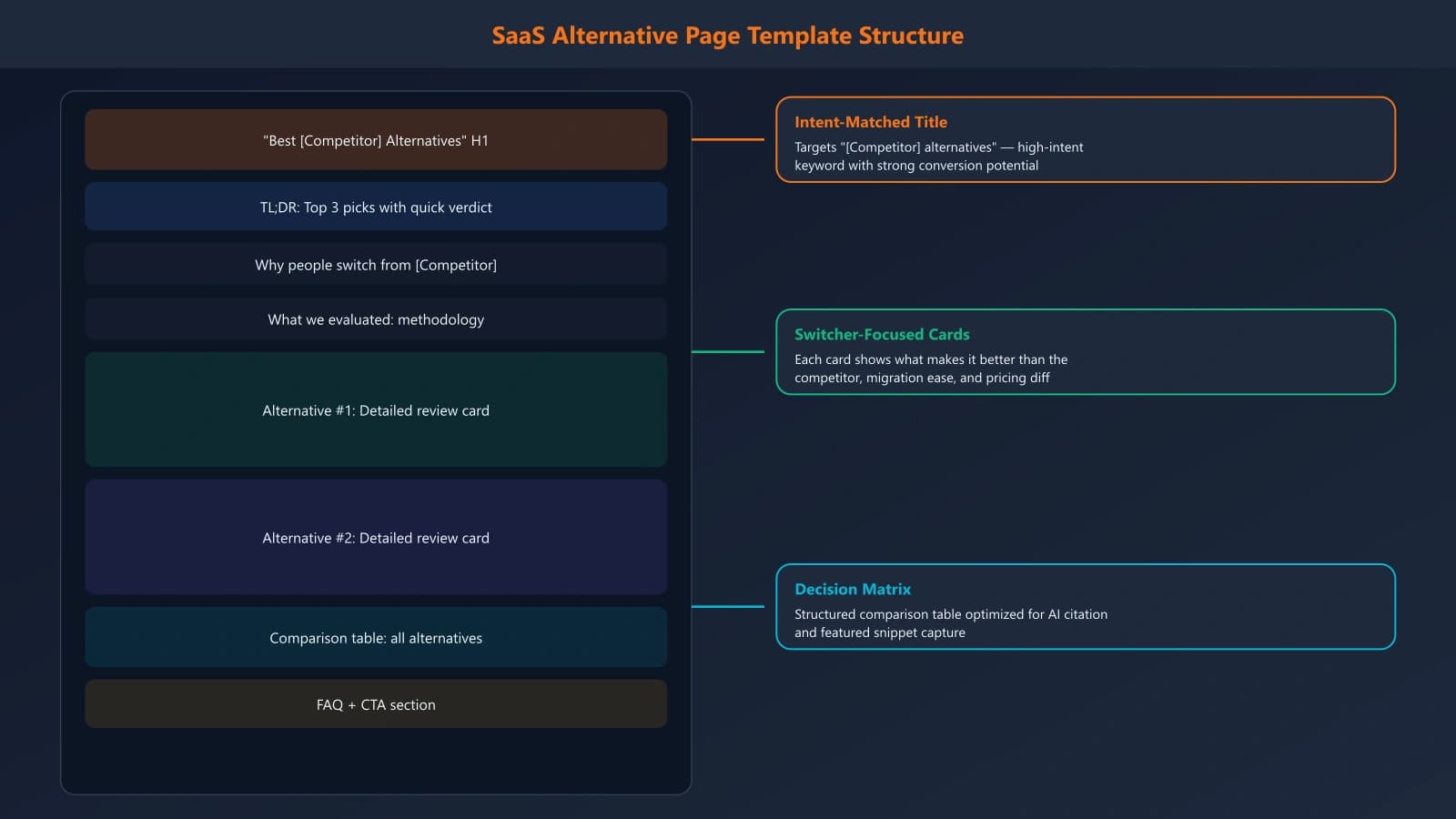
Section 1: Opening Hook
The opening should immediately validate the reader's search intent and promise value. They're looking for alternatives—acknowledge why and promise help finding the right one.
TEMPLATE: Opening Paragraph
“Looking for [Competitor] alternatives? You're not alone. While [Competitor] is popular for [main use case], many teams find themselves searching for alternatives due to [common pain point 1], [common pain point 2], or [common pain point 3]. This guide compares the top [number] [Competitor] alternatives based on [evaluation criteria], helping you find the right fit for your needs.”
Customization notes: Research actual complaints about the competitor in reviews, forums, and social media. Use their real pain points, not assumptions. Common SaaS pain points include pricing increases, feature limitations, poor support, complexity, and integration gaps.
Quick Picks Summary
Follow the opening with a quick-picks section for scanners who want immediate recommendations:
TEMPLATE: Quick Picks
Our top [Competitor] alternatives at a glance:
• Best overall alternative: [Tool A] — [one-line reason]
• Best for [use case 1]: [Tool B] — [one-line reason]
• Best budget option: [Tool C] — [one-line reason]
• Best for [use case 2]: [Tool D] — [one-line reason]
Section 2: Why People Switch from [Competitor]
This section validates the reader's concerns and demonstrates you understand their situation. It also establishes comparison criteria for the alternatives that follow.
TEMPLATE: Why Switch Section
Common reasons teams move away from [Competitor]:
[Pain Point 1 - Pricing]: [Competitor]'s pricing has increased significantly, with many teams seeing 30-50% cost jumps at renewal. For budget-conscious teams, this makes exploring alternatives worthwhile.
[Pain Point 2 - Complexity]: [Competitor] has grown into an enterprise platform with a steep learning curve. Teams wanting simpler solutions often find it overbuilt for their needs.
[Pain Point 3 - Feature Gap]: Despite its size, [Competitor] lacks [specific feature] that many teams need. Users resort to workarounds or third-party integrations.
[Pain Point 4 - Support]: As [Competitor] has scaled, support response times have increased. Teams with urgent issues report frustration with ticket-based support.
Research requirement: These pain points must be real and documented. Pull from G2/Capterra negative reviews, Reddit complaints, Twitter/X discussions, and support forum threads. Fabricated pain points destroy credibility.
Section 3: The Alternatives List
The core of the page—detailed profiles of each alternative. Each alternative should follow a consistent structure for easy comparison.
TEMPLATE: Individual Alternative Entry
## [Alternative Name] — [One-Line Positioning]
[2-3 sentence overview of what this tool is and who it's for]
Best for: [Specific use case or team type]
Key advantages over [Competitor]:
• [Advantage 1 with specific detail]
• [Advantage 2 with specific detail]
• [Advantage 3 with specific detail]
Potential drawbacks:
• [Honest limitation 1]
• [Honest limitation 2]
Pricing: [Pricing structure with specific numbers]
Verdict: [1-2 sentences summarizing fit]
Number of alternatives: Include 5-10 alternatives for comprehensive coverage. Too few looks thin; too many becomes overwhelming. Lead with your strongest picks.
Generate Alternative Pages at Scale
Create competitor alternative pages with this proven template structure built in.
Try for Free
Section 4: How to Choose
After the alternatives list, help readers make their decision with guidance based on their situation.
TEMPLATE: Decision Guidance
How to choose the right [Competitor] alternative:
If you're switching due to price: [Tool C] offers the best value, with comparable features at 40% lower cost. [Tool B] also offers a generous free tier for small teams.
If you need better [specific capability]: [Tool A] excels here with [specific feature]. It's purpose-built for teams prioritizing [capability].
If you want simpler/easier: [Tool D] strips away complexity while keeping core features. Best for teams that felt [Competitor] was overbuilt.
If you're enterprise/need advanced features: [Tool E] offers enterprise-grade [capabilities] that [Competitor] reserves for highest tiers.
This section maps alternatives to reader situations, helping them self-select the right option based on their primary switching motivation.
Section 5: FAQ Section
Address common questions that arise during the switching decision. FAQs also create additional keyword targeting opportunities.
TEMPLATE: FAQ Examples
Q: Can I migrate my data from [Competitor]?
A: Most alternatives offer migration tools or import features. [Tool A] has a dedicated [Competitor] import wizard. [Tool B] offers migration services for enterprise accounts.
Q: Will these alternatives integrate with [common integration]?
A: Yes, all alternatives listed offer [integration]. Check each tool's integration directory for your specific tech stack.
Q: What's the learning curve like?
A: Generally lower than [Competitor]. [Tool D] is the simplest, with most users productive in under an hour. [Tool A] has moderate complexity but offers excellent onboarding resources.
Section 6: Closing and CTA
End with a summary and clear next steps. If you're a competitor, this is where you make your case directly.
TEMPLATE: Closing (for SaaS companies)
Ready to switch from [Competitor]?
If [your primary differentiator] matters to your team, [Your Product] might be the right [Competitor] alternative. We built [Your Product] specifically for teams who [your ideal customer description].
[Button: Try [Your Product] Free] [Button: See How We Compare to [Competitor]]
TEMPLATE: Closing (for publishers)
Finding the right alternative
The best [Competitor] alternative depends on why you're switching. For most teams, [Tool A] offers the strongest overall package. Budget-conscious teams should explore [Tool C], while those prioritizing [specific need] will find [Tool B] a better fit.
Take advantage of free trials to test your top candidates before committing.
Implementing This Template
This template structure works because it matches how users actually research alternatives. They want validation (why switch section), options (alternatives list), guidance (how to choose), and answers (FAQ). Each section serves a purpose in the decision journey.
When implementing, prioritize accuracy over persuasion. Users researching alternatives are already skeptical of the incumbent—they'll be equally skeptical of content that feels like marketing. Honest, helpful content converts better than aggressive positioning.
For broader comparison page strategy, see Competitor Analysis for Comparisons. For the evaluation methodology behind your alternatives, see Tool Evaluation Framework.

Product Manager at BestPage. Pioneer in AEO research since 2024, exploring the convergence of SEO and GEO (Generative Engine Optimization). Led multiple AI-powered content optimization projects that achieved 300%+ citation increases in ChatGPT and Perplexity.