
Programmatic SEO creates many pages from templates and data. This scale is the strength of PSEO—but it also creates duplicate content risk. When hundreds or thousands of pages share similar structure and sometimes similar content, search engines need signals about which pages should rank for which queries.
Canonical tags are one of your primary tools for managing this. Used correctly, they tell search engines which pages should be treated as the authoritative version when similar content exists. Used incorrectly, they can consolidate pages that should rank separately or fail to address actual duplication issues.
This guide provides a framework for canonical strategy in PSEO contexts. We'll cover when to use self-referencing canonicals, when to cross-canonicalize, and how to identify which approach fits your specific page sets.
Canonical Tag Fundamentals
Before diving into PSEO-specific strategy, let's establish the fundamentals of how canonical tags work.
What Canonical Tags Signal
A canonical tag tells search engines: “If you're considering indexing this page, treat this other URL as the authoritative version instead.” Search engines typically respond by:
- Consolidating ranking signals: Links and other signals flow to the canonical URL
- Choosing which URL to show: The canonical URL appears in search results
- Potentially not indexing: The non-canonical page may not be indexed separately
Important: Canonical tags are hints, not directives. Search engines may ignore them if the pages seem truly different or if the canonical doesn't make sense.
Self-Referencing Canonicals
A self-referencing canonical points to the same URL as the page itself. This signals:
- “This page is the canonical version of itself”
- Protects against parameter variations: Prevents ?utm_source, ?sort=, etc. from creating duplicates
- Establishes explicit preference: Clearer than having no canonical at all
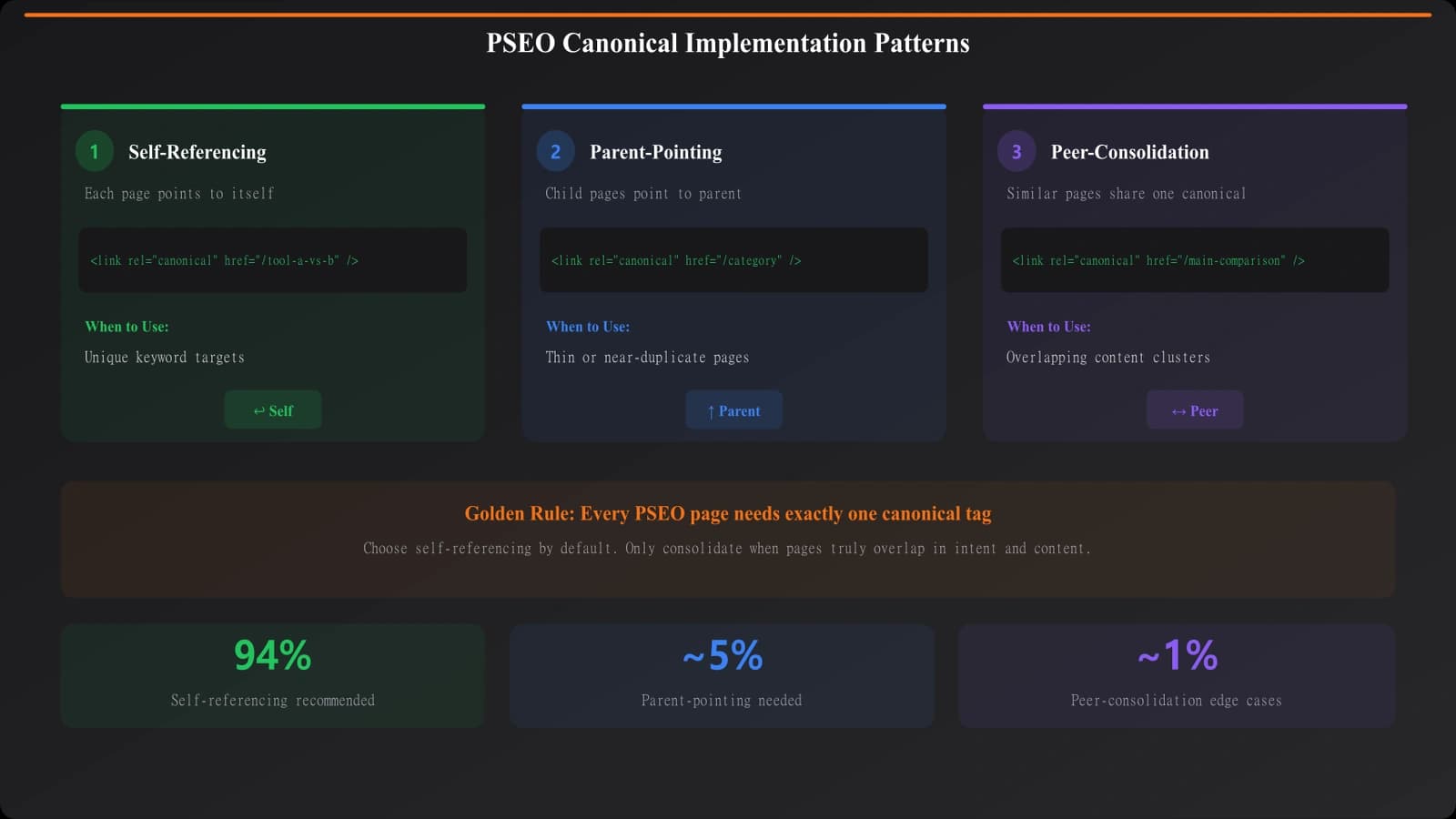
Self-referencing canonicals are the default for most PSEO pages that should rank independently.
Cross-Page Canonicals
A cross-page canonical points to a different URL. This signals:
- “Don't index this page; consolidate to that one”
- Useful for similar/duplicate pages: When you have multiple URLs with near-identical content
- Risk of accidental de-indexing: If used incorrectly, removes pages from index
| Canonical Type | When to Use | PSEO Example |
|---|---|---|
| Self-referencing | Page should rank on its own | Each city page for “best restaurants in [city]” |
| Cross-canonical to parent | Page too thin, should consolidate up | Neighborhood pages consolidating to city page |
| Cross-canonical to similar | Near-duplicate content | “Best X” and “Top X” pages with same content |
PSEO Canonical Scenarios
Different PSEO patterns require different canonical approaches.
Location-Based Page Sets
Pages targeting different locations (cities, neighborhoods, zip codes) with the same template:
- Each location is genuinely different: Self-referencing canonicals for all
- Data varies meaningfully: Different businesses, different rankings = unique content
- Thin location variants: If data is nearly identical, consider consolidating to regional pages
Example decision: “Best coffee shops in Austin” and “Best coffee shops in Houston” should both have self-referencing canonicals—they target different locations with different data. But “Best coffee shops in 78701” might canonical to “Best coffee shops in Austin” if the zip-level page has insufficient unique content.
Category and Subcategory Pages
Hierarchical page structures (category → subcategory → item comparisons):
- Each level serves different intent: Self-referencing for all
- Overlapping content concerns: If subcategory pages substantially repeat category content, consider restructuring rather than canonicalizing
- Thin subcategories: Low-item subcategories might canonical to parent
Filter and Parameter Variations
Pages created by URL parameters (sort order, filters, pagination):
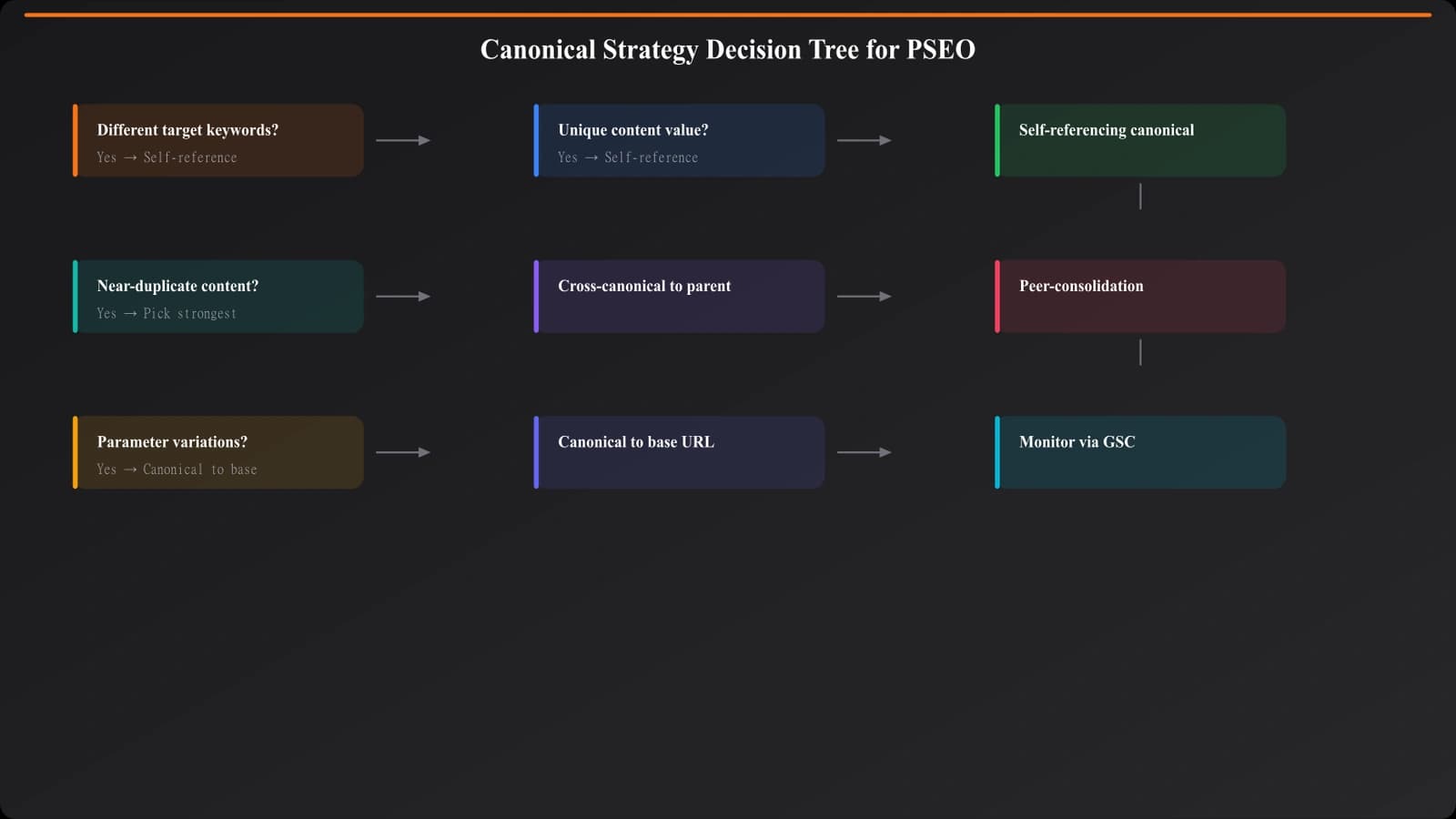
- Parameter variations typically canonical to base URL: ?sort=price should canonical to the unsorted version
- Filter combinations: Multi-filter URLs often should canonical to base or single-filter versions
- Pagination: Page 2, 3, etc. typically use self-referencing canonicals with rel=prev/next
Decision Framework
Use this framework to determine the right canonical strategy for any PSEO page set.
Question 1: Does this page target a unique keyword?
If the page targets a keyword that no other page targets:
- Yes: Self-referencing canonical (you want this page to rank for this keyword)
- No: Consider if the page should exist at all, or if it should canonical elsewhere
Question 2: Is the content meaningfully unique?
Compare the page to similar pages in your set:
- Unique data, unique recommendations: Self-referencing canonical
- Same content, different URL structure: Cross-canonical to preferred version
- Mostly similar with minor differences: Consider consolidating or adding more unique content
Question 3: What's the search volume and intent?
Lower search volume doesn't automatically mean consolidate:
- Low volume but genuine unique intent: Keep as separate page, self-referencing
- Low volume and overlapping intent with higher-volume page: Consider consolidating
- No search volume and thin content: Likely should noindex or canonical elsewhere
Question 4: What does search engine behavior show?
Monitor Search Console for signals:
- Google choosing different canonical: They may see duplication you missed
- Pages excluded for “duplicate, submitted URL not selected as canonical”: Review your canonical strategy
- Cannibalization in rankings: Multiple pages competing may need consolidation
Build PSEO Sites That Scale
Create programmatic comparison content with proper technical SEO foundations.
Try for Free
Implementation Best Practices
Technical implementation details matter as much as strategy.
Technical Requirements
- Use absolute URLs: Always use full URLs including https:// and domain
- Match protocol: Canonical URL must use same protocol (https) as served
- One canonical per page: Multiple canonical tags create confusion
- Place in <head>: Canonical must be in HTML head, not body
- Consistency with other signals: Don't canonical to a noindexed or redirected URL
Template-Level Implementation
In PSEO, canonicals are typically set at the template level:
- Default to self-referencing: Template generates canonical pointing to current page URL
- Logic for exceptions: Conditional logic for pages that should canonical elsewhere
- Data-driven decisions: Use page metadata to determine canonical strategy
Monitoring and Validation
- Search Console Index Coverage: Monitor for unexpected canonical selection
- Crawl your own site: Verify canonicals are rendering correctly
- Sample checking: Manually verify canonical implementation across page types
- Log analysis: Confirm Googlebot is seeing correct canonicals
Common Mistakes to Avoid
- Canonicalizing everything to the homepage: Only do this if pages truly shouldn't exist
- Cross-canonicalizing to non-existent pages: Always verify target URL exists
- Ignoring Google's canonical selection: If Google consistently chooses differently, investigate why
- Mixing noindex and canonical: Pick one signal, not both
- Forgetting about parameter handling: URL parameters need explicit canonical strategy
- Not testing after changes: Verify implementation actually works as intended
Canonical strategy is one of the most important technical decisions for PSEO sites. The right approach prevents duplicate content issues while preserving the ability of your programmatic pages to rank for their target keywords. Take time to develop a clear strategy before implementing, and monitor results to catch issues early.
For broader PSEO technical foundations, see our guide on Technical SEO for PSEO Sites: Foundation Guide. For handling duplicate content more broadly, check out Duplicate Content in PSEO: Prevention Tactics.

Product Manager at BestPage. Pioneer in AEO research since 2024, exploring the convergence of SEO and GEO (Generative Engine Optimization). Led multiple AI-powered content optimization projects that achieved 300%+ citation increases in ChatGPT and Perplexity.