
Duplicate content is programmatic SEO's original sin. The efficiency that makes PSEO attractive—generating many pages from templates—creates the risk that those pages are too similar. When Google sees 500 pages with 90% identical content, it doesn't rank them all. It picks one canonical, suppresses the rest, and may question whether your site adds value at all.
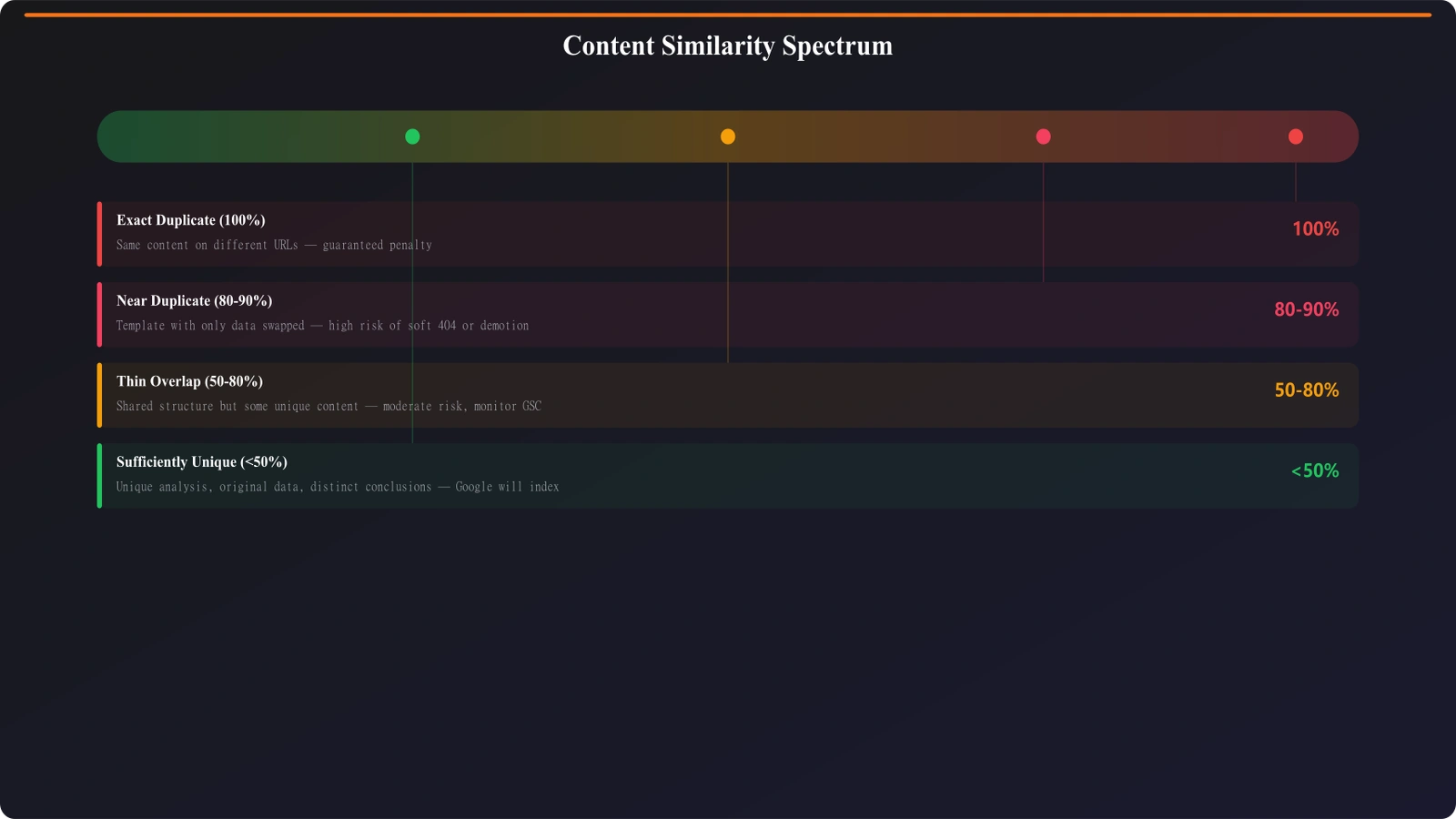
Understanding duplicate content for PSEO means thinking beyond exact copies. Google looks at content similarity, not just identity. Pages with the same template text and only different city names inserted are effectively duplicates even though no two pages match character-for-character.
This guide covers duplicate content prevention for programmatic sites: understanding how Google evaluates similarity, designing templates for differentiation, implementing technical controls, and auditing for duplication before it causes problems.
Types of Duplication in PSEO
Different duplication patterns require different solutions. Identify which types affect your programmatic content.
| Duplication Type | Example | Risk Level | Prevention Approach |
|---|---|---|---|
| Template-based similarity | City pages with only city name changed | High—extremely common in PSEO | Data variation, conditional content |
| Parameter-based duplicates | Same page with ?sort=price vs ?sort=name | Medium—technical, fixable | Canonical tags, parameter handling |
| Cross-domain copying | Your content scraped to other sites | Variable—depends on who ranks | Canonical to self, first-mover advantage |
| Internal path duplicates | /category/product same as /product | Medium—confuses canonicalization | Consistent URL structure, redirects |
| Pagination duplicates | Same products across /page/1, /page/2 | Low-medium—handled by rel=prev/next | Proper pagination implementation |
For PSEO sites, template-based similarity is the primary concern. The other types are important but solvable through standard technical SEO. Template similarity requires architectural thinking about how you generate content.
Content Differentiation Strategies
The core solution to template-based duplication is meaningful content that varies between pages.
Data-Driven Variation
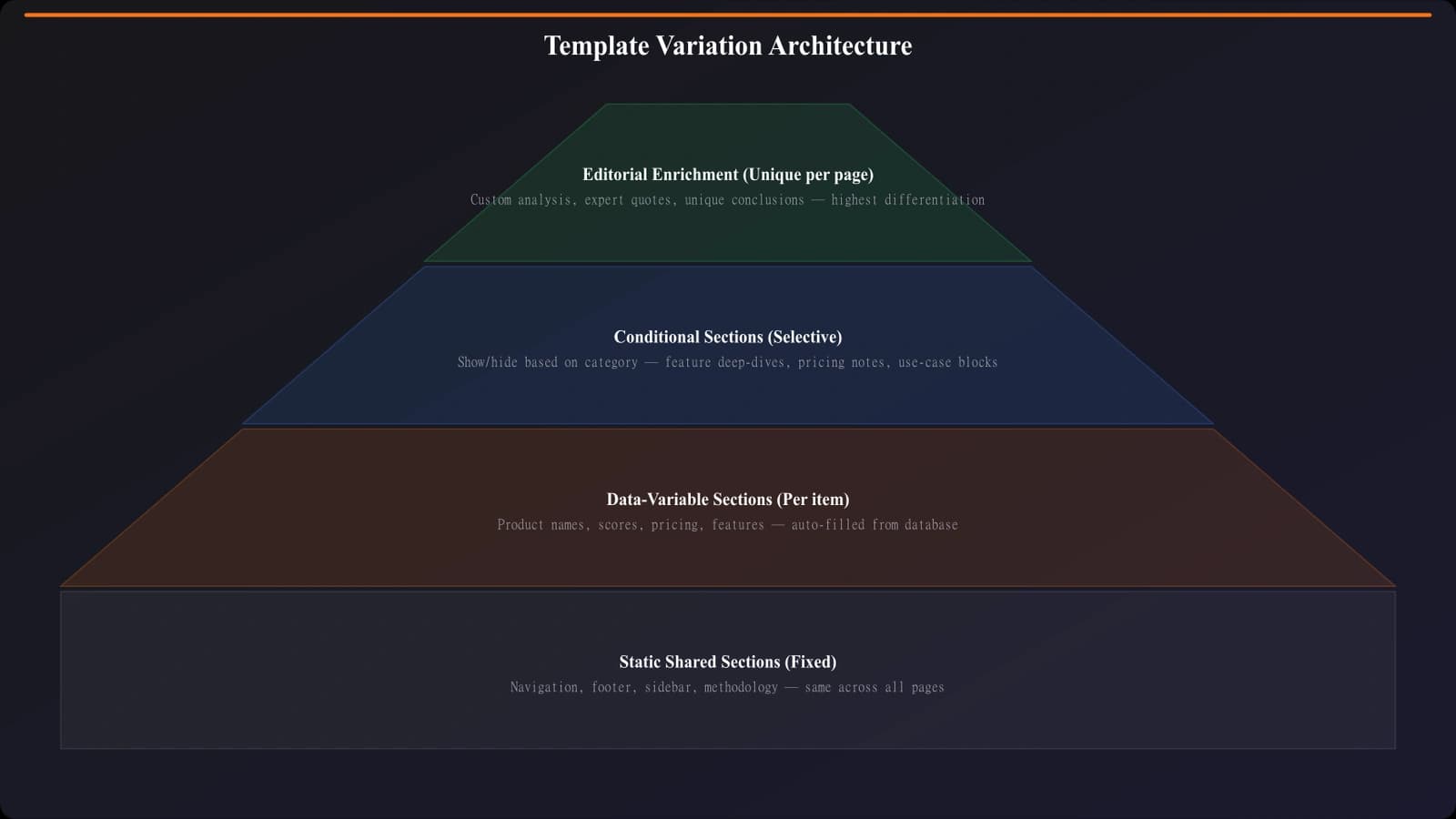
The foundation of unique PSEO pages is unique data. If you're generating city pages, each city needs genuinely different content: different local businesses listed, different market statistics, different local context. Swapping city names in identical text is not data variation—it's find-and-replace that Google sees through instantly.
Audit your data layer:
- List every variable in your template. What actually changes between pages?
- Calculate uniqueness percentage. What portion of page content is variable vs. static?
- Assess variable meaningfulness. Are variations substantive or superficial?
- Identify missing data opportunities. What additional unique data could you incorporate?
Target at least 40-50% unique content per page. Below that threshold, you're likely generating near-duplicates.
Conditional Template Sections
Smart templates include or exclude sections based on available data. If some cities have local regulations worth mentioning and others don't, the template should conditionally include a regulations section only where relevant. This creates natural variation without forcing fake differentiation.
Conditional logic example: If (city.hasLocalRegulations) then show RegulationsSection. If (city.providerCount > 10) then show ExtendedListFormat else show CompactListFormat. If (city.hasSeasonalFactors) then show SeasonalGuidance.
The result: pages reflect their actual content needs rather than forcing uniform structure across all variations.
Editorial Enrichment Layers
For highest-value PSEO pages, consider editorial enrichment—human-written content that supplements templated sections. This might mean adding custom introductions for major cities, including expert commentary on specific markets, or writing original analysis for high-traffic pages.
Editorial enrichment doesn't scale to every page, but it creates anchor content that establishes quality signals for your entire programmatic section.
Generate Unique PSEO Pages
Create programmatic pages with built-in content differentiation that avoids duplicate content issues.
Try for Free
Technical Prevention Controls
Beyond content architecture, technical implementations prevent duplication at the URL and crawling level.
Canonical Tag Implementation
Every PSEO page should have a self-referencing canonical tag pointing to its own URL. This signals that each page is the authoritative version of itself. Without canonicals, Google guesses—and may choose a different page as canonical than you intended.
- Implement self-referencing canonicals on all PSEO pages
- Use absolute URLs in canonical tags (full domain, not relative paths)
- Ensure canonical matches the URL structure you want indexed (www vs non-www, trailing slash consistency)
- Verify canonicals are in the <head> section, not body
- Check that JavaScript doesn't inject conflicting canonicals
URL Parameter Management
Sorting, filtering, and tracking parameters create URL variations that are often duplicates. Manage these properly:
- Canonical to parameter-free URL: ?sort=price should canonical to the base URL
- Robots.txt: Block crawling of parameter combinations that create duplicates
- Search Console parameter handling: Tell Google how to treat common parameters (though this feature is deprecated, legacy settings may persist)
- URL design: Consider whether parameters should be paths instead (less duplicate-prone)
URL Structure Consistency
Inconsistent URL structures create accidental duplicates. Enforce consistency across your PSEO pages:
- Choose www or non-www and redirect the other
- Decide on trailing slash or not and redirect the other
- Use lowercase URLs consistently
- Avoid session IDs or user-specific parameters in URLs
- Prevent multiple paths to the same content
Auditing for Duplication
Proactive auditing catches duplication before it affects indexation.
Content Similarity Analysis
Use tools or scripts to compare content across your PSEO pages. Calculate similarity scores between page pairs. Flag any pages with greater than 70% similarity for review. Identify which template sections are causing high similarity.
For large PSEO libraries, sample-based auditing works: compare a random sample of 50-100 pages to identify patterns, then extrapolate to the full set.
Search Console Signals
Search Console reveals duplication issues Google has detected. Check the Index Coverage report for “Duplicate without user-selected canonical” and “Duplicate, Google chose different canonical” entries. These indicate Google found duplicates and made canonicalization decisions—potentially not the ones you wanted.
Also check URL Inspection for individual pages. The “Canonical” section shows whether Google's chosen canonical matches your declared canonical. Mismatches suggest duplication issues.
Pre-Launch Prevention Checklist
Before launching new PSEO pages, verify:
- Unique content percentage meets 40%+ threshold
- Self-referencing canonicals implemented correctly
- Parameter handling prevents duplicate URLs
- Cross-page comparison shows sufficient differentiation
- Template conditionals create natural variation
- Data quality sufficient for each page variation
Prevention Over Recovery
Duplicate content prevention is far easier than duplicate content recovery. Once Google has categorized your PSEO pages as duplicates, changing that perception takes time—you need to make pages genuinely different, wait for recrawling, and hope Google reassesses.
Build differentiation into your PSEO architecture from the start. Invest in data that creates genuine page-level uniqueness. Use technical controls to prevent accidental URL duplication. Audit before launching, not after indexation problems appear.
If you're already seeing duplicate content signals, see Thin Content Recovery for remediation approaches. For the data architecture that enables differentiation, see Service Area PSEO Strategy.

Product Manager at BestPage. Pioneer in AEO research since 2024, exploring the convergence of SEO and GEO (Generative Engine Optimization). Led multiple AI-powered content optimization projects that achieved 300%+ citation increases in ChatGPT and Perplexity.