
You launched a programmatic SEO library. Traffic grew initially. Then it dropped—maybe gradually, maybe in a sudden cliff. Checking Search Console shows pages moved to “Crawled - currently not indexed,” or rankings disappeared entirely. The likely diagnosis: Google determined your PSEO pages don't provide sufficient value—the dreaded “thin content” assessment.
Thin content issues for PSEO are particularly painful because they often affect many pages at once. When your template is the problem, every page generated from that template inherits the problem. Recovery requires fixing the underlying content architecture, not just patching individual pages.
This troubleshooting guide covers the complete thin content recovery process: diagnosing the extent and cause of the problem, implementing targeted fixes, executing a recovery plan, and monitoring progress back to health.
Diagnosing the Problem
Before fixing anything, understand precisely what's wrong and how widespread the damage is.
Symptom Assessment
| Symptom | What It Indicates | Severity | Investigation Action |
|---|---|---|---|
| Pages moved to “Crawled - not indexed” | Google saw pages, decided not to index | High—active quality rejection | Analyze affected pages for common patterns |
| Ranking drops across PSEO section | Quality assessment affected ranking | High—traffic impact | Correlate with algorithm update timing |
| Manual action in Search Console | Google manually flagged thin content | Critical—explicit penalty | Read manual action details, prioritize fix |
| Indexation rate declining over time | Quality threshold not met for new pages | Medium—ongoing problem | Compare indexed vs non-indexed pages |
| Soft 404 errors appearing | Pages look empty to Google | Medium-high—rendering or content issue | Check if data failed to populate |
Scope Assessment
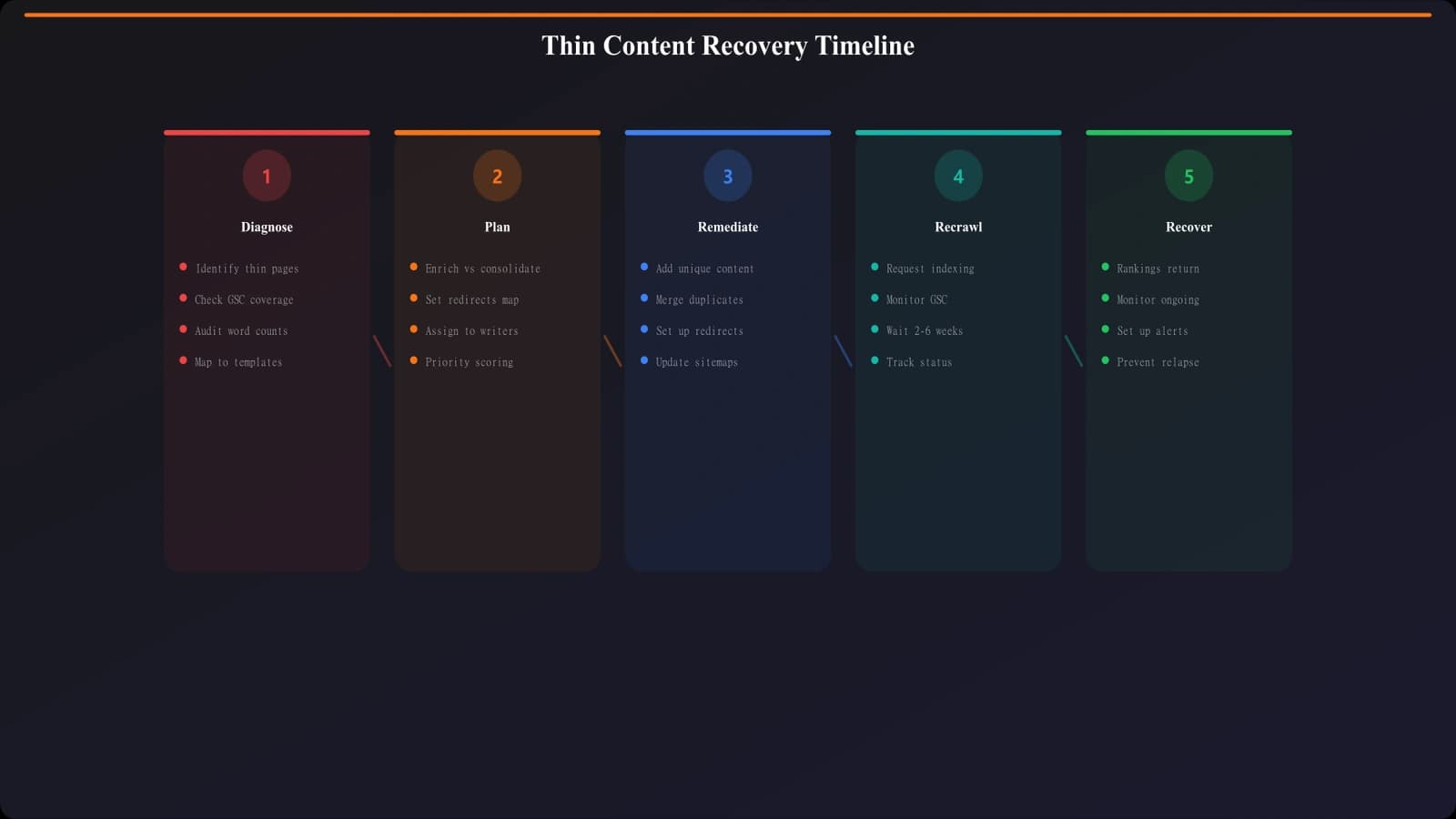
Determine how many pages are affected and whether they share patterns. Export your full URL list from Search Console, categorize by indexation status, and identify which PSEO page types are problematic. Sometimes thin content affects an entire template; sometimes specific data subsets (cities with sparse data, products with minimal descriptions) are the issue.
- Export affected URLs: Get the full list from Index Coverage report
- Categorize by template: Which PSEO templates are affected?
- Identify patterns: Do affected pages share data characteristics?
- Quantify impact: What percentage of your PSEO pages are affected?
- Check timing: When did problems start? Correlate with changes or updates
Root Cause Analysis
Compare affected pages against healthy pages (if any remain indexed). What's different? Common thin content causes in PSEO include insufficient data per page (too few items listed, missing key information), template text dominating (80%+ content is boilerplate), near-duplicate pages (city-name-swap templates), failed data population (pages rendered with empty sections), and low E-E-A-T signals (no expertise demonstration, generic content).
Diagnostic question: If you showed this page to a real user searching for this topic, would they find it genuinely useful? Would they trust it over competitor pages? If the honest answer is no, you've identified your problem.
Remediation Strategies
Once you've diagnosed the cause, choose the appropriate remediation approach.
Content Enrichment
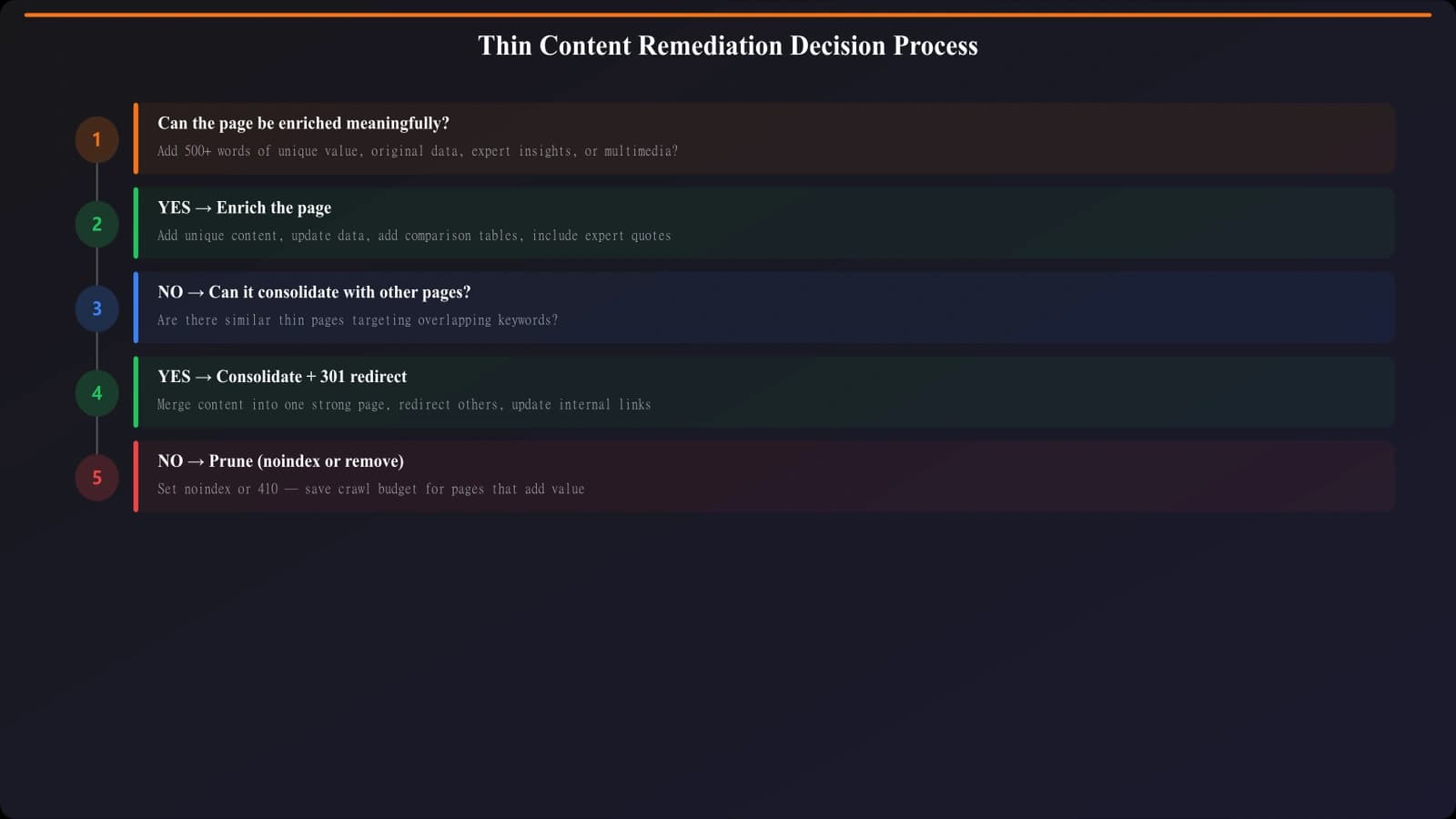
If pages lack sufficient content, add meaningful content that provides genuine value:
- More data points per page: Expand product details, add more items to lists, include additional context
- Contextual information: Add explanatory content that helps users understand the data
- Expert perspective: Include analysis, recommendations, or insights beyond raw data
- User-generated content: Reviews, ratings, or community contributions where available
- Visual content: Images, charts, or diagrams that add value (not decorative filler)
Before enrichment: “Best Plumbers in Springfield. Here are plumbers in Springfield. [List of 3 names with phone numbers]. Contact them today!”
After enrichment: “Springfield's plumbing market serves primarily residential customers, with most calls for water heater and drain issues given the area's aging housing stock. Licensed plumbers must carry state certification #XYZ. Here are 8 verified plumbers serving Springfield, with response times, specialties, and recent customer ratings. [Rich profiles with multiple data points, pros/cons, and selection guidance].”
Page Consolidation
Sometimes the right fix is fewer pages, not better individual pages. If you can't make 500 city pages genuinely valuable, consider consolidating into 50 regional pages with more depth. Redirect removed pages to relevant consolidated pages.
- Identify consolidation candidates: Pages with insufficient unique data
- Define consolidation targets: Which pages will absorb the redirected content?
- Implement 301 redirects: Point old URLs to new consolidated pages
- Update internal links: Point to new structure
- Monitor traffic transfer: Verify redirects work and traffic flows correctly
Strategic Pruning
For pages that can't be fixed or consolidated—pages with no realistic path to quality—remove them. Either noindex to keep them accessible to users without polluting Google's index, or remove entirely via 410 status if they serve no user purpose.
Pruning feels counterintuitive (fewer pages = less traffic opportunity), but removing low-quality pages often improves overall site quality signals, benefiting remaining pages.
Generate Quality PSEO Content
Create programmatic pages with built-in quality thresholds that avoid thin content issues.
Try for Free
Executing Recovery
With remediation strategy defined, execute systematically.
Prioritized Implementation
Don't try to fix everything at once. Prioritize based on page value (traffic potential) and fix difficulty. Start with high-value, fixable pages to demonstrate recovery is possible.
- Wave 1: High-traffic potential pages that can be enriched quickly
- Wave 2: Medium-priority pages with clear enrichment paths
- Wave 3: Consolidation of lower-value pages
- Wave 4: Pruning of unfixable pages
Requesting Recrawl
After fixing pages, request recrawling through Search Console's URL Inspection tool. This accelerates Google seeing your improvements rather than waiting for natural recrawl cycles. Don't submit pages that aren't actually fixed—this wastes recrawl requests and doesn't help.
Manual Action Reconsideration
If you received a manual action for thin content, you'll need to submit a reconsideration request after fixing the issues. Document what was wrong, what you fixed, and how you've prevented future problems. Be thorough—failed reconsideration requests delay recovery significantly.
Monitoring Recovery Progress
Recovery takes time. Monitor progress to ensure your fixes are working.
Key Recovery Metrics
- Indexation rate: Are fixed pages moving back to “Indexed” status?
- Ranking recovery: Are positions improving for affected pages?
- Traffic trends: Is organic traffic to PSEO section recovering?
- New page performance: Are newly launched pages indexing successfully?
- Crawl behavior: Is Google recrawling fixed pages at expected frequency?
Recovery Timeline Expectations
Thin content recovery is slow. After implementing fixes, expect 2-4 weeks for Google to recrawl updated pages, 4-8 weeks to see indexation status changes, 2-3 months for ranking recovery to stabilize, and 3-6 months for full traffic recovery.
If you're not seeing progress after 8 weeks, reassess whether fixes were sufficient. Sometimes thin content requires more aggressive remediation than initially estimated.
Prevention for the Future
Recovering from thin content damage is painful. Prevent recurrence by building quality into your PSEO process. Set minimum data thresholds before generating pages. Audit content uniqueness before launch. Monitor indexation health continuously. Fix problems early, before they compound.
The best thin content recovery is avoiding thin content in the first place. For prevention strategies, see Duplicate Content Prevention. For the indexation monitoring that catches issues early, see PSEO Indexation Troubleshooting.

Product Manager at BestPage. Pioneer in AEO research since 2024, exploring the convergence of SEO and GEO (Generative Engine Optimization). Led multiple AI-powered content optimization projects that achieved 300%+ citation increases in ChatGPT and Perplexity.