
You've generated hundreds of programmatic pages. Your sitemap is submitted. Googlebot has visited. But weeks later, most pages show “Crawled - currently not indexed” in Search Console. This is the most frustrating PSEO failure mode—Google knows your pages exist and actively decides not to include them.
The good news: this decision isn't random. Google's indexation choices follow patterns you can diagnose and address. The bad news: there's rarely a single cause, and fixes often require rethinking your content architecture rather than applying quick patches.
This troubleshooting guide covers the systematic process for diagnosing PSEO indexation issues: identifying symptoms, isolating causes, and implementing targeted fixes that address root problems.
Reading Search Console Signals
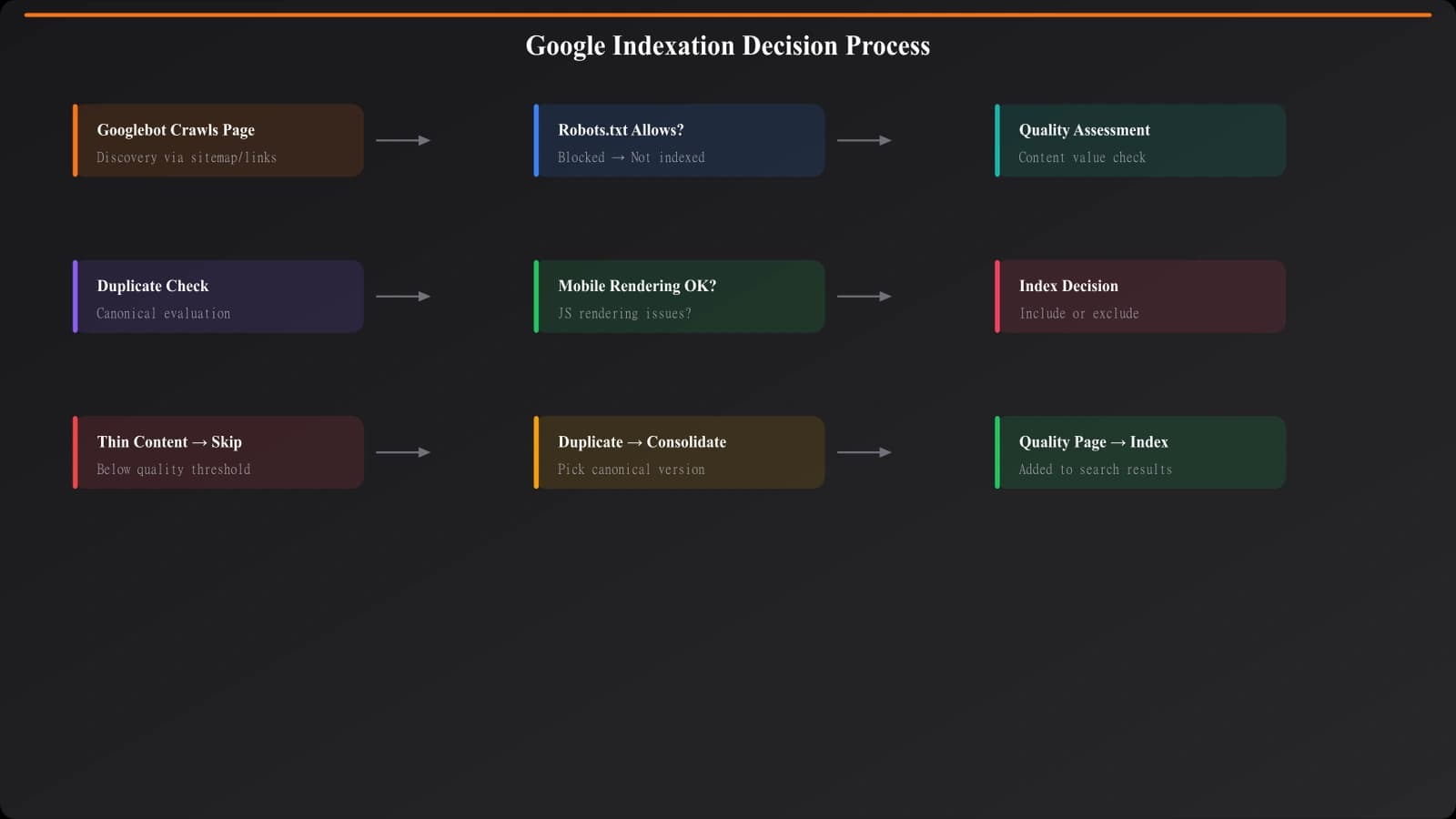
Before fixing anything, you need accurate diagnosis. Search Console provides the data, but interpreting it requires understanding what each status actually means for PSEO content.
Index Coverage Report Analysis
The Index Coverage report in Search Console categorizes your pages into Valid, Valid with warnings, Excluded, and Error states. For PSEO troubleshooting, focus on the Excluded category—this is where non-indexed pages land, and the specific exclusion reasons reveal what Google thinks is wrong.
Export your full exclusion list and categorize by reason. The distribution tells you whether you have a systemic issue (one reason dominates) or multiple independent problems (varied reasons across pages).
Understanding Exclusion Types
Different exclusion statuses indicate different problems. Here's how to interpret the most common ones affecting PSEO:
| Status | What It Means | Likely PSEO Cause | Severity |
|---|---|---|---|
| Crawled - currently not indexed | Google saw the page but chose not to index | Thin content, low quality signals, duplicate patterns | High |
| Discovered - currently not indexed | Google knows the URL exists but hasn't crawled yet | Crawl budget exhaustion, low priority signals | Medium |
| Duplicate without user-selected canonical | Google found similar/identical content elsewhere | Template content too similar across pages | High |
| Duplicate, Google chose different canonical | Google prefers another URL for this content | URL parameter issues, www/non-www conflicts | Medium |
| Soft 404 | Page returns 200 but looks empty to Google | Failed data population, empty template sections | High |
The most concerning status for PSEO is “Crawled - currently not indexed.” This means Google invested crawl resources, evaluated the page, and explicitly rejected it. Unlike discovery issues that might resolve with time, this status indicates a quality judgment you need to address.
Diagnosing Thin Content Issues
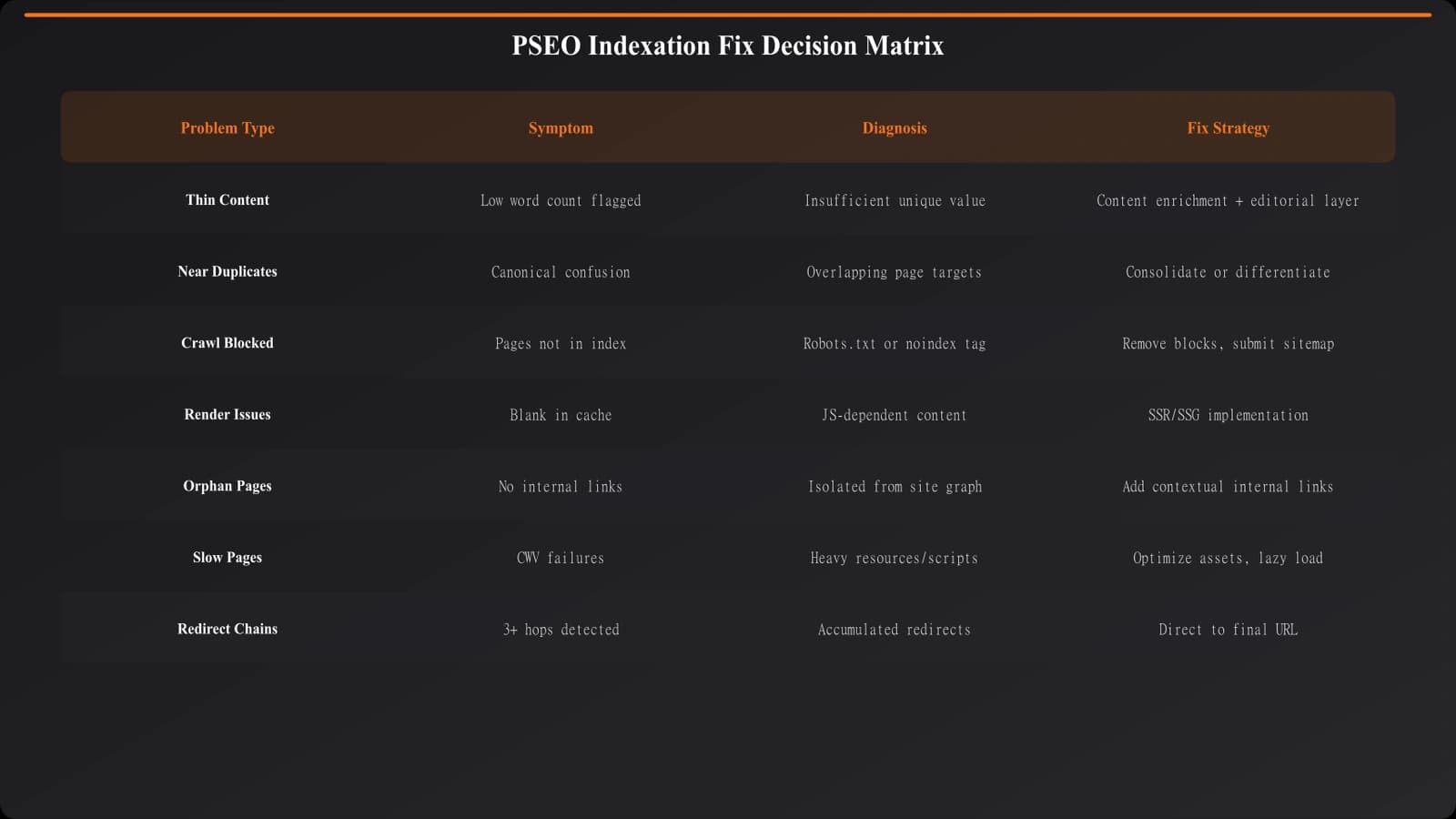
“Thin content” is the most common cause of PSEO indexation failures. But the term is vague—what specifically makes content “thin” to Google?
Content Uniqueness Analysis
Compare your programmatic pages against each other. How much content is truly unique per page versus templated boilerplate? If 80% of page content is identical across your PSEO pages with only small variable sections changing, Google may see these as essentially duplicate pages with minor variations—not worth indexing separately.
Calculate your uniqueness ratio: take a sample of 10 pages and identify which text blocks are identical across all of them. The percentage of page content that varies meaningfully should be at least 40-50% for indexation. Below that threshold, you're generating thin variations, not distinct pages.
Value Assessment Per Page
Ask honestly: does each page provide value that justifies its separate existence? A page for “best restaurants in Springfield” that lists the same generic content as “best restaurants in Shelbyville” with only city names changed provides no unique value. But a page with genuinely different restaurant listings, local context, and verified local information does justify separate indexation.
Review your lowest-performing pages (those consistently not indexed despite being crawled). What would make these pages genuinely valuable? If you can't articulate unique value, Google can't either.
Content Depth Signals
Word count alone doesn't determine thinness, but extremely short pages (under 300 words of unique content) rarely index. More importantly, check for depth indicators: do your pages have structured sections, multiple data points, contextual information beyond the core listing?
Compare pages that indexed successfully against those that didn't. Often you'll find the indexed pages had more complete data, more sections populated, or additional contextual content that the excluded pages lacked.
Fixing Common Indexation Issues
Once you've diagnosed the cause, apply targeted fixes. Different root causes require different solutions.
Content Enrichment Strategies
If thin content is the issue, you need to add meaningful content—not padding. Effective enrichment approaches include adding location-specific context that varies meaningfully between pages, incorporating user-generated content where available (reviews, ratings, comments), including relevant data that differs per page (pricing, availability, specifications), and adding editorial context that provides genuine insight.
The key is that enrichment must vary between pages. Adding the same 200-word methodology section to every page doesn't help—that's just more template content.
Page Consolidation
Sometimes the right fix is fewer pages, not better pages. If you can't differentiate 100 city pages meaningfully, consider consolidating to regional pages that can contain more value. If your product pages have minimal unique content per item, consider category pages that compare multiple items.
Consolidation isn't failure—it's recognition that fewer quality pages outperform many thin pages. The goal is indexed, ranking pages, not a large URL count.
Technical Fixes
Some indexation issues are technical rather than content-related:
- Rendering issues: Verify Googlebot sees the same content you see. Use URL Inspection's rendered HTML view to check for JavaScript rendering failures that leave pages empty.
- Canonical conflicts: Ensure self-referencing canonicals on every page. Conflicting canonical signals confuse indexation.
- Crawl efficiency: Reduce crawl waste on non-indexable pages (pagination, filters, facets) so budget goes to your target PSEO pages.
- Internal linking: Pages orphaned from your main site structure may get discovered but deprioritized. Ensure clear internal link paths to PSEO content.
Generate Indexable PSEO Pages
Create programmatic pages designed for indexation with built-in quality thresholds and unique content per page.
Try for Free
Crawl Budget Optimization
Crawl budget issues manifest as “Discovered - currently not indexed”—Google knows pages exist but hasn't prioritized crawling them. For large PSEO sites, this is often a real constraint.
Diagnosing Budget Issues
Check the Crawl Stats report in Search Console. Look at total crawl requests per day and compare against your total URL count. If you have 10,000 PSEO URLs but Google only crawls 500 pages daily across your entire site, it could take months to crawl everything—and priorities may shift before that happens.
Also check what Google is actually crawling. If most crawl budget goes to non-PSEO pages (blog posts, category pages, resources), your programmatic pages get leftovers. This isn't wrong—it means Google perceives those other pages as higher priority.
Improving Crawl Efficiency
Optimize crawl budget through both reduction and prioritization:
| Strategy | Implementation | Impact |
|---|---|---|
| Block low-value URLs | Robots.txt disallow on filter/sort variations | Immediate crawl savings |
| Reduce URL bloat | Consolidate parameter-based duplicate URLs | Focuses budget on unique pages |
| Improve internal linking | Link to PSEO pages from high-authority pages | Increases PSEO page priority |
| Speed optimization | Faster page loads = more pages crawled | Modest but cumulative effect |
| Sitemap prioritization | Segment sitemaps by priority, submit strategically | Signals importance to Google |
Staged Page Releases
Instead of launching 10,000 PSEO pages at once, consider staged releases. Launch 500-1,000 pages, wait for indexation, analyze results, then launch more. This prevents overwhelming crawl budget and lets you iterate based on what actually indexes.
Staged releases also provide quality feedback. If your first 1,000 pages achieve 30% indexation, you know to improve the template before launching more. Better to fix issues at 1,000 pages than at 10,000.
Ongoing Monitoring and Iteration
Indexation isn't a one-time achievement—it requires ongoing monitoring and adjustment.
Key Metrics to Track
Set up regular monitoring for indexation health:
- Indexation rate: Percentage of submitted URLs that are indexed (check weekly)
- Exclusion trends: Are exclusion counts growing, stable, or declining?
- Crawl frequency: Are your PSEO pages being recrawled regularly?
- New page velocity: How quickly do newly launched pages get indexed?
Establish baselines and alert thresholds. If indexation rate drops below 50%, investigate immediately rather than waiting for organic traffic to decline.
Continuous Improvement Loop
Treat indexation as an ongoing optimization, not a problem to solve once. Each month, review exclusion patterns for new issues, identify your lowest-indexing page segments, test enrichment on sample pages before rolling out broadly, and prune pages that consistently fail quality thresholds.
Building for Indexation Success
PSEO indexation problems are frustrating but diagnosable. The systematic approach—reading Search Console signals, identifying root causes, applying targeted fixes, and monitoring results—resolves most issues. The hardest part is often accepting that the fix may require content investment rather than technical tweaks.
The fundamental principle: Google indexes pages that provide unique value to searchers. Programmatic generation doesn't exempt you from this standard—it just means you need to architect your data and templates to deliver genuine value at scale.
For related guides, see Dynamic vs Static PSEO and Service Area PSEO Strategy for broader programmatic content architecture.

Product Manager at BestPage. Pioneer in AEO research since 2024, exploring the convergence of SEO and GEO (Generative Engine Optimization). Led multiple AI-powered content optimization projects that achieved 300%+ citation increases in ChatGPT and Perplexity.