
When building programmatic SEO pages, one of the first architectural decisions is: dynamic or static? Do you serve pages from a database in real-time, or pre-generate them as static files?
Both approaches power successful PSEO projects. Zapier's integration pages are dynamically generated. Many successful affiliate sites use static generation. The right choice depends on your specific requirements—update frequency, page count, technical stack, and team capabilities.
This guide compares both approaches, examines the tradeoffs, and helps you decide which fits your PSEO project.
The Dynamic Approach
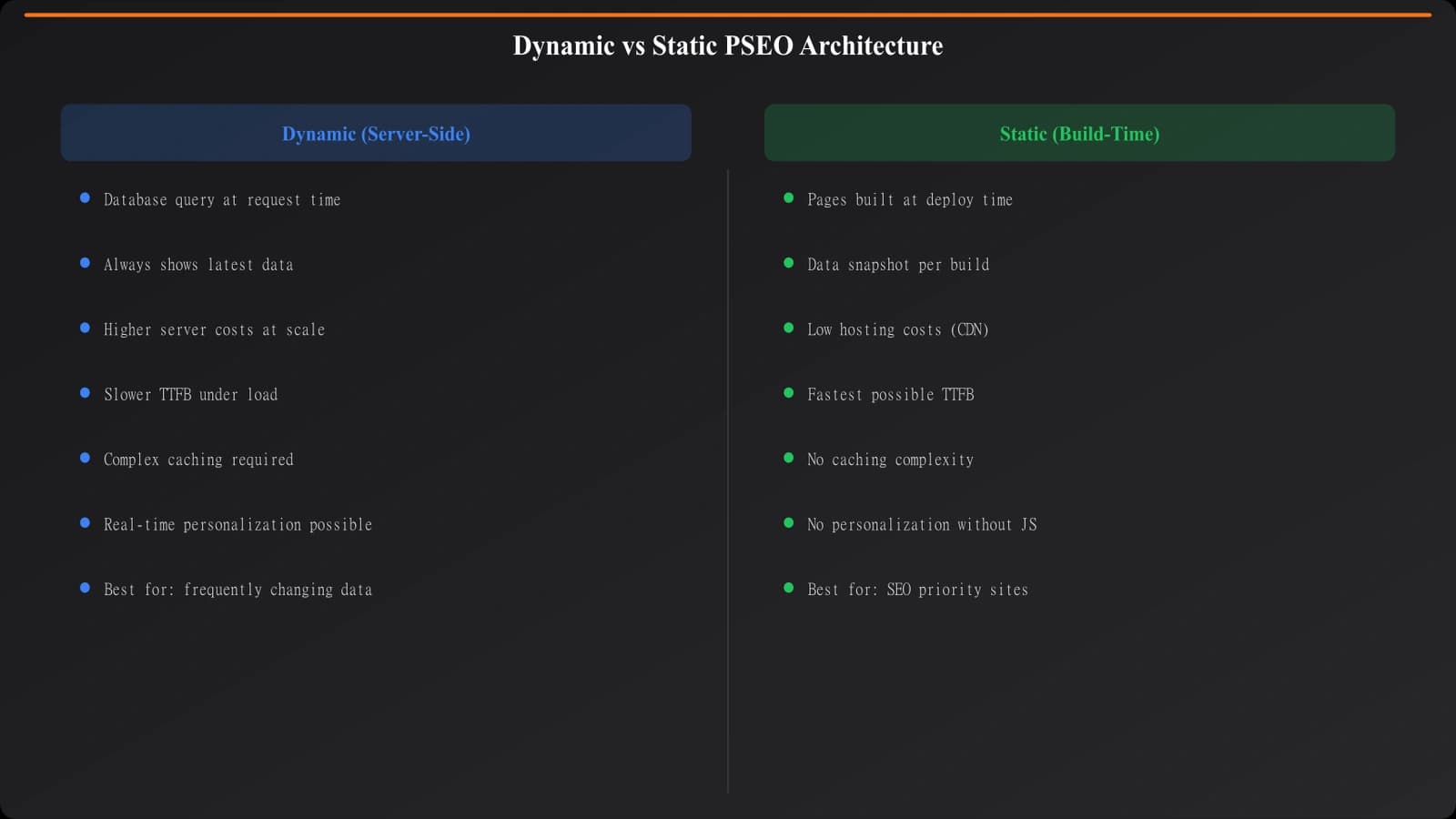
Dynamic PSEO stores content in a database and generates pages when users (or crawlers) request them. The URL triggers a template that queries data and renders HTML.
How It Works
- User requests /best/crm-for-startups/
- Server routes request to comparison template
- Template queries database for “crm + startups” data
- Template renders HTML with fresh data
- HTML returned to user
Each request hits the database. Pages don't exist as files—they're constructed on demand.
Advantages
Always fresh. Data changes immediately reflect on pages. Update a product price in your database; the next page request shows the new price. No rebuild required.
Unlimited scale potential. You can serve millions of unique URLs without generating millions of files. The database and templates define what's possible; pages exist virtually.
Flexible querying. Complex filtering, sorting, and personalization are possible. Show different content based on parameters, user context, or real-time factors.
Disadvantages
Crawlability concerns. Search engines must execute server requests for every page. Slow response times or server errors affect crawl coverage. Database issues can take your entire PSEO section offline.
Performance overhead. Database queries add latency. Without aggressive caching, page speed suffers. CDN caching helps but complicates freshness guarantees.
Infrastructure complexity. Requires maintaining databases, application servers, and caching layers. More moving parts mean more potential failure points.
The Static Approach
Static PSEO pre-generates all pages during a build process. Pages exist as HTML files before any user requests them.
How It Works
- Build process runs (scheduled or triggered)
- Generator iterates through all data combinations
- Each combination produces an HTML file
- Files deployed to CDN/hosting
- User requests served directly from files
No database queries at request time. The page already exists.
Advantages
Maximum performance. Static files served from CDN are as fast as web delivery gets. No database, no server processing, no latency beyond network transit.
Perfect crawlability. Pages exist as files. Search engines can crawl them with standard HTTP requests. No JavaScript rendering concerns, no database timeout risks.
Infrastructure simplicity. Host static files anywhere—Netlify, Vercel, S3, traditional hosting. No application servers or databases to maintain.
Version control. Pages are files in a repository. You can diff changes, roll back deployments, and review exactly what's live.
Disadvantages
Stale until rebuilt. Data changes don't appear until the next build. If you update a price, pages show old prices until regenerated.
Build time constraints. Generating thousands of pages takes time. Build duration limits how often you can update and how quickly you can respond to data changes.
Scale limitations. At extreme scale (millions of pages), build times become hours or days. Storage and deployment of that many files creates its own challenges.
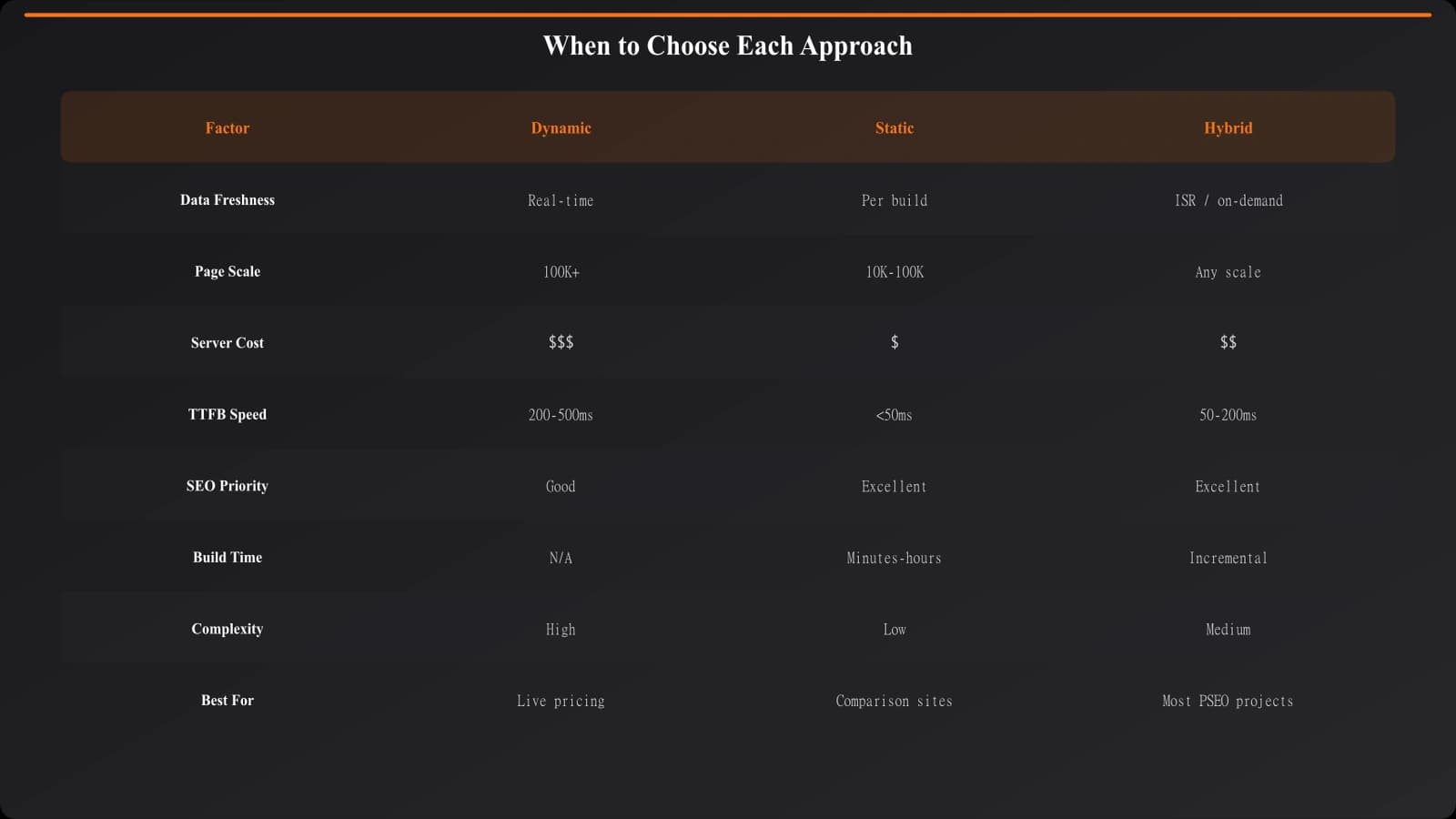
| Factor | Dynamic | Static |
|---|---|---|
| Data freshness | Immediate | Build-dependent |
| Page speed | Moderate (cacheable) | Excellent |
| Crawlability | Server-dependent | Excellent |
| Infrastructure | Complex | Simple |
| Scale ceiling | Very high | Moderate |
| Update workflow | Database update | Rebuild + deploy |
Generate Static PSEO Pages at Scale
Create optimized static comparison pages with built-in templating and data integration.
Try for Free
The Hybrid Approach
Most successful PSEO projects use neither pure dynamic nor pure static—they combine both.
Common Hybrid Patterns
Static pages with dynamic data. Generate static page shells but fetch real-time data (prices, availability) via JavaScript after page load. Crawlers see static content; users see current data.
Incremental static regeneration (ISR). Pages are static but regenerate on a schedule or when data changes. Next.js and similar frameworks support this natively—stale pages serve while fresh versions build in the background.
Static for high-value, dynamic for long-tail. Pre-generate your top 1,000 pages statically. Serve long-tail pages dynamically. Most traffic hits static pages; most URLs are dynamic but infrequently requested.
Implementation Considerations
Hybrid approaches add complexity. You need to manage:
- Cache invalidation when data changes
- Fallback behavior when static pages don't exist yet
- Monitoring to ensure both systems work correctly
- Deployment pipelines that handle both modes
The complexity is usually worth it for the combined benefits, but don't underestimate implementation effort.
Making the Decision
Choose your approach based on these key questions:
How often does data change? Daily price changes push toward dynamic or ISR. Quarterly product updates work fine with static.
How many pages are you targeting? Under 10,000 pages, static is usually fine. Over 100,000, consider dynamic for primary generation with static for top performers.
What's your technical stack? Already running a CMS with good caching? Dynamic is natural. Using JAMstack with Netlify? Static fits better.
How critical is page speed? Competitive categories where Core Web Vitals matter favor static. Less competitive spaces are more forgiving of dynamic overhead.
What can your team maintain? Static generation is simpler to operate. Dynamic requires ongoing database and application maintenance.
Choosing Your PSEO Architecture
Neither dynamic nor static is universally better—both power successful PSEO projects. The right choice depends on your specific requirements around freshness, scale, performance, and team capabilities.
For most listicle and comparison content, static or ISR provides the best balance. You get SEO-friendly performance, simple infrastructure, and sufficient freshness for content that updates periodically rather than continuously.
Dynamic shines when data changes constantly, when you need personalization, or when page count makes static builds impractical. But even then, heavy caching often makes dynamic pages behave like static ones.
Start with the simpler approach (usually static) and add complexity only when requirements demand it. You can always evolve architecture as your PSEO project scales.
For related implementation guidance, see Listicle Refresh System and E-commerce PSEO.

Product Manager at BestPage. Pioneer in AEO research since 2024, exploring the convergence of SEO and GEO (Generative Engine Optimization). Led multiple AI-powered content optimization projects that achieved 300%+ citation increases in ChatGPT and Perplexity.