
Publishing a listicle isn't the end—it's the beginning of an ongoing maintenance responsibility. The product you recommended last month might have doubled in price. The “best budget option” might be discontinued. A genuinely better alternative might have launched yesterday.
Stale listicles hurt users, hurt your credibility, and eventually hurt your rankings. Google favors fresh content for queries where freshness matters—and product comparisons definitely qualify.
This guide covers how to build a refresh system that keeps listicle content current without requiring heroic manual effort. The right combination of automation and strategic manual review makes freshness sustainable at scale.
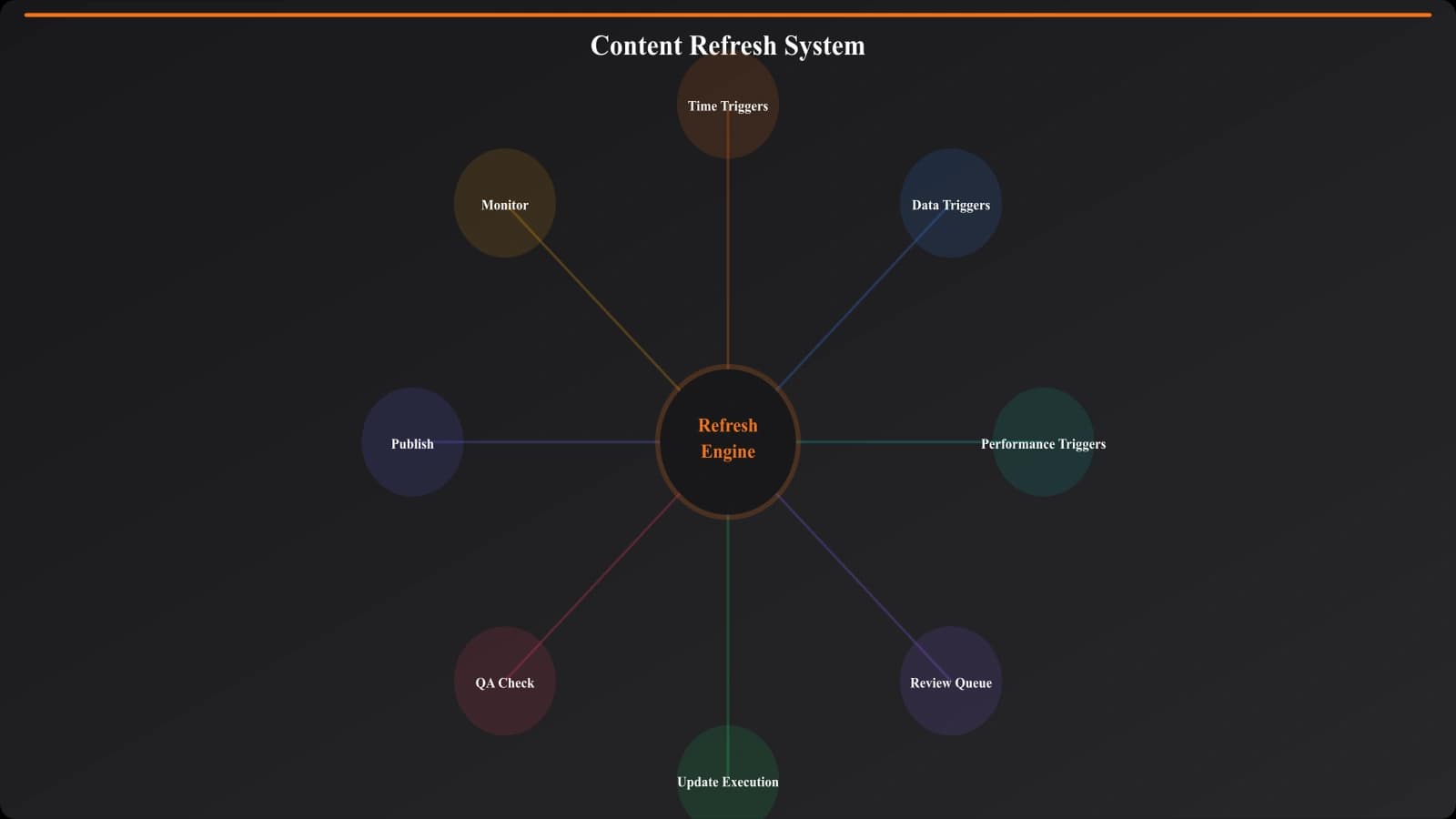
Refresh Triggers
Not all refreshes are equal. Different triggers indicate different types of updates needed.
Time-Based Triggers
The simplest trigger: schedule reviews based on content age. Different categories require different cadences:
- Fast-moving categories (tech, SaaS): Monthly light review, quarterly deep refresh
- Moderate categories (appliances, home goods): Quarterly review, biannual deep refresh
- Stable categories (classic products): Biannual review, annual deep refresh
Time triggers ensure nothing falls through the cracks even if automated monitoring misses changes.
Data-Triggered Refreshes
Automated monitoring of data changes flags pages for review:
- Price changes — Significant price shifts may change recommendations
- Availability changes — Out-of-stock products shouldn't be #1 picks
- Rating changes — Major rating drops signal quality issues
- New product launches — Competitors to existing picks emerge
- Discontinuations — Products removed from market
These triggers require data feeds—either API access to product sources or regular scraping of key information.
Performance-Triggered Refreshes
SEO performance changes can indicate content issues:
- Ranking drops — Competitors may have fresher content
- Traffic decline — Page may be losing relevance
- Bounce rate increase — Users may be finding outdated information
- Search Console issues — Technical or quality problems flagged
Connect your analytics to your refresh queue. Pages showing performance degradation jump the priority list.
| Trigger Type | Detection Method | Typical Response |
|---|---|---|
| Time elapsed | Content age tracking | Scheduled review |
| Price change >20% | Price monitoring API | Update pricing, verify pick still valid |
| Product discontinued | Availability monitoring | Remove product, promote next pick |
| Ranking drop >5 spots | Rank tracking | Content audit, competitor analysis |
| New competitor launch | Market monitoring | Evaluate for inclusion |
Types of Updates
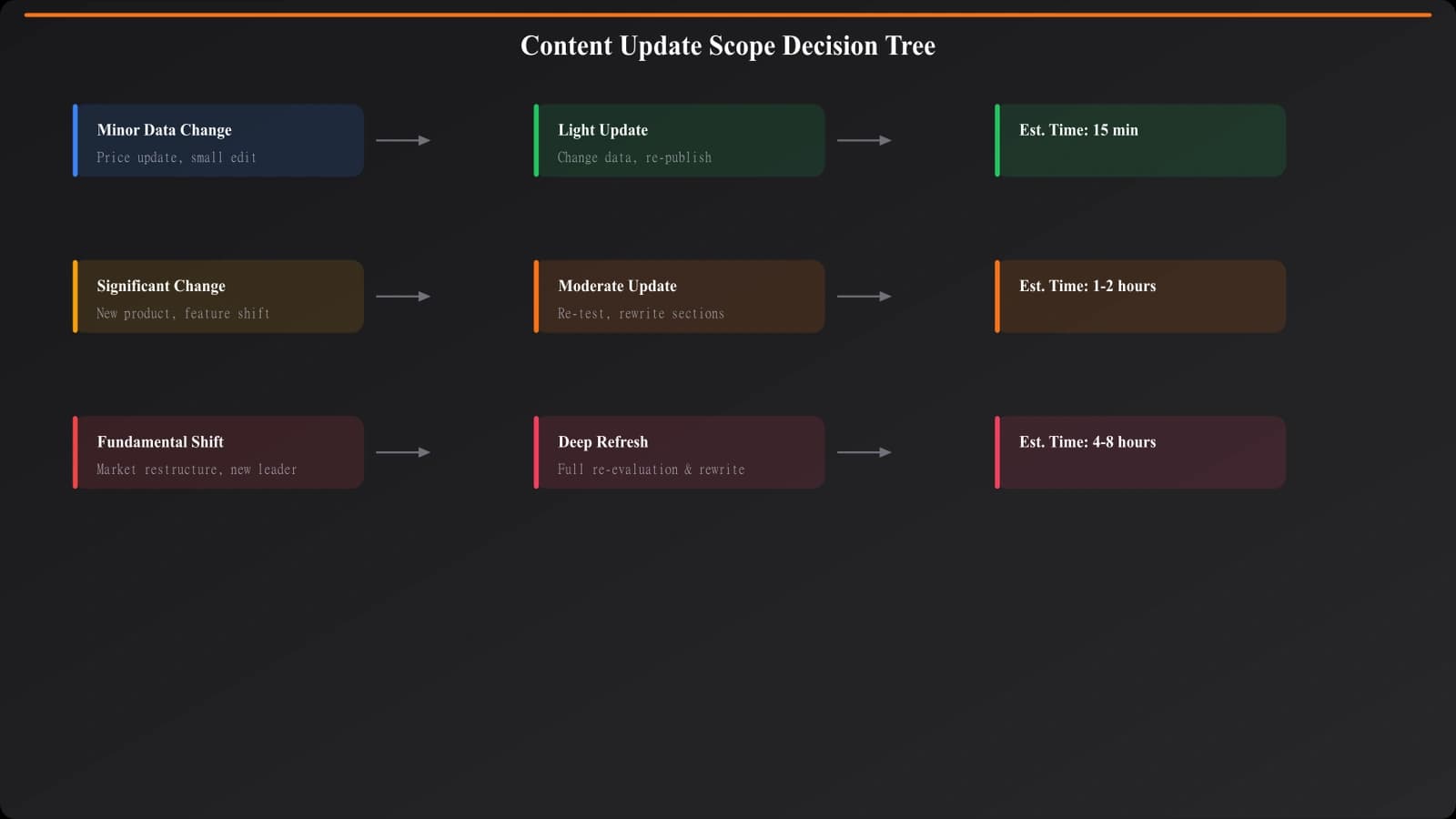
Not every refresh requires rewriting the page. Match the update scope to the trigger.
Light Updates
Quick fixes that don't require deep review:
- Update prices to current values
- Fix broken links
- Update “last reviewed” date
- Correct minor factual changes (version numbers, specs)
Light updates can often be automated. Pull fresh prices from data sources and update pages programmatically. Human review confirms the changes make sense.
Moderate Updates
Content adjustments that require editorial judgment:
- Reorder rankings based on new information
- Add new products that have emerged
- Remove discontinued products
- Update pros/cons based on user feedback
- Refresh editorial commentary
Moderate updates need human involvement but don't require starting from scratch. The page structure remains; the content within sections changes.
Deep Refreshes
Complete content rebuilds for major changes:
- Category landscape has fundamentally shifted
- Top picks are all outdated or discontinued
- Competitor content now significantly better
- Original testing methodology needs updating
Deep refreshes are essentially new content projects. Budget time and resources accordingly.
Keep Listicles Fresh Automatically
Built-in data monitoring and refresh workflows keep your comparison content current.
Try for Free
Automation Opportunities
The more you automate, the more pages you can maintain. Focus automation on detection and data updates; preserve human judgment for editorial decisions.
Monitoring Automation
Set up automated monitoring for:
- Product data feeds — Pull pricing, availability, specs on schedule
- Rank tracking — Monitor your positions for target keywords
- Competitor monitoring — Detect when competitors update their content
- Alert aggregation — Consolidate triggers into a review queue
Update Automation
Certain updates can be fully automated:
- Price updates from verified data sources
- Availability status changes
- “Last updated” timestamp updates
- Removing products flagged as discontinued
Even automated updates should have human review before publishing. Automation handles the grunt work; humans verify quality.
Workflow Automation
Automate the refresh workflow itself:
- Trigger detected → page added to review queue
- Queue prioritized by trigger severity and page importance
- Assignee notified of pending reviews
- Review completed → changes staged
- Changes approved → publishing scheduled
- Published → monitoring resumes
Tools like Airtable, Notion, or custom dashboards can manage this workflow at scale.
Building Your Refresh System
Content freshness is a competitive advantage—especially in categories where recommendations change frequently. Sites that maintain current listicles outrank sites that publish and forget.
Start with the basics: time-based review triggers for your most important pages. Add data monitoring as resources allow. Build toward a system where triggers create queues, queues assign tasks, and tasks result in updates with minimal friction.
The goal isn't constant updating—it's appropriate updating. Pages refresh when they need to, not more often, not less often. A good refresh system makes freshness effortless rather than heroic.
For related quality maintenance topics, see Avoiding Thin Content in PSEO and Dynamic vs Static PSEO.

Product Manager at BestPage. Pioneer in AEO research since 2024, exploring the convergence of SEO and GEO (Generative Engine Optimization). Led multiple AI-powered content optimization projects that achieved 300%+ citation increases in ChatGPT and Perplexity.