
When you're building a library of comparison and listicle content, the connections between pages matter as much as the pages themselves. A well-linked content library signals topical authority to search engines, helps users discover relevant content, and distributes the ranking power of your strongest pages across your entire collection.
But internal linking for listicle sites has unique characteristics. You're not just connecting blog posts about random topics—you're building a structured network of comparisons, alternatives, and best-of pages that have natural relationships to each other. A page comparing project management tools naturally connects to pages about Asana alternatives, Monday.com reviews, and comparisons like “Asana vs Monday.”
This guide provides a framework for internal linking specifically designed for comparison content libraries. We'll cover the types of relationships between listicle pages, linking patterns that maximize SEO value, and practical implementation strategies that work at scale.
Why Internal Linking Matters for Listicles
Before diving into tactics, let's understand why internal linking is particularly important for comparison content libraries.
Building Topical Authority
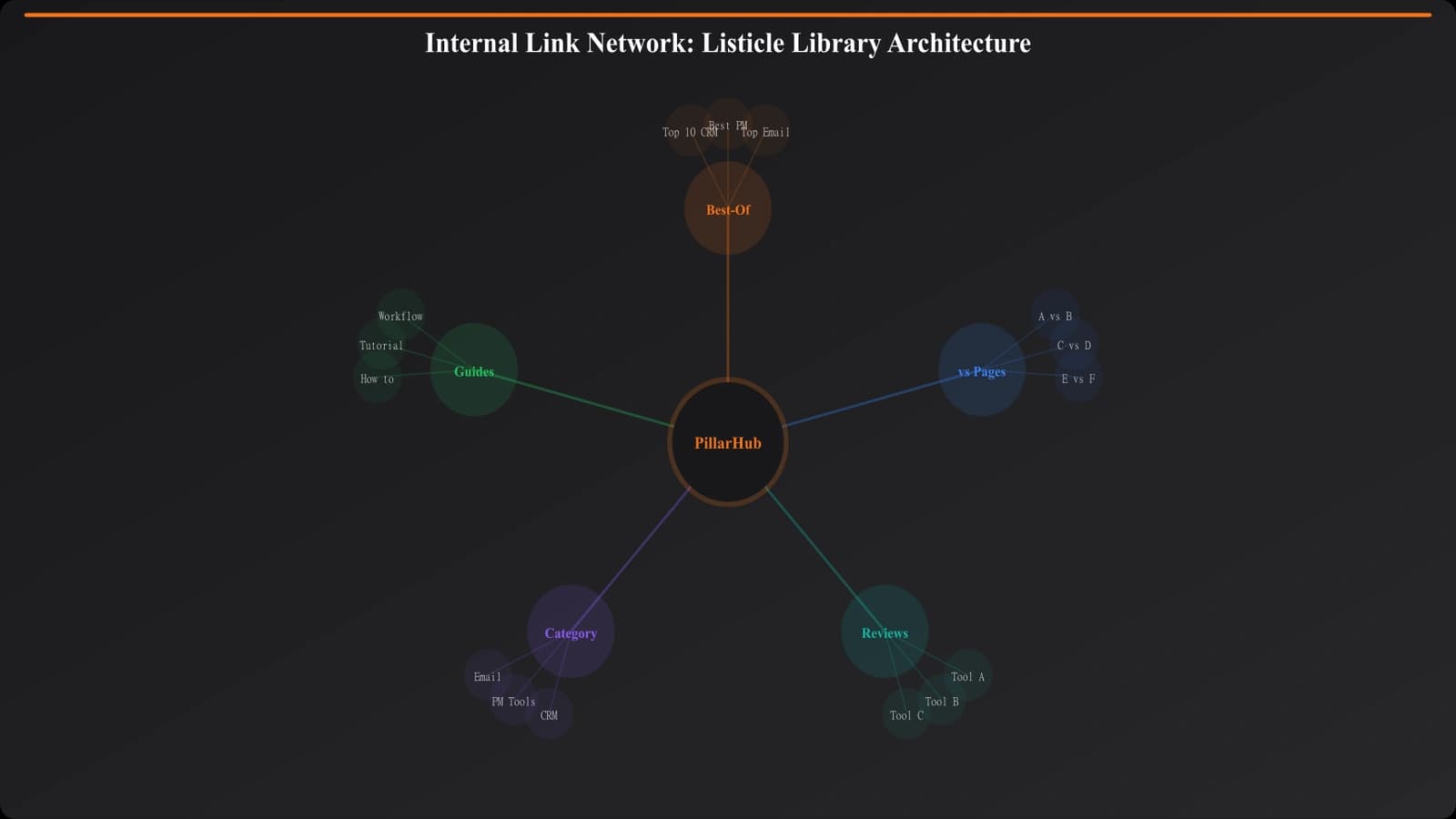
Search engines use internal linking patterns to understand which topics your site has depth and authority on. When you have a “Best Project Management Software” pillar page that links to and receives links from 15 related articles about project management tools, it signals that you're a comprehensive resource on that topic.
This topical authority helps you rank for competitive category terms. A site with one isolated comparison page will struggle against a site with a interconnected cluster of related content covering the topic from multiple angles.
Distributing Link Equity
When other sites link to your content, they pass ranking power (link equity) to those pages. Internal linking lets you distribute that equity across your site. A viral comparison post that earns lots of external links can help your other pages rank better—if you've connected them properly with internal links.
Without internal linking, pages become orphaned islands that don't benefit from your site's overall authority. With strategic internal linking, your whole library rises together.
User Experience and Engagement
Beyond SEO, internal links help users find relevant content. Someone reading “Best CRM Software” might want to see “Salesforce Alternatives” or “CRM for Small Business.” Good internal linking anticipates these needs and provides pathways to related content.
This improves engagement metrics—time on site, pages per session—which may indirectly help rankings and certainly helps with conversions.
Types of Content Relationships
Different types of listicle content have different relationships to each other. Understanding these relationships helps you decide which pages should link to which.
Pillar to Supporting
The most important relationship is between pillar (comprehensive cornerstone content) and supporting pages that cover specific aspects of the same topic.
| Pillar Page | Supporting Pages | Link Direction |
|---|---|---|
| Best Project Management Software | Best PM for Marketing Teams | Both directions |
| Best Project Management Software | Asana vs Monday | Both directions |
| Best Project Management Software | Monday.com Review | Both directions |
| Best CRM Software | CRM for Real Estate | Both directions |
Linking pattern: Supporting pages should always link to their parent pillar page. Pillar pages should link to relevant supporting pages, but don't need to link to every single one—prioritize the most valuable and relevant.
Cross-Category Connections
Sometimes pages from different categories relate to each other. A page about “Marketing Automation Software” might naturally reference “Email Marketing Tools” or “CRM Software.”
Linking pattern: Link when there's a genuine user benefit or topical connection. Don't force cross-category links just to distribute equity—the relevance should be clear to readers.
Product Mention Links
When you mention a specific product in one listicle that you cover in depth elsewhere, that's an opportunity for an internal link.
Example: Your “Best Email Marketing Tools” listicle mentions Mailchimp. If you have a “Mailchimp Alternatives” page or “Mailchimp Review,” link to it when Mailchimp is mentioned.
Linking pattern: Link on the first meaningful mention of a product to related product-specific content. Don't over-link—one link per product per page is usually sufficient.
Sibling Relationships
Pages at the same level in your content hierarchy often relate to each other. “Best CRM for Real Estate” is a sibling to “Best CRM for Nonprofits”—both are use-case-specific variations under the CRM umbrella.
Linking pattern: Contextual links when relevant (“If you're in the nonprofit sector, see our guide to CRM for Nonprofits”) or “Related content” sections that surface sibling pages.
Effective Linking Patterns
Now let's look at specific linking patterns that work well for listicle libraries.
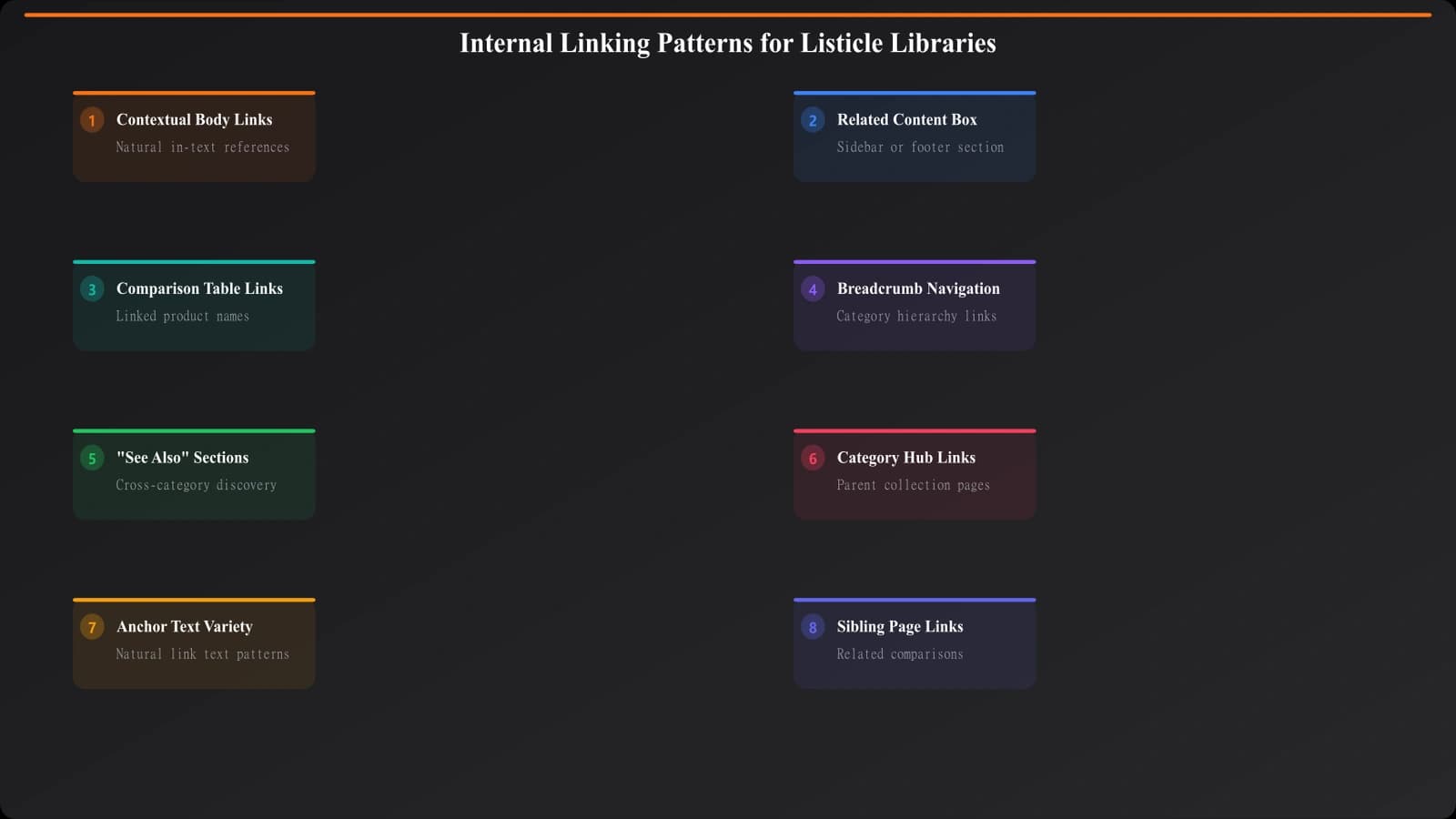
Pattern 1: Contextual Body Links
The most valuable internal links appear naturally within body content. When discussing a topic, you link to related content where it makes sense in context.
Example: “If you're specifically looking for tools that integrate well with Slack, see our guide to [link to: project management tools with Slack integration].”
Best practices:
- Use descriptive anchor text that indicates what the linked page is about
- Place links where they add value to the reader's journey
- Don't interrupt flow with excessive links
- 2-5 contextual links per article is typically appropriate
Pattern 2: Related Content Sections
Dedicated sections that surface related content can help users discover more of your library:
- “Related Comparisons” at the end of an article
- “You Might Also Like” sidebar modules
- “Explore More in [Category]” category landing pages
Best practices:
- Keep related content sections focused (3-5 items)
- Prioritize the most relevant links, not just the newest
- Use consistent placement across pages so users know where to find more
Pattern 3: Comparison Table Links
Your comparison tables offer natural linking opportunities. When listing products in a comparison table, link product names to relevant product-specific pages.
| Product | Best For | Related Content |
|---|---|---|
| Asana | Marketing teams | [Link to Asana Review, Asana vs Monday] |
| Monday.com | Visual workflows | [Link to Monday Review, Monday Alternatives] |
| ClickUp | Feature richness | [Link to ClickUp Review, ClickUp vs Asana] |
Best practices:
- Link product names if you have dedicated product pages
- Add a “Deep Dive” or “Learn More” column for links to detailed reviews
- Keep table links minimal to maintain scannability
Pattern 4: Breadcrumb Navigation
Breadcrumbs provide hierarchical linking that reinforces your site structure:
Home > Software Comparisons > Project Management > Best PM for Marketing Teams
Best practices:
- Every page should have breadcrumbs showing its position in the hierarchy
- Each breadcrumb segment should link to its corresponding category page
- Use structured data (BreadcrumbList schema) to help search engines understand the hierarchy
Build Optimized Listicle Libraries
Create interconnected comparison content with built-in internal linking structures.
Try for Free
Anchor Text Best Practices
The text you use for internal links (anchor text) affects both user experience and SEO. Here's how to get it right.
Use Descriptive Anchor Text
Anchor text should tell users and search engines what the linked page is about. Avoid generic phrases like “click here” or “read more.”
| Poor Anchor Text | Better Anchor Text |
|---|---|
| “Click here for more” | “our guide to CRM for small business” |
| “Read more” | “Salesforce alternatives” |
| “This article” | “how to choose between Asana and Monday” |
| “Learn more” | “complete comparison table UX patterns” |
Natural Variation
When linking to the same page from multiple locations, use natural variation in anchor text. If every link to your “Best CRM Software” page uses that exact phrase, it looks unnatural. Mix in variations:
- “best CRM software”
- “top CRM tools for 2026”
- “our comprehensive CRM comparison”
- “guide to choosing CRM software”
Keyword Relevance Without Over-Optimization
Anchor text should include relevant keywords, but don't force exact-match keywords if they don't fit naturally. Natural-sounding anchor text that describes the linked content is better than awkwardly stuffed keywords.
Scaling Internal Linking
When you have hundreds of listicle pages, manual linking becomes impractical. Here are strategies for scaling internal linking.
Automated Linking Systems
Build systems that automatically suggest or insert internal links based on rules:
- Product name matching: Automatically link product names to their review/alternatives pages
- Category matching: Insert related content modules based on page category
- Pillar matching: Every supporting page automatically links to its pillar
- Keyword matching: Flag content for potential internal links based on keyword presence
Maintaining a Link Inventory
Track what pages exist and their relationships in a structured inventory:
| Page | Category | Parent Pillar | Products Covered | Link Opportunities |
|---|---|---|---|---|
| Asana Alternatives | PM Tools | Best PM Software | Asana, Monday, Trello... | Link from any Asana mention |
| CRM for Real Estate | CRM | Best CRM Software | Follow Up Boss, Wise Agent... | Link from real estate context |
This inventory helps your team (or automation) know what linking opportunities exist when creating or updating content.
Regular Link Audits
Schedule periodic audits to identify:
- Orphan pages: Pages with no internal links pointing to them
- Underlinkined pages: Important pages that should have more internal links
- Broken links: Internal links pointing to deleted or moved pages
- Missing relationships: Pages that should link to each other but don't
Tools like Screaming Frog, Sitebulb, or Ahrefs can help automate these audits.
Implementation Guide
Here's how to implement a robust internal linking strategy for your listicle library:
- Map your content relationships. Document which pages are pillars, which are supporting, and what products each covers.
- Establish linking rules. Define which relationships always require links (supporting to pillar) and which are contextual.
- Create linking templates. Build templates for your listicle pages that include standard linking elements (breadcrumbs, related content sections, pillar links).
- Build product/topic matching. Create a system to identify when a product or topic mentioned in one page is covered in depth elsewhere.
- Train your team. If humans create content, train them on anchor text best practices and linking expectations.
- Audit regularly. Schedule quarterly audits to find orphan pages, broken links, and missed opportunities.
- Iterate based on performance. Monitor which linked pages get traffic from internal links and optimize accordingly.
Internal linking isn't glamorous, but it's one of the highest-ROI activities for a listicle content library. The compounding benefits of better topical authority, distributed link equity, and improved user experience make it worth the investment in building systematic linking practices.
For the broader site architecture that internal linking plugs into, see our guide on Hub and Spoke Architecture for Comparison Sites. For URL structure considerations that affect linking, check out URL Structure for PSEO: Patterns That Scale.

Product Manager at BestPage. Pioneer in AEO research since 2024, exploring the convergence of SEO and GEO (Generative Engine Optimization). Led multiple AI-powered content optimization projects that achieved 300%+ citation increases in ChatGPT and Perplexity.