
When building programmatic SEO sites, URL structure is one of those decisions that seems simple at first but has enormous downstream implications. The pattern you choose determines how search engines understand your content relationships, how easily users can navigate your site, and whether you'll face duplicate content issues as you scale.
The challenge is that URL structure decisions are hard to change later. Migrating URLs means redirects, potential ranking drops during transition, and the risk of broken links. Getting it right from the start saves enormous pain down the road.
This guide provides URL structure patterns specifically designed for programmatic comparison and listicle sites. We'll cover different content types, common pitfalls, and practical implementation guidance.
Core URL Principles for PSEO
Before diving into specific patterns, let's establish the principles that should guide URL structure decisions for programmatic sites.
Human Readability
URLs should make sense to humans who read them. A user should be able to look at a URL and understand what page they're about to visit.
| Poor URL | Better URL | Why Better |
|---|---|---|
| /p/12345 | /project-management/best-tools | Descriptive, clear topic |
| /compare?a=asana&b=monday | /compare/asana-vs-monday | Clean, shareable, SEO-friendly |
| /cat/pm/sub/marketing | /project-management/for-marketing-teams | Full words, clear hierarchy |
Consistency at Scale
Every URL should follow the same pattern. When you generate thousands of pages programmatically, inconsistent patterns create confusion for both users and search engines.
Define your patterns upfront and enforce them systematically. Document your URL rules so everyone on the team follows the same conventions.
Clear Hierarchy
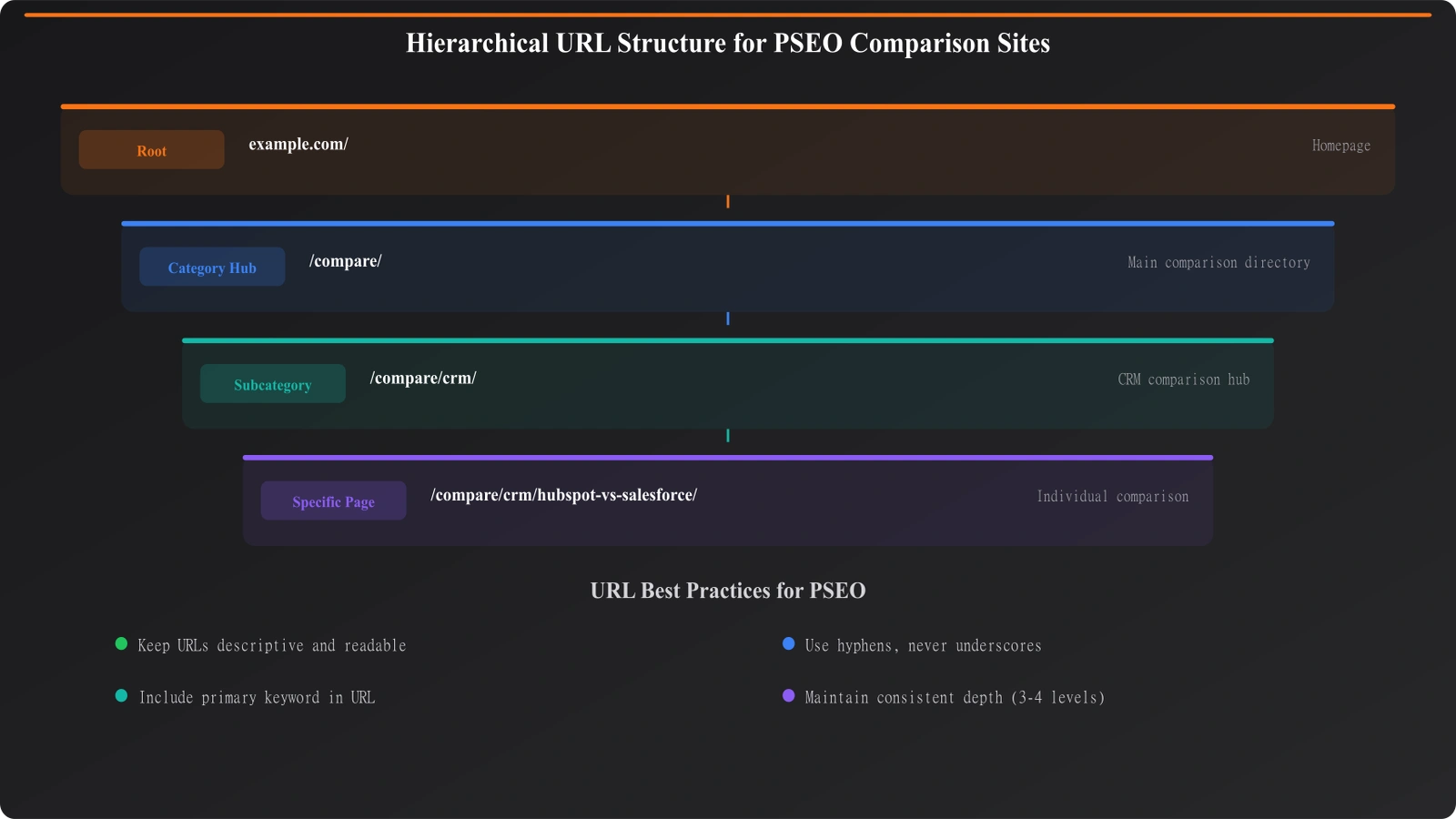
URL structure should reflect content hierarchy. Parent categories should appear before specific pages in the URL path:
/crm/→ CRM category hub/crm/best-crm-software→ Best CRM listicle (under CRM)/crm/salesforce-alternatives→ Salesforce alternatives (under CRM)/crm/for-real-estate→ CRM for real estate (under CRM)
This hierarchy helps search engines understand relationships and makes navigation intuitive.
Future-Proofing
Consider how your URL structure will accommodate growth. If you start with /best-crm and later want to add /best-crm-for-small-business, does your structure support that cleanly? Think through likely expansion scenarios before committing to a pattern.
URL Patterns by Content Type
Different types of comparison content call for different URL patterns. Here are recommended structures for common content types.
Category Hub Pages
Category pages serve as the entry point for a topic area. They should have short, memorable URLs at the top of the hierarchy.
Pattern: /[category-slug]/
Examples:
/project-management//crm//email-marketing//accounting-software/
Best-Of Listicles
Your main comparison listicles covering the best tools in a category.
Pattern: /[category]/best-[category]-[qualifier]
Examples:
/project-management/best-project-management-software/crm/best-crm-for-small-business/email-marketing/best-email-marketing-tools-2026
Alternatives Pages
Pages covering alternatives to specific products.
Pattern: /[category]/[product]-alternatives
Examples:
/project-management/asana-alternatives/crm/salesforce-alternatives/email-marketing/mailchimp-alternatives
Vs Comparison Pages
Head-to-head comparison pages between specific products.
Pattern: /compare/[product-a]-vs-[product-b] or /[category]/[product-a]-vs-[product-b]
Examples:
/compare/asana-vs-monday/project-management/asana-vs-monday/crm/hubspot-vs-salesforce
Note: Alphabetize product names to avoid duplicate pages. “Asana vs Monday” and “Monday vs Asana” should be the same URL.
Use Case Pages
Pages targeting specific use cases or audiences.
Pattern: /[category]/for-[use-case] or /[category]/best-for-[use-case]
Examples:
/crm/for-real-estate/project-management/for-marketing-teams/accounting/best-for-freelancers
Location Variant Pages
For local comparison content or international variants.
Pattern: /[category]/best-in-[location] or /[location]/[category]
Examples:
/contractors/best-in-austin/austin/best-contractors/uk/best-accounting-software
| Content Type | Pattern | Example |
|---|---|---|
| Category hub | /[category]/ | /crm/ |
| Best-of listicle | /[category]/best-[type] | /crm/best-crm-software |
| Alternatives | /[category]/[product]-alternatives | /crm/salesforce-alternatives |
| Vs comparison | /compare/[a]-vs-[b] | /compare/hubspot-vs-salesforce |
| Use case | /[category]/for-[use-case] | /crm/for-real-estate |
| Location | /[category]/best-in-[location] | /contractors/best-in-austin |
Common Mistakes to Avoid
These URL structure mistakes are common in PSEO projects and can cause serious problems at scale.
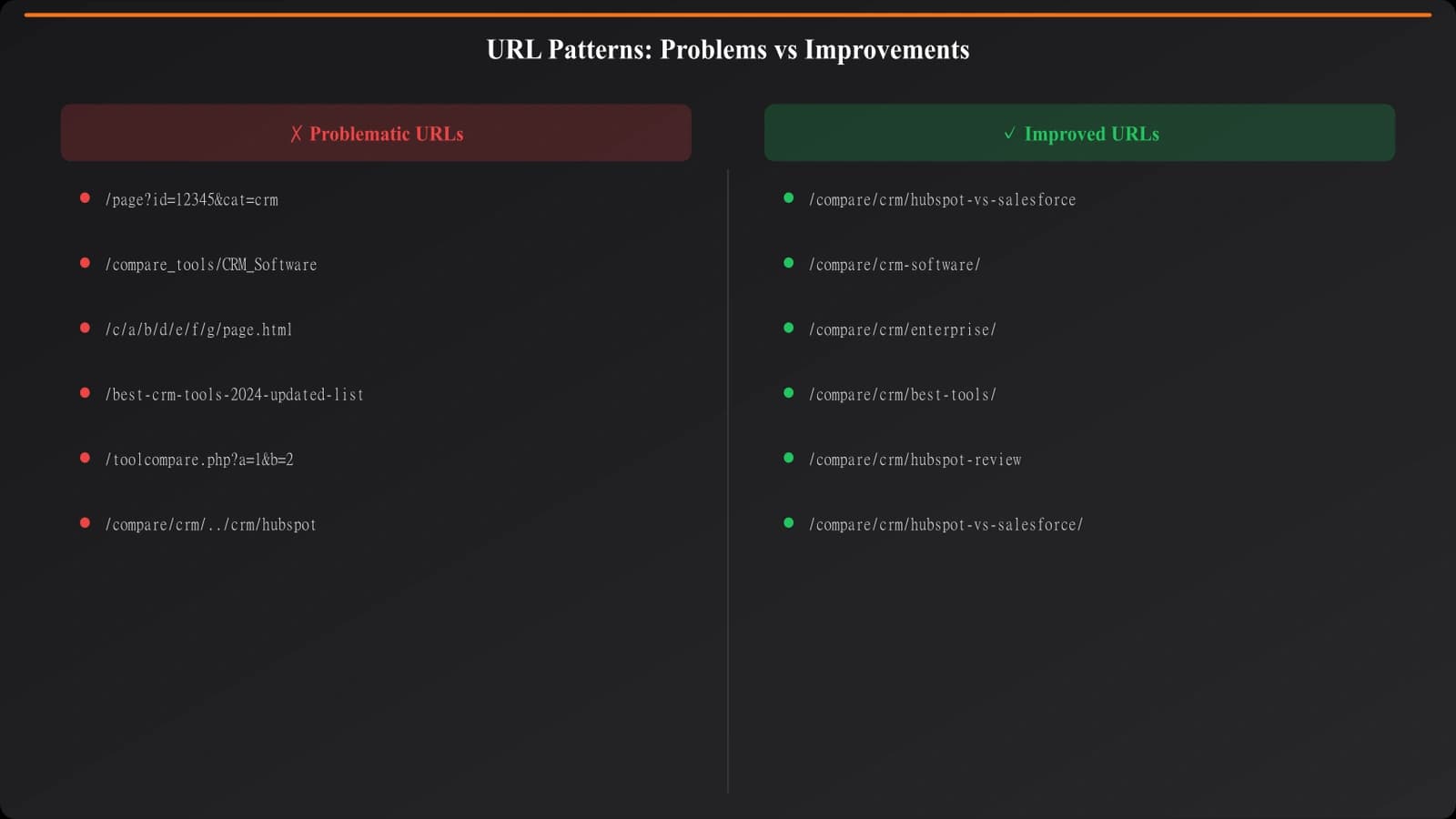
Mistake 1: Query Parameters for Core Content
Using URL parameters for what should be unique pages:
Avoid: /compare?product1=asana&product2=monday
Better: /compare/asana-vs-monday
Query parameters are harder for search engines to index properly, can't be linked as cleanly, and often trigger duplicate content issues.
Mistake 2: Inconsistent Patterns
Mixing patterns within the same content type:
Avoid:
/asana-alternatives/alternatives/monday/compare/trello-vs-notion/alternatives
Pick one pattern and use it consistently for all pages of that type.
Mistake 3: Missing Canonical Handling
When the same content can be reached through multiple URLs, you need canonical tags to tell search engines which URL is authoritative.
Example problem: Both /crm/best-crm and /best-crm show the same content without canonicalization. Search engines may index both, splitting ranking signals.
Mistake 4: Excessive URL Depth
Overly deep URL structures that are hard to navigate:
Avoid: /software/business/productivity/project-management/tools/best/2026/
Better: /project-management/best-tools-2026
Keep URLs as shallow as practical while maintaining clear hierarchy.
Build PSEO Sites That Scale
Create programmatic comparison content with properly structured URLs from the start.
Try for Free
Technical Implementation
Let's cover the technical aspects of implementing URL structures for programmatic sites.
Slug Generation
When generating URLs programmatically, consistent slug generation is essential:
- Lowercase everything: URLs should be lowercase only
- Hyphens for spaces: Use hyphens, not underscores or encoded spaces
- Remove special characters: Strip punctuation and non-ASCII characters
- Limit length: Keep slugs reasonably short (under 60 characters)
- Handle duplicates: Have a strategy for when two items generate the same slug
Redirect Management
At scale, you'll inevitably need redirects for:
- URL pattern changes
- Consolidated or deleted content
- Product name changes (e.g., if “Asana” rebranded, you'd need redirects)
- Category restructuring
Build redirect management into your infrastructure from the start. A database or configuration file mapping old URLs to new ones is easier to maintain than hardcoded redirect rules.
Canonical Tag Implementation
Every page should have a self-referencing canonical tag, and pages with multiple possible URLs need explicit canonicalization:
- Self-referencing:
<link rel="canonical" href="https://example.com/crm/best-crm" /> - Cross-domain: If content appears on multiple domains, canonical to the authoritative one
- Pagination: Paginated content needs proper rel="prev"/"next" or all-page canonicals
Implementation Checklist
Before launching or expanding your PSEO site, verify these URL structure elements:
- Document your patterns. Write down the URL pattern for every content type you'll create.
- Test at scale. Generate sample URLs for 100+ pages to spot pattern issues early.
- Validate uniqueness. Ensure your slug generation doesn't create duplicates.
- Implement canonicals. Every page needs a canonical tag.
- Set up redirect infrastructure. Have a system for managing redirects before you need it.
- Check hierarchy. Verify that URL structure reflects your intended content hierarchy.
- Test readability. Show URLs to someone unfamiliar with your site—can they guess what the page is about?
URL structure is foundational infrastructure for PSEO sites. The time invested in getting it right upfront pays dividends as you scale, while shortcuts create compounding technical debt.
For how URL structure fits into overall site architecture, see our guide on Hub and Spoke Architecture for Comparison Sites. For taxonomy considerations that affect URL design, check out Taxonomy Design: Categories That Help UX and SEO.

Product Manager at BestPage. Pioneer in AEO research since 2024, exploring the convergence of SEO and GEO (Generative Engine Optimization). Led multiple AI-powered content optimization projects that achieved 300%+ citation increases in ChatGPT and Perplexity.