
When your comparison page has 50, 100, or more items, how should users navigate through them? Traditional pagination breaks content into numbered pages. Infinite scroll loads more content as users scroll down. “Load more” buttons offer a middle ground. Each approach has different implications for SEO, user experience, and performance.
The right choice isn't universal. A “best products” listicle with 100 items has different needs than a directory of 10,000 local businesses. Your primary traffic source matters too—organic search visitors have different expectations than social media visitors.
This guide examines the trade-offs between pagination, infinite scroll, and hybrid approaches for comparison and listicle content. We'll cover SEO implications, UX considerations, and implementation recommendations for each.
Pagination: Analysis
SEO Advantages
Traditional pagination with numbered pages offers several SEO benefits:
- Each page is crawlable: Googlebot can easily discover and index content on page 2, 3, etc.
- Discrete URLs: /page/2, /page/3 create linkable, shareable URLs
- Lower initial page weight: Faster initial load with subset of content
- Clear content boundaries: Search engines understand how content is divided
- rel=prev/next signals: Can indicate relationship between pages (though Google no longer uses these)
UX Considerations
- Friction: Clicking “next” is more effort than scrolling
- Lost position: Users can't easily find where they left off
- Predictable behavior: Users understand pagination from decades of web use
- Back button works: Users can return to previous page states
- Better for purposeful browsing: Users looking for specific items can jump to pages
When to Use Pagination
- SEO is primary traffic source
- Users may want to link to or bookmark specific pages
- Content items are relatively independent (not a continuous feed)
- You have many items (50+) that would create very long pages otherwise
Infinite Scroll: Analysis
SEO Challenges
Infinite scroll creates significant SEO challenges if not implemented carefully:
- Content not crawlable: Search engines can't scroll; JS-loaded content may not be indexed
- No discrete URLs: Single URL means content beyond initial load may be invisible to search
- Page weight issues: Very long pages with many images hurt performance
- Crawl budget: Googlebot may not wait for all content to load
UX Advantages
- Low friction: Scrolling is effortless; no clicks required
- Continuous discovery: Users can browse without interruption
- Higher engagement metrics: Often increases time on page and items viewed
- Mobile-friendly: Scrolling feels natural on touch devices
When to Use Infinite Scroll
- Social or direct traffic dominates (not relying on organic search)
- Content is discovery-oriented, not search-oriented
- You can implement proper SEO-friendly infinite scroll (pushState, server rendering)
- Feed-style content where position doesn't matter
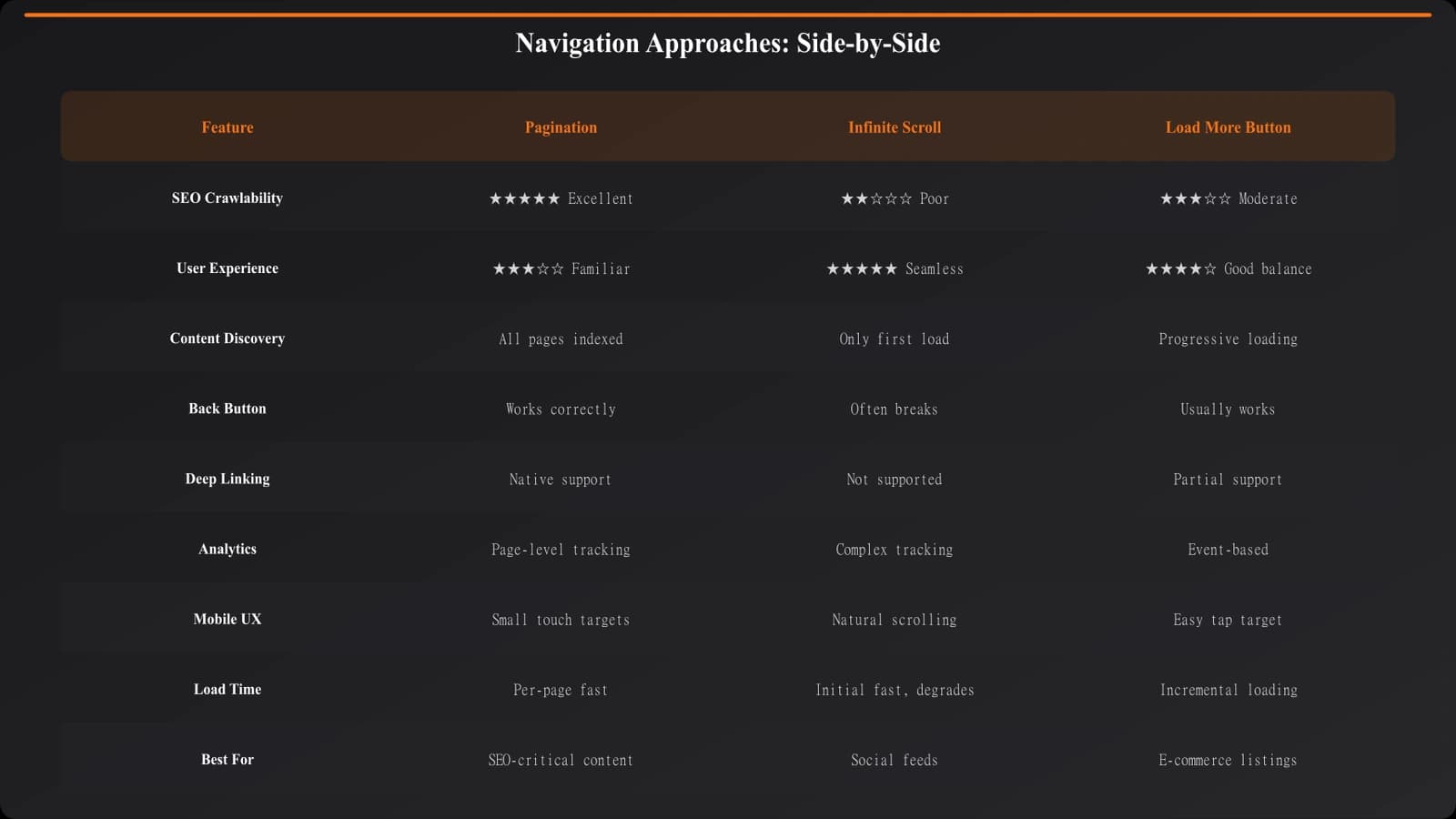
| Factor | Pagination | Infinite Scroll | Load More Button |
|---|---|---|---|
| Crawlability | Excellent | Poor (without fixes) | Moderate |
| User friction | Higher | Lowest | Low |
| Bookmarkability | Excellent | Poor | Poor |
| Performance | Good | Degrades with content | Moderate |
| Implementation complexity | Low | High (SEO-friendly) | Medium |
Hybrid Approaches
SEO-Friendly Infinite Scroll
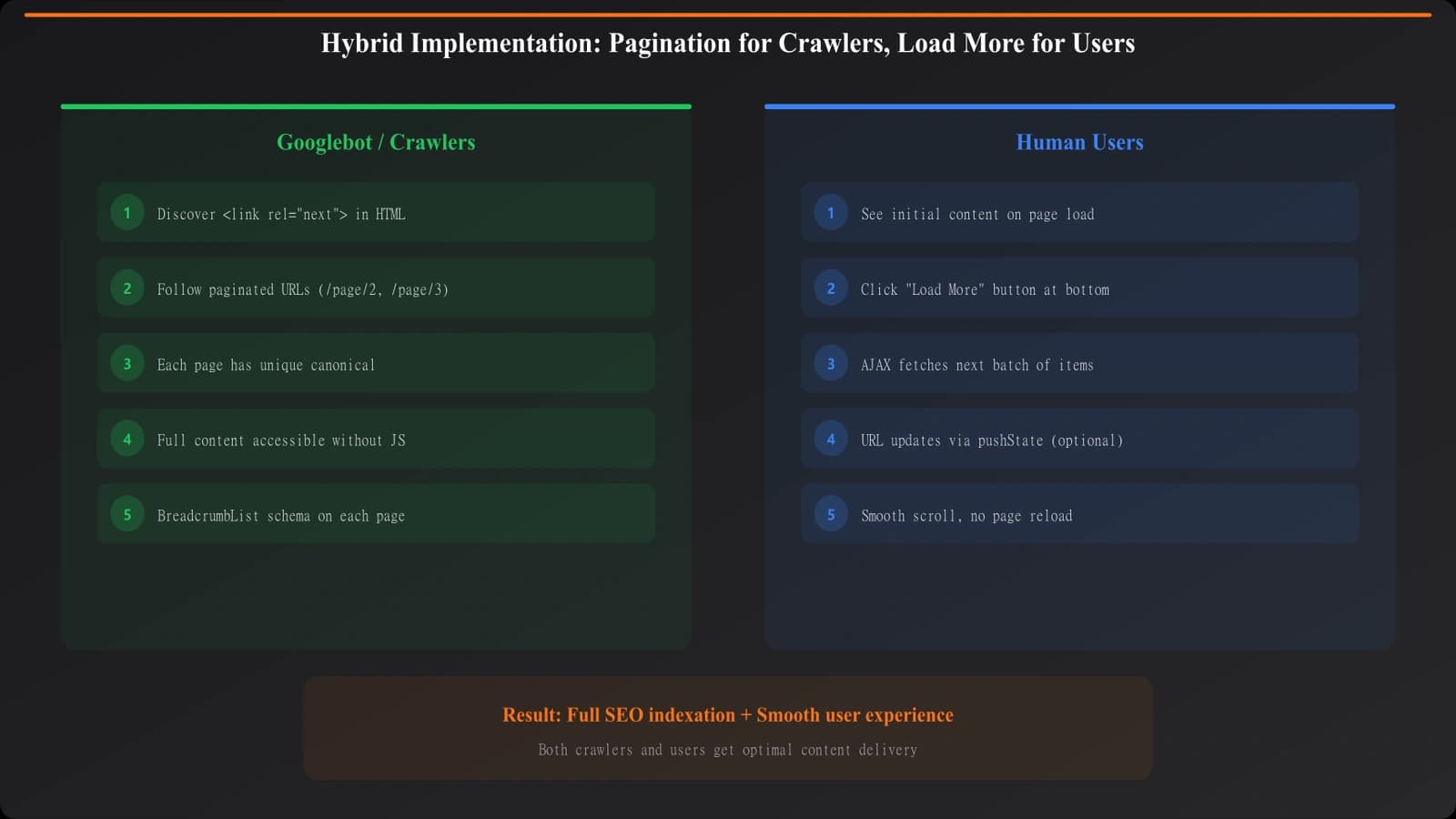
You can have infinite scroll UX with pagination SEO through hybrid implementation:
- PushState URLs: Update URL as user scrolls (e.g., /page/2 appears in address bar)
- Server-rendered paginated versions: Each page URL returns complete HTML
- Fallback for no-JS: Works as pagination when JavaScript disabled
- rel=canonical correctly set: Each paginated page canonicals to itself
Load More Button Pattern
A “Load More” button is a middle ground:
- User-initiated: Content loads on click, not automatically on scroll
- Better than pure infinite scroll for SEO: Initial content is always present
- Lower friction than pagination: No full page reload
- Still needs SEO consideration: Content loaded via JS may not be indexed
Build Crawlable Listicle Navigation
Create comparison pages with navigation patterns that work for both users and search engines.
Try for Free
Recommendations by Content Type
Comparison Listicles (10-50 items)
For typical “best of” content with moderate item counts:
- Recommendation: Single page with no pagination needed
- If longer: Paginate after 25-30 items or use “Load More”
- Lazy load images: Keep page performant without splitting content
Large Directories (100+ items)
- Recommendation: Pagination with hybrid “Load More” option
- Items per page: 20-50 depending on content density
- Include jump navigation: Let users go to page 5, 10, etc.
Discovery/Feed Content
- Recommendation: Infinite scroll with SEO-friendly implementation
- Require pushState: Update URLs as user scrolls
- Server render all pages: Each URL returns complete content
Implementation Checklist
- Determine content type and volume: How many items? How often added?
- Identify primary traffic source: SEO-dependent or not?
- Choose base pattern: Pagination, infinite scroll, or hybrid
- Ensure crawlability: All content accessible to search engines
- Implement proper URLs: Each “page” of content has a distinct, canonical URL
- Test with JavaScript disabled: Verify core content still accessible
- Monitor indexation: Confirm items beyond page 1 are being indexed
- Measure UX metrics: Track whether users engage with content across pages
Navigation pattern choice significantly affects both SEO and user experience. For comparison content where organic search matters, start with pagination or a SEO-friendly hybrid. Test and iterate based on actual user behavior and indexation data.
For faceted navigation considerations, see our guide on Faceted Navigation: Filter Without Crawl Bloat. For technical SEO foundations, check out Technical SEO for PSEO Sites.

Product Manager at BestPage. Pioneer in AEO research since 2024, exploring the convergence of SEO and GEO (Generative Engine Optimization). Led multiple AI-powered content optimization projects that achieved 300%+ citation increases in ChatGPT and Perplexity.