
Building a programmatic SEO site isn't just about content strategy—it requires technical infrastructure to manage data, generate pages, publish at scale, and monitor performance. The tooling decisions you make can either enable efficient scaling or create bottlenecks and technical debt.
The challenge is finding the right level of tooling complexity. Too simple, and you'll hit walls as you scale. Too complex, and you'll spend more time maintaining infrastructure than creating content. Most teams either under-invest in tooling (limiting scale) or over-engineer (wasting resources on solutions to problems they don't have).
This guide provides a practical framework for building a PSEO tooling stack in 2026. We'll cover the functions you need to address, tool options for each, and how to make build-vs-buy decisions. The goal is a stack that enables scale without unnecessary complexity.
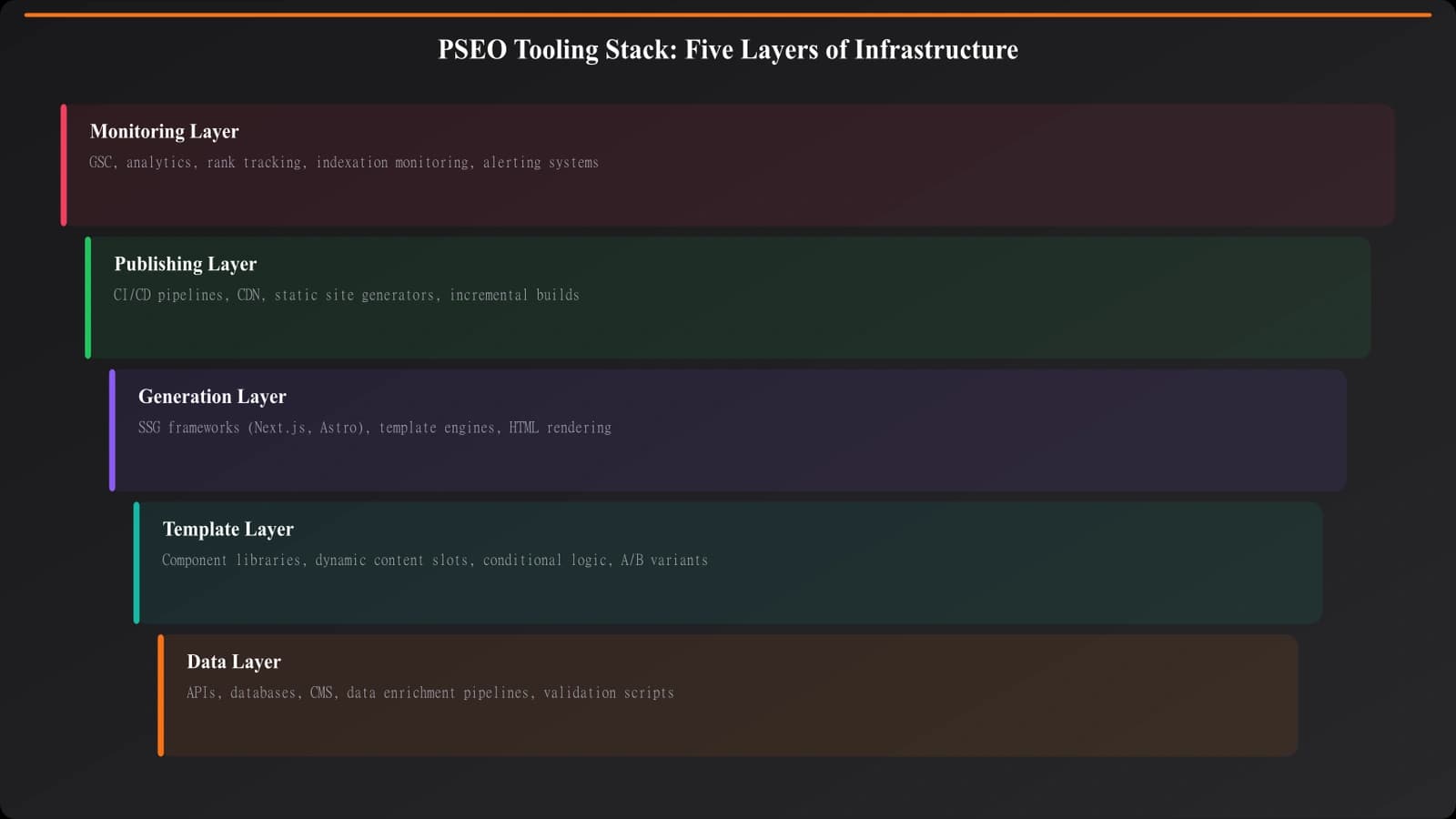
Core Functions of a PSEO Stack
Before looking at specific tools, let's understand the functions your stack needs to address.
Data Management
PSEO runs on data. You need systems to:
- Collect: Gather data about products, features, prices, reviews, etc.
- Store: Organize data in a queryable format
- Update: Keep data current as sources change
- Validate: Ensure data quality and completeness
Template Management
Templates determine what your pages look like. You need:
- Creation: Tools to build and edit templates
- Versioning: Tracking changes to templates over time
- Variation: Managing multiple template types for different content
- Testing: Previewing how templates render with different data
Content Generation
The actual page creation process:
- Rendering: Combining templates with data to create pages
- Personalization: Making each page unique despite template origins
- Quality control: Checking generated content for issues
- Batch processing: Generating many pages efficiently
Publishing
Getting content live on your site:
- Deployment: Pushing pages to production
- Scheduling: Controlling when pages go live
- Rollback: Reverting if something goes wrong
- Sitemap management: Keeping sitemaps current
Monitoring and Analytics
Understanding how content performs:
- Indexation tracking: Are pages being indexed?
- Ranking monitoring: How are pages performing in search?
- Traffic analytics: Which pages get visits?
- Content freshness: Which pages need updates?
| Function | Key Capability | Scale Consideration |
|---|---|---|
| Data Management | Store and update product data | 1000s of products, 100s of attributes |
| Template Management | Create and version templates | 5-20 template types |
| Content Generation | Render pages from templates + data | 1000s-100,000s of pages |
| Publishing | Deploy and manage live pages | Batch updates, incremental publishing |
| Monitoring | Track indexation and performance | Per-page and aggregate metrics |
Tool Options by Function
Now let's look at specific tools for each function, ranging from simple to sophisticated.
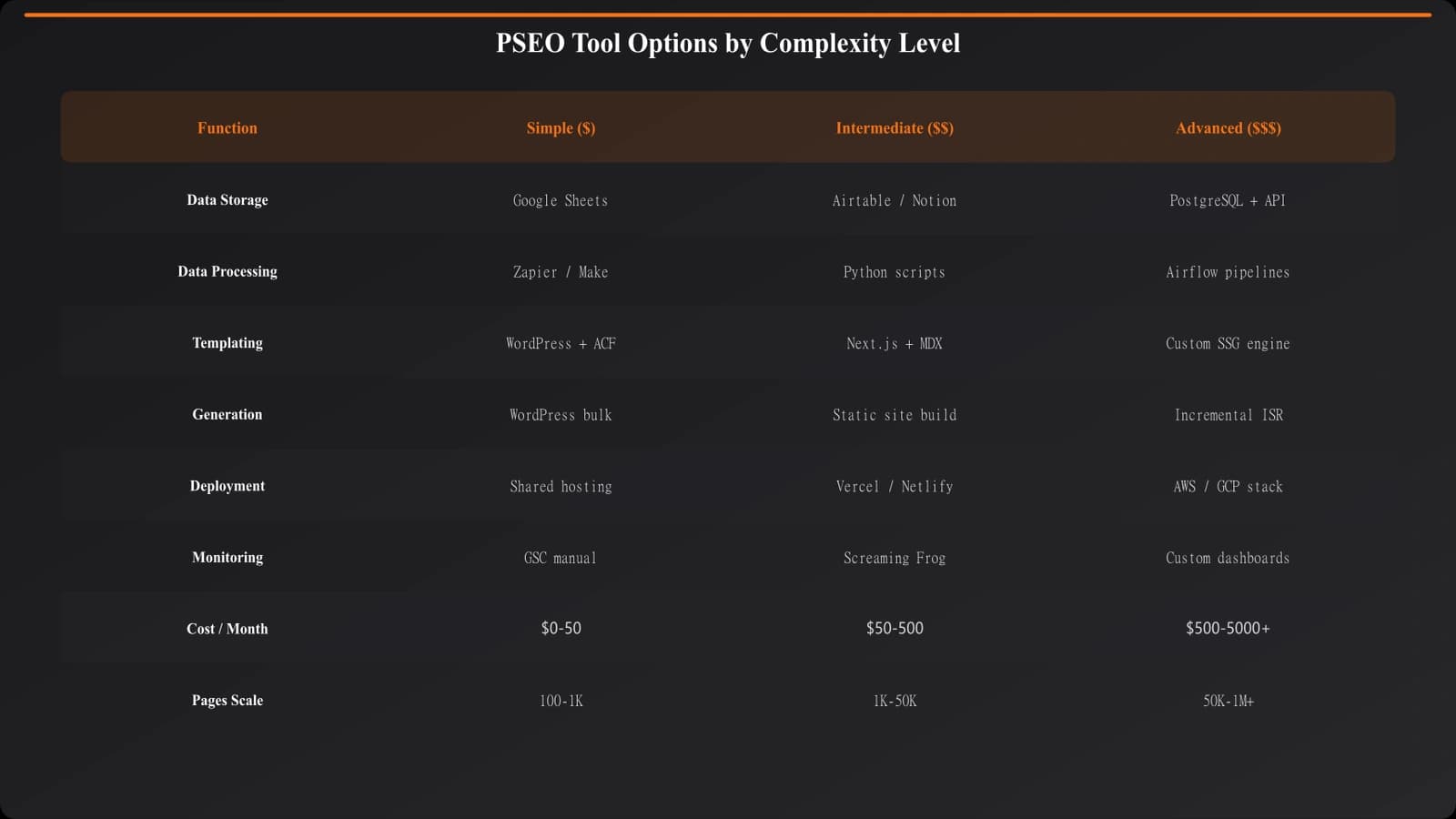
Data Management Tools
Simple (0-1000 items):
- Google Sheets or Airtable for data storage
- Manual updates or basic scripts for data collection
- CSV exports for processing
Intermediate (1000-10,000 items):
- PostgreSQL or MongoDB for structured storage
- Python scripts or APIs for data collection
- Validation rules and data quality checks
Advanced (10,000+ items):
- Data warehouse (BigQuery, Snowflake)
- ETL pipelines for data ingestion
- Automated data freshness monitoring
Template Management Tools
Simple:
- Markdown or HTML templates in a Git repository
- Basic templating engines (Jinja, Handlebars)
- Manual template testing
Intermediate:
- CMS with custom fields (WordPress, Webflow)
- Component libraries for reusable elements
- Preview environments for testing
Advanced:
- Headless CMS (Contentful, Sanity)
- Visual template builders
- A/B testing infrastructure for template variants
Content Generation Tools
Simple:
- Static site generators (Next.js, Gatsby, Hugo)
- Script-based page generation
- Manual quality review
Intermediate:
- Custom generation pipeline
- AI-assisted content variation (for uniqueness)
- Automated quality scoring
Advanced:
- LLM integration for unique content per page
- Semantic similarity checking across pages
- Multi-stage generation with review workflows
Publishing Tools
Simple:
- Git-based deployment (Vercel, Netlify)
- Manual sitemap updates
- Full rebuilds for changes
Intermediate:
- Incremental static regeneration
- Automated sitemap generation
- Staging environments for review
Advanced:
- On-demand generation with caching
- Canary deployments for testing
- Multi-region deployment
Monitoring Tools
Simple:
- Google Search Console for indexation
- Google Analytics for traffic
- Manual rank tracking
Intermediate:
- SEO platforms (Ahrefs, SEMrush) for rank tracking
- Custom dashboards aggregating data sources
- Automated alerting for issues
Advanced:
- Log file analysis for crawl behavior
- Real-time indexation monitoring
- Predictive analytics for content performance
Build vs. Buy Decisions
One of the hardest decisions in building a PSEO stack is when to build custom solutions versus using off-the-shelf tools.
When to Use Off-the-Shelf Tools
- Standard problems: If your need is common (web hosting, basic analytics), existing tools do it well
- Rapid start: When you need to move quickly and iterate
- Maintenance burden: When you don't want to maintain infrastructure
- Cost efficiency: When the cost of building exceeds the cost of buying
When to Build Custom Solutions
- Unique requirements: When your specific needs aren't met by existing tools
- Competitive advantage: When custom tooling creates differentiation
- Control needs: When you need full control over functionality
- Integration complexity: When connecting multiple systems requires custom work anyway
Decision Framework
| Function | Recommendation | Rationale |
|---|---|---|
| Data storage | Buy (database services) | Well-solved problem, not your differentiator |
| Data collection | Build (custom scripts) | Specific to your data sources and needs |
| Template system | Hybrid (CMS + custom) | Use existing CMS, customize for your templates |
| Page generation | Build (custom pipeline) | Core to your PSEO approach, needs flexibility |
| Hosting/CDN | Buy (cloud services) | Commoditized, not differentiating |
| Basic analytics | Buy (GA4, Search Console) | Standard tools work well |
| PSEO-specific monitoring | Build (custom dashboards) | Off-the-shelf tools don't address PSEO specifics |
Build PSEO Content at Scale
Generate comparison content with built-in tooling for templates, data, and publishing.
Try for Free
Example Stacks by Scale
Here are example tooling stacks for different scales of PSEO operations.
Starter Stack (100-1000 pages)
- Data: Airtable or Google Sheets
- Templates: Markdown files in Git
- Generation: Next.js or Gatsby static generation
- Publishing: Vercel or Netlify
- Monitoring: Google Search Console + Analytics
Total cost: $0-100/month
Growth Stack (1000-10,000 pages)
- Data: PostgreSQL on managed hosting
- Templates: Headless CMS (Contentful/Sanity)
- Generation: Custom generation scripts + Next.js
- Publishing: Vercel with incremental regeneration
- Monitoring: Ahrefs + custom dashboards
Total cost: $200-1000/month
Enterprise Stack (10,000+ pages)
- Data: Data warehouse + ETL pipelines
- Templates: Custom template engine + component library
- Generation: Distributed generation infrastructure
- Publishing: Multi-region CDN with edge caching
- Monitoring: Full observability stack + custom PSEO metrics
Total cost: $2000+/month
Implementation Guidance
Here's how to approach building your PSEO tooling stack:
- Start simple. Use the simplest tools that can handle your current needs. Don't build for scale you don't have.
- Validate content first. Make sure your PSEO content approach works before investing heavily in tooling.
- Identify bottlenecks. Only upgrade tooling when current tools become actual bottlenecks.
- Invest in data. Data quality is the foundation. Prioritize data management over other functions.
- Automate gradually. Add automation where you're doing manual work repeatedly at scale.
- Document your stack. Keep records of what tools you use, why, and how they connect.
- Plan for migration. When choosing tools, consider how hard it will be to migrate if you need to change later.
The right tooling stack enables PSEO scale without creating maintenance burden or technical debt. Start simple, validate your approach, and invest in more sophisticated tooling as your needs grow and become clear.
For the content production process that your tools will support, see our guide on PSEO Production System: End-to-End Workflow. For template design considerations, check out Listicle Template Design: Unique Pages at Scale.

Product Manager at BestPage. Pioneer in AEO research since 2024, exploring the convergence of SEO and GEO (Generative Engine Optimization). Led multiple AI-powered content optimization projects that achieved 300%+ citation increases in ChatGPT and Perplexity.