
The above-fold real estate on your listicle is the most valuable space on your entire website. It's where the bounce vs. engage decision happens, usually within 3 seconds of landing.
And here's the frustrating part: most listicles waste this space. Giant hero images that add no information. Paragraphs of introduction nobody reads. Brand messaging instead of user value. The stuff that actually helps visitors? Pushed below the fold where half of them never see it.
The framework in this guide flips that equation. Everything above the fold should serve one purpose: convince visitors to scroll or click. If an element doesn't directly contribute to that goal, it gets pushed down or removed entirely.
This is the deep dive on above-fold optimization specifically. For the complete conversion framework that puts this in context, see our CRO for Listicles guide.
What Visitors Are Deciding in the First 3 Seconds
Understanding the cognitive process visitors go through helps explain why certain above-fold elements matter. When someone lands on your listicle, their brain runs through a rapid evaluation:
The Subconscious Evaluation
Question 1: “Is this what I searched for?”
They scan for their search terms. If your H1 doesn't echo their query, they assume they're in the wrong place. Keyword in the title isn't just for SEO—it's for instant recognition.
Question 2: “Is this current?”
For product comparisons, outdated information is worse than no information. Visitors look for date signals. If they can't quickly confirm the content is recent, doubt creeps in.
Question 3: “Is this credible?”
They're looking for signals that distinguish your page from content farms. Author name, site recognition, design quality—all contribute to a snap credibility judgment.
Question 4: “What's in it for me?”
This is where Quick Picks or your #1 recommendation comes in. Showing immediate value→ldquo;here's the answer you're looking for”—earns the scroll to see more.
Common Above-Fold Bounce Triggers
When visitors bounce without scrolling, it's usually because of one of these above-fold failures:
- Content mismatch →Page doesn't appear to match search intent
- Outdated appearance →No date, old copyright year, stale design
- Content farm signals →Generic stock photos, no author, templated feel
- No immediate value →Just intro text, no glimpse of actual recommendations
- Aggressive promotion →Popup immediately, pushy CTAs before content
- Poor mobile experience →Slow load, broken layout, text too small
Your above-fold design needs to actively counter each of these bounce triggers.
The Essential Above-Fold Elements
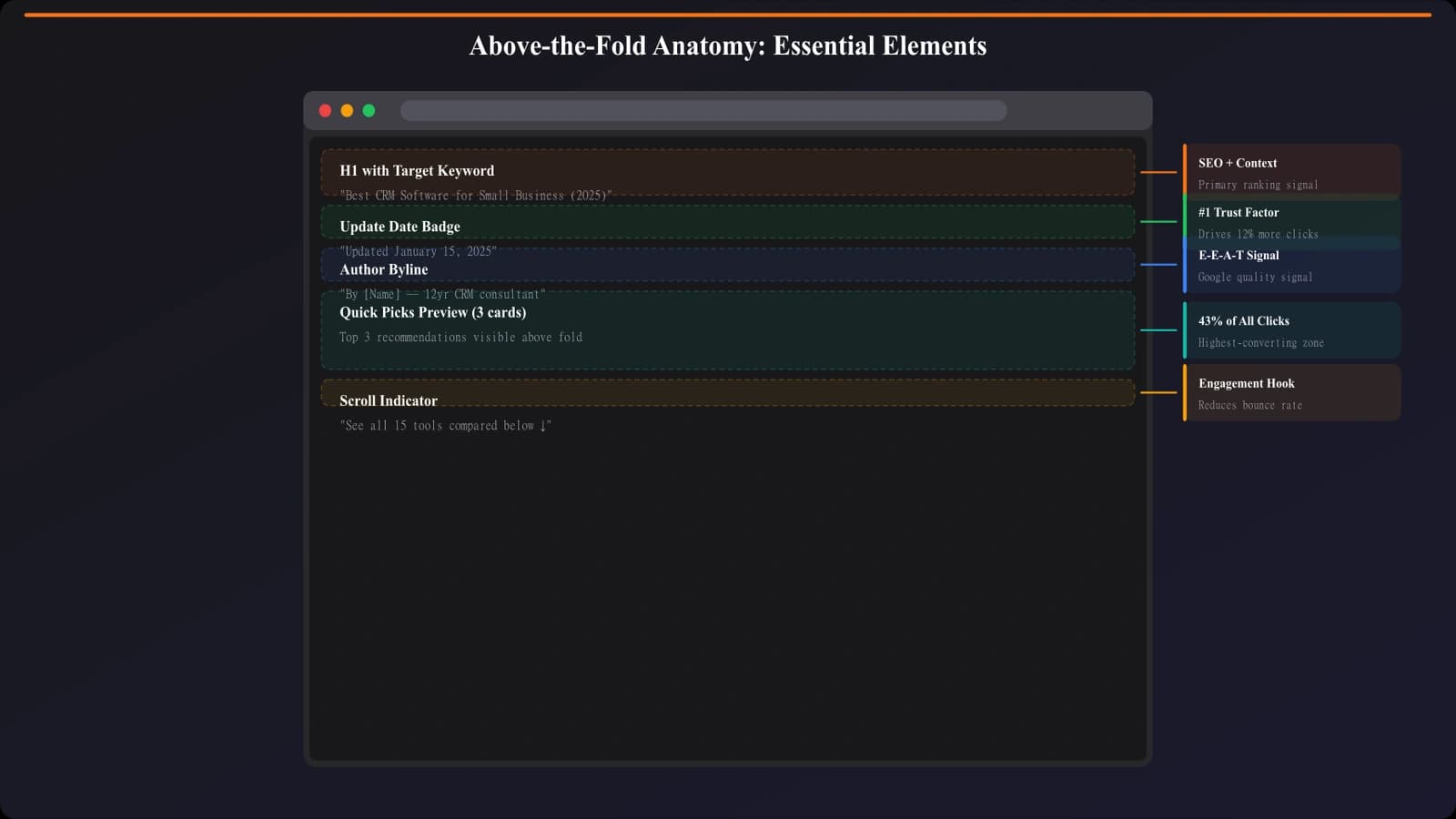
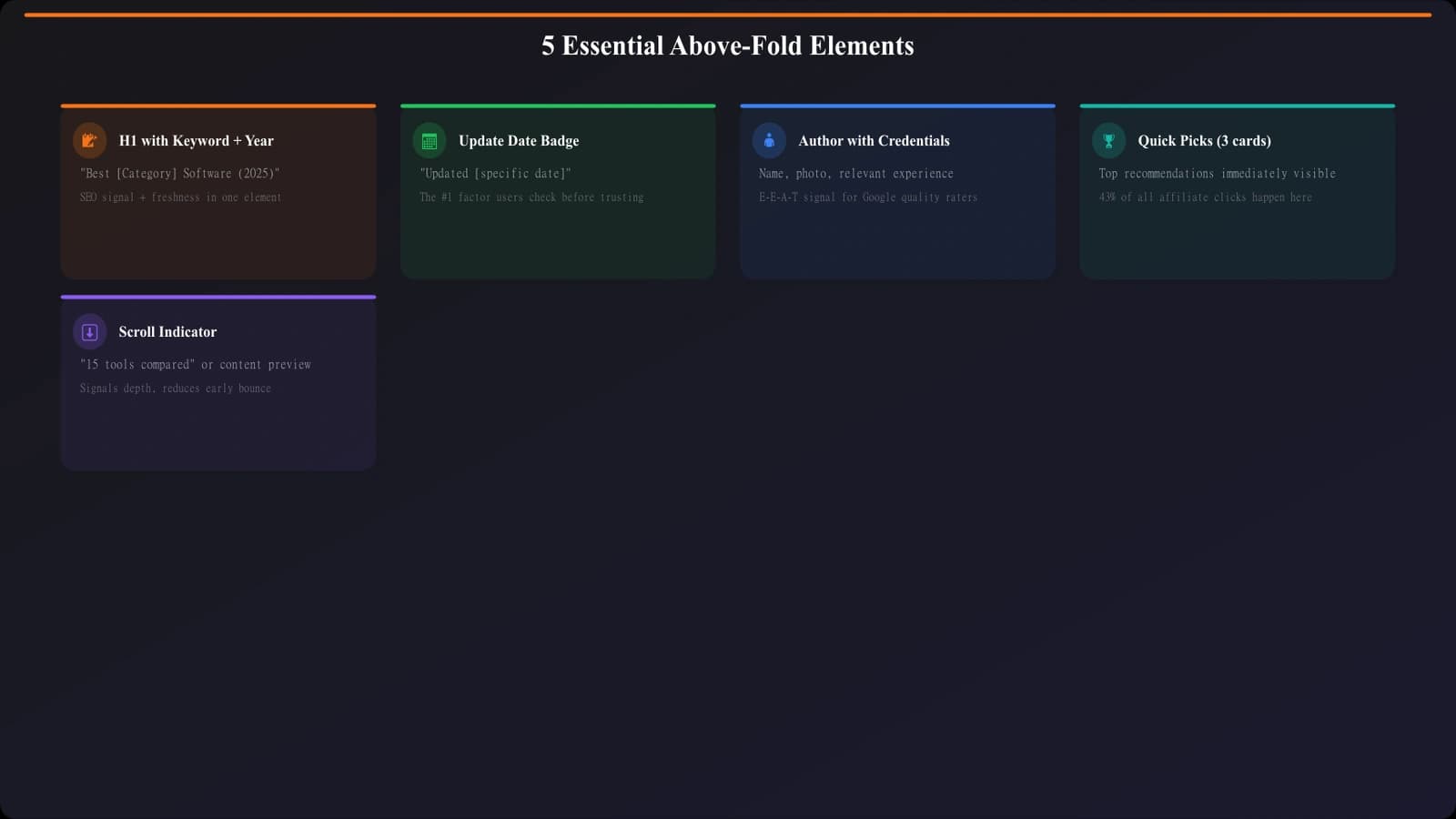
Based on testing and conversion data, here are the elements that should appear in the first viewport, in rough order of importance:
1. H1 Title with Primary Keyword
Your H1 should be immediately visible and should echo the search query that brought visitors to the page. Not a creative variation. Not a clever headline. The actual keyword phrase.
Good: “Best CRM Software for Small Business (2026)”
Bad: “Find Your Perfect Customer Relationship Management Solution”
The good example matches what users searched. The bad example makes them work to confirm they're in the right place.
2. Freshness Date
A visible “Updated [Month Year]” badge is the single highest-impact trust signal above the fold. Place it near the H1 where it's impossible to miss.
Format that works: “Updated January 2026” or “Last reviewed: Jan 15, 2026”
Format that doesn't: Just a copyright year in the footer
3. Author Byline
A real author name (ideally with a small photo) signals that a human created this content. In the age of AI content farms, this matters more than ever.
Keep it compact: author name, maybe a one-line credential, small avatar. Full bios belong at the bottom of the page.
4. Quick Picks Preview or Top Recommendation
This is where most listicles fail. Visitors came looking for recommendations, but above the fold shows only introduction text. They have to scroll to get any value.
Fix: Include at least a preview of your Quick Picks section—even just the names and one-line descriptions of your top 3. Give visitors a taste of the value immediately.
5. Scroll Indicator
Make it obvious there's more below. This can be:
- Visual cut-off of the next section (cards visible but not fully)
- “12 products reviewed below” text
- Subtle down arrow or animated scroll cue
- Table of contents preview showing section structure
What to Push Below the Fold (or Remove)
Above-fold space is limited. To fit the essentials, something has to go. Here's what doesn't deserve prime real estate:
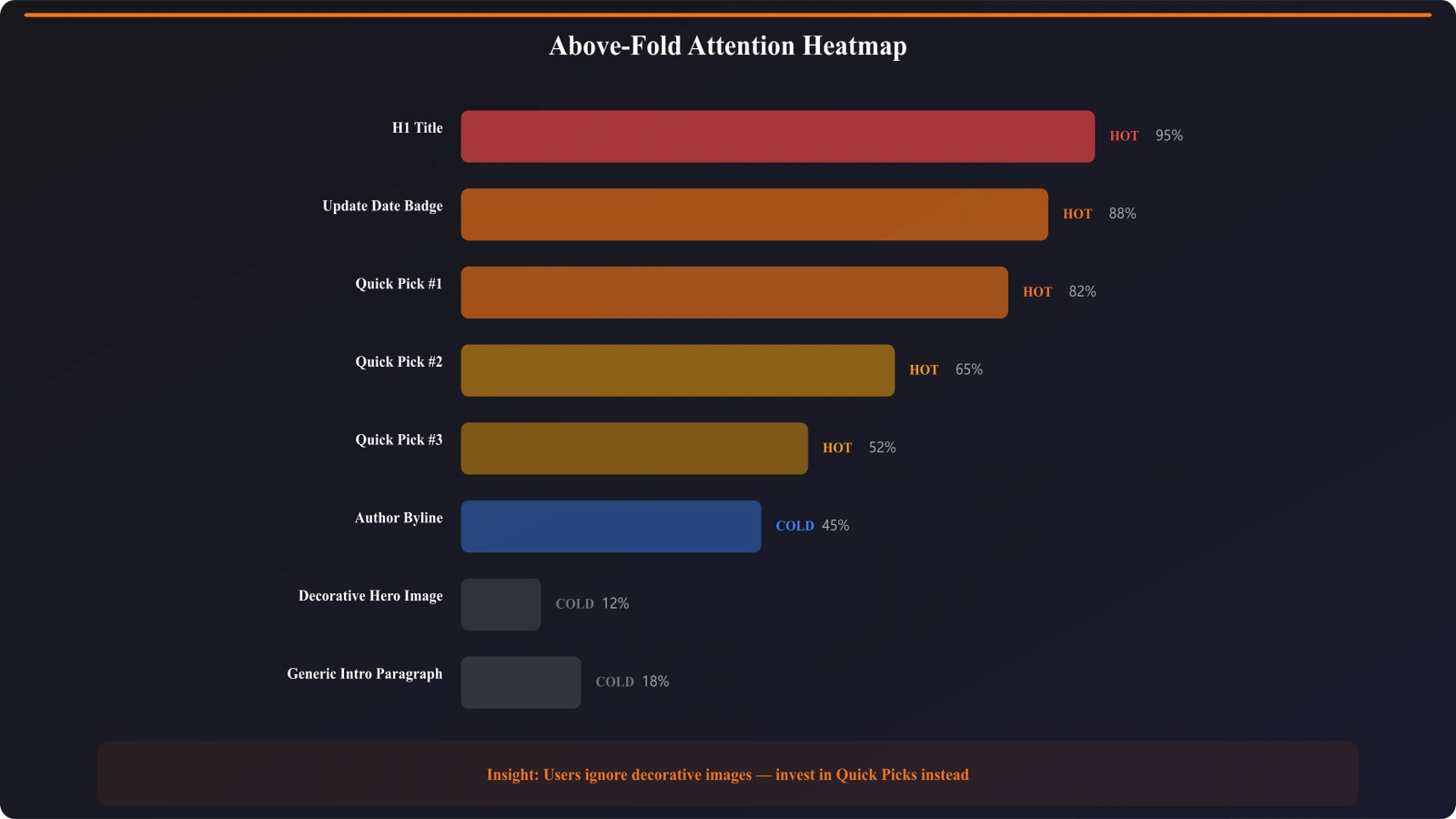
Large Hero Images
Unless your hero image adds genuine information (showing your #1 product, for example), it's a waste of premium space. A stock photo of “happy business people” tells visitors nothing and pushes actual content down.
If you need a hero image for design reasons, make it small enough that Quick Picks are still visible without scrolling.
Lengthy Introduction Text
Most listicle intros are skipped entirely. Visitors came for the list, not for your thoughts on why CRM software matters in the modern business landscape.
If you need intro text for SEO or context, keep it to 2-3 sentences max above the fold. Move the rest below Quick Picks.
Heavy Table of Contents
A full TOC listing all 15 products is useful, but it doesn't need to dominate above the fold. A collapsed or minimal TOC that expands on click is better than a giant navigation block.
Company Branding Elements
Your logo is in the header. That's enough. Additional brand messaging, mission statements, or “about us” content above the fold competes with user value.
Social Sharing Buttons
Nobody shares articles before reading them. Social buttons above the fold are wasted space. Move them to the end of the content.
Generate Listicles With Optimized Layouts
Create comparison pages with conversion-optimized above-fold sections automatically.
Try for Free
Mobile Above-Fold Considerations
Mobile viewports are dramatically smaller than desktop. What fits above the fold on a 1440px monitor definitely doesn't fit on a 375px phone screen.
Ruthless Prioritization
On mobile, you might only have space for:
- H1 (possibly truncated or smaller font)
- Update date
- One Quick Pick or “See Top Pick” link
Author byline, intro text, and full Quick Picks might all need to be below the fold. That's okay—the goal is proving value fast, not cramming everything in.
Mobile-Specific Structure
- Larger touch targets →CTAs and links need to be easily tappable
- No horizontal scroll →Quick Picks should stack, not overflow
- Readable text →16px minimum font size
- Fast load →Compress images, defer non-critical elements
Testing Mobile Above-Fold
Use actual devices, not just browser dev tools. The viewport sizes are similar, but the experience is different. Test on:
- iPhone (iOS Safari)
- Android (Chrome)
- Different screen sizes (SE, regular, Plus/Max)
Watch for: address bar behavior (shrinks on scroll), keyboard interactions, thumb reach zones.
Testing and Optimizing Above-Fold
Above-fold optimization isn't a one-time task. Test variations, measure results, iterate.
What to Test
| Element | Test Variations | Primary Metric |
|---|---|---|
| H1 format | With year vs without, short vs long | Scroll rate |
| Quick Picks presence | Full preview vs teaser vs none | Engagement, bounce |
| Hero image | Large vs small vs none | Scroll rate, time on page |
| Date placement | Near H1 vs byline vs both | Trust survey, CTR |
| Intro text length | 2 sentences vs 2 paragraphs vs none | Scroll rate |
Metrics to Watch
- Bounce rate →Direct measure of above-fold failure
- Scroll rate →What % of visitors scroll past the fold
- Time to first scroll →How quickly visitors engage
- Quick Picks CTR →Are visitors acting on above-fold content
- Mobile vs desktop differences →Often need different approaches
Heatmap Analysis
Tools like Hotjar or Clarity can show you exactly where visitors look and click above the fold. Key things to look for:
- Dead zones →Areas with no attention or clicks
- Rage clicks →Visitors clicking non-clickable elements (indicates confusion)
- Attention distribution →Is attention on valuable elements or wasted on decoration?
Your Above-Fold Checklist
The first viewport is where you win or lose most visitors. Treat it as the most important 600 pixels on your entire page.
Above-fold must-haves:
- H1 with primary keyword, matching search intent exactly
- Visible “Updated [Month Year]” freshness signal
- Author byline (compact, with credentials)
- Quick Picks preview or top recommendation visible
- Clear indication that more content exists below
Push below the fold or remove:
- Large hero images that don't add information
- Lengthy introduction paragraphs
- Heavy navigation or full table of contents
- Brand messaging and company information
- Social sharing buttons
Test and validate:
- Monitor bounce rate and scroll rate
- Use heatmaps to see attention patterns
- Test on actual mobile devices
- Iterate based on data, not assumptions
For Quick Picks optimization specifically, see Quick Picks: Capture Impatient Visitors Instantly. For the complete conversion framework, see CRO for Listicles: Complete Conversion Guide.

Product Manager at BestPage. Pioneer in AEO research since 2024, exploring the convergence of SEO and GEO (Generative Engine Optimization). Led multiple AI-powered content optimization projects that achieved 300%+ citation increases in ChatGPT and Perplexity.