
If I could only make one change to improve a listicle's conversion rate, it would be adding a well-designed Quick Picks section. Nothing else comes close in terms of impact-to-effort ratio.
Why? Because a huge chunk of your visitors—somewhere between 35-40% based on behavior analysis—aren't really in research mode. They've already done their research elsewhere. They arrive at your listicle looking for confirmation, a final sanity check, maybe a comparison of their top choices.
For these visitors, making them scroll through 15 product descriptions is friction. They don't want the full tour—they want to know what you recommend and why, quickly. Quick Picks gives them exactly that: “Here are the top 3. Here's why. Click here to get started.”
This guide covers everything about Quick Picks design, from information architecture to visual treatment to conversion optimization. For the complete listicle conversion framework, see CRO for Listicles: Complete Conversion Guide.
Why Quick Picks Works So Effectively
Quick Picks isn't just a nice design element—it fundamentally changes how your listicle serves its audience. Understanding why it works helps you implement it correctly.
The Impatient Visitor Segment
Behavior analysis consistently shows that listicle visitors fall into distinct segments:
| Segment | % of Visitors | Behavior Pattern | What They Need |
|---|---|---|---|
| Quick Deciders | 35-40% | Scan top options, click within 30 seconds | Quick Picks |
| Comparers | 40-45% | Scan full list, use comparison tools | Full list + tables |
| Deep Divers | 15-20% | Read full descriptions, check sources | Detailed cards |
Without Quick Picks, you're forcing the Quick Deciders—over a third of your traffic—to wade through content designed for Comparers and Deep Divers. Many of them will bounce instead of scrolling.
Reducing Decision Fatigue
Research on decision-making consistently shows that more options leads to worse decisions and lower satisfaction. A listicle with 15 options can actually be less effective than one with 3-5 clearly differentiated choices.
Quick Picks addresses this by curating. It says: “We evaluated everything. Here are the three that matter for most people.” This editorial curation is exactly what visitors want from a trusted resource.
The Anchoring Effect
Quick Picks also serves visitors who do scroll through the full list. By establishing your top recommendations immediately, you anchor their expectations. As they read through other options, they're comparing to your recommended picks.
This often leads visitors back to the Quick Picks—they scroll through alternatives, confirm there's nothing better, and return to convert on your original recommendation.
Quick Picks Structure and Information Architecture
The effectiveness of Quick Picks depends heavily on how you structure it. Too much information and it becomes another wall of text. Too little and it doesn't serve its purpose.
Why Three Picks (Not Two, Not Five)
Three is the magic number for Quick Picks, and there's psychology behind it:
- Two feels incomplete →Visitors wonder what else they're missing
- Three offers meaningful choice →Different options for different needs
- Four or more reintroduces decision fatigue →The whole point was to simplify
The three picks should cover distinct use cases or priorities. Don't pick three similar options—that doesn't help anyone decide.
Category Labels That Work
Each Quick Pick needs a category label that explains why it's included. Effective labels:
| Good Labels | Why They Work |
|---|---|
| “Best Overall” | Clear primary recommendation |
| “Best Value” | For budget-conscious visitors |
| “Best for Enterprises” | Specific audience segment |
| “Best for Beginners” | Experience level targeting |
| “Most Powerful” | Feature-focused users |
Avoid generic labels like “Our #1 Pick,” “Editor's Choice,” or just numbers. These don't help visitors self-select based on their needs.
Essential Card Elements
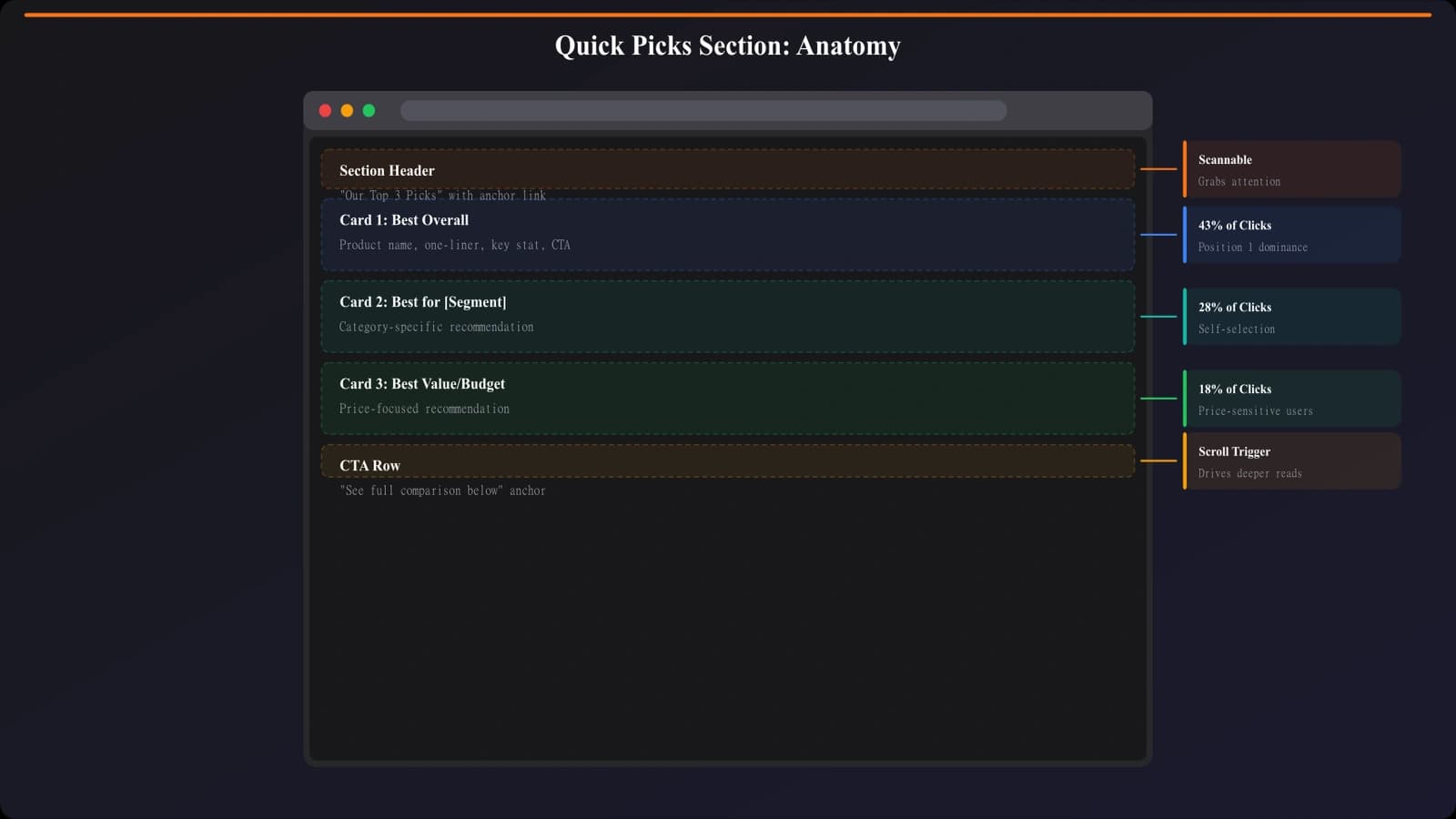
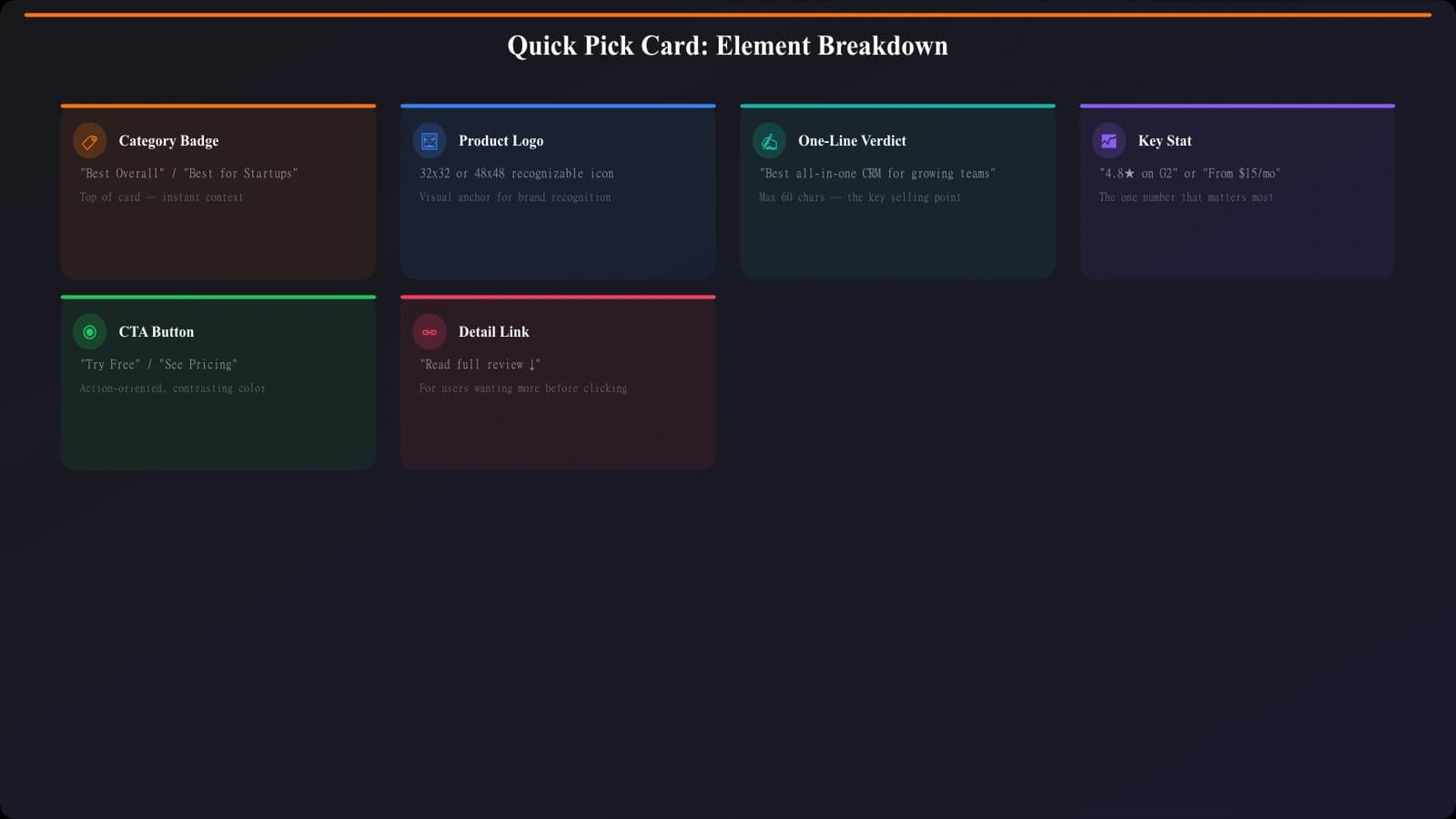
Each Quick Pick card should include, in this order:
- Category label →“Best Overall,” “Best Value,” etc.
- Product logo or image →Visual recognition, breaks up text
- Product name →Clear identification
- One-sentence verdict →Why this product wins its category
- Key differentiator →Price point, standout feature, or metric
- Primary CTA →“Visit Site,” “Try Free,” etc.
Notice what's NOT in this list: full feature comparisons, detailed pros/cons, lengthy descriptions. Quick Picks is about fast decisions—save the details for the full product cards.
Placement and Positioning
Where you put Quick Picks dramatically affects its performance. The goal: make it impossible to miss without being aggressive.
Above the Fold vs. After Intro
Two placements that work well:
Option A: Fully above the fold
- Quick Picks visible without scrolling
- Requires minimal or no intro text
- Best for: high-intent traffic, return visitors, simple products
Option B: Immediately after a minimal intro
- 2-3 sentences of context, then Quick Picks
- Visitors scroll slightly but Quick Picks is the first major content
- Best for: complex products needing context, SEO considerations
What does NOT work: burying Quick Picks after multiple paragraphs of introduction, methodology explanations, or table of contents. By that point, you've lost the Quick Deciders.
Visual Distinction
Quick Picks should look different from the rest of your page—it needs to be instantly recognizable as “the summary section.” Ways to achieve this:
- Background color →Subtle tint that sets it apart
- Border or shadow →Container treatment that defines the section
- Header treatment →“Quick Picks” or “Our Top 3” header
- Card layout →Horizontal cards when the main list is vertical
Generate Quick Picks Automatically
Create optimized Quick Picks sections for any listicle in seconds.
Try for Free
CTA Optimization Within Quick Picks
The CTAs in Quick Picks carry a lot of weight—for many visitors, these are the only buttons they'll interact with. Get them right.
CTA Copy That Converts
Quick Picks CTAs should be action-oriented and specific:
| Effective CTAs | Why They Work |
|---|---|
| “Try Free” | Low commitment, immediate action |
| “View Pricing” | Matches decision stage, sets expectations |
| “Start Free Trial” | Specific action, clear value |
| “Get Started Free” | Action + free combo |
Avoid: “Learn More” (too vague), “Click Here” (dated), “Buy Now” (too aggressive for research stage), “Read Full Review” (sends them down page instead of converting).
Visual Treatment
- High contrast →CTAs should be the most visually prominent element in each card
- Consistent styling →All three CTAs should look the same
- Adequate size →Easy to click on mobile (minimum 44px height)
- Whitespace →Don't crowd the CTA with other elements
Secondary Actions
Some visitors want more info before clicking out. Consider adding a subtle secondary action:
- “Jump to full review →rdquo; text link (not a button)
- “See comparison” link to comparison table
Keep these visually subdued—they're escape hatches for uncertain visitors, not competing CTAs.
Common Quick Picks Mistakes
I've audited hundreds of listicles. These Quick Picks mistakes show up constantly:
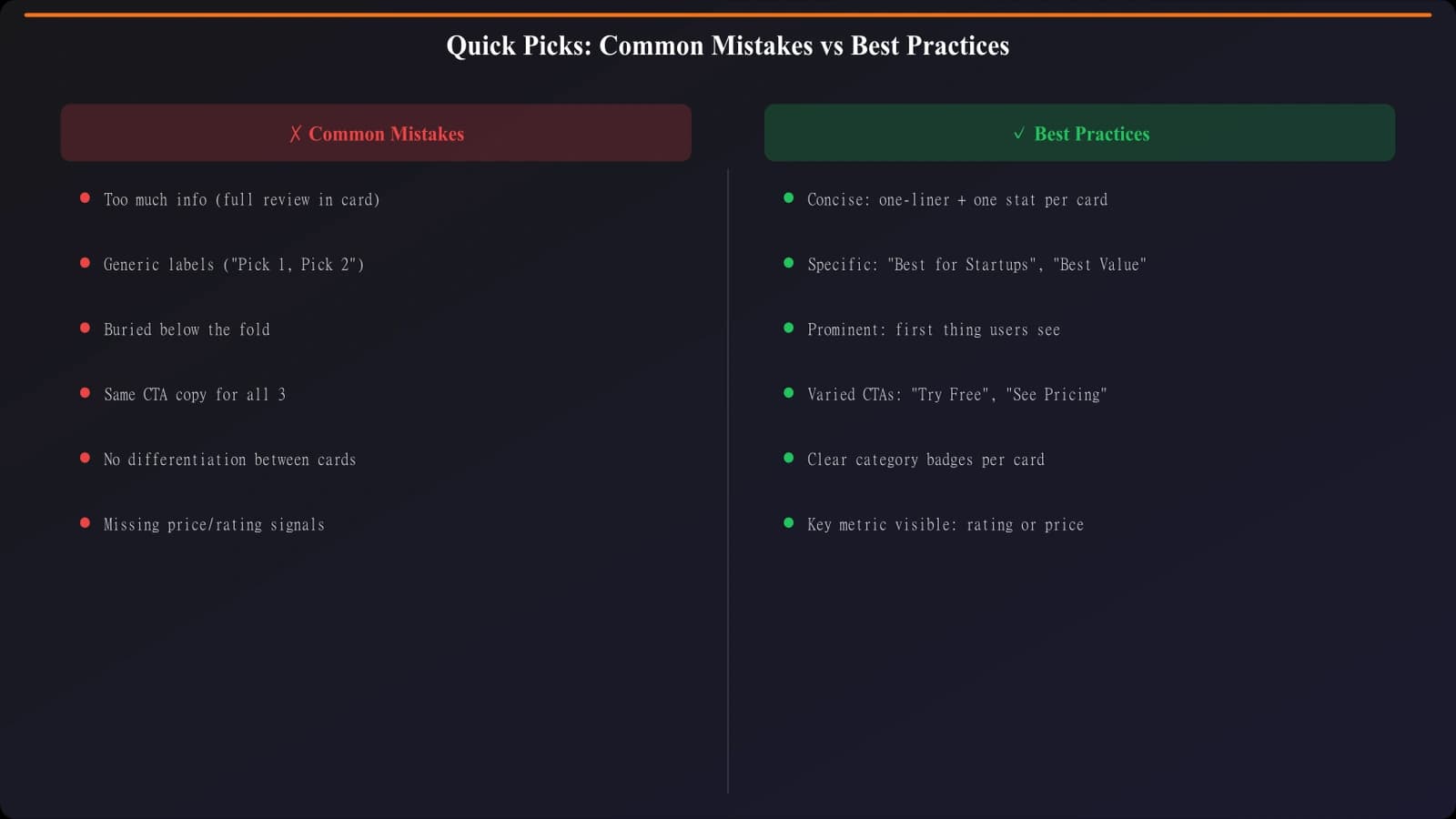
Too Much Information
Trying to cram full product descriptions into Quick Picks defeats the purpose. If each card is a wall of text, it's not “quick” anymore.
Fix: One sentence verdict, one differentiator stat, done. Everything else goes in the full card.
Generic Category Labels
“#1 Pick,” “#2 Pick,” “#3 Pick” tells visitors nothing about why these three were selected or which one fits their needs.
Fix: Use labels that differentiate by use case, audience, or priority (value, power, ease of use, etc.).
Buried Placement
Quick Picks after a lengthy intro, methodology section, and table of contents misses the entire point. The visitors who need Quick Picks have already bounced.
Fix: Quick Picks within first scroll at most. Above the fold is even better.
Weak CTAs
“Learn More” or “Visit Website” CTAs underperform specific action-oriented alternatives.
Fix: Test “Try Free,” “Start Trial,” “View Pricing”—whatever matches the actual next step.
No Visual Distinction
Quick Picks that look identical to the rest of the page don't get recognized as the summary section.
Fix: Background color, border, header—something to make it visually distinct at a glance.
Testing and Measuring Quick Picks Performance
Quick Picks is worth testing carefully—small changes can have significant conversion impact.
What to Test
- Number of picks →2 vs 3 vs 4 (3 usually wins, but test your audience)
- Category labels →Different framing of the same picks
- CTA copy →Action verbs, specificity, urgency language
- Placement →Above fold vs after intro
- Visual treatment →Card style, background color, prominence
- Information density →More detail vs less
Metrics to Track
| Metric | What It Tells You |
|---|---|
| Quick Picks CTR | Direct conversion from the section |
| Click distribution | Which pick gets most clicks? Is distribution healthy? |
| Time before first click | Are Quick Deciders converting quickly? |
| Scroll depth after QP | Do visitors continue exploring or stop? |
| Return clicks to QP | Do explorers come back to Quick Picks to convert? |
Benchmark Performance
What's “good” Quick Picks performance? Benchmarks vary by niche, but roughly:
- Quick Picks CTR: 15-30% →Percentage of visitors who click a QP CTA
- Share of total page conversions: 40-60% →Quick Picks should capture significant portion
- Click distribution: 50/30/20 →Rough target for 1st/2nd/3rd pick (top should win, but not dominate)
Quick Picks Implementation Checklist
Quick Picks is potentially the highest-impact element on your listicle. Get it right and you'll capture a significant chunk of conversions from visitors who might otherwise bounce or wander.
Structure checklist:
- Exactly 3 picks (not more, not fewer)
- Clear, differentiated category labels
- One-sentence verdict per pick
- One key differentiator (price, metric, feature)
- Prominent, action-oriented CTA per pick
Placement checklist:
- Visible within first scroll at most
- Above the fold preferred for high-intent traffic
- Visually distinct from rest of page
- Clear “Quick Picks” or similar header
Conversion checklist:
- CTAs use specific action verbs (“Try Free,” not “Learn More”)
- CTAs are visually prominent and easy to click
- Optional secondary action for uncertain visitors
- Testing different variations to optimize
For above-fold optimization that complements Quick Picks, see Above the Fold: What to Show First on Listicles. For the complete conversion framework, see CRO for Listicles: Complete Conversion Guide.

Product Manager at BestPage. Pioneer in AEO research since 2024, exploring the convergence of SEO and GEO (Generative Engine Optimization). Led multiple AI-powered content optimization projects that achieved 300%+ citation increases in ChatGPT and Perplexity.