

When you look at your comparison site's traffic, you're usually seeing an aggregate number that mixes content published last week with content published two years ago. This makes it hard to answer important questions: Are we getting better at creating content that ranks? How long does new content take to mature? When does content typically start declining?
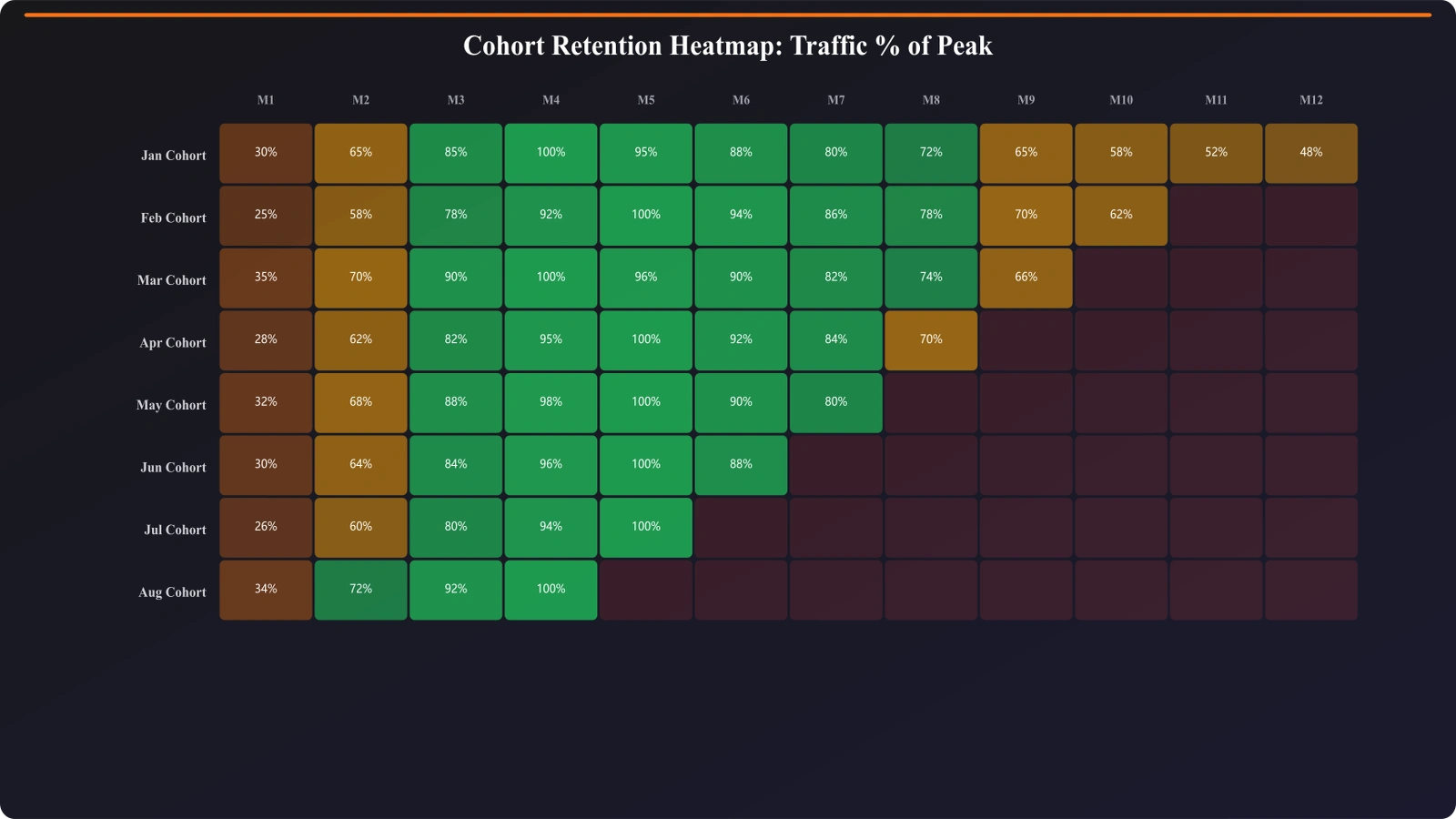
Cohort analysis solves this by grouping content by when it was published, then tracking each group's performance over time. Articles published in January 2025 form one cohort; articles published in February 2025 form another. You can then compare how each cohort performed at the same points in their lifecycle.
This approach reveals patterns that aggregate metrics hide. It helps you understand your content lifecycle, identify systemic issues in your content strategy, and make better decisions about publishing and refreshing content.

Why Cohort Analysis Matters
Cohort analysis answers questions that standard analytics can't.
Questions Cohort Analysis Answers
| Question | What Cohort Analysis Reveals |
|---|---|
| How long to rank? | Time from publication to peak traffic by cohort |
| Are we improving? | Whether recent cohorts outperform older ones at same age |
| When does decay start? | Typical age when cohorts begin declining |
| What's our hit rate? | Percentage of each cohort that achieves meaningful traffic |
| Do refreshes work? | Whether refreshed cohorts recover vs continue declining |
Limitations of Aggregate Metrics
Consider this scenario: Your total comparison page traffic is flat month-over-month. Is this good or bad? It depends:
- If you're publishing new content that isn't ranking, you have a creation problem
- If old content is decaying faster than new content grows, you have a refresh problem
- If new content ranks quickly but peaks low, you have a targeting problem
- If everything is performing as expected, flat might be fine
Aggregate metrics can't distinguish these scenarios. Cohort analysis can.
Setting Up Cohort Tracking
Here's how to implement cohort analysis for your comparison content.
Define Your Cohorts
First, decide how to group content:
- Monthly cohorts: All content published in the same month (most common)
- Quarterly cohorts: Useful if you publish less frequently
- Weekly cohorts: For high-volume publishers
- Campaign cohorts: Content from specific initiatives
Monthly cohorts work well for most comparison sites. They're granular enough to see trends but not so granular that cohorts are too small.
Data Requirements
You need to track:
| Data Point | Source | Notes |
|---|---|---|
| Page URL | Your CMS | Unique identifier |
| Publication date | Your CMS | Original publish date |
| Last updated date | Your CMS | For refresh tracking |
| Content type | Your CMS | Listicle, alternatives, vs, etc. |
| Sessions by day/week | GA4 | Traffic metric |
| Position by day/week | Search Console | Ranking metric |
Calculating Cohort Age
For each data point, calculate how old the content was at that time:
- Week 1: First 7 days after publication
- Month 1: First 30 days after publication
- Month 3: Days 61-90 after publication
- And so on...
This “age” dimension is what allows you to compare cohorts at the same lifecycle stage.
Analysis Structure
Your cohort data should look like this:
| Cohort | Month 1 | Month 2 | Month 3 | Month 6 | Month 12 |
|---|---|---|---|---|---|
| Jan 2025 | 1,200 | 3,400 | 5,800 | 7,200 | 6,100 |
| Feb 2025 | 1,400 | 3,900 | 6,200 | 8,100 | - |
| Mar 2025 | 1,800 | 4,500 | 6,800 | - | - |
| Apr 2025 | 1,600 | 4,100 | - | - | - |
This structure shows how each cohort performed at each age, making comparison easy.
Track Content Performance Over Time
Build comparison content with publication tracking for lifecycle analysis.
Try for Free
Interpreting Cohort Data
Once you have cohort data, here's how to extract insights.
Content Maturation Patterns
Look at how cohorts grow in their early months:
- Typical time to rank: When do cohorts reach 50% of their peak traffic?
- Peak timing: At what age do cohorts typically peak?
- Growth curve shape: Is it steep (fast ranking) or gradual?
What it tells you: If recent cohorts are taking longer to rank, you may have indexation issues or increased competition. If they're ranking faster, your content or authority is improving.
Cross-Cohort Performance Trends
Compare cohorts at the same age:
- Is the March cohort outperforming the January cohort at month 3?
- Is there a trend of improvement or decline over time?
- Are certain types of content consistently outperforming others?
What it tells you: If recent cohorts consistently underperform at the same age, something has changed—competition, content quality, or algorithm. If they outperform, your improvements are working.
Decay Patterns
Look at cohorts that are old enough to show decay:
- When does decay typically start? Month 6? Month 12?
- How fast is the decline? Gradual or steep?
- Is decay consistent or variable? Some cohorts decline more than others?
What it tells you: If decay starts at month 6, you know content needs refreshing around month 5. If some cohorts decay faster, investigate what's different about them.
Hit Rate Analysis
Calculate what percentage of each cohort reaches meaningful traffic thresholds:
- What % of pages reach 100 sessions/month?
- What % of pages reach 500 sessions/month?
- What % of pages never rank meaningfully?
What it tells you: Your hit rate is a key efficiency metric. If only 20% of pages ever get significant traffic, you need to either improve targeting or content quality.
Advanced Cohort Analysis
Once you have basic cohort tracking, consider these advanced analyses.
Segmented Cohorts
Break cohorts into sub-segments:
- By content type: Do listicles mature faster than alternatives pages?
- By category: Does CRM content outperform PM content?
- By author/process: Does content from a new process perform differently?
Refresh Impact Analysis
Create “refresh cohorts” for content that was updated:
- Track performance before and after refresh
- Compare refreshed content to non-refreshed content of similar age
- Measure time from refresh to recovery (if there was a decline)
Predictive Modeling
Use historical cohort data to predict future performance:
- Expected traffic: Based on historical patterns, how much traffic should a cohort have at month 6?
- Decay forecasting: When will this cohort likely need refreshing?
- Investment planning: How much traffic will new content generate over its lifecycle?
Implementation Guide
Here's how to implement cohort analysis for your comparison site:
- Export your content catalog. List all pages with publication dates and types.
- Assign cohorts. Group pages by publication month.
- Pull traffic data. Export GA4 data by page and date.
- Calculate content age. For each traffic data point, calculate age since publication.
- Build the cohort matrix. Aggregate traffic by cohort and age.
- Visualize patterns. Create heatmaps and line charts showing cohort performance.
- Extract insights. Identify maturation time, decay patterns, and performance trends.
- Act on findings. Adjust content strategy based on what you learn.
Cohort analysis takes more setup than standard reporting, but it provides insights you can't get any other way. Understanding how your content performs over its lifecycle is essential for building a sustainable comparison content operation.
For content decay monitoring (a key input to cohort analysis), see our guide on Content Decay: Catch Declining Listicles Early. For dashboard templates that can include cohort views, check out Comparison Site Dashboard Template.

Product Manager at BestPage. Pioneer in AEO research since 2024, exploring the convergence of SEO and GEO (Generative Engine Optimization). Led multiple AI-powered content optimization projects that achieved 300%+ citation increases in ChatGPT and Perplexity.