
You have 200 listicles. You have resources to update 20 this quarter. Which 20 do you pick? This is the content prioritization problem, and getting it wrong is expensive—not just in wasted effort, but in the traffic and revenue you lose while the wrong pages get attention.
Most teams approach this badly. They either update on a fixed schedule (every page gets refreshed every 6 months, regardless of need), or they react to emergencies (only updating when traffic crashes have already happened). Neither approach maximizes the return on your refresh investment.
The smart approach is systematic prioritization. Score every page on a combination of factors—traffic potential, decay signals, competitive pressure, and update effort—then work the list from highest to lowest priority. This ensures your limited refresh resources always go to the highest-impact opportunities.
This framework gives you a practical, repeatable system for making those prioritization decisions. You'll learn which signals matter most, how to score pages, and how to build a refresh queue that maximizes results.
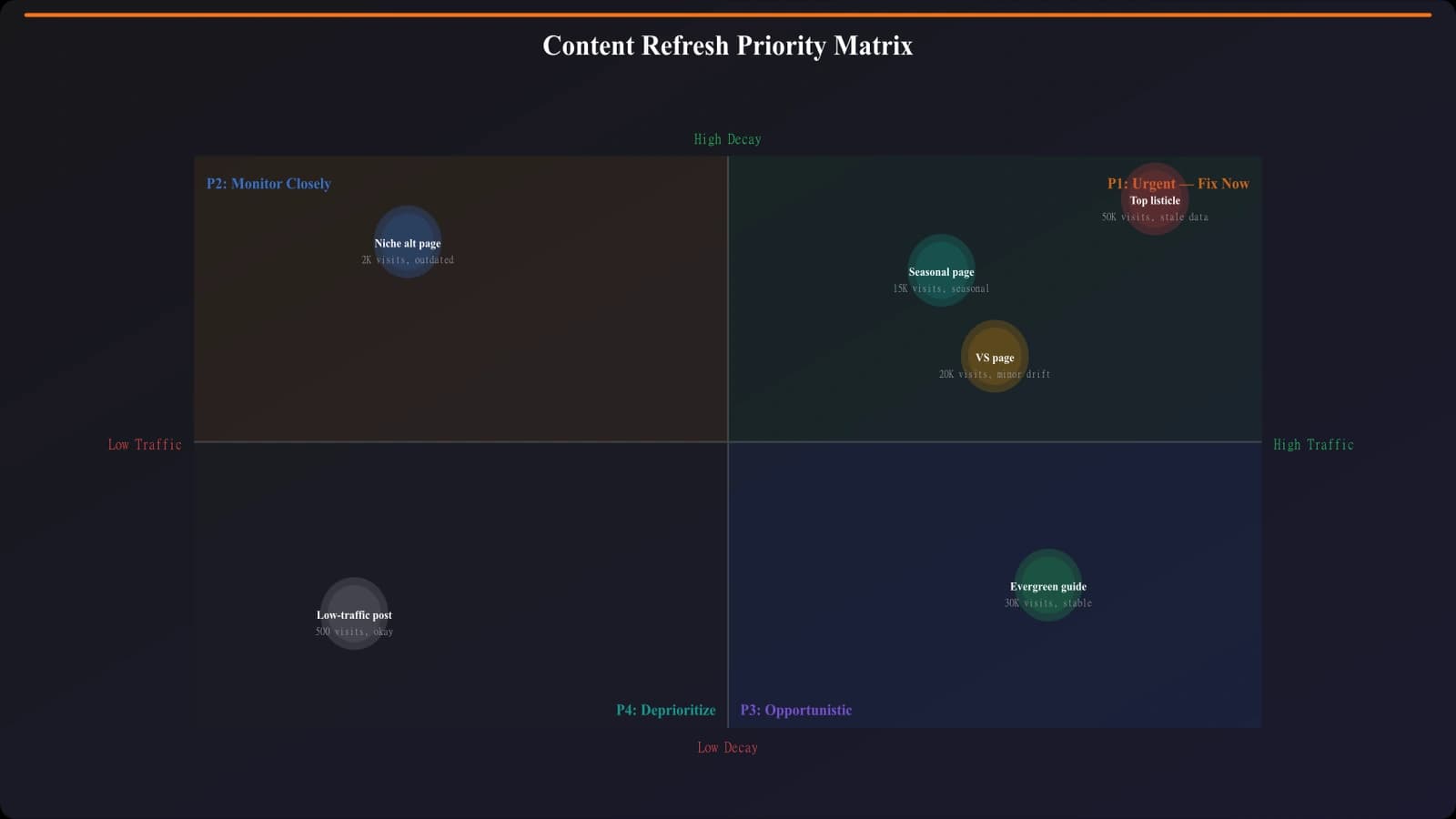
The Four Priority Signals
Effective prioritization combines multiple signals. No single factor tells the whole story—you need to weigh them together.
Signal 1: Traffic Potential
This is the ceiling on what a refresh can achieve. It combines two elements:
Current traffic: Pages already driving significant traffic are high-value targets. A 10% improvement on a 10,000 visit/month page beats a 50% improvement on a 500 visit/month page.
Recoverable traffic: Pages that used to perform but have declined represent recovery opportunities. If a page was getting 5,000 visits monthly and now gets 1,500, there's 3,500 visits of recoverable traffic waiting for a refresh.
Calculate traffic potential as: Current Traffic + (Peak Historical Traffic - Current Traffic) × 0.7. The 0.7 factor accounts for the reality that you won't always fully recover past performance.
Signal 2: Decay Severity
How urgently does this page need updating? Decay severity considers:
- Traffic trend: Is traffic declining, stable, or growing? Declining pages need priority
- Ranking trend: Are positions dropping? This often precedes traffic decline
- Data staleness: How old is the core information? Outdated pricing, discontinued products, or wrong features damage credibility
- Click-through rate decline: Falling CTR even with stable rankings suggests the SERP listing needs updating
| Decay Level | Signals | Priority Score |
|---|---|---|
| Critical | Traffic down 40%+ from peak, rankings dropped 5+ positions, data 6+ months old | 10 |
| Significant | Traffic down 20-40%, rankings dropped 2-5 positions, data 3-6 months old | 7 |
| Moderate | Traffic flat or down <20%, minor ranking fluctuation, data 2-3 months old | 4 |
| Low | Traffic stable or growing, rankings stable, data recently verified | 1 |
Signal 3: Competitive Pressure
Even pages performing well need attention if competitors are closing in. Competitive pressure signals include:
- New competitor entries: Fresh, comprehensive pages targeting your keywords
- Competitor refreshes: Existing competitors updating their content with newer data
- SERP changes: Different domains appearing where you used to dominate
- Feature updates: Competitors adding comparison tables, updated timestamps, or richer content
Monitor your top 50-100 pages monthly for competitive movements. When a strong competitor publishes a new or refreshed page targeting your primary keyword, that's a refresh trigger regardless of your current performance.
Signal 4: Update Effort
Not all refreshes require equal effort. Factor in the work required:
- Light refresh: Update dates, verify pricing, check links, minor copy tweaks (2-4 hours)
- Moderate refresh: Add new products, update product descriptions, refresh comparison tables (4-8 hours)
- Heavy refresh: Complete rewrite, new research, restructure sections, add new features (8-20+ hours)
A page needing light refresh should be prioritized over a page needing heavy refresh if their other signals are similar. You can refresh 5 light pages for the same effort as 1 heavy page.
Building Your Scoring System
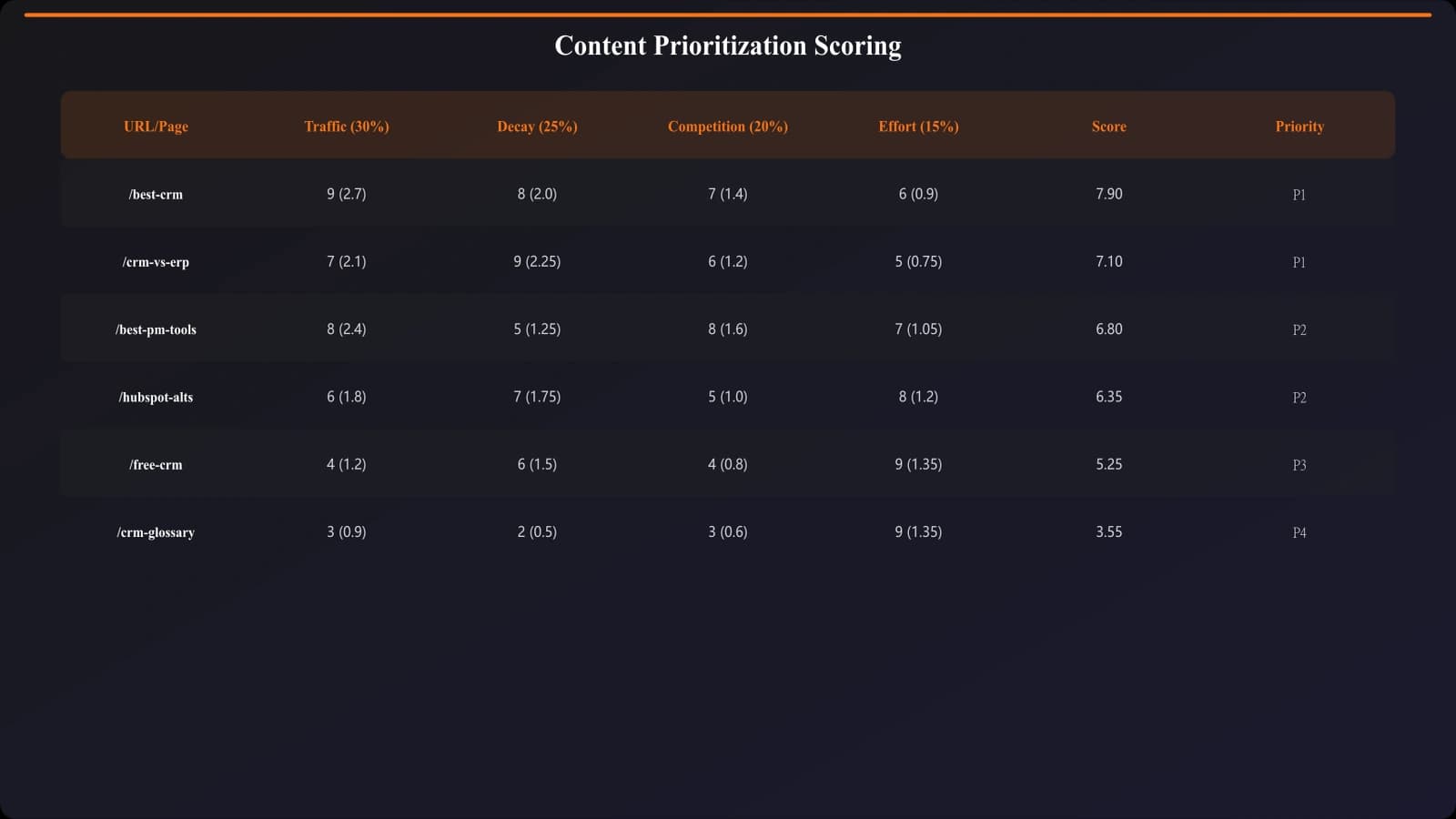
Combine the four signals into a single priority score that lets you rank your content library objectively.
The Priority Score Formula
Priority Score = (Traffic Potential × 0.4) + (Decay Severity × 0.3) + (Competitive Pressure × 0.2) + (Effort Efficiency × 0.1)
The weights reflect typical impact—traffic potential matters most, decay severity is urgent, competitive pressure is important but less immediate, and effort efficiency is a tie-breaker.
Adjust weights based on your situation. If you're in a highly competitive space, increase competitive pressure weight. If resources are extremely limited, increase effort efficiency weight.
Normalizing Your Data
To make scores comparable, normalize each signal to a 1-10 scale:
- Traffic Potential: Divide by your highest-traffic-potential page, multiply by 10
- Decay Severity: Use the table above directly (already 1-10)
- Competitive Pressure: Rate 1-10 based on SERP volatility and competitor activity
- Effort Efficiency: Invert effort level (light refresh = 10, heavy refresh = 3)
Building Your Refresh Queue
With priority scores calculated, you can build a rational refresh queue. But the queue isn't just a ranked list—it needs structure.
Tiered Queue Structure
Organize your queue into tiers:
Tier 1 - Immediate (This Week): Pages with critical decay and high traffic potential. These are actively losing you money. Attack them first.
Tier 2 - Priority (This Month): High priority scores but not emergency-level. Schedule these in your regular content workflow.
Tier 3 - Scheduled (This Quarter): Moderate priority pages that need attention but won't catastrophically decline if delayed. Batch these for efficiency.
Tier 4 - Monitor (Review Next Quarter): Low priority pages that are stable. Check again next quarter to see if priority has increased.
Batching for Efficiency
Group similar updates together. Refreshing all pages in a category at once is more efficient than jumping between unrelated topics. Your research carries over, and you develop momentum.
Consider batching by:
- Category: All CRM comparisons together, all email tool comparisons together
- Update type: All pages needing pricing updates together, all needing new product additions together
- Data source: All pages requiring verification from the same sources
Automate Your Refresh Prioritization
Track content freshness, monitor decay signals, and get automatic refresh recommendations for your listicle library.
Try for Free
Building a Monitoring System
Prioritization isn't a one-time exercise. You need ongoing monitoring to catch decay early and update your queue dynamically.
Automated Decay Alerts
Set up automated alerts that flag pages when they cross decay thresholds:
- Traffic drop alert: Notify when any page drops 15%+ month-over-month
- Ranking drop alert: Notify when primary keyword drops 3+ positions
- Staleness alert: Notify when “last updated” exceeds category threshold
- Competitor alert: Notify when new competitor page appears for tracked keywords
These alerts feed your queue continuously, ensuring high-priority refreshes don't get missed between quarterly reviews.
Regular Priority Recalculation
Run full prioritization audits quarterly. Traffic patterns shift, competitors move, effort estimates change. A page that was Tier 3 last quarter might be Tier 1 now—and vice versa.
Make the quarterly audit a calendar event with a standard process. Export data, run calculations, update the queue, communicate changes to your team.
For a deeper dive on detecting content decay early, see Content Decay: Catch Declining Listicles Early.
Common Prioritization Mistakes
Even with a framework, teams make predictable errors. Avoid these:
Mistake 1: Recency Bias
The error: Prioritizing recently created content over older pages with more traffic and decay. New content feels more urgent because it's top of mind.
The fix: Trust the numbers, not your memory. Score every page the same way regardless of when you last worked on it.
Mistake 2: Playing Favorites
The error: Prioritizing pages you personally like or that were difficult to create originally. Emotional attachment clouds judgment.
The fix: Remove subjective factors from the scoring system entirely. Let data drive decisions.
Mistake 3: Ignoring Quick Wins
The error: Focusing on complex refreshes while easy updates pile up. Big projects feel more important than small ones.
The fix: Always process light refreshes first. Clearing the quick win queue before tackling heavy projects maintains freshness across more pages.
Mistake 4: Purely Reactive Updates
The error: Only refreshing when traffic has already crashed. By then, you've lost months of performance.
The fix: Weight leading indicators (ranking drops, competitive entries) heavily. Refresh before decay becomes visible in traffic data.
Your Implementation Steps
Implementing a prioritization system takes effort upfront but saves time and improves results ongoing. Here's your path forward:
- Gather your data: Export traffic data (current and historical), ranking data for primary keywords, and last-updated dates for all pages. This is your raw material.
- Set up the spreadsheet: Create a prioritization scorecard with columns for each signal and the weighted formula. Score your full content library.
- Build your initial queue: Sort by priority score. Assign pages to tiers. Identify quick wins for immediate action.
- Configure monitoring: Set up automated alerts for decay signals. Schedule quarterly full audits.
- Execute systematically: Work the queue from top to bottom. Track refresh completion and resulting performance changes.
The prioritization framework transforms content maintenance from chaotic reaction to strategic investment. You'll stop wasting resources on low-impact updates and focus your effort where it moves the needle most.
Start with your top 50 pages by traffic. Score them, build the queue, and refresh the highest-priority pages first. The system proves its value quickly when you see traffic recover on pages you might otherwise have neglected.
For the complete framework on building systematic content operations, see our pillar guide on Scaling Listicles: More Output Without Quality Loss.

Product Manager at BestPage. Pioneer in AEO research since 2024, exploring the convergence of SEO and GEO (Generative Engine Optimization). Led multiple AI-powered content optimization projects that achieved 300%+ citation increases in ChatGPT and Perplexity.