
Here's a scenario that keeps content managers up at night: You've finally cracked the listicle formula. Your best-of pages are ranking, driving traffic, earning links. Your boss notices and says the magic words: “Great work—now do 10x more of this.”
And suddenly you're stuck. Because the approach that worked for 5 listicles per month completely falls apart at 50. Your writers burn out. Quality becomes inconsistent. Some pages hit, most miss. The whole operation feels like it's held together with duct tape and caffeine.
I've seen this pattern play out dozens of times. The teams that successfully scale their listicle production all figured out the same fundamental truth: you can't scale effort, you can only scale systems.
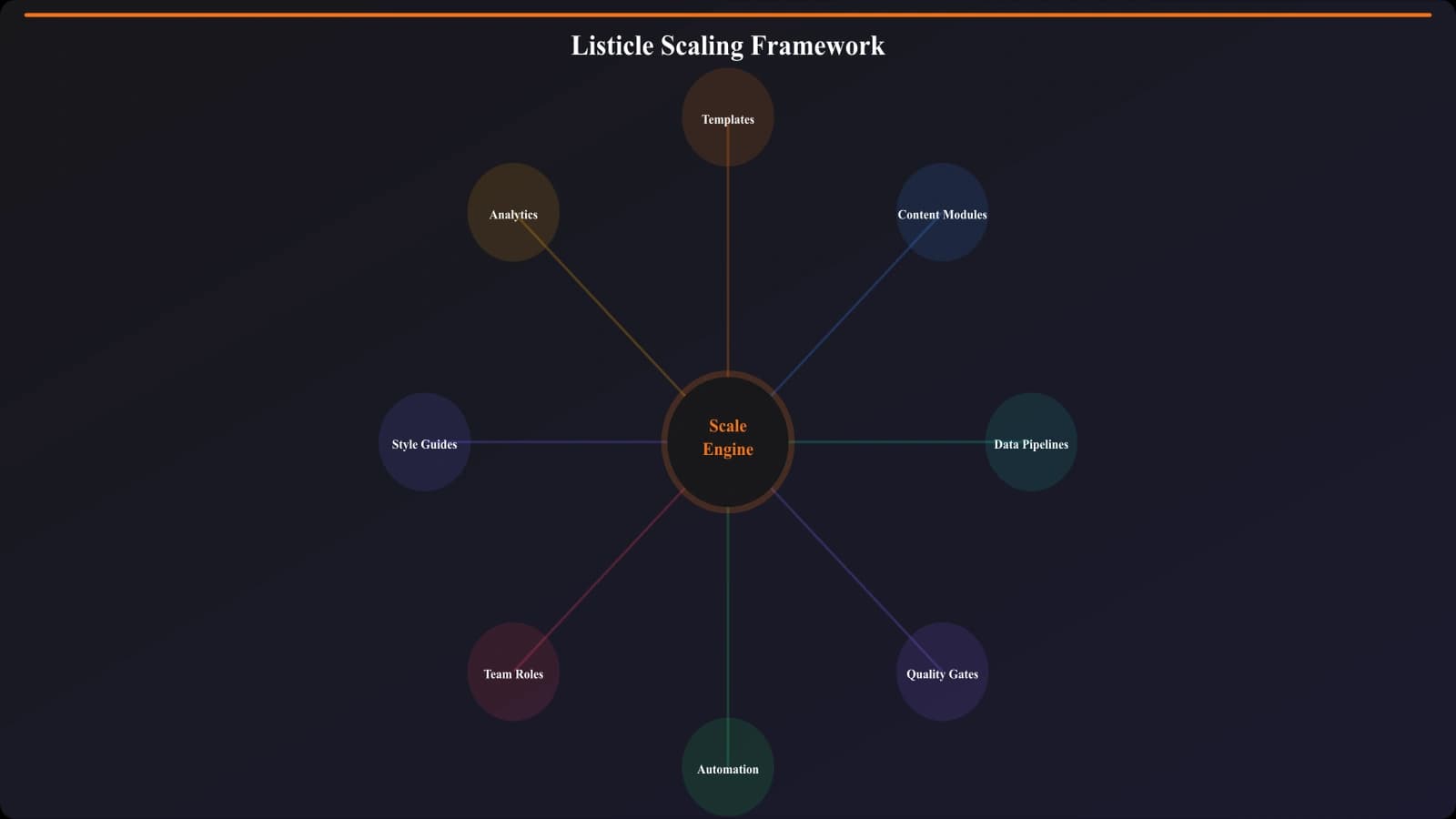
What follows is the complete framework for building a listicle production system that delivers consistent quality at scale. We'll cover the infrastructure, the workflows, the quality gates, and the automation opportunities. By the end, you'll have a blueprint for going from artisanal content creation to industrial-grade content manufacturing—without turning your pages into generic garbage.
The Real Problem With Scaling Content
Before diving into solutions, let's diagnose why scaling content is so hard in the first place. Because if you don't understand the failure modes, you'll build systems that look good on paper but collapse under real-world pressure.
The Quality Decay Curve
When teams try to scale content production through brute force—more writers, faster turnarounds—quality doesn't just decline linearly. It crashes. Here's what typically happens:
| Production Level | Quality Trend | Typical Problems |
|---|---|---|
| 1-10 pieces/month | High, consistent | None—founder or senior team handles everything |
| 10-25 pieces/month | Variable, trending down | Inconsistent voice, missed details, research shortcuts |
| 25-50 pieces/month | Significant decline | Thin content, factual errors, template fatigue visible |
| 50+ pieces/month | Collapse or system required | Either quality crashes or production systems kick in |
The inflection point is usually around 25-30 pieces per month. That's when the informal systems that worked early on—“just have someone review it”—start breaking down. Reviewers get overwhelmed, standards drift, and suddenly you're publishing content that would have embarrassed you six months ago.
The Three Failure Modes
Teams that fail at scaling usually hit one of three walls:
Failure Mode 1: The Bottleneck Trap
One person (usually the founder or original content lead) becomes the quality gatekeeper. Everything flows through them. They can't keep up. Either they become the constraint that limits growth, or they start rubber-stamping content they haven't really reviewed. Both outcomes are bad.
Failure Mode 2: The Template Zombie
The team creates templates to speed production. Good instinct. But then they follow templates so rigidly that every page reads identically. Same structure, same phrasing patterns, same types of examples. Google notices. Users notice. Rankings decline.
Failure Mode 3: The Data Desert
Listicles require accurate, current data—pricing, features, ratings, availability. At low volume, someone manually checks this stuff. At high volume, nobody has time. So data goes stale, errors creep in, and trust erodes.
The framework we're about to cover addresses all three failure modes. Think of it as building the infrastructure that makes quality inevitable rather than dependent on individual heroics.
Building Your Template Architecture
Templates are the foundation of scalable content. But there's a right way and a wrong way to do them. The wrong way creates zombie content. The right way creates a flexible framework that ensures consistency while allowing creativity.
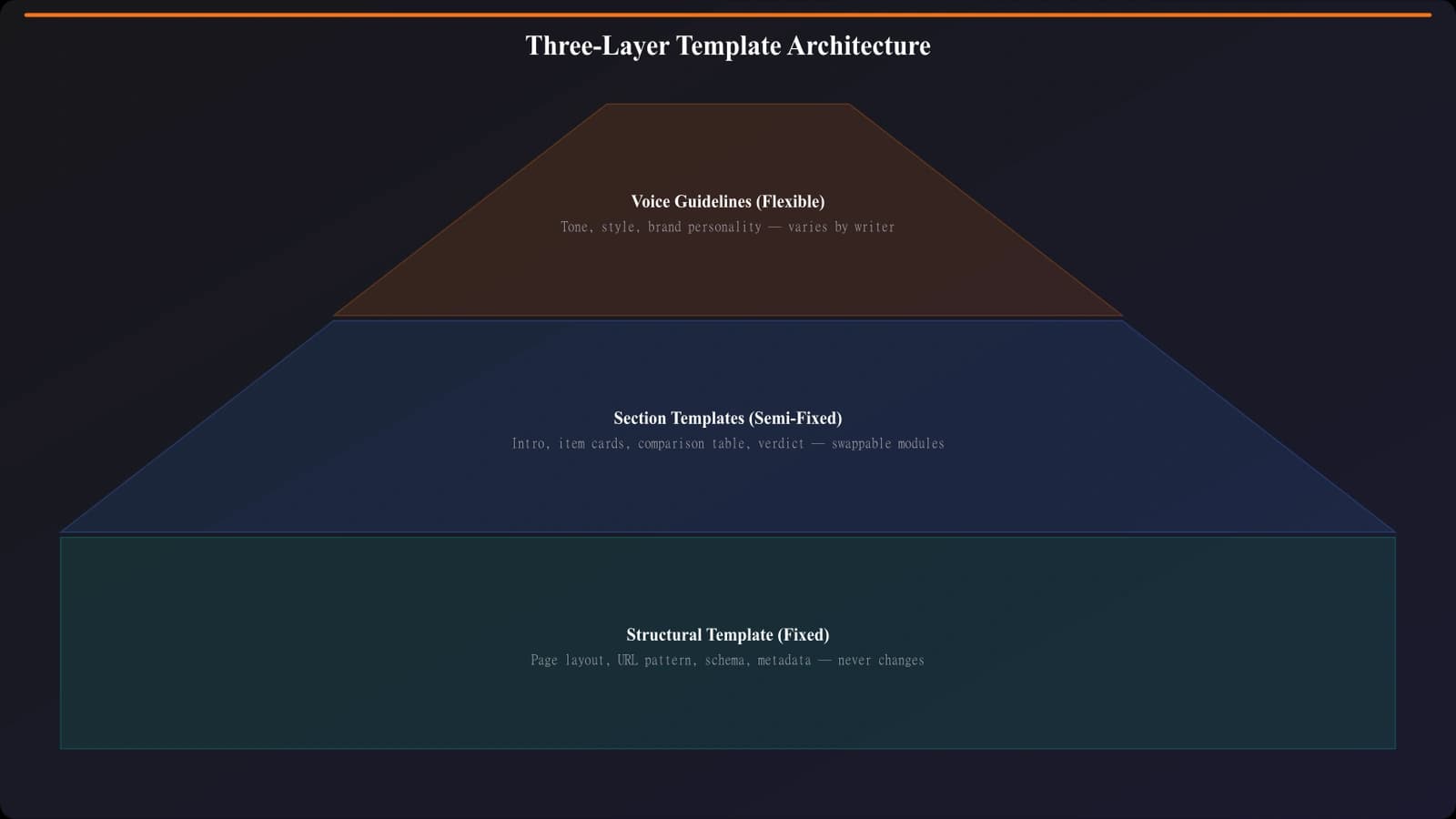
The Three-Layer Template System
Instead of one rigid template, think in layers:
Layer 1: Structural Template (Fixed)
This is the skeleton that never changes. The sections that must exist, in the order they must appear. For listicles, this typically includes:
- H1 with primary keyword
- Last updated indicator
- Quick Picks / TL;DR section
- Methodology disclosure
- Individual product sections (repeated)
- Comparison table
- How we tested / selection criteria
- FAQ section
Layer 2: Section Templates (Semi-Fixed)
Within each section, you have guidelines—not scripts. For example, a product section template might specify:
- Must include: product name, our verdict, 3-5 pros, 2-3 cons, pricing, CTA
- Should include: screenshot or logo, specific use case recommendation
- May include: expert quote, comparison to competitors, edge case warnings
Notice the flexibility. “Must include” items are mandatory. “Should include” items are expected but can be skipped with reason. “May include” items add differentiation without being required.
Layer 3: Voice and Style Guide (Flexible)
This layer governs how things are written, not what's written. It includes tone guidelines, vocabulary preferences, formatting conventions, and examples of good vs. bad execution. Writers use this as reference, not as fill-in-the-blank.
Template Versioning and Evolution
Your templates aren't static documents—they're living systems that evolve based on performance data. Here's how to manage that evolution:
Version Control: Treat templates like code. Number versions, document changes, and track which content was created with which template version. This lets you correlate template changes with performance shifts.
A/B Testing Templates: When you want to test a template change, don't update everything at once. Run the new template on a subset of new pages and compare performance against pages using the old template. Only roll out changes that demonstrate improvement.
Feedback Loops: Create a formal process for writers and editors to suggest template improvements. The people using templates daily often spot optimization opportunities that managers miss.
Modular Content Blocks
Here's where scaling really starts to accelerate. Instead of writing every product description from scratch, you build a library of reusable content blocks that can be assembled in different combinations.
Types of Content Blocks
| Block Type | Description | Reuse Potential | Example |
|---|---|---|---|
| Entity Blocks | Core info about a product/tool | High—reuse across all lists featuring this product | Ahrefs description, pricing, key features |
| Comparison Blocks | Head-to-head comparison of two products | Medium—reuse in relevant contexts | Ahrefs vs SEMrush comparison |
| Use Case Blocks | When/why to use a specific product | High—different framing for different audiences | “Best for enterprise teams” description |
| Methodology Blocks | How you evaluated products in a category | Very High—reuse across entire category | “How we test SEO tools” section |
| FAQ Blocks | Common questions about a topic/category | High—reuse across related listicles | “Is SEO tool X worth it?” answer |
Building Your Block Library
Start by auditing your existing content. You've probably already written great product descriptions, comparison paragraphs, and methodology explanations. Extract them, tag them, and organize them into a searchable library.
Step 1: Content Extraction
Go through your top-performing listicles and identify reusable components. Copy them into a central database or document with consistent tagging.
Step 2: Standardization
Rewrite blocks to follow consistent formatting. An entity block for Ahrefs should have the same structure as an entity block for SEMrush. This makes assembly faster and output more consistent.
Step 3: Variation Creation
For high-use blocks, create 2-3 variations. You don't want every listicle featuring Ahrefs to have identical text—that's duplicate content risk. Variations let you swap in different phrasings while maintaining accuracy.
Step 4: Freshness Tracking
Every block needs a “last verified” date. Products change. Pricing updates. Features get added or removed. Build a system for periodically reviewing and updating your block library.
Data Pipelines: The Accuracy Engine
Listicles live or die on data accuracy. Wrong prices, outdated features, discontinued products—these errors kill credibility fast. At scale, manual data management becomes impossible. You need automated pipelines.
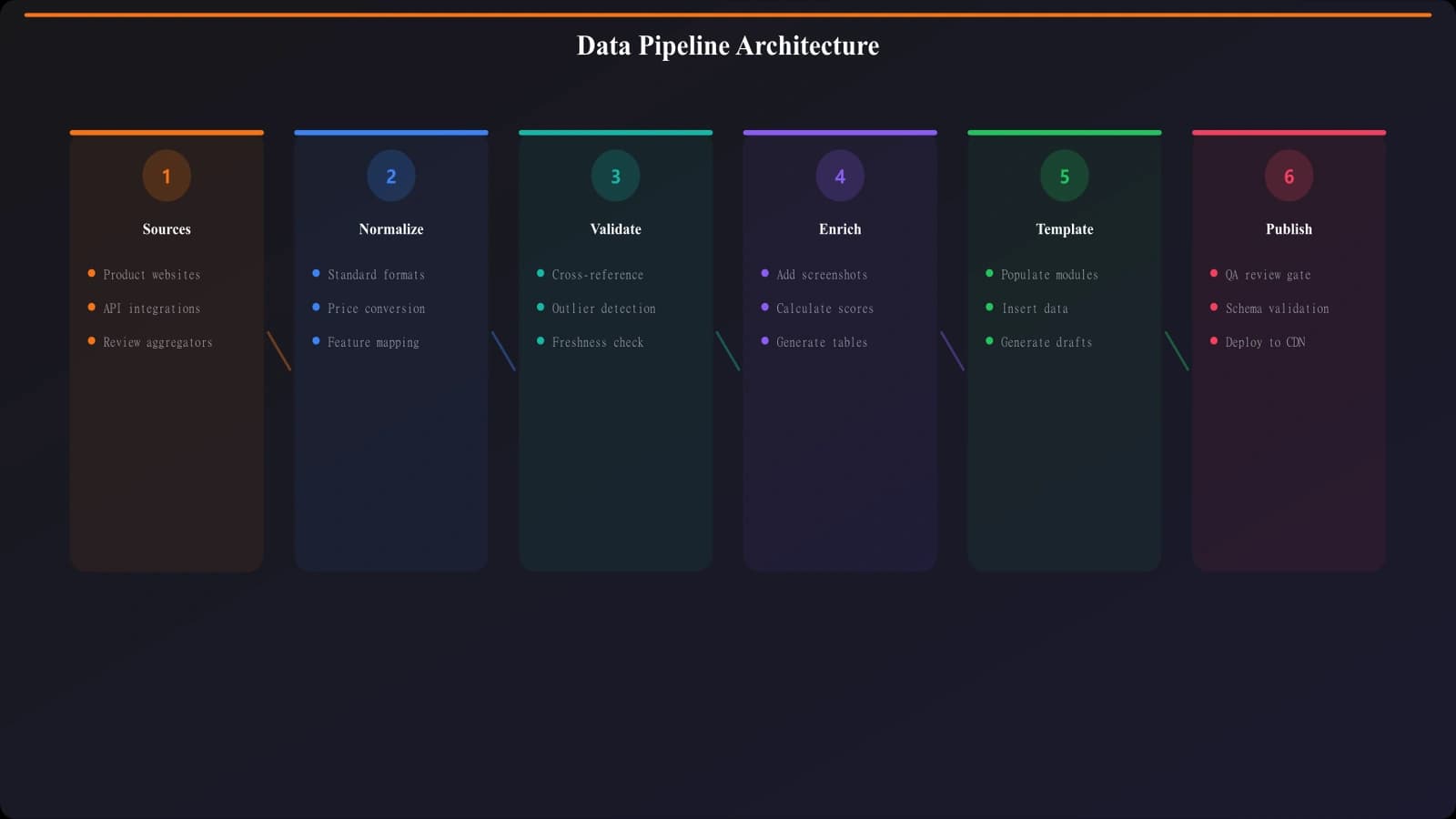
The Data Architecture
Think of your data pipeline as three connected systems:
Source Layer: Where data originates. This includes official product websites, API integrations (where available), review aggregators (G2, Capterra), pricing pages, and your own testing data.
Normalization Layer: Where data gets cleaned and standardized. Raw data from different sources comes in different formats. This layer converts everything to a consistent schema.
Content Layer: Where normalized data connects to your content blocks and templates. When you need Ahrefs pricing for a listicle, you pull from the content layer, which automatically reflects the latest normalized data.
Automated Data Updates
The most sophisticated teams automate data collection and updates. Here's a realistic implementation path:
Level 1: Scheduled Manual Reviews
Not automation, but systematized. Create a calendar for reviewing data by category. SEO tools get checked monthly. Enterprise software quarterly. Static categories (historical lists) annually.
Level 2: Change Monitoring
Use tools like Visualping or custom scripts to monitor product pricing pages and feature lists. Get alerts when changes are detected. This triggers human review rather than auto-updating.
Level 3: API Integration
For products with public APIs or affiliate data feeds, automate data pulls directly. This works well for pricing, availability, and ratings. Features still need human verification.
Level 4: AI-Assisted Updates
Emerging approach: Use AI to scan product websites and extract structured data, then flag significant changes for human review. Not fully automated, but dramatically reduces manual effort.
Maintaining Data Freshness
Stale data is worse than no data—it actively misleads readers and damages trust. Here's how to maintain freshness at scale:
- Freshness SLAs by data type: Pricing data: monthly max staleness. Feature data: quarterly. Availability: weekly for volatile products.
- Automatic staleness flags: Your CMS or content database should automatically flag content that hasn't been verified in X days.
- Published update indicators: Show readers when data was last verified. This builds trust and creates internal accountability.
- Update triggers: Major product announcements, pricing changes, or acquisitions should trigger immediate review of all content featuring that product.
Scale Your Listicle Production Today
Build comparison pages and best-of lists with automated data pipelines and quality-assured templates. Go from 5 to 50+ pages per month.
Start Scaling Free
Quality Gates: Building Consistency Into the System
When one person can't review everything, you need systematic quality controls that catch problems without creating bottlenecks. This is where most scaling efforts fail—and where yours can succeed.
The Tiered Review System
Not all content needs the same level of review. Implement tiered quality gates based on risk and visibility:
| Tier | Content Type | Review Process | Turnaround |
|---|---|---|---|
| Tier 1: Premium | High-traffic keywords, money pages | Full senior editorial + subject expert review | 3-5 days |
| Tier 2: Standard | Mid-volume keywords, category pages | Editorial review + automated checks | 1-2 days |
| Tier 3: Programmatic | Long-tail, location variants, templated pages | Automated checks + spot sampling | Same day |
The key insight: you're not lowering quality for Tier 3 content. You're building systems (templates, automation, spot checks) that maintain quality without requiring full manual review of every page.
Automated Quality Checks
Many quality issues can be caught programmatically. Build automated checks for:
- Structural compliance: Does the page have all required sections? Are H1s and H2s present and properly formatted?
- Word count thresholds: Does each section meet minimum word counts? Are product descriptions substantive?
- Link validation: Are all external links working? Do affiliate links have proper tracking parameters?
- Image checks: Are all images present with alt text? Are screenshots current?
- Data validation: Are prices in valid ranges? Are ratings between 0-5? Are dates not in the future?
- Duplicate detection: Is content too similar to existing pages? Are blocks being overused?
Run these checks automatically before publishing. Any failures trigger human review. This catches 60-70% of issues without human effort.
Statistical Spot Sampling
For high-volume production, you can't review everything, but you need visibility into quality trends. Implement spot sampling:
Sample 10-15% of production for full manual review. Select randomly to get an accurate picture of overall quality. Track quality scores over time to catch drift early.
Stratified sampling ensures you're checking across writers, templates, and categories. If one writer or template is underperforming, sampling catches it before too much bad content goes live.
Quality scorecards standardize evaluation. Create a checklist with weighted criteria so different reviewers produce consistent scores. This makes trends visible and actionable.
Team Structure for Scale
The team structure that works at 10 pages per month doesn't work at 100. As you scale, you need to specialize roles and create clear handoffs. Here's a proven structure:
Role Specialization
At scale, the generalist “content writer who does everything” becomes a bottleneck. Break the work into specialized roles:
- Research Specialists: Gather data, verify product information, build content blocks. These folks don't write—they create the raw material writers work from.
- Writers: Assemble content using templates, blocks, and research. Focus on voice, flow, and unique insights rather than data gathering.
- Editors: Quality control, consistency checks, final polish. Different editors can specialize in different quality tiers.
- Systems/Ops: Maintain templates, data pipelines, and automation. The infrastructure people who make everyone else more productive.
Workflow and Handoffs
Clear handoff points prevent confusion and dropped balls:
Brief to Research: Content manager creates brief with target keyword, page type, and priority tier. Research pulls relevant data and content blocks.
Research to Writing: Research delivers a package with all data, verified blocks, and source links. Writer shouldn't need to Google anything.
Writing to Editing: Writer submits through a standardized process (PR, form submission, etc.) with checklist confirmation. Editor knows exactly what to expect.
Editing to Publishing: Editor approves with any required fixes. Publishing is handled by ops or automated based on tier.

Automation Opportunities
Automation isn't about replacing humans—it's about removing low-value tasks so humans can focus on judgment calls and creative work. Here's where automation delivers the biggest wins:
High-Value Automation Targets
| Task | Automation Approach | Time Saved | Implementation Effort |
|---|---|---|---|
| Template population | Pull data from database into template structure | 60-70% of drafting time | Medium |
| Internal linking | Automated suggestion of relevant internal links | 10-15 minutes per page | Low |
| Image optimization | Automated resizing, compression, alt text generation | 5-10 minutes per page | Low |
| Schema markup | Generate structured data from page content | 15-20 minutes per page | Medium |
| Competitor monitoring | Track competitor listicles for gaps and updates | Hours per week | Medium |
| Freshness alerts | Flag stale content and data automatically | Prevents manual audits | Low |
AI-Assisted Content Creation
AI tools are transforming content production, but the key is knowing where they add value and where they create risk.
Good uses for AI:
- First draft generation from structured data—AI turns your product database into prose drafts
- Variation creation—generating multiple versions of a content block
- Summarization—turning long product descriptions into concise bullets
- SEO optimization suggestions—identifying missing keywords or topics
Risky uses for AI:
- Generating facts without verification—AI can confidently state wrong information
- Final copy without human review—voice and quality drift
- Pricing or spec data—too easy to hallucinate numbers
- Competitor comparisons—potential for bias or inaccuracy
The sweet spot: AI for volume, humans for verification and judgment. AI creates the first 70%, humans refine, verify, and add the final 30%.
Measuring Success at Scale
At low volume, you can intuitively track how each page performs. At scale, you need systematic measurement to spot patterns and catch problems early.
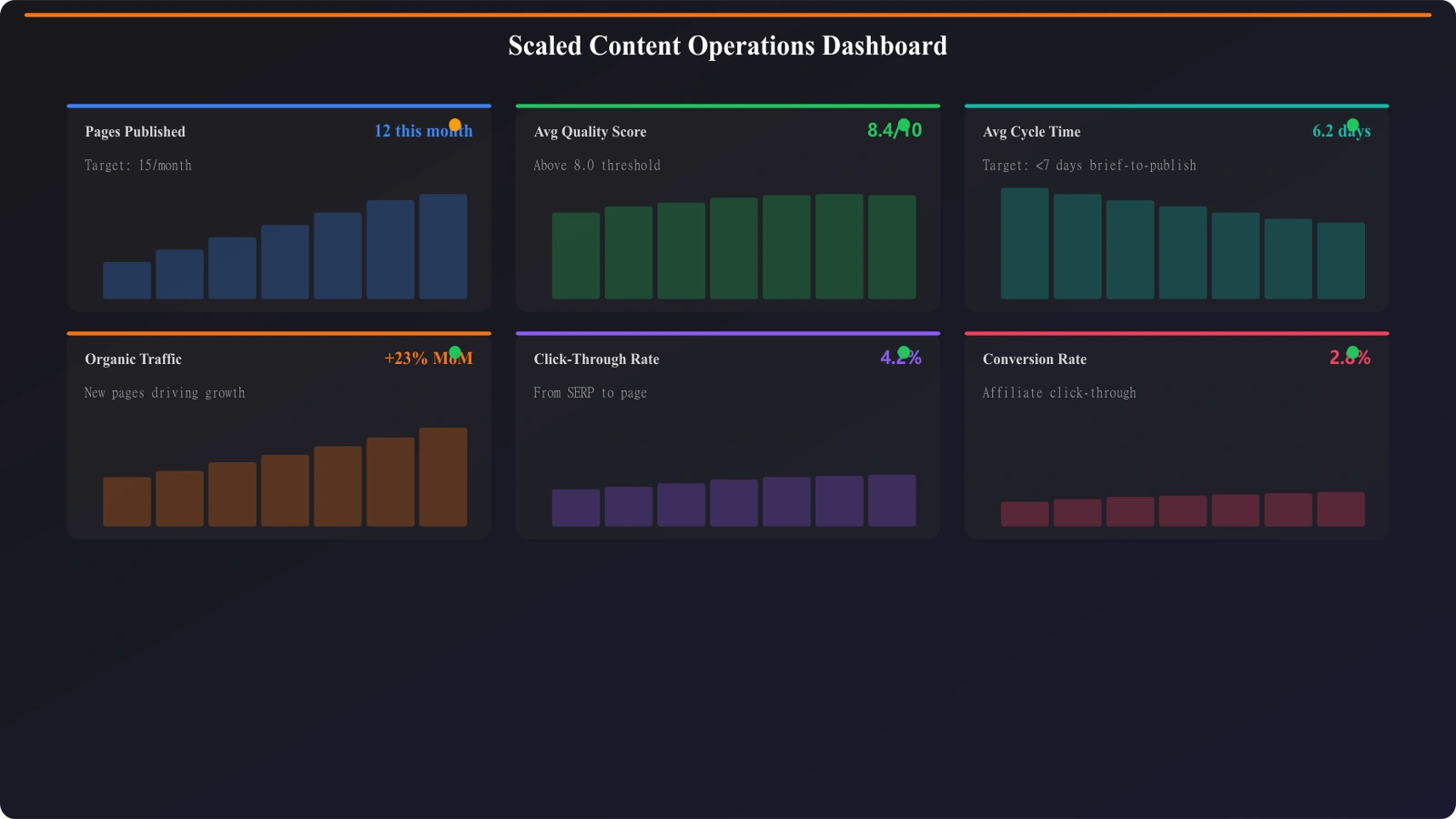
Production Metrics
Track the health of your production system:
- Output rate: Pages published per week/month, by tier and category
- Cycle time: Days from brief to publication, by tier
- First-pass rate: Percentage of content passing editorial without revision
- Block reuse: How often content blocks are being reused vs. created fresh
- Writer velocity: Pages per writer per week, tracking for burnout or bottlenecks
Quality Metrics
Ensure scale isn't coming at the cost of quality:
- Quality score trends: Are spot-sample scores stable, improving, or declining?
- Error rate: Factual corrections needed post-publication
- Reader feedback: Comments, ratings, bounce rates as proxies for content quality
- Update lag: How long stale data persists before correction
Performance Metrics
Connect production to business outcomes:
- Indexation rate: What percentage of new pages get indexed within target timeframe?
- Ranking velocity: Time from publication to first page rankings
- Traffic per page: Are new pages meeting traffic projections?
- Conversion rate: Clicks to affiliate/CTA goals, by page and category
Common Pitfalls and How to Avoid Them
Even with good systems, scaling can go wrong. Here are the most common pitfalls and how to prevent them:
Pitfall 1: Thin Content at Scale
The problem: As production pressure increases, content gets thinner. Product descriptions shrink. Unique insights disappear. Pages start looking like templated garbage.
The fix: Set minimum word counts by section and enforce them in automated QA. Make unique insights a required element in templates, not optional. Include “unique value add” as a quality scorecard criterion.
Pitfall 2: Voice and Brand Drift
The problem: Different writers, different days, different results. Your brand voice becomes inconsistent, making the site feel like a content farm.
The fix: Create a detailed style guide with examples. Have new writers shadow experienced ones. Build voice consistency into editorial review criteria. Do periodic “voice audits” across content.
Pitfall 3: Data Staleness Creep
The problem: Initial content is accurate, but updates don't happen. Over time, your data becomes increasingly wrong.
The fix: Build freshness tracking into your content database from day one. Set SLAs by data type. Create dashboards showing staleness distribution. Make freshness a key metric, not an afterthought.
Pitfall 4: Internal Cannibalization
The problem: At scale, it's easy to accidentally create overlapping pages that compete with each other in search results.
The fix: Maintain a keyword mapping document before production. Check every new brief against existing content. Build cannibalization checks into your workflow—no new page starts without verifying it's targeting unique intent.
For more on avoiding these content quality issues, see our guide on Avoiding Thin Content in PSEO: Proven Techniques.
Your Implementation Roadmap
Scaling listicle production is a journey, not a switch you flip. Here's a phased approach to building your system:
Phase 1: Foundation (Weeks 1-4)
- Document your current best-performing templates
- Create your first content block library (20-30 blocks)
- Set up basic automated QA checks
- Define quality tiers and review processes
Phase 2: Systems (Weeks 5-8)
- Build your data pipeline and freshness tracking
- Implement tiered review workflow
- Create production and quality dashboards
- Train team on new processes
Phase 3: Scale (Weeks 9-12)
- Gradually increase production volume (2x, then 3x)
- Monitor quality metrics closely
- Iterate on templates and processes based on feedback
- Expand content block library
Phase 4: Optimization (Ongoing)
- A/B test template variations
- Add automation for high-value repetitive tasks
- Refine AI assistance integration
- Build predictive quality models
The teams that scale successfully treat this as infrastructure investment, not a content project. You're not just making more content—you're building a content factory with quality controls, monitoring, and continuous improvement built in.
Start with the foundation. Build systematically. Monitor relentlessly. And remember: the goal isn't just more pages. It's more pages that perform. Scale without quality is just expensive noise.
For related frameworks on building sustainable content operations, explore PSEO Production System: End-to-End Workflow and Listicle Template Design: Unique Pages at Scale.

Product Manager at BestPage. Pioneer in AEO research since 2024, exploring the convergence of SEO and GEO (Generative Engine Optimization). Led multiple AI-powered content optimization projects that achieved 300%+ citation increases in ChatGPT and Perplexity.