
When analyzing comparison page performance, it's tempting to focus on standard engagement metrics like time on page, bounce rate, and pages per session. But these metrics can be deeply misleading for listicle and comparison content. A visitor who lands on your “Best CRM Software” page, quickly finds their answer, and clicks through to a product has technically “bounced”—but that's a success, not a failure.
The challenge is that comparison content has unique engagement patterns. Users often arrive with high intent, find what they need quickly, and take action by clicking through to products or services. Traditional engagement metrics were designed for content where longer time on site always means better engagement. That's not how comparison content works.
This guide reframes engagement metrics for comparison content. We'll identify which metrics actually matter, how to interpret them correctly, and how to set up tracking that captures meaningful user behavior rather than vanity numbers.
Why Standard Metrics Mislead
Before discussing what to measure, let's understand why standard engagement metrics often give false signals for comparison content.
The Bounce Rate Problem
Bounce rate measures the percentage of visitors who leave without triggering another pageview. For blog content, high bounce rates often signal poor content quality. For comparison content, the picture is more complex.
Consider this scenario: A visitor searches “best project management software,” lands on your comparison page, reads your recommendations, decides Asana looks right for them, and clicks your affiliate link to try it. That visitor bounced, but they converted—exactly what you wanted.
Another scenario: A visitor lands on your page, can't find what they need, returns to Google, and visits a competitor. They also bounced, but this represents a failure.
Standard bounce rate can't distinguish between these scenarios.
The Time on Page Problem
Time on page seems like a quality signal—longer time means more engagement, right? Not necessarily for comparison content.
- Quick success: User finds their answer in 45 seconds and clicks through = low time, high value
- Confused browsing: User spends 5 minutes searching for information that's poorly organized = high time, low value
- Thorough research: User reads entire comparison carefully before deciding = high time, high value
Time on page alone can't tell you which scenario you're seeing.
The Pages Per Session Problem
For many sites, more pages per session indicates higher engagement. For comparison sites, it depends on intent:
- Good scenario: User views category page → best-of listicle → alternatives page → clicks through to product
- Bad scenario: User bounces around unable to find relevant comparisons
- Neutral scenario: User finds exactly what they need on first page, converts immediately
| Metric | Traditional Interpretation | Comparison Content Reality |
|---|---|---|
| Bounce rate | Lower is better | Depends on exit type (outbound click vs pogo-stick) |
| Time on page | Longer is better | Depends on intent (quick answer vs research mode) |
| Pages per session | More is better | Depends on whether journey was intentional |
| Exit rate | Lower is better | High exit rate with product clicks is good |
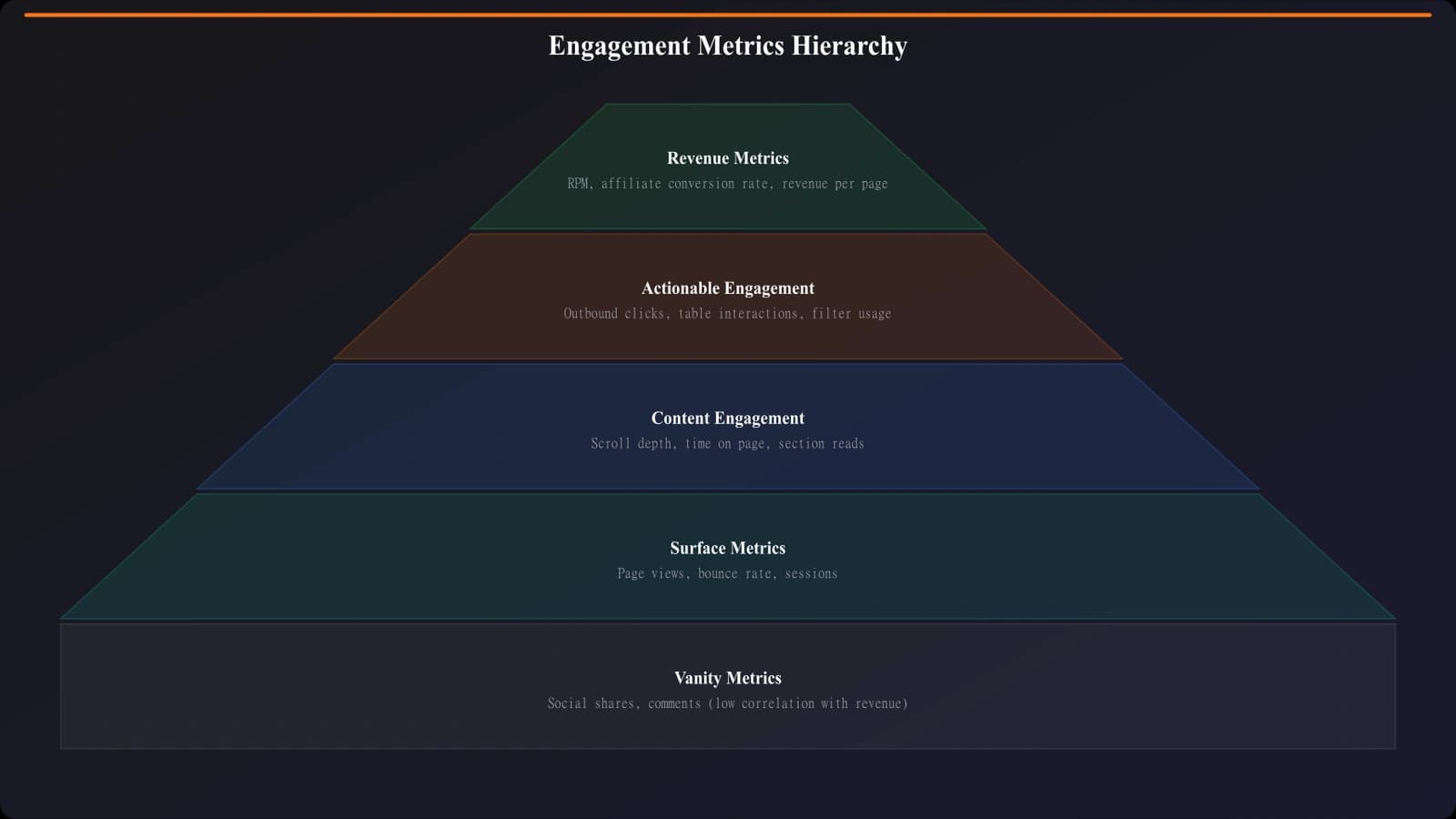
Metrics That Actually Matter
Now let's focus on the metrics that provide genuine insight into comparison content performance.
Outbound Click Rate
The most important metric for monetized comparison content is outbound click rate: what percentage of visitors click through to a product or service you're comparing?
Why it matters:
- Directly tied to revenue (affiliate clicks, leads)
- Indicates content successfully helped users make decisions
- Distinguishes between “good bounces” and abandoned sessions
Benchmarks for comparison content:
- Below 10%: Likely issues with content quality or CTA visibility
- 10-20%: Typical for well-optimized comparison pages
- 20-30%: Excellent performance
- Above 30%: Exceptional, likely high-intent traffic
Scroll Depth
Scroll depth measures how far down the page users scroll. For comparison content, this reveals whether users are engaging with your recommendations or abandoning early.
What to look for:
- Quick drop at top: Headline or intro not resonating with search intent
- Plateau mid-page: Users finding what they need (not necessarily bad)
- Continued scrolling to bottom: Strong engagement with full comparison
- Low scroll but high click-through: Quick picks section working well
Comparison Table Interactions
If your comparison pages include interactive elements (filters, sorting, expandable sections), track how users interact with them.
- Filter usage: Which filters are used most? (Reveals user priorities)
- Sort actions: How do users sort? (Price, rating, features)
- Expansion clicks: Which products get expanded for details?
- Tab switches: Which comparison tabs are most viewed?
Click Position Data
Track which positions in your rankings get the most clicks. This reveals reading patterns and the influence of ranking order.
| Ranking Position | Typical Click Share | Interpretation |
|---|---|---|
| Position 1 | 25-40% | Strong “best overall” effect |
| Positions 2-3 | 15-25% each | Users considering alternatives |
| Positions 4-5 | 8-15% each | Niche appeal or specific use cases |
| Positions 6+ | 5-10% combined | Long-tail interest |
If your click distribution is heavily skewed to position 1, users may not be engaging with the full comparison. If clicks are more evenly distributed, users are actively comparing options.
Qualified vs. Unqualified Engagement
The key to understanding comparison content metrics is distinguishing qualified from unqualified engagement.
What Qualifies Engagement
Engagement is “qualified” when it indicates the user is successfully using your content for its intended purpose: comparing options and making decisions.
Qualified engagement signals:
- Scrolling to comparison sections
- Clicking to expand product details
- Using filters or sorting
- Clicking through to products
- Viewing multiple products within the comparison
- Returning to the page from a product site
Unqualified engagement signals:
- Long time on page without scrolling (tab left open?)
- Scrolling without stopping at any section
- No clicks on any interactive elements
- Returning to search results immediately (pogo-sticking)
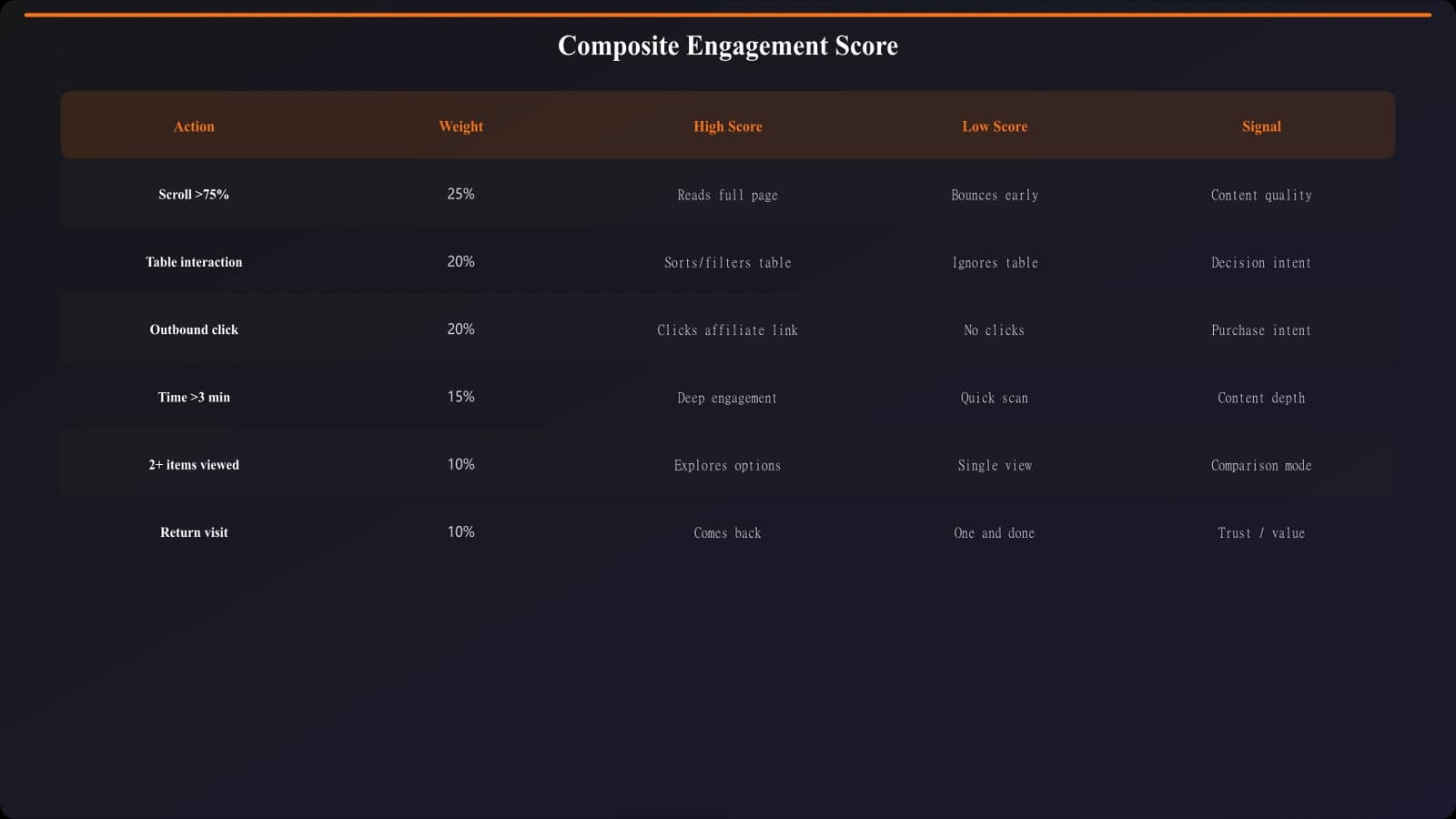
Creating an Engagement Score
Consider creating a composite engagement score that weights actions by their value:
| Action | Weight | Rationale |
|---|---|---|
| Product click-through | 10 points | Highest value action |
| Expanded product details | 3 points | Shows research intent |
| Used filter/sort | 2 points | Active comparison behavior |
| Scrolled to 50%+ | 2 points | Engaged with content |
| Scrolled to 100% | 1 point | Read full comparison |
A composite score gives you a single number that's more meaningful than any individual metric.
Track Metrics That Matter
Build comparison pages with built-in tracking for meaningful engagement signals.
Try for Free
Setting Up Proper Tracking
To capture the metrics that matter, you need intentional tracking setup. Here's what to implement.
Outbound Click Tracking
Track every click to an external product or service. Capture:
- Which product was clicked
- Which position in the ranking
- Which element (main CTA, comparison table, inline link)
- Time to click (how long before the click happened)
Scroll Depth Tracking
Set up scroll tracking at meaningful thresholds:
- 25% (past intro/TL;DR)
- 50% (mid-comparison)
- 75% (most products viewed)
- 90-100% (read to conclusion)
Also track scroll to specific elements: comparison table, quick picks section, individual product entries.
Interaction Tracking
If your pages have interactive elements, track:
- Filter selections and combinations
- Sort actions
- Expand/collapse actions on product cards
- Tab or section switches
- Search within page (if applicable)
Session Quality Events
Fire events that indicate session quality:
- “Engaged” event: Scroll to 50% OR any outbound click OR any interaction
- “Highly engaged” event: Multiple product clicks OR deep scroll + interaction
- “Converted” event: Outbound click to product
Interpreting Your Data
Once you're collecting the right metrics, here's how to interpret them.
Segment Your Analysis
Engagement patterns vary significantly by:
- Traffic source: Organic visitors often have higher intent than social
- Device: Mobile users scroll differently than desktop
- Query type: Best-of queries vs alternatives vs vs-comparisons
- New vs returning: Returning visitors may be further in decision process
Always segment your data before drawing conclusions. Aggregate numbers often hide meaningful patterns.
Page-Specific Funnel Analysis
Create a funnel for each comparison page type:
| Funnel Stage | Metric | Healthy Range |
|---|---|---|
| Landed | 100% | Baseline |
| Scrolled to comparison | Scroll depth 25%+ | 70-85% |
| Engaged with comparison | Interaction or 50%+ scroll | 40-60% |
| Viewed products | Product expand or click | 20-40% |
| Clicked through | Outbound click | 10-25% |
Identify where users drop off to focus optimization efforts.
Benchmark Against Your Own Content
External benchmarks for comparison content are unreliable because of variation in content types, traffic sources, and tracking implementations. Instead:
- Compare similar page types against each other
- Track trends over time for each page
- A/B test changes and measure relative impact
- Identify your top performers and analyze what makes them different
Action Plan
Here's how to implement meaningful engagement tracking for your comparison content:
- Audit current tracking. What are you measuring now? What's missing?
- Implement outbound click tracking. This is the most important addition if you don't have it.
- Add scroll depth tracking. At minimum, 25/50/75/100% thresholds.
- Track key interactions. Whatever interactive elements your pages have.
- Create engagement segments. Define what “engaged” means for your content and create audience segments.
- Build a dashboard. Focus on the metrics that matter, not default GA4 reports.
- Establish baselines. Run tracking for 2-4 weeks before making changes.
- Iterate based on data. Use insights to optimize content and design.
The goal isn't more metrics—it's the right metrics. Focus on measurements that tell you whether users are successfully using your comparison content to make decisions. Everything else is noise.
For tracking outbound clicks specifically, see our guide on Outbound Click Tracking: Measure Every Exit. For scroll depth analysis, check out Scroll Depth: What It Reveals About Your Listicles.

Product Manager at BestPage. Pioneer in AEO research since 2024, exploring the convergence of SEO and GEO (Generative Engine Optimization). Led multiple AI-powered content optimization projects that achieved 300%+ citation increases in ChatGPT and Perplexity.