
When a user clicks “Visit Salesforce” on your CRM comparison, that click is the culmination of your content's value. Everything else—the traffic, the engagement, the scroll depth—leads to this moment of user action. Without tracking these clicks, you're measuring inputs without measuring output.
But click tracking varies dramatically in usefulness. Basic tracking tells you clicks happened. Rich tracking tells you which products were clicked, from which position, through which CTA element, on which page, by which user segment. This detail enables optimization; basic tracking only confirms existence.
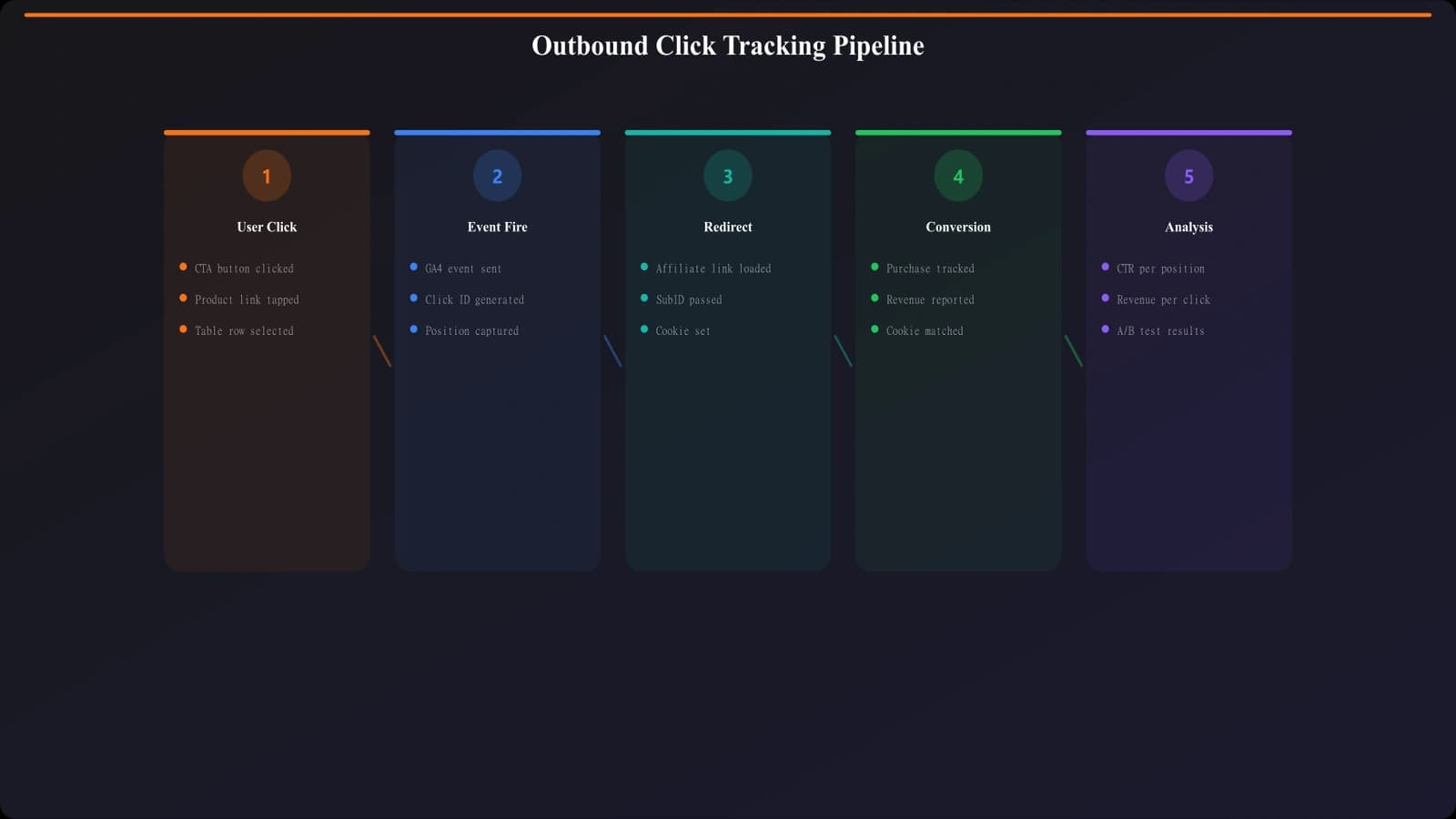
This guide covers outbound click tracking implementation for listicle content. We start with basic GA4 enhanced measurement, then build toward comprehensive custom tracking with full product context. By the end, you'll have the tracking infrastructure to answer questions like “does position 1 outperform position 3?” and “which CTA style converts best?”
The implementation uses Google Tag Manager and GA4, the most common stack for publishers. Concepts apply to other analytics platforms with appropriate adaptation.
Basic Enhanced Measurement Tracking
Start with GA4's built-in outbound click tracking.
Enabling Enhanced Outbound Clicks
GA4 can track outbound clicks automatically:
- Navigate to Admin > Data Streams > [Your Stream]
- Click “Enhanced measurement”
- Enable “Outbound clicks”
- Verify with DebugView that clicks register
Enhanced measurement tracks clicks to external domains automatically. Events appear as “click” with outbound parameter.
Limitations of Basic Tracking
Enhanced measurement provides minimal context:
What enhanced measurement captures:
• Link URL (destination)
• Link domain
• Link classes (sometimes)
• Page URL (source page)
What enhanced measurement misses:
• Which product was clicked
• Product position in listicle
• CTA type (button vs text link)
• Section of page (above vs below fold)
• Product category or type
For any meaningful optimization, you need custom tracking beyond enhanced measurement.
Custom Click Tracking Implementation
Build rich click tracking with GTM and data attributes.
Data Attribute Setup
Add data attributes to outbound links for tracking context:
- data-product: Product name or identifier
- data-position: Position in listicle (1, 2, 3...)
- data-cta-type: Button style (primary, secondary, text)
- data-section: Page section (hero, comparison, conclusion)
- data-affiliate: Affiliate ID if applicable
Adding these attributes to your HTML enables extraction by GTM without complex DOM traversal.
| Attribute | Example Value | Analysis Enabled |
|---|---|---|
| data-product | “salesforce” | Click rate by product |
| data-position | “1” | Position impact on CTR |
| data-cta-type | “primary-button” | CTA style effectiveness |
| data-section | “comparison-table” | Section conversion rates |
| data-affiliate | “aff123” | Affiliate link performance |
GTM Configuration
Configure GTM to capture data attributes on click:
- Create variables: Data layer or auto-event variables for each data attribute
- Create trigger: Click trigger for links matching outbound domain pattern
- Create tag: GA4 event tag with parameters from variables
- Map parameters: Send product, position, cta_type as event parameters
- Test thoroughly: Verify in GTM Preview and GA4 DebugView
GTM extracts data attribute values and sends them to GA4 as event parameters.
Data Layer Alternative
For more complex setups, push click data to data layer:
Data layer push example:
When user clicks, push object containing:
• event: “product_click”
• productName: “Salesforce”
• productPosition: 1
• ctaType: “primary-button”
• destinationUrl: “https://salesforce.com...”
• listicleSlug: “best-crm-software”
Data layer approach is more reliable than DOM scraping for complex pages or SPAs.
Analyzing Click Data
Once tracking is implemented, use data for optimization insights.
Core Click Metrics
Calculate these metrics from click data:
- Click-through rate (CTR): Clicks / pageviews for overall page performance
- Product click share: Clicks on product / total clicks for relative performance
- Position CTR: Click rate by position to understand position impact
- CTA CTR: Click rate by CTA type to optimize buttons
- Clicks per session: Average clicks per visitor for engagement measurement
Build these metrics in GA4 explorations or Looker Studio for regular monitoring.
Optimization Insights
Use click data to answer optimization questions:
Questions click data answers:
• Does position 1 significantly outperform position 5?
• Do button CTAs outperform text links?
• Which products consistently underperform despite visibility?
• Does CTR vary by traffic source or device?
• Are comparison table clicks higher than in-content links?
These insights inform content layout, product ordering, and CTA design decisions.
Track Product Clicks Automatically
Generate listicles with built-in click tracking data attributes.
Try for Free
Advanced Tracking Scenarios
Handle complex tracking scenarios for mature implementations.
Multiple Click Tracking
Users may click multiple products in a session:
- Track each click as separate event
- Include sequence number (first click, second click)
- Track time between clicks for comparison behavior analysis
- Identify patterns: do users click 1 product or compare several?
Multi-click behavior reveals whether users are decisive or comparative in their research.
Click Intent Signals
Enrich click data with intent signals:
- Time on page before click: Quick clicks vs considered clicks
- Scroll depth before click: Did user see alternatives?
- Previous page: Journey context before listicle
- Return visits: Is this first visit or return?
Intent signals help distinguish high-quality clicks from casual exploration.
Tracking Error Handling
Handle tracking failures gracefully:
Error handling considerations:
• Don't block clicks if tracking fails
• Use beacon API for reliable click tracking
• Implement fallback for ad-blocked scenarios
• Monitor tracking coverage to detect issues
User experience takes priority over tracking completeness. Never break functionality to ensure tracking.
Testing and Verification
Verify tracking accuracy before relying on data.
Testing Process
Follow this testing sequence:
- GTM Preview: Verify triggers fire and variables populate correctly
- GA4 DebugView: Confirm events reach GA4 with correct parameters
- Parameter verification: Check parameter values match expected
- Cross-browser testing: Verify in Chrome, Firefox, Safari
- Mobile testing: Confirm tracking works on mobile devices
- Ad blocker testing: Understand impact of common ad blockers
Thorough testing prevents investing in optimization based on flawed data.
Ongoing Monitoring
Monitor tracking health continuously:
- Compare click events to pageviews (CTR should be reasonable range)
- Check for sudden drops indicating tracking failures
- Monitor parameter coverage (% of clicks with full parameters)
- Alert on anomalies that might indicate issues
Tracking can break silently. Proactive monitoring catches issues before they corrupt significant data.
Conclusion: Clicks as Conversion Currency
Outbound clicks are the conversion currency of listicle content. Tracking them with full context—product, position, CTA type, page section—transforms vague engagement metrics into actionable optimization data.
Start with enhanced measurement for baseline coverage. Add custom tracking with data attributes or data layer for product-level detail. Build analysis reports that answer specific optimization questions. Test thoroughly and monitor continuously.
With proper click tracking, you can optimize product ordering, CTA design, page layout, and content structure based on actual user behavior rather than assumptions.
For full tracking strategy, see Conversion Tracking Guide. For scroll tracking integration, see Scroll Depth Insights.

Product Manager at BestPage. Pioneer in AEO research since 2024, exploring the convergence of SEO and GEO (Generative Engine Optimization). Led multiple AI-powered content optimization projects that achieved 300%+ citation increases in ChatGPT and Perplexity.