

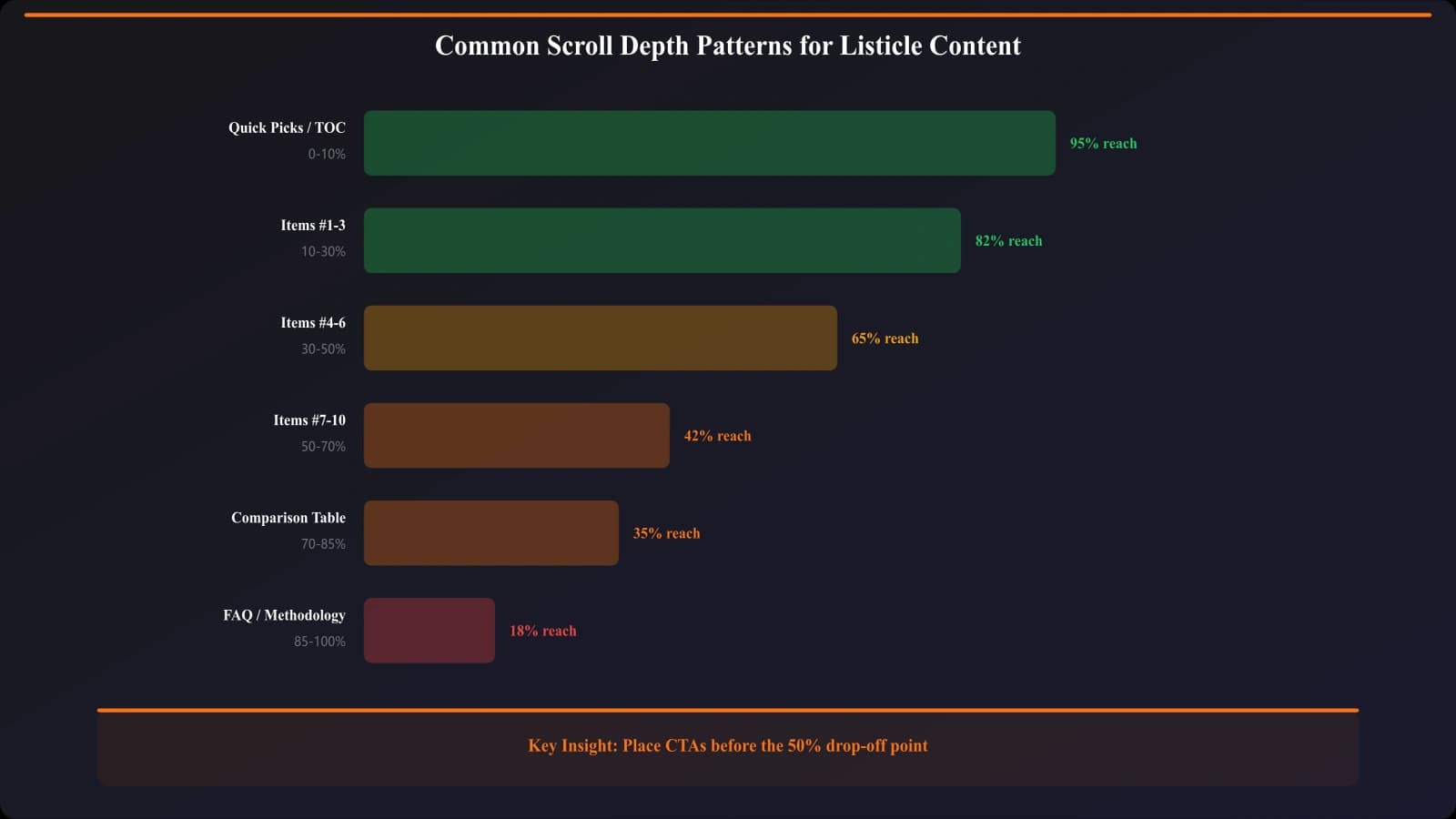
Your 15-product listicle takes effort to create. But if 70% of users never scroll past product 5, those bottom 10 products might as well not exist. Scroll depth data reveals whether users actually see your content—and whether the effort invested in comprehensive coverage reaches its audience.
Scroll depth is particularly meaningful for listicle content because listicles are inherently sequential. Users encounter products in order; scroll depth directly indicates how many products users see. Unlike blog posts where any paragraph might contain key value, listicles have products ranked by quality—users who don't scroll miss the lower-ranked options that might actually be their best fit.
This guide covers scroll depth tracking for listicle content: what to track, how to interpret patterns, and how to act on insights. We'll connect scroll data to other metrics—particularly click-through—to understand the full picture of user engagement and conversion.
The goal isn't just measuring scroll depth but using it to optimize content structure, length, and layout for better user outcomes and conversion rates.
Scroll Depth Tracking Setup
Implement scroll tracking that captures meaningful data.
Percentage Threshold Tracking
Track scroll depth at standard percentage thresholds:
- 25% scroll: User engaged beyond initial content
- 50% scroll: User reached midpoint of listicle
- 75% scroll: User approaching end; high engagement
- 90% or 100%: User scrolled to conclusion/footer
GA4 enhanced measurement tracks 90% by default. Add custom events for additional thresholds using GTM scroll triggers.
Element-Based Tracking
For listicles, element-based tracking provides more meaningful data:
Element-based scroll events:
• Product 1 in view: First product entered viewport
• Product 5 in view: Mid-listicle reached
• Product 10 in view: Deep engagement
• CTA section in view: User saw primary conversion area
• Comparison table in view: User saw feature comparison
Element-based tracking maps directly to content structure rather than abstract percentages. Knowing “50% reached product 7” is more actionable than “50% reached 50% scroll depth.”
Interpreting Scroll Patterns
Scroll data tells stories about user behavior. Learn to read them.
Healthy Scroll Patterns
What good engagement looks like:
- Gradual drop-off: Each threshold shows gradual decrease, not cliff
- 50%+ reach rate: At least half of users reach midpoint
- Correlation with clicks: Deeper scroll correlates with higher CTR
- CTA visibility: Most users see primary CTA before leaving
- Consistent across devices: Similar patterns on mobile and desktop
Healthy patterns indicate content that engages users and guides them toward conversion opportunities.
Problem Patterns
Warning signs in scroll data:
Early cliff (high 25%, low 50%):
• Content doesn't deliver on search intent
• Introduction is weak or misleading
• Format mismatch (user expected different content)
• Technical issues (slow loading, layout shifts)
Flat line (similar rates across thresholds):
• Users scroll through quickly without reading
• Content may be thin or not engaging
• Users may be looking for something specific (not browsing)
Mobile vs desktop gap:
• Mobile users scroll less than desktop
• May indicate mobile formatting issues
• Content may be too long for mobile context
Problem patterns indicate specific issues to investigate and address.
Scroll Depth and Conversion Correlation
Connect scroll data to conversion outcomes for actionable insights.
Scroll-CTR Relationship
Analyze how scroll depth correlates with click-through:
- Segment users by scroll depth: 0-25%, 25-50%, 50-75%, 75%+
- Calculate CTR per segment: Do deeper scrollers click more?
- Identify optimal depth: Is there a point where CTR plateaus?
- Compare across pages: Does the relationship hold consistently?
Often, CTR correlates strongly with scroll depth until a plateau—indicating the depth at which most interested users have found what they need.
Product Exposure Analysis
Connect scroll depth to product visibility:
Exposure analysis questions:
• What percentage of users see product in position 10?
• Do products seen by fewer users have lower or higher CTR when seen?
• Are some high-quality products underperforming due to low visibility?
• Should product ordering change based on exposure data?
Exposure analysis reveals whether product performance reflects product quality or simply visibility.
Conversion by Scroll Segment
Understand which scroll behaviors correlate with conversion:
- Quick converters: Users who click within 25% scroll—decisive, high intent
- Researchers: Users who scroll deeply before clicking—comparative shoppers
- Bouncers: Users who scroll but don't click—content mismatch or low intent
- Completers: Users who scroll fully—may be information gatherers
Different segments may need different content approaches or CTA strategies.
Optimize Listicle Engagement
Generate comparison content structured for maximum scroll engagement.
Try for Free
Optimization Actions
Turn scroll insights into content improvements.
Content Length Optimization
Use scroll data to inform optimal content length:
- Identify drop-off points: Where do most users stop scrolling?
- Evaluate content below drop-off: Is it worth keeping?
- Test shorter versions: Does cutting content improve conversion?
- Consider pagination: Would “load more” improve engagement?
Sometimes shorter content performs better because users see CTAs before losing interest. Sometimes longer content performs better because comprehensive coverage builds trust. Scroll data helps determine which applies.
Layout Optimization
Optimize layout based on scroll patterns:
Layout optimization opportunities:
• Move key CTAs above drop-off points
• Place highest-value products where most users see them
• Add engagement elements before common drop-off points
• Consider sticky elements that remain visible during scroll
• Optimize above-fold to encourage continued scrolling
Layout changes can significantly impact scroll behavior and conversion without changing content itself.
Mobile-Specific Optimization
Address mobile scroll patterns specifically:
- Mobile users often have lower scroll tolerance—prioritize ruthlessly
- Ensure touch targets are appropriately sized
- Consider mobile-specific formats (accordion, tabs) to reduce scroll requirements
- Test mobile-specific CTAs and positioning
Mobile users may need different content structure than desktop users based on scroll pattern differences.
Advanced Scroll Analysis
Deepen scroll insights with advanced techniques.
Scroll Velocity Analysis
Fast scrolling indicates skimming; slow scrolling indicates reading:
- Track time between thresholds: How long to go from 25% to 50%?
- Calculate read time vs scroll time: Are users actually reading?
- Identify skim sections: Which parts do users speed through?
Velocity data reveals whether scroll depth reflects genuine engagement or surface-level scanning.
Scroll Patterns by Traffic Source
Different traffic sources may scroll differently:
- Organic search: Users with specific intent—may scroll to find match
- Social traffic: Often casual browsers—lower scroll tolerance
- Direct/returning: Familiar with format—may scroll efficiently
- Email traffic: Warmer audience—may engage more deeply
Segment scroll analysis by source to understand audience-specific behavior.
Conclusion: Scroll as Engagement Indicator
Scroll depth data reveals the reality of content consumption versus the aspiration. Users may visit your 20-product listicle, but if only 30% see past product 5, your carefully curated bottom half isn't reaching its audience.
Use scroll data to optimize content length, layout, and structure. Connect scroll patterns to conversion outcomes for actionable insights. Address different patterns across devices and traffic sources. Test changes rather than assuming scroll-informed hypotheses are correct.
The goal is content that engages users through to conversion—scroll depth data shows whether you're achieving that goal and where improvements are needed.
For click tracking integration, see Outbound Click Tracking. For comprehensive tracking setup, see Conversion Tracking Guide.

Product Manager at BestPage. Pioneer in AEO research since 2024, exploring the convergence of SEO and GEO (Generative Engine Optimization). Led multiple AI-powered content optimization projects that achieved 300%+ citation increases in ChatGPT and Perplexity.