
Your “Best CRM Software” listicle gets 10,000 monthly visitors. Is that good? Without conversion tracking, you can't know. Those 10,000 visitors might generate 500 qualified leads for featured products, or they might bounce immediately and contribute nothing to business goals. Pageviews without conversion context are vanity metrics.
Comparison content has unique tracking challenges. Unlike e-commerce where conversions happen on-site, listicle conversions often happen on external sites after outbound clicks. Attribution gets complicated when users visit multiple pages before converting. Different monetization models—affiliate, advertising, lead generation, direct sales—require different tracking approaches. This guide addresses each challenge comprehensively.
We'll cover the complete tracking stack for listicle content: defining the events that matter for your business model, implementing tracking across analytics platforms, handling outbound click attribution, measuring downstream conversions, and building dashboards that enable optimization decisions. By the end, you'll have a blueprint for conversion tracking that transforms listicle content from traffic generator to measurable business asset.
This guide assumes basic familiarity with Google Analytics 4 and Tag Manager. If you're new to these tools, review platform documentation first. We'll focus on listicle-specific implementation rather than general analytics fundamentals.
Defining Listicle Conversions
Before implementing tracking, define what conversions mean for your content.
Types of Listicle Conversions
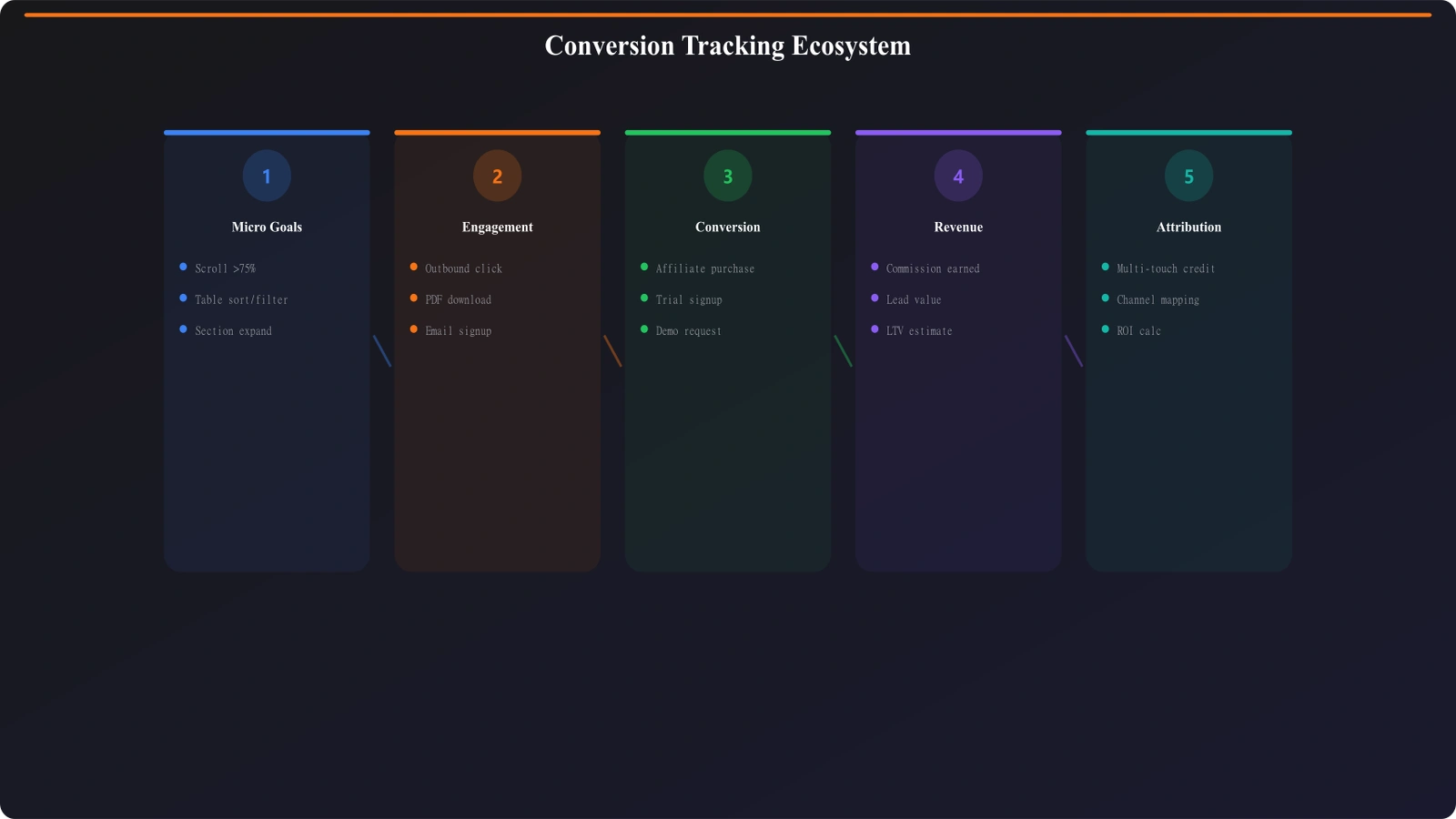
Listicle content drives various conversion types depending on monetization model:
- Outbound clicks: Clicks to featured products or services
- Affiliate conversions: Purchases or signups through affiliate links
- Lead captures: Email signups, form submissions, demo requests
- Ad revenue events: Viewable impressions, ad clicks
- Engagement goals: Scroll depth, time on page, multi-page sessions
- Brand conversions: Newsletter signups, social follows, brand recall
Most listicle publishers have multiple conversion types. Prioritize based on business model but track all meaningful events.
Assigning Conversion Values
Where possible, assign monetary values to conversions for ROI calculation:
Conversion value examples:
• Affiliate commission: Actual commission per conversion (varies by product)
• Lead capture: Estimated lead value (close rate × average deal value)
• Outbound click: Estimated click value (conversion rate × average commission)
• Email signup: Subscriber lifetime value
• Ad impression: RPM/1000 for viewable impressions
Conversion values enable ROI comparisons across different content pieces and traffic sources.
| Conversion Type | Tracking Complexity | Value Assignment | Primary Tool |
|---|---|---|---|
| Outbound clicks | Low | Estimated per-click value | GA4 + GTM |
| Affiliate conversions | Medium | Actual commission | Affiliate platform + GA4 |
| Lead captures | Low | Lead value estimate | GA4 + CRM |
| Ad revenue | Medium | Actual revenue | Ad platform + GA4 |
| Engagement goals | Low | Proxy value or none | GA4 |
| Downstream conversions | High | Attributed revenue | Multi-platform integration |
Outbound Click Tracking
Outbound clicks are the most fundamental listicle conversion—users clicking through to featured products.
Basic Outbound Click Setup
GA4 can track outbound clicks automatically with enhanced measurement, but listicle content needs more detail:
- Enable enhanced measurement: GA4 Admin > Data Streams > Enhanced measurement > Outbound clicks
- Verify automatic tracking: Check DebugView for “click” events with outbound parameter
- Note limitations: Default tracking lacks product-level detail needed for listicle analysis
Enhanced measurement provides baseline data but custom implementation adds the detail needed for optimization.
Custom Click Tracking Implementation
For meaningful listicle analysis, implement custom outbound click tracking:
Custom click event parameters:
• product_name: Which product was clicked
• product_position: Position in the listicle (1st, 2nd, 3rd, etc.)
• click_element: CTA button, product name, image, etc.
• listicle_name: Which listicle the click occurred on
• link_destination: Full URL of destination
• affiliate_id: Affiliate link identifier if applicable
These parameters enable analysis like “which products get most clicks” and “does position affect click rate.”
Google Tag Manager Implementation
Implement custom click tracking through GTM:
- Create click trigger: Click - Just Links trigger for outbound domains
- Set up variables: Data layer variables for product info, or CSS selector variables
- Configure GA4 event tag: Event name “outbound_click” with custom parameters
- Add data attributes: Add data-product, data-position attributes to links in your HTML
- Test thoroughly: Use GTM Preview and GA4 DebugView to verify
Well-implemented click tracking provides the foundation for all subsequent optimization.
Affiliate Conversion Tracking
For affiliate-monetized listicles, track the full journey from click to conversion.
Affiliate Platform Integration
Major affiliate platforms provide conversion data that can integrate with your analytics:
- Commission Junction: Postback URLs, API access for conversion data
- ShareASale: Affiliate API, transaction reports
- Amazon Associates: Reports API, limited real-time data
- Impact: Comprehensive API, real-time conversion webhooks
- Direct programs: Varies widely; request API access
Integration complexity varies by platform. Prioritize platforms that offer conversion APIs or webhook notifications.
SubID Tracking Strategy
SubIDs pass information through affiliate links that returns with conversion data:
SubID parameters to include:
• Page identifier: Which listicle generated the click
• Product position: Where the product appeared
• Traffic source: How the user reached the listicle
• User session ID: For matching to analytics sessions
• Click timestamp: For conversion window analysis
Well-structured SubIDs enable attribution of conversions back to specific content and positions.
Matching Conversions to Clicks
The challenge: connecting affiliate platform conversions to your analytics data.
- SubID matching: Parse SubIDs from conversion reports to identify originating content
- Session matching: Use session IDs in SubIDs to connect to GA4 sessions
- Time-window matching: For platforms without SubID support, match by time and product
- Aggregated analysis: When individual matching fails, analyze at page/product level
Perfect matching isn't always possible, but reasonable attribution is achievable with proper SubID strategy.
Engagement Event Tracking
Engagement events provide leading indicators of conversion potential.
Scroll Depth Tracking
How far users scroll indicates content engagement and exposure to different products:
- Percentage thresholds: Track 25%, 50%, 75%, 90% scroll depth
- Product exposure: Track when each product section enters viewport
- Bottom reach: Track when users reach CTA or conclusion sections
Scroll data reveals whether users see products lower in listicles and helps optimize product ordering.
Time Engagement Tracking
Time metrics indicate genuine engagement versus bounces:
Time engagement events:
• Engaged time thresholds: 30s, 60s, 120s, 300s on page
• Active vs idle time: Distinguish active reading from background tabs
• Time to first click: How long before users click outbound
• Time per section: Where users spend time (requires custom implementation)
Time engagement correlates with conversion intent and content quality.
Interaction Event Tracking
Track user interactions that indicate intent:
- Comparison table interactions: Sorting, filtering, expanding
- Tab or accordion usage: Which product sections users expand
- Image gallery engagement: Viewing product images
- Video plays: Watching embedded product videos
- Internal link clicks: Navigation to related content
Interaction patterns reveal user intent and content element effectiveness.
Track Listicle Conversions Automatically
Generate comparison content with built-in tracking-friendly structure and data attributes.
Try for Free
Lead Capture Tracking
For lead-generation listicles, track form submissions and lead quality.
Form Submission Tracking
Track every form submission with context:
- Form type: Newsletter, demo request, quote request, etc.
- Source page: Which listicle generated the lead
- Form placement: Header, inline, exit-intent, footer
- Lead interest: If forms include product preference, capture it
- Form completion: Track partial completions for optimization
Form context enables optimization of both content and lead capture placement.
CRM Integration
Connect web leads to CRM for downstream tracking:
Lead data to pass to CRM:
• Source listicle URL
• Original traffic source
• Products viewed/clicked before form
• Engagement metrics (time, scroll depth)
• GA4 client ID for session matching
CRM integration enables measuring lead quality and conversion rates by source content.
Dashboard and Reporting Setup
Raw tracking data needs transformation into actionable dashboards.
Essential Listicle Reports
Build these core reports for listicle optimization:
| Report | Metrics | Dimensions | Purpose |
|---|---|---|---|
| Content performance | Sessions, outbound clicks, CTR, conversions | Page, traffic source | Identify top/bottom performers |
| Product performance | Clicks, click share, conversion rate | Product, position | Optimize product ordering |
| Position analysis | CTR by position, scroll-to-position rate | Position (1-10) | Understand position impact |
| Engagement quality | Avg time, scroll depth, bounce rate | Page, device, source | Content quality signals |
| Revenue attribution | Revenue, ROAS, RPV | Page, product, source | ROI measurement |
Looker Studio Dashboard Setup
Build a comprehensive dashboard in Looker Studio (formerly Data Studio):
- Connect data sources: GA4, affiliate platforms, CRM if available
- Build calculated fields: CTR, conversion rate, revenue per visitor
- Create scorecards: Key metrics with period-over-period comparison
- Build tables: Sortable content and product performance tables
- Add date controls: Enable flexible date range analysis
- Create segments: Filters for traffic source, device, content category
A well-designed dashboard makes data accessible to team members who don't work directly in analytics platforms.
Automated Alerts
Set up alerts for significant changes:
Alert conditions to monitor:
• Traffic drops >20% week-over-week
• CTR drops >15% for top pages
• Conversion rate changes significantly
• New content hitting traffic thresholds
• Affiliate link errors (zero clicks on high-traffic pages)
Alerts enable rapid response to problems and opportunities.
Attribution Considerations
Listicle visitors often interact with multiple pages before converting.
Multi-Touch Attribution
Users may visit multiple listicles before clicking through and converting. Understand how credit is assigned:
- Last-click attribution: Credit to the final listicle before conversion
- First-click attribution: Credit to the first listicle in the journey
- Linear attribution: Equal credit across all touchpoints
- Position-based: Higher credit to first and last, less to middle
- Data-driven: ML-based attribution based on conversion patterns
GA4 uses data-driven attribution by default. Understand the model when interpreting conversion data.
Attribution Windows
Configure appropriate lookback windows for listicle conversions:
- Click-through window: How long after click can conversion be attributed (typically 30-90 days for affiliate)
- View-through window: Whether impressions without clicks receive credit (less common for listicles)
- Cross-device considerations: User journeys across devices require identity resolution
Match attribution windows to your typical customer journey length.
Privacy and Compliance
Tracking must comply with privacy regulations.
Consent Management
Implement proper consent for tracking:
- Cookie consent: Obtain consent before setting tracking cookies
- Consent mode: GA4 consent mode for graceful degradation without consent
- Consent storage: Remember and respect consent choices
- Consent-aware tags: Configure GTM tags to respect consent state
Privacy compliance isn't optional. Build it into tracking implementation from the start.
Data Retention Policies
Configure appropriate data retention:
Data retention considerations:
• GA4 retention: 2 months or 14 months (configurable)
• Export to BigQuery for longer retention if needed
• Aggregate data survives individual retention limits
• User deletion requests affect historical data
Balance analytics needs against privacy requirements and storage costs.
Optimization Workflow
Tracking enables optimization. Build systematic optimization workflows.
Data-Driven Optimization Process
Use tracking data to systematically improve content:
- Identify opportunities: Find low-CTR high-traffic pages or high-CTR low-traffic pages
- Diagnose causes: Use engagement data to understand behavior
- Form hypothesis: What change might improve performance?
- Implement test: Make changes or run A/B test
- Measure results: Compare key metrics before/after
- Scale or revert: Roll out successful changes; revert failures
Tracking data removes guesswork from optimization decisions.
Testing Framework
Run structured tests to validate optimization hypotheses:
- A/B testing: Split traffic between variations for definitive results
- Sequential testing: Compare before/after when A/B isn't feasible
- Statistical significance: Ensure sufficient sample size for conclusions
- Test documentation: Record hypotheses, methods, and results
Systematic testing compounds learning and prevents regression.
Conclusion: From Pageviews to Business Value
Proper conversion tracking transforms listicle content from traffic metric to business asset. When you understand which content drives conversions, which products resonate, and which audiences convert, you can optimize systematically. Investment in tracking infrastructure pays returns through better content decisions and improved ROI.
Start with fundamental outbound click tracking. Add affiliate conversion integration as your tracking matures. Build dashboards that surface actionable insights. Establish optimization workflows that use data to drive improvement. Over time, sophisticated tracking becomes a competitive advantage—enabling optimization that competitors flying blind cannot match.
The goal isn't tracking for its own sake but informed decision-making. Every tracking implementation should answer specific questions that guide content strategy. If you can't articulate what decisions a metric enables, question whether you need it. Focus tracking effort on the data that drives action.
For attribution deep-dive, see Attribution Models. For GA4 specifics, see GA4 Setup Guide. For click tracking detail, see Outbound Click Tracking.

Product Manager at BestPage. Pioneer in AEO research since 2024, exploring the convergence of SEO and GEO (Generative Engine Optimization). Led multiple AI-powered content optimization projects that achieved 300%+ citation increases in ChatGPT and Perplexity.