

Modern comparison tables do more than display static data. They filter, sort, paginate, and update dynamically based on user interactions. This interactivity typically requires JavaScript—which creates an SEO tension. Users want dynamic experiences; search engines work better with static HTML.
Google has improved significantly at rendering JavaScript. The rendering engine processes most modern frameworks, and rendered content gets indexed. But “can render” differs from “reliably renders quickly.” JavaScript rendering happens in a separate queue, with delays that can extend to days or weeks. For SEO-critical comparison content, this delay poses real risks.
This guide covers how to build dynamic comparison tables that work for both users and search engines—understanding rendering behavior, choosing appropriate architectures, and testing to verify Google sees what you intend.
JavaScript Rendering for SEO: The Basics
Understanding how Google processes JavaScript-heavy pages helps you make informed architectural decisions.
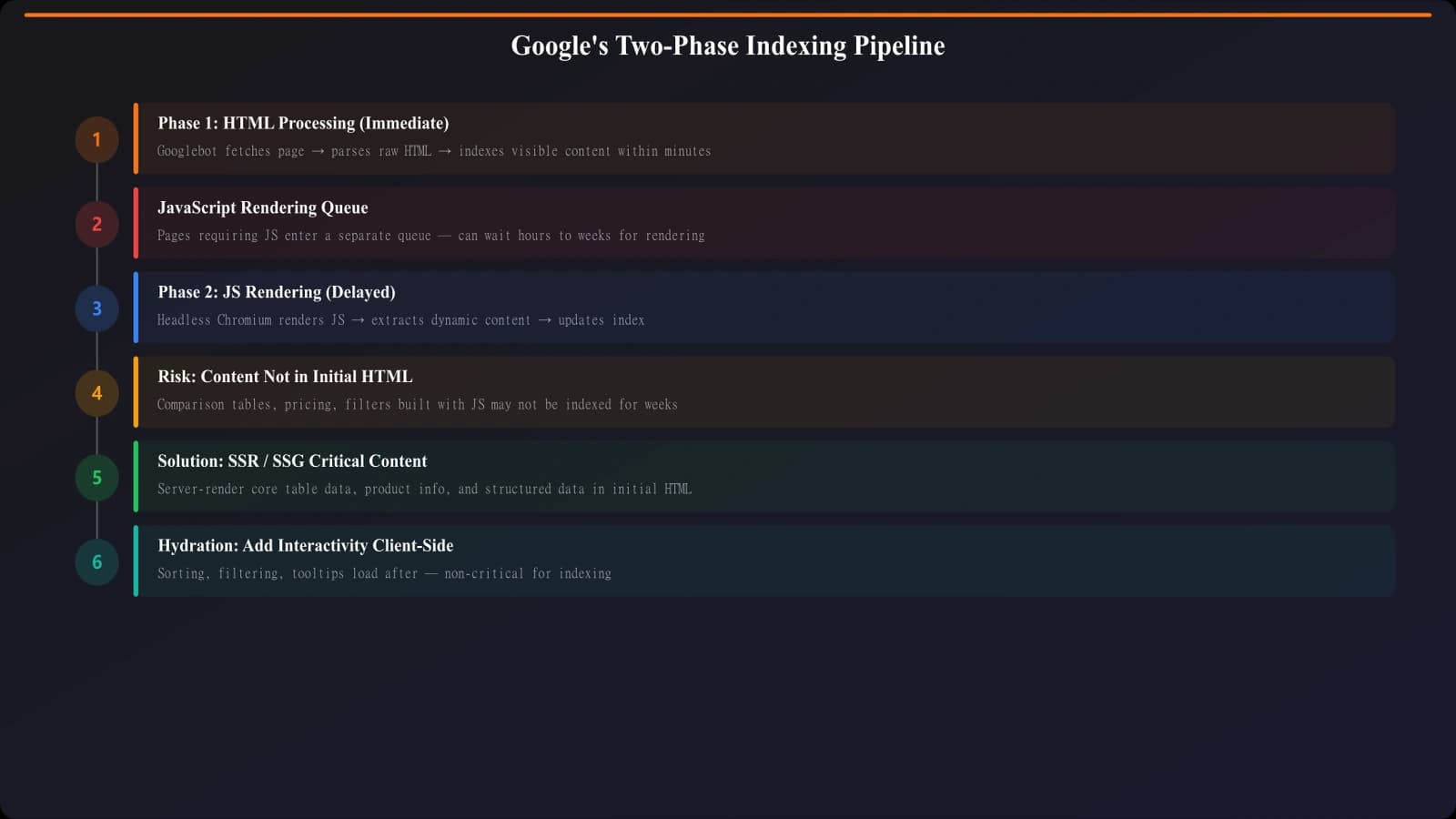
Two-Wave Indexing
Google processes pages in two waves. The first wave indexes the initial HTML—what the server sends before any JavaScript executes. This happens quickly, often within hours of crawling. The second wave renders JavaScript and indexes the resulting DOM. This happens later, in a separate rendering queue, and timing varies from hours to weeks depending on crawl priority.
For static comparison tables embedded in HTML, the first wave is sufficient. For JavaScript-rendered tables, you're waiting for the second wave—and hoping it succeeds.
What Google Can and Can't Render
Google's renderer (based on Chromium) handles most JavaScript scenarios, including React, Vue, Angular applications, dynamic DOM manipulation, AJAX-loaded content, and most modern JavaScript features.
Common failure points include infinite scroll without static fallbacks, content behind user interactions (clicks, hovers), content requiring authentication, extremely slow-loading resources (timeouts), and some web components and shadow DOM patterns.
Rendering Architecture Options
Different architectural approaches balance user experience, development complexity, and SEO reliability.
| Approach | Description | SEO Reliability | Best For |
|---|---|---|---|
| Static HTML | All content in server response | Highest—no rendering needed | Simple comparisons, PSEO at scale |
| SSR (Server-Side Rendering) | Full page rendered on server, JS hydrates | High—content in initial HTML | Dynamic apps needing SEO |
| SSG (Static Site Generation) | Pages pre-built at deploy time | Highest—pure static files | Content that doesn't change per request |
| ISR (Incremental Static Regeneration) | Static with on-demand regeneration | High—mostly static with updates | Large sites with changing data |
| CSR (Client-Side Rendering) | All rendering in browser | Lower—depends on rendering queue | Apps where SEO isn't critical |
| Hybrid | Critical content SSR, enhancements CSR | High—core content server-rendered | Interactive comparisons needing SEO |
The Hybrid Approach for Comparisons
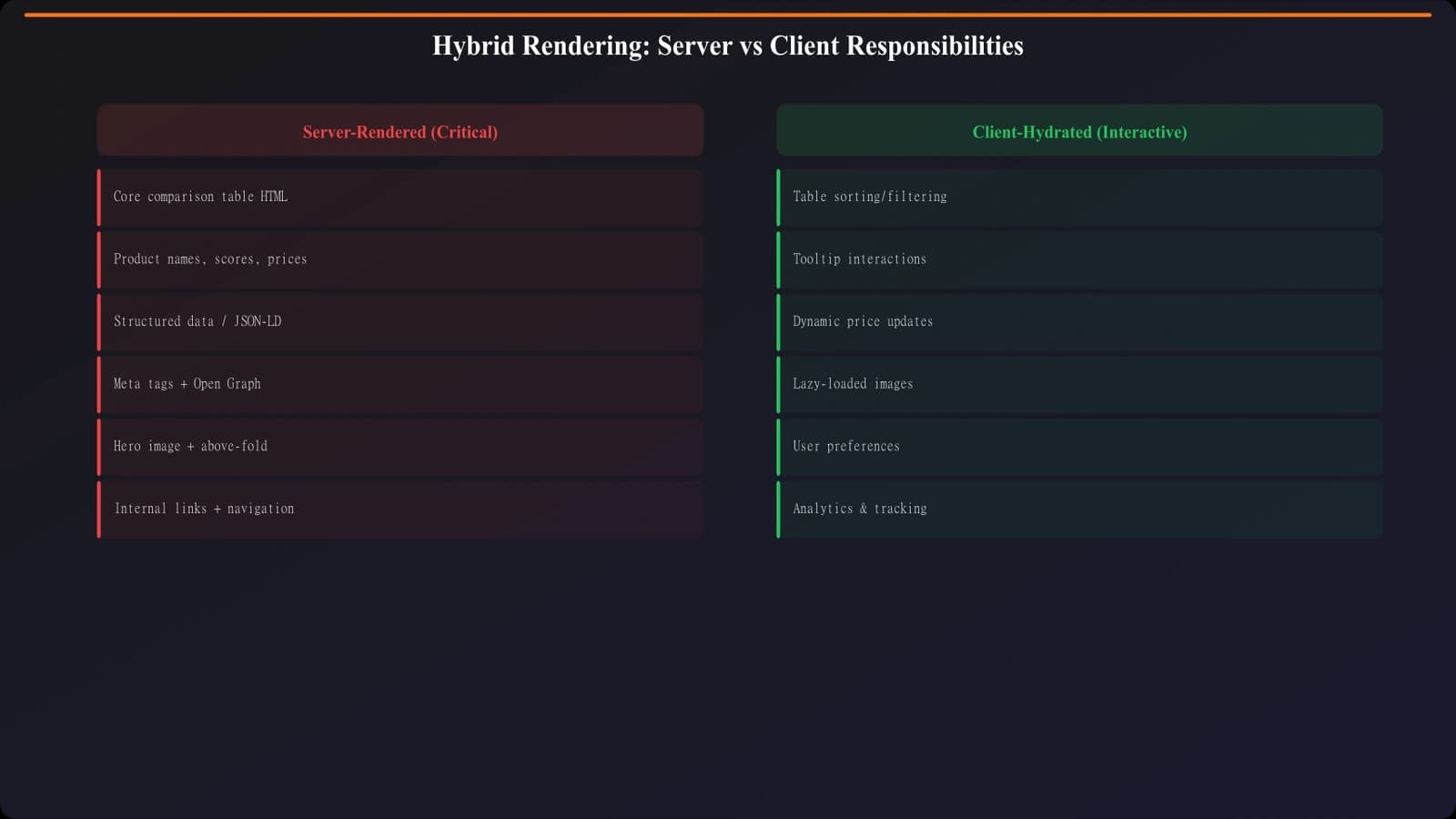
For comparison tables, a hybrid approach often works best: server-render the core comparison data (product names, key specs, prices) so it appears in initial HTML, then enhance with client-side interactivity (sorting, filtering, expanding details). This ensures Google indexes your comparison content immediately while users get the interactive experience they expect.
Implementation pattern: Render the full comparison table in server HTML. Use JavaScript to add sorting and filtering that modify the visible display, but don't hide the underlying data. Google sees the complete table; users see interactive controls.
Framework Considerations
Modern frameworks make server rendering accessible:
- Next.js: SSR, SSG, and ISR built in; excellent for comparison sites
- Nuxt.js: Vue equivalent with similar rendering options
- Gatsby: Static generation focus; good for content sites
- Remix: Server-first with progressive enhancement
- Astro: HTML-first with selective JavaScript hydration
If starting fresh, choose a framework with native SSR/SSG support. If retrofitting an existing CSR application, consider gradual migration or dynamic rendering as an interim solution.
Generate SEO-Safe Comparison Tables
Create server-rendered comparison pages that Google can index immediately.
Try for Free
Testing and Verification
Never assume—always verify what Google actually sees.
URL Inspection Tool
Search Console's URL Inspection tool is your primary verification method. For any comparison page, inspect the URL, click “View Tested Page,” and examine both the HTML and the rendered screenshot. Verify that your comparison table appears in the rendered HTML, all product data is visible, and the screenshot shows the complete table.
Pay attention to “Page resources” section. Failed resources (JavaScript files that didn't load, API calls that timed out) can cause incomplete rendering.
Rendering Verification Checklist
| Check | How to Verify | Pass Criteria |
|---|---|---|
| Core table appears | URL Inspection rendered HTML | All products/rows visible in DOM |
| Data is complete | Compare rendered vs expected | All cells have content, no loading placeholders |
| No JS errors | Check console in URL Inspection | No blocking errors; warnings acceptable |
| Resources loaded | Page resources section | All critical JS/CSS loaded successfully |
| Screenshot accurate | Visual inspection of screenshot | Matches expected page appearance |
| Mobile rendering | Test mobile URL if different | Mobile version renders correctly too |
Ongoing Monitoring
Rendering can break when code changes. Include rendering verification in your deployment process. After significant JavaScript changes, re-test a sample of comparison pages to ensure rendering still works. Consider automated monitoring for rendering regressions.
Dynamic Rendering as Alternative
When server-side rendering isn't feasible, dynamic rendering offers an alternative—serving pre-rendered HTML to bots while serving JavaScript to users.
How Dynamic Rendering Works
A dynamic rendering setup detects user-agent, routes bot requests to a renderer (like Puppeteer or Rendertron), and returns the rendered HTML. Users get the normal JavaScript experience; bots get static HTML.
This isn't cloaking (which is prohibited) because the content is identical—just delivered differently. Google officially supports this approach as a workaround for JavaScript-heavy sites.
Implementation Considerations
Dynamic rendering adds infrastructure complexity. You need a rendering service, caching layer, and user-agent detection logic. It's typically a transitional solution while migrating toward proper SSR rather than a long-term architecture.
When dynamic rendering makes sense: Large existing CSR application, need SEO improvement quickly, full SSR migration too resource-intensive short-term. Plan to migrate to native SSR eventually.
Building Render-Safe Comparison Content
The safest approach for SEO-critical comparison content is ensuring core data appears in server-rendered HTML. Whether through SSR, SSG, or hybrid approaches, server rendering eliminates dependency on Google's JavaScript rendering queue.
When JavaScript interactivity is essential, design progressively: server-render the baseline experience, then enhance with client-side features. Test rigorously using URL Inspection to verify Google sees what you expect.
For related technical optimization, see Site Speed for Large Listicles and Crawl Budget Optimization.

Product Manager at BestPage. Pioneer in AEO research since 2024, exploring the convergence of SEO and GEO (Generative Engine Optimization). Led multiple AI-powered content optimization projects that achieved 300%+ citation increases in ChatGPT and Perplexity.