
A comprehensive comparison page might list 150 products, each with an image, specifications, and pricing. That's potentially 150+ images, thousands of DOM elements, and megabytes of content. Without optimization, such pages load slowly, scroll jankily, and fail Core Web Vitals assessments. Users bounce; rankings suffer.
The good news: large pages can be fast. The techniques for optimizing them are well-established. The challenge is applying them thoughtfully to comparison content where you want readers to see everything without waiting forever.
This guide covers performance optimization specifically for large listicles: image handling, DOM management, Core Web Vitals optimization, and the architectural choices that keep content-rich pages snappy.
Core Web Vitals for Large Pages
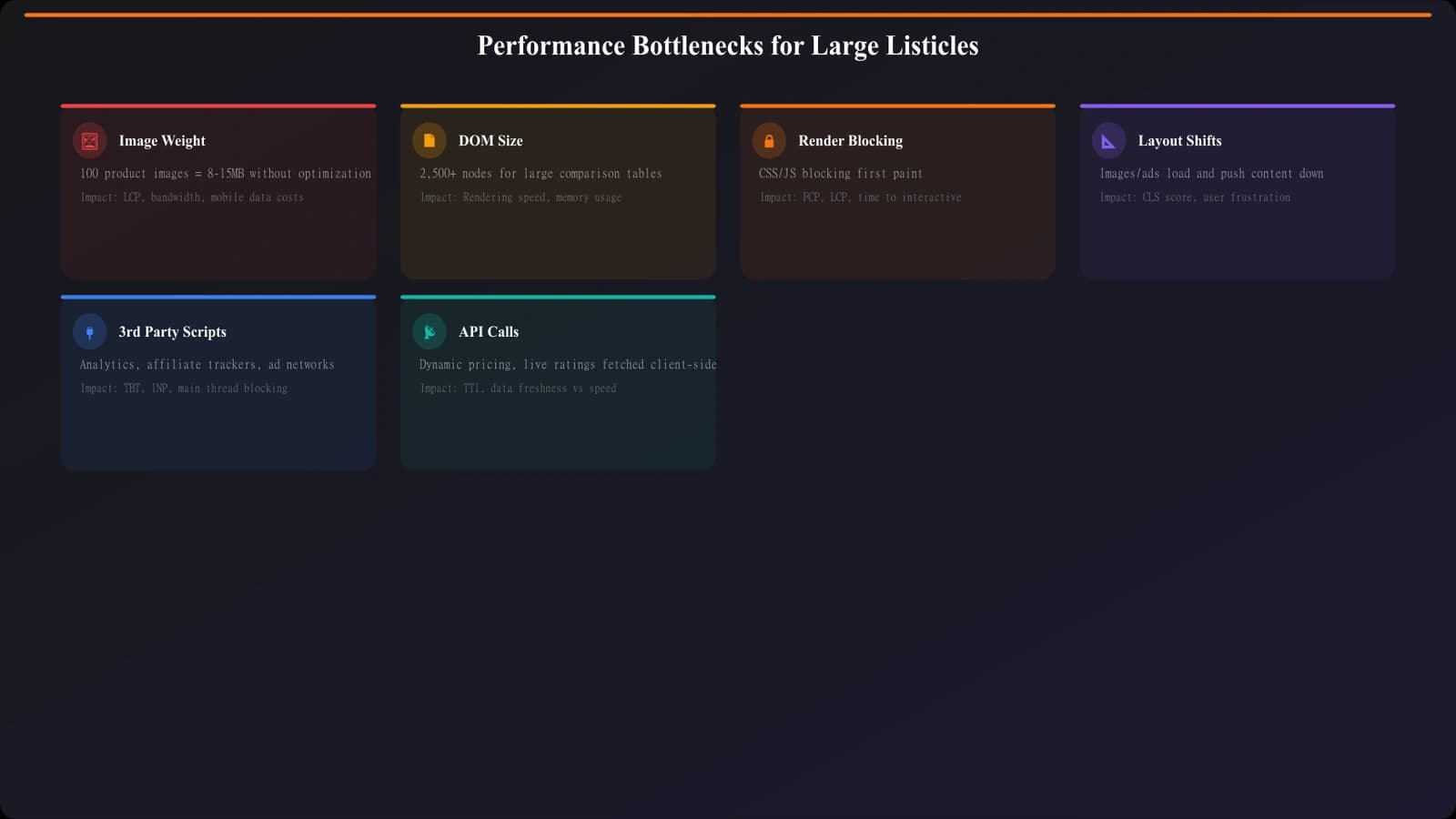
Large listicles face specific challenges for each Core Web Vital. Understanding these helps prioritize optimization efforts.
Largest Contentful Paint (LCP)
LCP measures when the largest visible element renders. For listicles, this is often the hero image or first comparison table. Challenges include large hero images that take time to load, above-the-fold content blocked by CSS or JavaScript, and server response time if pages are dynamically generated.
Optimizations: preload the LCP image, use optimized image formats (WebP/AVIF), ensure critical CSS is inlined, and consider static generation or aggressive caching.
Interaction to Next Paint (INP)
INP measures responsiveness to user interactions. Large listicles can struggle because massive DOM size slows event handling, complex JavaScript for filtering/sorting blocks the main thread, and many event listeners attached to list items create overhead.
Optimizations: defer non-critical JavaScript, use event delegation instead of per-item listeners, and consider virtual scrolling for extremely long lists.
Cumulative Layout Shift (CLS)
CLS measures visual stability—elements shifting as the page loads. Listicles often suffer from images loading without reserved space (causing content to jump), lazy-loaded content that pushes items down, and fonts loading late and changing text dimensions.
Optimizations: always specify image dimensions, use aspect-ratio CSS, preload fonts, and avoid inserting content above visible area.
Image Optimization Strategies
Images typically account for 70-90% of page weight on image-heavy listicles. Optimizing images delivers the biggest performance gains.
Format and Sizing
| Technique | Implementation | Typical Savings | Priority |
|---|---|---|---|
| Modern formats (WebP/AVIF) | Convert images, use picture element for fallbacks | 25-50% vs JPEG | High |
| Responsive sizing | srcset with multiple sizes, serve appropriate size | 30-60% on mobile | High |
| Compression | Quality 75-85% for photos, optimize further for icons | 20-40% | Medium |
| Lazy loading | loading="lazy" for below-fold images | Initial load savings | High |
| CDN delivery | Serve from edge locations, enable compression | Latency reduction | Medium |
| Blur placeholder | Low-quality placeholder during load | Perceived performance | Low-medium |
Lazy Loading Implementation
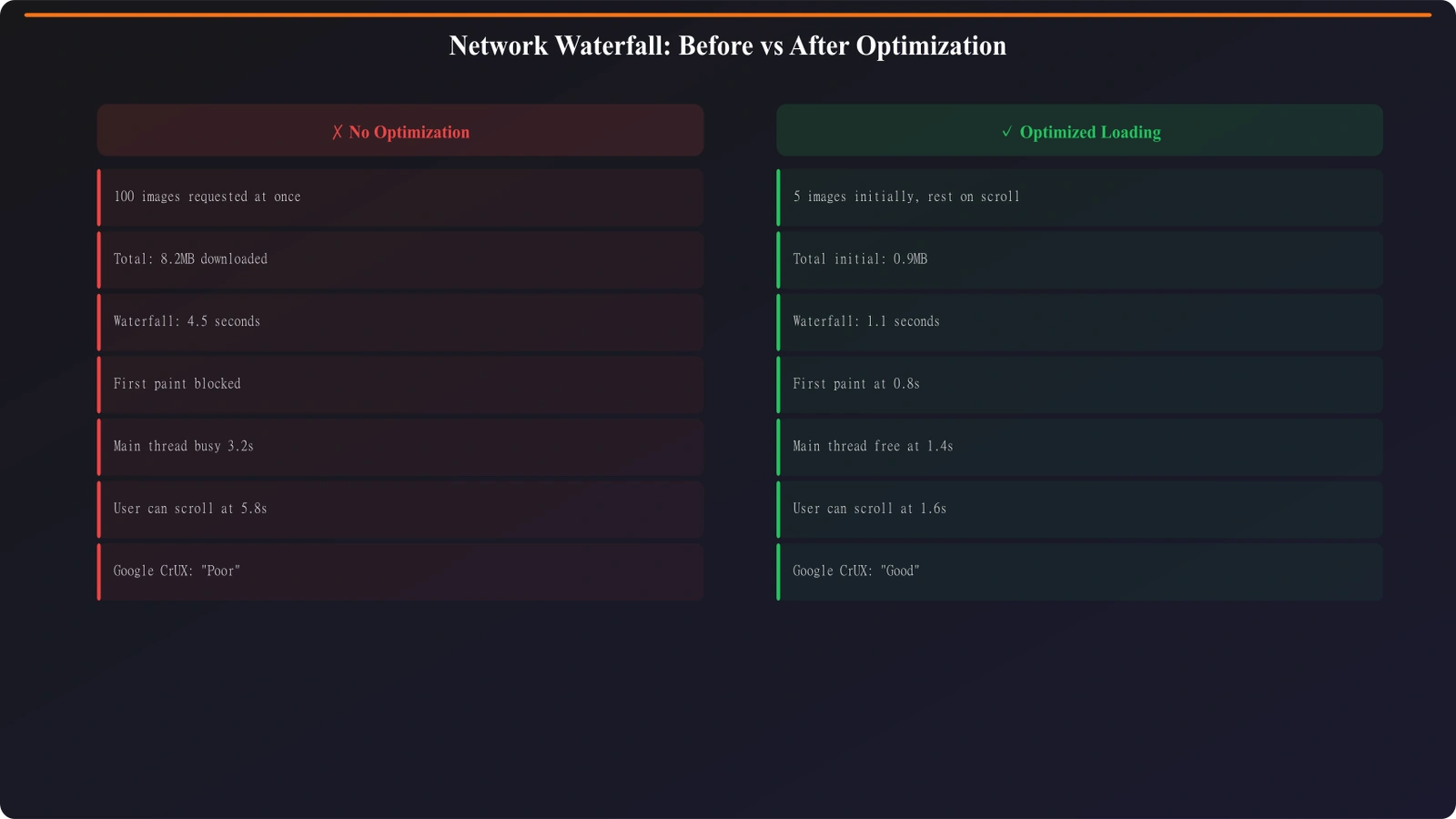
For listicles with 100+ images, lazy loading is essential. Only load images as they approach the viewport, not all at once on page load. Modern browsers support native lazy loading with the loading="lazy" attribute.
- Above-fold images: Load immediately (no lazy loading)—these include hero and first few list items
- Below-fold images: Use loading="lazy" attribute
- Set dimensions: Always specify width and height to prevent CLS
- Consider threshold: Load images slightly before they enter viewport for smoother experience
- Test thoroughly: Verify images actually lazy load and don't all request immediately
Implementation example: For a 100-product listicle showing 5 products above the fold, eager-load the first 5 product images (loading="eager" or no attribute), then lazy-load the remaining 95 (loading="lazy"). Initial page load drops from ~50MB to ~3MB.
Generate Performance-Optimized Listicles
Create large comparison pages with built-in image optimization and lazy loading.
Try for Free
DOM and Rendering Optimization
Beyond images, large DOM size affects rendering performance and interactivity.
Managing DOM Complexity
A 100-item listicle with complex per-item markup can easily exceed 1,500+ DOM elements—the threshold where Chrome DevTools flags DOM size warnings. Excessive DOM size causes slower style calculations, longer paint times, increased memory usage, and sluggish JavaScript operations.
Reduce DOM complexity by simplifying per-item markup (do you really need 15 divs per product?), using CSS rather than nested elements for styling, removing hidden elements entirely rather than display:none, and considering CSS Grid/Flexbox to reduce wrapper elements.
Virtual Scrolling for Extreme Cases
For truly massive lists (500+ items), consider virtual scrolling—only rendering items currently in or near the viewport. Libraries like react-window or react-virtualized implement this pattern.
Virtual scrolling has tradeoffs: it adds JavaScript complexity, can affect accessibility if not implemented carefully, and may complicate SEO since content isn't all in initial HTML. Use it only when simpler optimizations aren't sufficient.
Pagination as Alternative
Sometimes the simplest solution is not showing 100+ items on one page. Pagination breaks content into manageable chunks, reducing per-page complexity while maintaining comprehensive coverage.
Consider pagination when per-page optimization isn't achieving performance targets, when users don't typically scroll through all items anyway, and when SEO can be maintained with proper pagination markup (rel=prev/next, though Google now handles this algorithmically).
Implementation Checklist
Use this checklist when building or optimizing large listicle pages:
Image Optimization
- Convert images to WebP/AVIF with JPEG fallback
- Generate responsive image sizes (srcset)
- Compress to quality 75-85%
- Implement lazy loading for below-fold images
- Preload hero/LCP image
- Specify dimensions on all img elements
- Use CDN for image delivery
Performance Optimization
- Inline critical CSS for above-fold rendering
- Defer non-essential JavaScript
- Minimize DOM depth and element count
- Preload key fonts
- Enable Gzip/Brotli compression
- Implement browser caching headers
- Consider static generation or edge caching
Testing and Monitoring
- Test with Lighthouse on realistic device throttling
- Check real-user metrics in Search Console
- Verify lazy loading with Network tab
- Test on slow 3G to expose issues
- Monitor Core Web Vitals in production
Balancing Content and Speed
Large listicles don't have to be slow. With proper image optimization, lazy loading, and attention to Core Web Vitals, pages with 100+ entries can achieve “good” performance scores while delivering comprehensive comparison content.
The key is building performance into your architecture rather than trying to optimize after the fact. Set up image pipelines that automatically generate optimized formats and sizes. Implement lazy loading in your templates. Monitor performance as you scale.
For related optimization, see JavaScript Rendering for Comparisons and Crawl Budget Optimization.

Product Manager at BestPage. Pioneer in AEO research since 2024, exploring the convergence of SEO and GEO (Generative Engine Optimization). Led multiple AI-powered content optimization projects that achieved 300%+ citation increases in ChatGPT and Perplexity.