
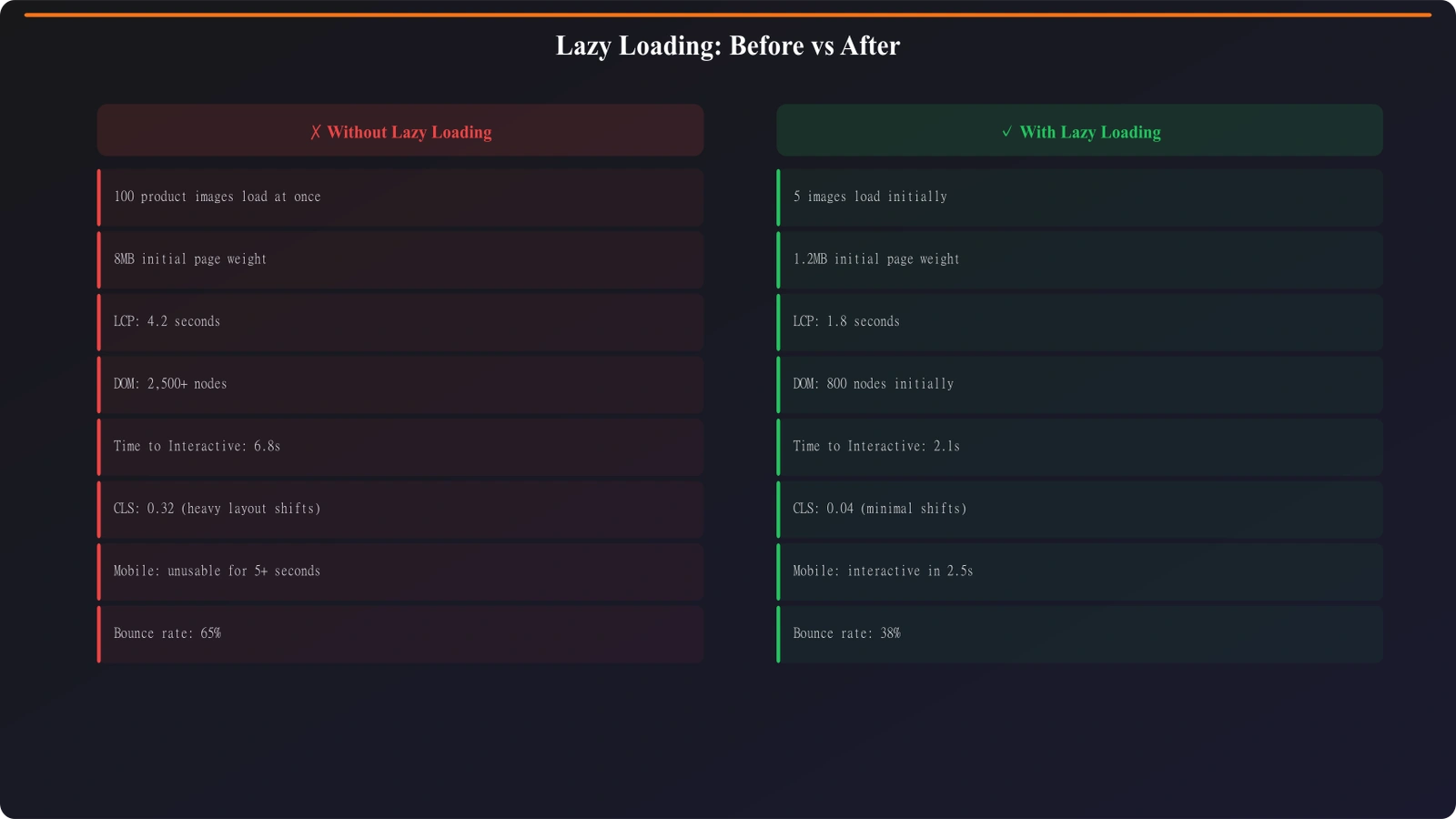
Comparison pages often feature large data tables—dozens of products, each with multiple attributes, sometimes with images and interactive elements. These tables are exactly what users come for, but they're also performance killers. A 50-row comparison table with product images can add seconds to page load, especially on mobile connections.
The obvious solution is lazy loading: only render table content when users scroll to view it. This dramatically improves initial page load. But naive lazy loading creates an SEO problem: content that loads on scroll often isn't visible to search crawlers, meaning your valuable comparison data might never get indexed.
This guide covers how to implement lazy loading for comparison tables in ways that improve performance without sacrificing crawlability. The goal is getting the best of both worlds: fast pages that still get their full content indexed.
Understanding the Problem
Before implementing solutions, understand how lazy loading typically breaks crawlability.
How Crawlers Process Pages
Googlebot and other search crawlers have limited JavaScript execution capability. While modern Googlebot does render JavaScript, there are important constraints:
- Render budget: Crawlers won't spend unlimited time waiting for content to load
- No scroll interaction: Crawlers don't simulate scrolling to trigger lazy content
- Viewport limitations: Content triggered only by specific viewport sizes may be missed
- Delayed rendering queue: JavaScript rendering happens in a separate, later crawl phase
If your table content only loads when a user scrolls to it, crawlers that never scroll will never see that content. The initial HTML they receive shows an empty or placeholder table.
Common Implementation Mistakes
Typical lazy loading mistakes that hurt crawlability:
- Scroll-triggered loading: Content loads only after scroll events—crawlers don't scroll
- Intersection Observer only: Content renders when element enters viewport—crawlers have limited viewport simulation
- Client-side data fetching: Table data fetched via API after page load—crawlers may not wait for async data
- Infinite scroll without pagination: Additional content never visible without scroll interaction
Crawlable Lazy Loading Patterns
Several implementation patterns preserve crawlability while delivering performance benefits.
Server-Side Rendering with Client Hydration
The most robust approach: render full table content server-side, then enhance with lazy loading behavior client-side.
SSR + Hydration approach:
• Server renders complete table HTML in initial response
• Crawlers receive full content immediately (no JS required)
• Client-side JavaScript “hydrates” the table for interactivity
• Images within the table can still use native lazy loading
• Performance benefit comes from image/asset lazy loading, not content hiding
This approach separates content (always available) from assets (lazy loaded). The table structure and text content are always in the HTML; images and heavy assets load progressively.
Native Image Lazy Loading
For comparison tables with product images, native lazy loading provides performance benefits without crawlability concerns:
Implementation pattern:
• Add loading="lazy" attribute to table images
• Keep full image URLs in src attribute (not placeholder)
• Browser handles lazy loading natively
• Crawlers see the real image URLs regardless of load state
• Works without any JavaScript
Native lazy loading is the safest performance optimization for image-heavy tables. Browsers that support it get performance benefits; crawlers always see the image references.
Progressive Table Enhancement
For very large tables, render a meaningful subset server-side with an option to expand:
Progressive enhancement pattern:
• Server renders top 10-20 table rows in initial HTML
• “Show more” button loads additional rows
• Additional rows can also be in hidden HTML, revealed by JS
• Critical: the hidden content should still be in initial HTML for crawlers
• Use CSS to hide, not JavaScript to insert
This pattern shows users a manageable initial view while keeping all content in the HTML document for crawler access.
Technical Implementation Details
Specific implementation guidance for common technology stacks.
Next.js / React SSR
For Next.js applications, leverage server components and streaming:
Next.js approach:
• Use Server Components for table data fetching and rendering
• Table HTML is included in initial SSR response
• Add loading="lazy" to images within the table
• Client components handle interactivity (sorting, filtering)
• Suspense boundaries can progressively stream content
Server Components ensure table content is in the initial HTML response while still enabling client-side interactivity for enhanced user experience.
Vanilla JavaScript / Static Sites
For static sites or vanilla JavaScript implementations:
Static site approach:
• Generate full table HTML at build time
• Include all rows in the HTML, hidden rows via CSS class
• JavaScript toggles visibility, doesn't insert content
• Consider pagination with separate URLs for very large datasets
• Each paginated page is independently crawlable
The key principle: content should exist in HTML from the start; JavaScript enhances presentation and interaction but doesn't create content.
Testing and Verification
Verify your implementation works for crawlers:
- View page source: Check that table content appears in raw HTML, not just rendered DOM
- Disable JavaScript: Verify table content is visible with JS disabled
- Google URL Inspection: Use Search Console to see what Googlebot actually renders
- Fetch as Google: Compare fetched HTML to live page
- Mobile-first test: Ensure mobile rendering includes full content
Testing with JavaScript disabled is the quickest sanity check. If content disappears without JavaScript, crawlers may not see it either.
Generate Performance-Optimized Comparisons
Build comparison pages with crawlability-safe lazy loading built in.
Try for Free
Balancing Performance and Crawlability
Sometimes you must make trade-offs. Understanding the options helps make informed decisions.
When Content Hiding Is Acceptable
Not all content needs to be crawlable. Consider hiding from initial render when:
- Duplicate content: Detailed specs also shown on individual product pages
- Non-unique content: Standard data that exists elsewhere on your site
- Interactive-only features: Filters, sorting UI, comparison tools
- Personalized content: User-specific data that varies by visitor
If the core comparison content is crawlable and unique, secondary interactive features can be JavaScript-rendered without SEO concern.
Performance Priority Hierarchy
When optimizing comparison tables, prioritize in this order:
- Image optimization: Compress, resize, and lazy load images (biggest impact, lowest SEO risk)
- Critical CSS: Inline above-fold styles, defer non-critical CSS
- Font optimization: Subset fonts, use font-display: swap
- JavaScript deferral: Load non-critical JS after content
- Content lazy loading: Only if other optimizations aren't sufficient
Content lazy loading should be the last resort, not the first optimization. Other techniques often provide sufficient performance improvement without crawlability trade-offs.
Performance Without Sacrifice
Lazy loading comparison tables doesn't have to mean hiding content from search engines. Server-side rendering with client hydration, native image lazy loading, and CSS-based progressive disclosure all deliver performance benefits while keeping content crawlable.
The key principle: structure and text content should always be in the initial HTML response. Lazy loading should target assets (images, videos) and interactive enhancements—not the core comparison data that both users and search engines need to see.
For broader performance optimization, see Core Web Vitals for Listicles. For PSEO-specific crawl issues, see Log File Analysis for PSEO.

Product Manager at BestPage. Pioneer in AEO research since 2024, exploring the convergence of SEO and GEO (Generative Engine Optimization). Led multiple AI-powered content optimization projects that achieved 300%+ citation increases in ChatGPT and Perplexity.