
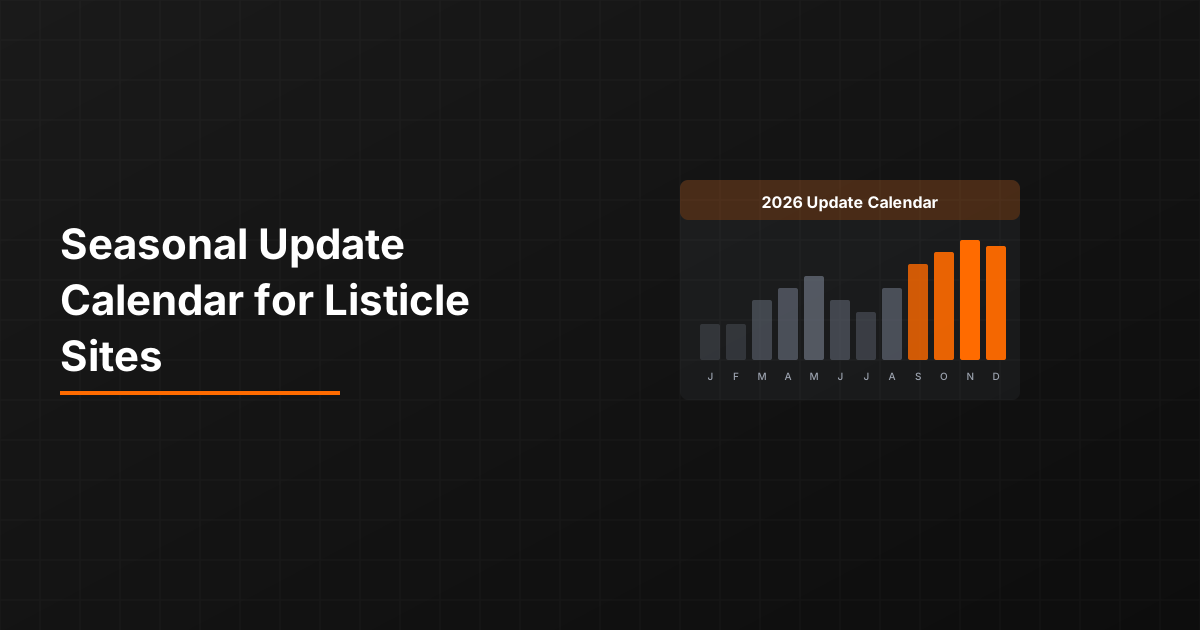
Most content teams update listicles on a fixed schedule—every 3 months, every 6 months, or whenever someone remembers. This ignores a fundamental reality: search demand for different topics peaks at different times. Updating your “Best Tax Software” listicle in July means you've refreshed it at exactly the wrong time.
Smart teams align their refresh calendars with search demand patterns. They update before peaks to capture the traffic surge with fresh content, maintain during peaks to protect rankings, and use off-peak periods for major restructuring that might temporarily hurt performance.
This template gives you a ready-to-use seasonal update calendar, plus the framework for customizing it to your specific content categories. You'll walk away with a 12-month plan that ensures your most important pages are always fresh when it matters most.
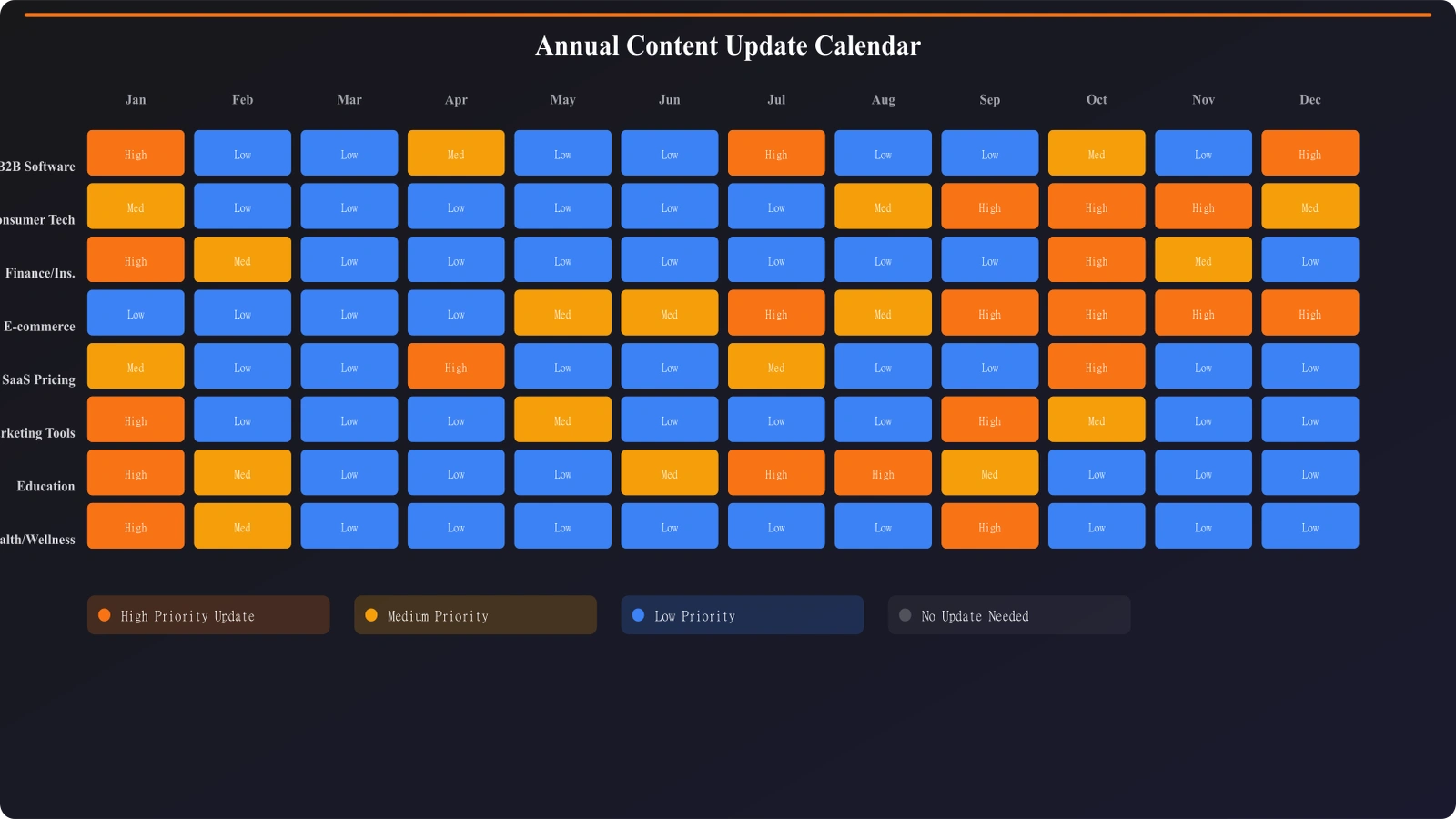
The Template: Annual Update Calendar
This calendar organizes the year into planning phases. Each month includes recommended activities based on typical search demand patterns and content needs.
Q1: January - March
| Month | Search Pattern | Recommended Actions |
|---|---|---|
| January | New year resolution traffic, “best of [year]” searches spike, B2B planning season |
|
| February | Post-holiday normalization, Valentine's seasonal spike, tax prep acceleration |
|
| March | Tax deadline approaching, spring product research begins, Q1 B2B wrap-up |
|
Q2: April - June
| Month | Search Pattern | Recommended Actions |
|---|---|---|
| April | Tax deadline peak, spring cleaning searches, outdoor product research |
|
| May | Mother's Day spike, graduation season, summer planning intensifies |
|
| June | Summer product peaks, Father's Day, vacation tool searches |
|
Q3: July - September
| Month | Search Pattern | Recommended Actions |
|---|---|---|
| July | Prime Day spike, back-to-school early research, summer travel peak |
|
| August | Back-to-school peak, end-of-summer deals, Labor Day prep |
|
| September | Fall product transition, B2B budget planning begins, holiday early research starts |
|
Q4: October - December
| Month | Search Pattern | Recommended Actions |
|---|---|---|
| October | Halloween spike, holiday gift research begins, Black Friday prep |
|
| November | Black Friday/Cyber Monday peak, holiday shopping surge |
|
| December | Holiday peak through mid-month, year-end B2B rush, resolution research begins |
|
Category-Specific Timing Guides
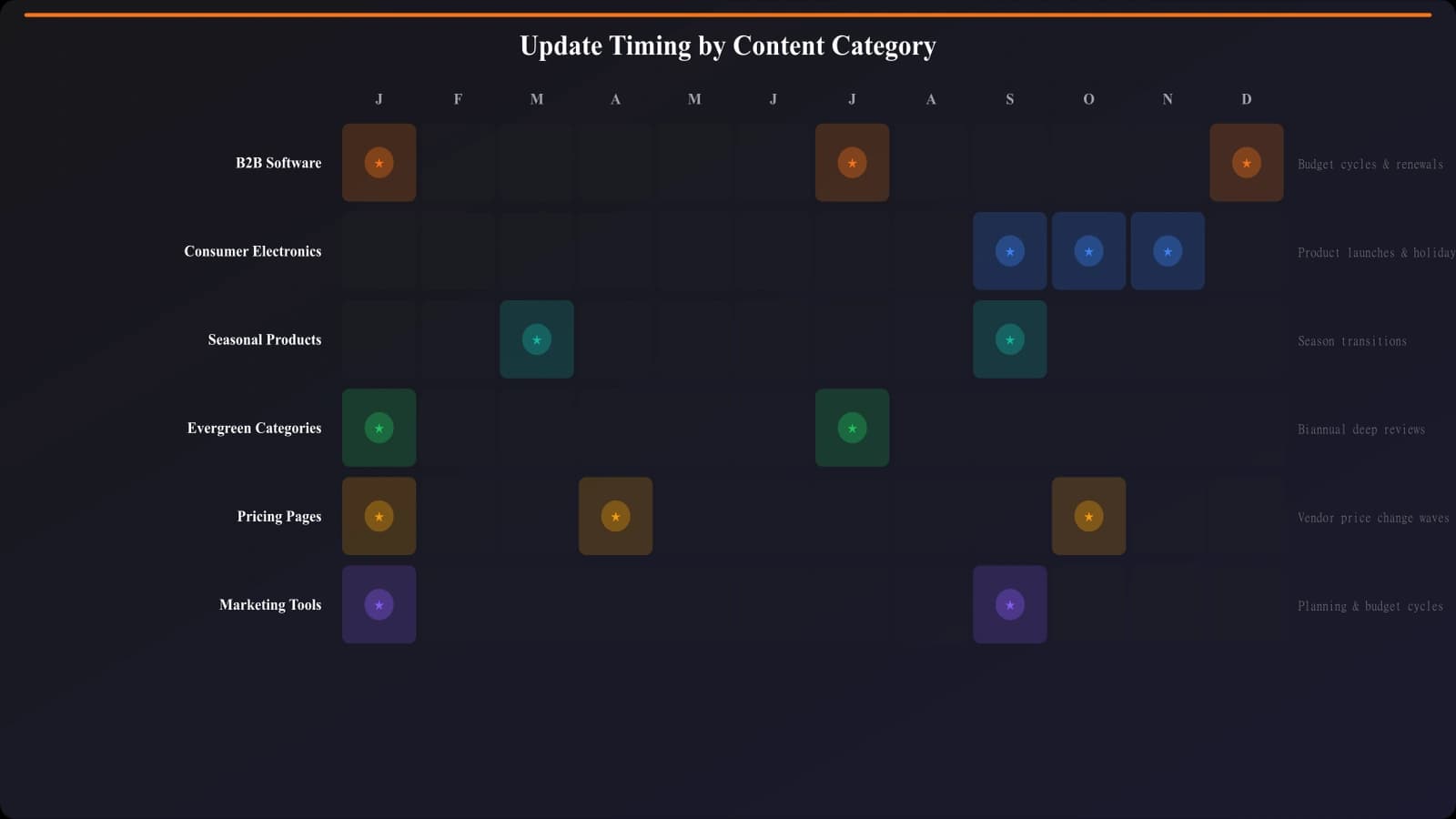
Different content categories follow different seasonal patterns. Here's timing guidance for common listicle categories:
B2B Software and Tools
B2B search patterns follow budget cycles rather than consumer seasons:
- Peak periods: January (new year budgets), April (Q2 planning), September (Q4 planning)
- Refresh timing: December, March, August (month before each peak)
- Annual major update: November-December for January readiness
- Freshness signals: Quarterly pricing verification, feature updates as products release
Consumer Electronics
Consumer tech follows product launch cycles and shopping events:
- Peak periods: Black Friday, Prime Day, post-product-launch windows
- Refresh timing: October (holiday prep), June (Prime Day prep), after major announcements
- Annual major update: September-October for holiday season
- Special consideration: Category-specific launch cycles (Apple September, CES January, etc.)
Seasonal Products
Outdoor, gardening, HVAC, and similar categories have obvious seasonality:
- Peak periods: 2-4 weeks before season begins (varies by category)
- Refresh timing: 6-8 weeks before seasonal peak starts
- Major overhaul timing: During off-season when traffic is low
- Regional note: Consider geographic audience—spring starts at different times
How to Fill Out Your Calendar
Use this step-by-step process to customize the template for your specific content library:
Step 1: Inventory Your Content by Category
List all your listicles and group them by seasonal pattern type:
- Holiday-driven: Gift guides, shopping comparisons, seasonal products
- B2B cycle-driven: Software, tools, services following budget cycles
- Event-driven: Categories affected by specific events (tax season, back-to-school)
- Evergreen: Categories without strong seasonality
Step 2: Map Peak Periods for Each Category
For each category, identify when search demand peaks. Use Google Trends to verify timing for your specific keywords. Document the peak month and the start of the ramp-up period.
Step 3: Schedule Pre-Peak Refreshes
For each peak period, schedule a refresh 4-6 weeks prior. This is your “must complete by” date for that category. Mark it on your calendar with buffer time for execution.
Step 4: Plan Major Overhauls for Troughs
Identify the lowest-traffic periods for each category. Schedule major restructuring, significant content additions, or template changes for these periods. You can afford temporary performance dips when traffic is already low.
Step 5: Set Evergreen Maintenance Cadence
For evergreen categories without strong seasonality, set a regular maintenance cadence—typically quarterly. Spread these across the year to avoid refresh overload in any single month.
Automate Your Seasonal Updates
Get automatic refresh reminders based on seasonal patterns and track freshness across your entire listicle library.
Try for Free
Execution Tips for Seasonal Updates
Having a calendar is only useful if you execute on it. Here's how to make seasonal updates actually happen:
Batch Process by Category
When a category's refresh window arrives, update all pages in that category together. Batching is more efficient—you research once, update many pages. It also ensures consistent freshness across related content.
Use Tiered Update Depth
Not every refresh needs to be comprehensive. Match update depth to timing:
- Peak maintenance: Light touches only—verify pricing, check links, update timestamp
- Pre-peak refresh: Moderate depth—update products, refresh descriptions, verify all data
- Off-peak overhaul: Deep work—restructure sections, add new products, refresh entire approach
Automate What You Can
Certain seasonal tasks can be automated or templated:
- Year updates: Script to find and update year references across pages
- Price checks: Set up monitoring for price changes on featured products
- Reminders: Calendar alerts 6 weeks before each peak period
- Checklists: Standardized refresh checklists by update type
Implement Peak Period Freezes
During absolute peak periods (Black Friday week, etc.), avoid major changes. The risk of breaking something outweighs potential gains. Limit activity to emergency fixes and price updates only.
Document your peak freeze periods in the calendar so the team knows when to avoid significant changes.
Customizing for Your Situation
This template provides a starting framework, but your specific situation may require adjustments:
Geographic Audience Considerations
If you serve international audiences, seasons and holidays shift:
- Southern hemisphere audiences have reversed seasons
- Holiday timings differ (Diwali, Chinese New Year, regional holidays)
- B2B budget cycles may vary by country
Create separate calendars for major geographic segments if your traffic justifies it.
Industry-Specific Events
Add your industry's major events to the calendar:
- Trade shows and conferences (refresh before, capitalize on announcements)
- Product launch cycles specific to your category
- Regulatory deadlines (tax filing, compliance dates)
- Award and review season timings
Team Capacity Planning
Overlay team availability on your content calendar:
- Account for vacation periods (August, late December)
- Note other major projects that will compete for resources
- Identify periods when you'll need extra capacity or contractor support
For the complete framework on deciding which specific pages to update within each window, see Content Refresh Priority: Update High-Impact First.
Putting Your Calendar Into Action
A seasonal update calendar transforms chaotic, reactive content maintenance into a planned, strategic operation. You'll stop scrambling to update pages after peak periods have passed and start capturing maximum traffic with perfectly-timed refreshes.
To implement your calendar:
- Download or create your calendar: Use the monthly template above as your starting framework
- Map your content library: Assign each listicle to a seasonal category
- Identify peak periods: Use Google Trends to verify timing for your specific keywords
- Schedule refresh windows: Mark pre-peak refresh deadlines 4-6 weeks before each peak
- Plan overhaul periods: Designate low-traffic periods for major changes
- Set reminders: Create calendar alerts for each refresh deadline
- Review quarterly: Assess what worked, adjust timing as you learn
The teams that execute seasonal content strategies consistently outperform those updating randomly. They capture more traffic during peaks, maintain rankings through high-competition periods, and use off-peak time productively for major improvements.
Start with your highest-traffic categories. Build the calendar, test the timing, refine based on results. Within one annual cycle, you'll have a proven seasonal playbook that delivers year after year.
For the comprehensive framework on building scalable content operations that support seasonal execution, see our pillar guide on Scaling Listicles: More Output Without Quality Loss.

Product Manager at BestPage. Pioneer in AEO research since 2024, exploring the convergence of SEO and GEO (Generative Engine Optimization). Led multiple AI-powered content optimization projects that achieved 300%+ citation increases in ChatGPT and Perplexity.