

Social proof works. Decades of research confirm that people look to others' choices when making decisions. On comparison pages, where trust directly impacts which CTA gets clicked, social proof can significantly lift conversion rates.
But there's a trap. When every product card has G2 badges, Capterra stars, TrustPilot ratings, customer logos, testimonial quotes, and award badges, the page becomes an overwhelming wall of trust signals. Paradoxically, too much social proof reduces trust—it feels desperate, salesy, and makes it hard to actually compare products.
This guide covers how to add social proof that actually converts: what types work for comparison pages, where to place them, and how to maintain clean design while building credibility. For the broader conversion framework, see our CRO for Listicles guide.
Types of Social Proof for Comparison Pages
Not all social proof is equal. Different types serve different purposes.
Product-Level Social Proof
Social proof about the products you're comparing:
- Aggregate ratings: G2, Capterra, TrustPilot scores
- Review counts: “Based on 2,847 reviews”
- Review snippets: Short quotes from actual users
- User numbers: “Used by 50,000+ companies”
- Customer logos: Recognizable brands using the product
- Awards: Industry recognition badges
Page-Level Social Proof
Social proof about your comparison content itself:
- Author credentials: Expert byline with credentials
- Methodology note: “We tested 47 products over 6 months”
- Reader engagement: View counts, shares, comments
- Last updated: Shows content is current
- Editorial independence: Disclosure statements
| Proof Type | Purpose | Clutter Risk |
|---|---|---|
| Aggregate rating | Quick quality signal | Low |
| Review snippet | Specific validation | Medium |
| Customer logos | Enterprise credibility | High |
| Awards badges | Industry recognition | High |
| Author byline | Content credibility | Low |
Strategic Placement Patterns
Where you place social proof matters as much as what you include.
Within Product Cards
For individual product listings:
- Rating next to product name: Star rating + score immediately visible
- Review count below rating: Context for the score
- One review snippet: Short, specific quote (if space allows)
- Limit to 1-2 elements: More creates clutter
In Comparison Tables
- Rating column: Include as one of your comparison criteria
- Keep it simple: Star + number, not full rating breakdown
- Consistent source: Use same rating platform for all products
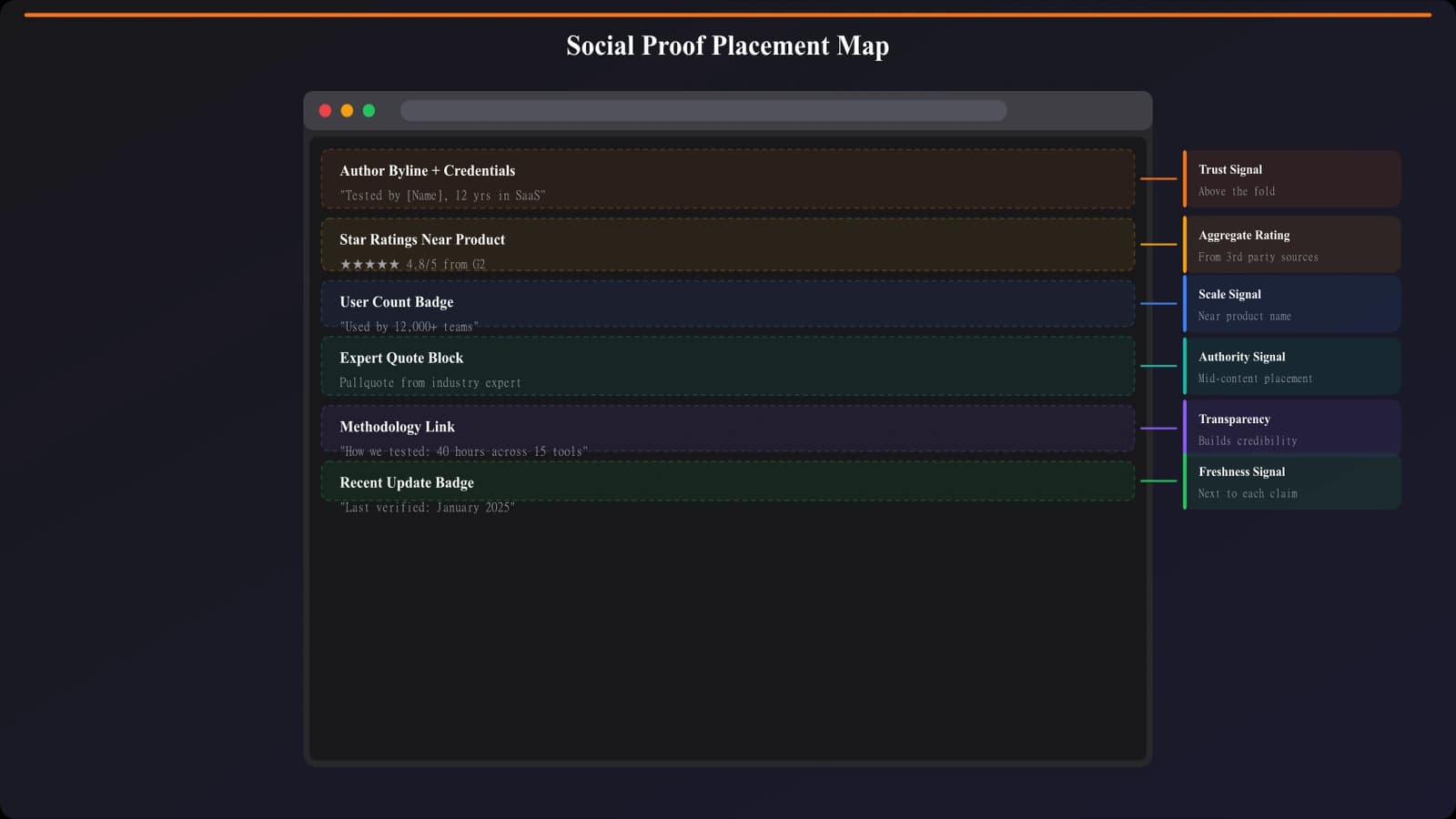
Page-Level Placement
- Header area: Author byline with photo and credentials
- Methodology section: “How we tested” with detail
- Footer: Editorial disclosure and independence statement
- Sidebar: Content credentials (if using sidebar)
Ratings and Reviews Best Practices
Ratings are the most common and most effective form of social proof for comparisons.
Rating Display Guidelines
- Use stars: Universally understood visual
- Include numeric score: 4.7 out of 5 adds precision
- Show review count: 4.7 (2,847 reviews) adds credibility
- Link to source: Let users verify on G2/Capterra
Review Snippet Best Practices
- Short and specific: 1-2 sentences maximum
- Highlight differentiators: Choose quotes that address unique features
- Include context: “— Marketing Director, SaaS company”
- Vary topics: Don't repeat same praise across all products
Choosing Rating Sources
| Platform | Best For | Considerations |
|---|---|---|
| G2 | B2B software | Detailed, verified reviews |
| Capterra | SMB software | Large volume, broad coverage |
| TrustPilot | Consumer products | Wide recognition |
| Product Hunt | New/indie products | Tech-savvy audience |
Build Trust-Optimized Comparisons
Generate listicle pages with properly integrated social proof and trust signals.
Try for Free
Avoiding Social Proof Clutter
The biggest social proof mistake is adding too much. Here's how to avoid it.
Signs of Social Proof Clutter
- Product cards have 4+ different proof elements
- Multiple badge types compete for attention
- Social proof takes more space than product information
- Every product has identical proof patterns
- Users can't quickly scan to compare products
Decluttering Rules
- One rating per product: Pick the most relevant platform
- One snippet maximum: More quotes slow reading
- Skip badges on products: G2/Capterra badge images add visual noise
- Remove redundant proof: If rating shows quality, skip “Award Winner”
- Prioritize comparison: Products matter more than proof
Visual Hierarchy
- Social proof should be secondary to product info
- Use smaller type for ratings than for product names
- Subtle colors for proof elements (gray works well)
- Consistent styling across all products
Building Page-Level Credibility
Beyond individual products, build trust in your comparison content itself.
Author Expertise
- Real name and photo: Anonymous content lacks trust
- Relevant credentials: “10 years in SaaS marketing”
- Link to profile: LinkedIn or author page
- Consistent byline: Same author across related content
Methodology Transparency
- Testing approach: How did you evaluate products?
- Time invested: “40+ hours of research”
- Criteria disclosure: What factors influenced rankings?
- Update schedule: “Reviewed quarterly”
Editorial Independence
- Affiliate disclosure: Be transparent about monetization
- Independence statement: “Rankings not influenced by sponsors”
- Conflict acknowledgment: If you sell a compared product, say so
Dynamic Social Proof Elements
Some social proof updates in real-time or requires special handling.
Live Rating Updates
- API integration: Pull current ratings from G2/Capterra
- Caching: Update daily, not per-request (performance)
- Fallback: Show static rating if API fails
- Freshness indicator: “Rating as of [date]”
User-Generated Additions
- Comments section: Adds unique perspectives
- Upvotes: Let readers endorse recommendations
- User reviews: First-hand experiences from your audience
- Moderation required: Spam and low-quality content risks
Popularity Signals
- View counts: “Read by 45,000 people this month”
- Share counts: Social shares as validation
- Most popular badge: Highlight most-clicked products
- Trending indicators: Products gaining popularity
Testing Social Proof Impact
Don't assume social proof helps. Test and measure.
What to A/B Test
- Proof vs. no proof: Does including ratings improve clicks?
- Rating source: G2 vs. Capterra vs. your rating
- Review snippets: With quotes vs. without
- Placement: Above product name vs. below
- Visual treatment: Stars vs. numbers vs. both
Metrics to Track
- CTA click rate: Does proof lift clicks?
- Time on page: Does proof encourage engagement?
- Scroll depth: Are users reaching product sections?
- Bounce rate: Does clutter increase bounces?
Social Proof That Converts
Social proof is essential for comparison pages, but restraint is key. The goal is building trust while maintaining clean, scannable design that lets users actually compare products.
Key principles:
- Less is more: 1-2 proof elements per product, not 5
- Consistency: Same rating source across all products
- Strategic placement: Rating near name, methodology in intro
- Page-level trust: Author credentials and methodology matter
- Visual hierarchy: Products first, proof secondary
- Transparency: Disclosures increase, not decrease, trust
- Test impact: Measure whether proof actually helps
Audit your current comparison pages. If social proof is competing with product information for attention, simplify. If you have no proof at all, add strategic elements. Find the balance that builds trust without creating clutter.
For the complete conversion optimization framework, see our CRO for Listicles guide. For related trust-building strategies, explore our guide on trust signals that lift conversions.

Product Manager at BestPage. Pioneer in AEO research since 2024, exploring the convergence of SEO and GEO (Generative Engine Optimization). Led multiple AI-powered content optimization projects that achieved 300%+ citation increases in ChatGPT and Perplexity.