
The sticky element debate is one of those conversion optimization topics where the “obvious” answer is usually wrong.
Conventional CRO wisdom says: make your CTA always visible, never let users scroll past it without seeing a way to convert. Put it in a sticky bar. Make it float. Chase them down the page.
And for certain page types—checkout flows, lead capture pages—this can work. But listicles and comparison pages are different. Visitors are in research mode, not buying mode. Push too hard with aggressive sticky elements and you trigger exactly the wrong response: defensive skepticism.
This guide presents the research on when sticky elements help vs. hurt on comparison content, with specific guidelines for implementing them correctly. For the full conversion framework, see our CRO for Listicles guide.
Sticky Navigation: The Good Kind of Sticky
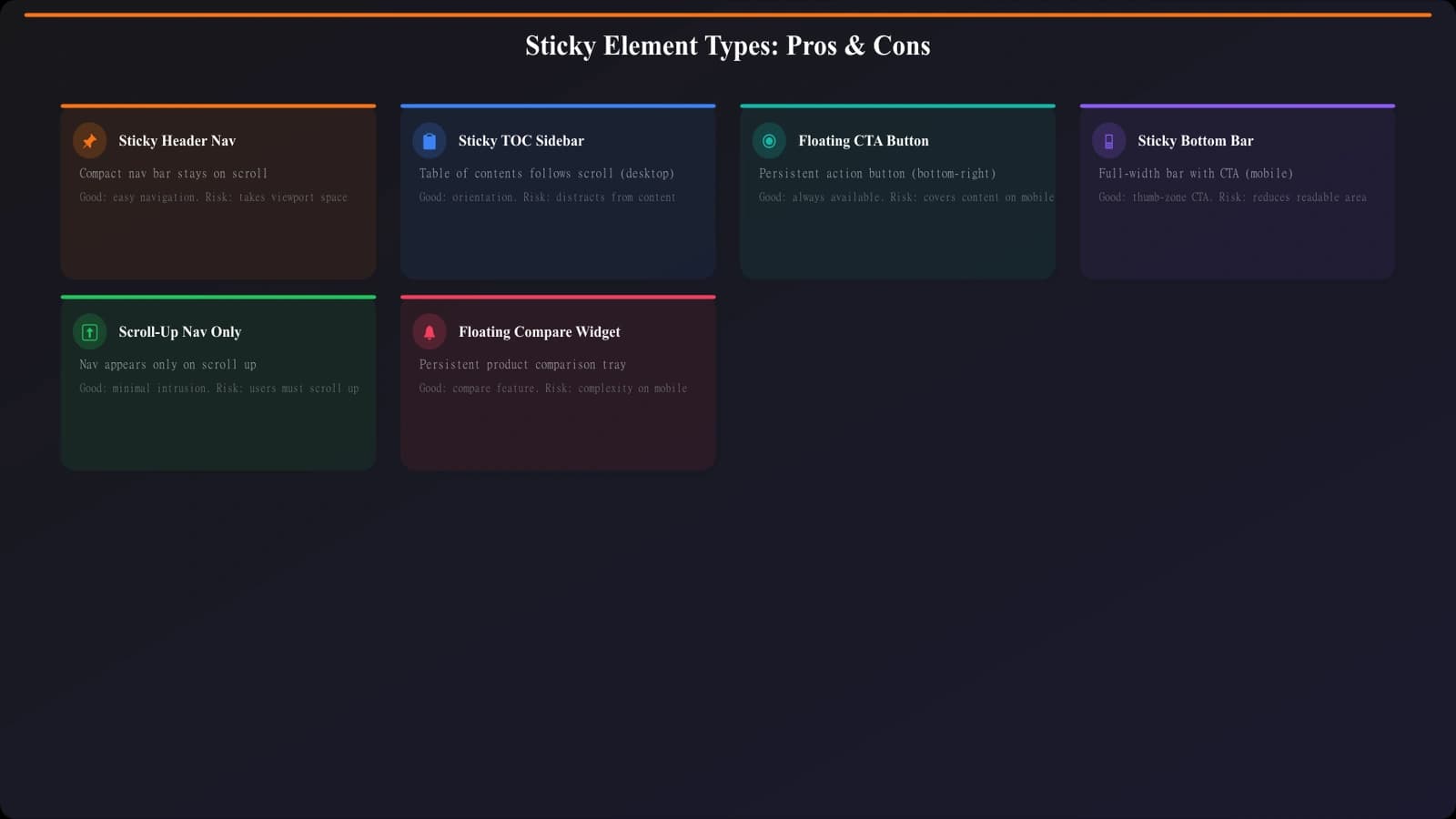
Let's start with what works. Sticky navigation elements—particularly table of contents and section jumps—consistently improve engagement on long-form listicles.
Why Sticky Navigation Helps
Long listicles have a navigation problem. If you've got 15 products, visitors need a way to:
- Jump to specific products they're interested in
- Track where they are in the list
- Navigate back to sections they want to revisit
- Find the comparison table or Quick Picks without scrolling back to the top
A sticky TOC solves all of these. It's not promotional—it's functional. It makes the content more usable, which keeps visitors engaged longer and reduces frustration-driven bounces.
What Testing Shows
In A/B tests across multiple listicle sites, sticky navigation consistently outperforms no navigation:
| Metric | No Sticky Nav | With Sticky TOC | Change |
|---|---|---|---|
| Average scroll depth | 62% | 78% | +26% |
| Time on page | 3:12 | 4:45 | +48% |
| Products viewed (of 12) | 5.2 | 7.8 | +50% |
| Affiliate CTR | 8.4% | 9.1% | +8% |
The conversion lift is modest (8% in this example), but the engagement improvements are substantial. Visitors explore more of the page, which leads to more considered decisions and clicks.
Implementation Best Practices
- Keep it slim →Under 50px height on desktop, 40px on mobile
- Delay appearance →Don't show on page load; trigger after 100-200px scroll
- Use a scroll-up pattern →Hide when scrolling down (reading), show when scrolling up (navigating)
- Highlight current section →Visual indicator of where the user is in the content
- Include Quick Picks link →Easy jump back to top recommendations
Sticky CTAs: The Problematic Kind of Sticky
Now let's talk about what usually doesn't work: sticky promotional elements, particularly floating CTA buttons and persistent banners.
Why Sticky CTAs Often Backfire
Sticky CTAs have several problems specific to comparison content:
They signal aggressive monetization. Visitors on listicles are already somewhat suspicious of affiliate content. A floating “Buy Now” button following them down the page confirms their suspicion that the page exists to sell, not to inform.
They interrupt the research process. Comparison shoppers are in evaluation mode. They're reading, comparing, building a mental model. A persistent CTA is a visual interruption that breaks this process.
They feel like ads. Years of banner blindness training have taught users to ignore persistent visual elements. At best, your sticky CTA gets filtered out. At worst, it triggers the “this is a sales page” alarm.
They cover content. Especially on mobile, floating elements obscure the actual information visitors came for. Nothing kills engagement faster than content that's literally hidden behind promotional elements.
What Testing Shows
The data on sticky CTAs is more nuanced than “always bad”—but for listicle content, the pattern is clear:
| Metric | No Sticky CTA | With Floating CTA | Change |
|---|---|---|---|
| Raw click rate on sticky | — | 2.3% | — |
| Total page CTR | 9.1% | 9.8% | +8% |
| Time on page | 4:45 | 3:28 | -27% |
| Scroll depth | 78% | 64% | -18% |
| Post-click conversion | 4.2% | 2.8% | -33% |
The sticky CTA gets clicks, and even increases raw click-through rate slightly. But engagement drops, and—critically—conversion quality drops. Those clicks are less likely to turn into actual customers.
This is the trap of optimizing for the wrong metric. More clicks that convert worse is not a win.
Create High-Converting Listicle Layouts
Generate comparison pages with optimal UX patterns—no sticky CTA tricks needed.
Try for Free
Mobile: Where Sticky Elements Get Really Tricky
Everything about sticky elements gets harder on mobile. Viewport space is precious, touch targets need to be larger, and users have less patience for elements that get in the way.
The Viewport Math Problem
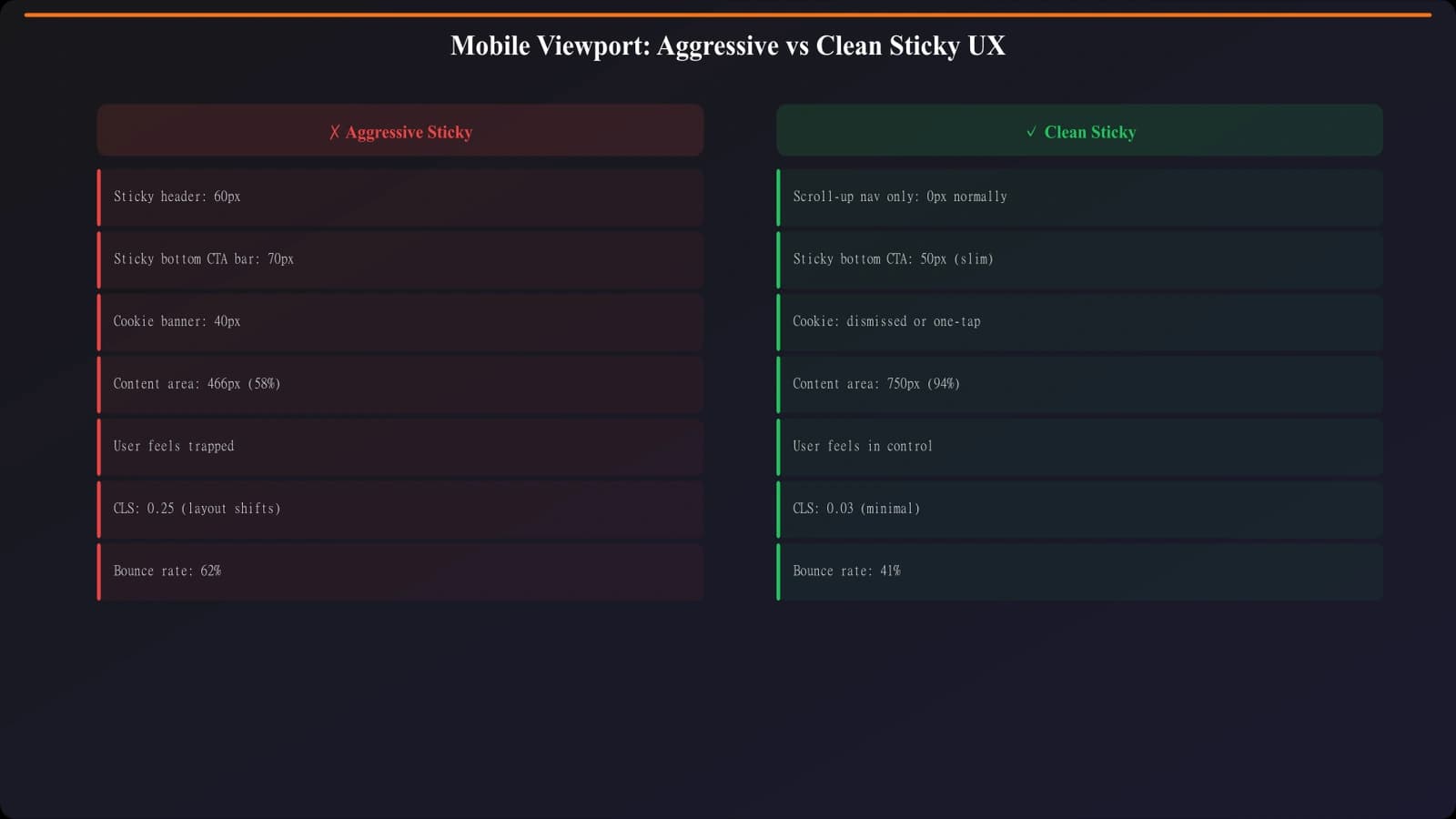
A typical mobile screen is around 375px × 667px (viewport, not physical). Consider what happens when you add sticky elements:
- Browser chrome (address bar): ~50px
- Sticky header: 40-60px
- Floating CTA button: 50-70px
- Remaining content area: 500-530px
That's over 20% of your viewport eaten by non-content elements. On a page where visitors are trying to read and compare, this is a serious usability problem.
Mobile-Specific Patterns That Work
Scroll-direction responsive navigation:
- Hide completely when scrolling down
- Slide in from top when scrolling up
- Maximum 40px height
- Include only essential navigation (TOC, back to top)
No floating CTAs:
- Convert with well-placed in-content CTAs instead
- Make product cards fully tappable where appropriate
- Include CTA buttons after each product card
Collapsible sections:
- Let users expand/collapse product details
- Keep the list scannable without forced scrolling
- Show key info (name, rating, price) with details on tap
Sidebar Sticky Elements on Desktop
Desktop layouts offer a different opportunity: sticky sidebars. With a two-column layout, you can have a fixed sidebar that doesn't compete with content space.
What Works in Sticky Sidebars
Table of contents: The classic use case. Shows the full navigation, highlights current section, lets users jump around. This is almost always a win.
Quick Picks summary: A persistent view of your top 3 recommendations. Useful for visitors who scroll deep, forget the top picks, and want a quick reference.
Comparison widget: If you have a “compare selected products” feature, the sidebar is a natural home for it.
What to Avoid in Sidebars
Promotional banners: Ad-like elements in the sidebar trigger banner blindness and look spammy.
Aggressive CTAs: “Start Free Trial!” blinking in the sidebar is the desktop equivalent of a floating mobile CTA.
Unrelated content: Newsletter signups, social buttons, etc. Keep the sidebar focused on helping with the current task.
Implementation Notes
- Stop before footer: Sticky sidebars should stop scrolling before reaching the footer to avoid layout breaks
- Test scroll performance: Sticky positioning can cause janky scrolling on some browsers; test thoroughly
- Responsive fallback: On tablet/mobile, sidebars typically collapse to top navigation
Alternatives to Sticky Elements
If sticky CTAs hurt and sticky nav has limitations, what should you do instead? Here are patterns that achieve similar goals without the downsides.
Strategic In-Content CTAs
Instead of one persistent CTA, place well-designed CTAs at natural break points:
- After Quick Picks section
- Within each product card
- After comparison table
- Before conclusion
- “Still deciding?” helper at end of page
This gives multiple conversion opportunities without the aggressive feel of chasing users down the page.
Anchor Links and Jump Points
Instead of a persistent navigation element, use well-placed anchor links:
- “Jump to #1 pick” link above the fold
- “Back to top” buttons after each section
- “See comparison table” links in product cards
These serve the same navigation purpose as sticky elements but don't consume permanent viewport space.
Scroll-Triggered Elements
Rather than always-visible sticky elements, trigger elements based on behavior:
- Exit intent: Show CTA only when cursor moves toward browser close
- Scroll completion: Show “Ready to decide?” only after 80%+ scroll
- Time delayed: Show navigation help only after 30+ seconds on page
These approaches serve users who actually need help without bothering everyone else.
The Sticky Element Decision Framework
Here's how to decide what sticky elements, if any, to use on your listicle:
| Element Type | Recommendation | Conditions |
|---|---|---|
| Sticky TOC/Navigation | Usually yes | List >8 items, scroll-up pattern, slim design |
| Sticky Sidebar (desktop) | Yes if space allows | Two-column layout, useful content only |
| Floating CTA Button | Usually no | Avoid on listicles; use in-content CTAs |
| Sticky Bottom Bar | Rarely | Only for truly essential actions |
| Any sticky on mobile | Minimal | Scroll-up nav only, max 40px, easy dismiss |
The core principle: sticky elements should help users navigate, not pressure them to convert. Navigation aids improve the experience. Promotional chase elements degrade it.
Test with full-funnel metrics, not just click rates. And remember that what works on a landing page may actively hurt a comparison page where visitors are in research mode.
For the complete conversion optimization framework, see CRO for Listicles: Complete Conversion Guide. For related elements like Quick Picks that can reduce the need for sticky CTAs, check Quick Picks: Capture Impatient Visitors Instantly.

Product Manager at BestPage. Pioneer in AEO research since 2024, exploring the convergence of SEO and GEO (Generative Engine Optimization). Led multiple AI-powered content optimization projects that achieved 300%+ citation increases in ChatGPT and Perplexity.