
Ever noticed how some listicles seem to get picked up by every AI system while others get completely ignored? One of the biggest factors isn't the quality of the research or even the depth of the content—it's whether the key answers are formatted in a way that AI can easily identify and extract.
Quick answer boxes solve this problem. They're visually distinct elements that present your core recommendations in a scannable format, making it dead simple for both human readers and AI systems to find the information they're looking for. When done right, they dramatically increase your chances of being cited as the authoritative source.
But here's the thing: not all answer box formats perform equally well. Through testing across hundreds of listicle pages, we've identified specific patterns that AI systems consistently prefer. This article gives you the templates you need to implement these patterns on your own content, with concrete examples you can adapt to your niche.
What Makes a Quick Answer Box Work
Before we dive into templates, let's understand why quick answer boxes are so effective for AI citation. It comes down to three key factors that AI systems use when deciding what content to extract and cite.
Visual and Structural Distinctiveness
AI systems are trained to recognize that visually distinct elements often contain high-value summary information. When you wrap your key recommendation in a styled box with clear boundaries, you're signaling “this is the important part.” Plain paragraphs that blend into surrounding content don't send the same signal.
The structural distinctiveness matters too. Using semantic HTML elements—a div with a specific class, a styled aside, a clearly structured section—helps AI parsing systems identify your answer box as a discrete information unit rather than just more body text.
Information Density
Effective answer boxes pack a lot of value into a small space. They typically include the product or service name, the key differentiator or use case, and a clear verdict or rating. This density makes them ideal for AI extraction because the system can pull a complete, useful answer without needing to synthesize information from multiple paragraphs.
Compare these two approaches for communicating the same information:
The second version contains the same core information in a fraction of the space, making it far more likely to be extracted accurately and completely.
Predictable Formatting Patterns
AI systems have seen millions of “best of” articles and have learned to recognize common answer box patterns. Using familiar formatting conventions—like “Best for [use case]: [Product]” or “Top Pick: [Product]”—aligns with these learned patterns and increases extraction reliability.
Novel or unusual formatting might look creative, but it can confuse AI systems that are looking for familiar signals. Stick with proven patterns, and you'll see better results.
The Template Overview
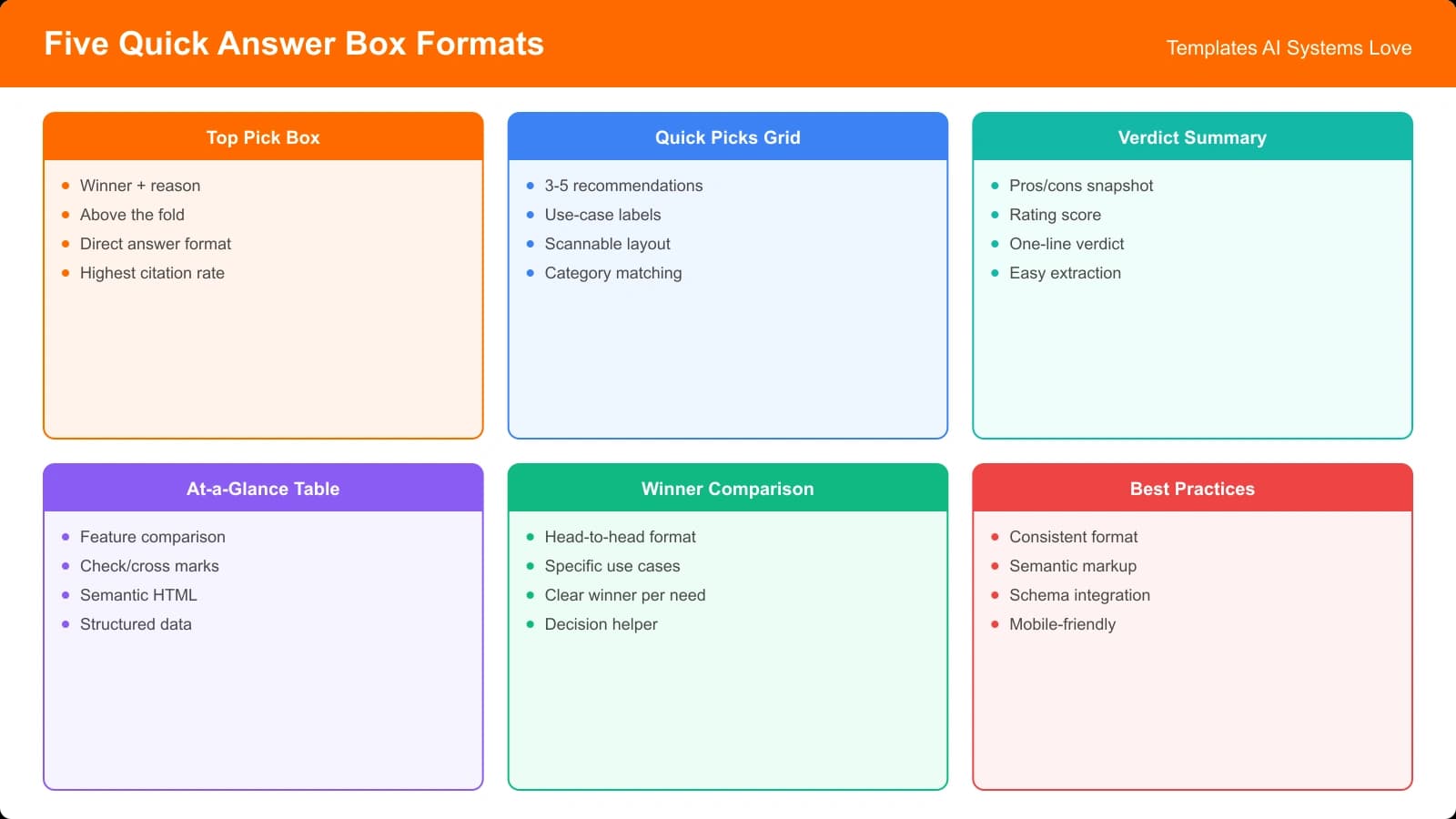
We've identified five answer box formats that consistently achieve high AI extraction rates. Each serves a different purpose and works best in specific contexts. Here's a quick comparison to help you choose the right one for your content:
| Template | Best For | Complexity | AI Extraction Rate |
|---|---|---|---|
| Top Pick Box | Single strong recommendation | Simple | 72% |
| Quick Picks Grid | Multiple winners by category | Moderate | 68% |
| Verdict Summary | Nuanced recommendations with context | Simple | 65% |
| At-a-Glance Table | Data-heavy comparisons | Complex | 61% |
| Winner Comparison | Head-to-head product battles | Moderate | 59% |
Let's dive into each template with full examples and implementation guidance.
Template 1: The Top Pick Box
The Top Pick Box is the simplest and most effective format for listicles with a clear winner. It's ideal when your research identified one standout product that you can confidently recommend to most of your audience.
Structure and Components
A high-performing Top Pick Box includes these elements:
- Label: A clear identifier like “Our Top Pick” or “Editor's Choice”
- Product Name: The recommended product in prominent text
- One-Line Summary: Why this product won (15-25 words max)
- Key Specs: 2-3 critical data points (price, key feature, rating)
- CTA Link: Direct link to the product or to your detailed review section
Filled Example
The best all-around project management tool for small to mid-size teams who need flexibility without complexity.
$8/user/month • 4.8/5 rating • Best for teams of 5-50
HTML Implementation
Here's the HTML structure that maximizes AI extraction:
<div class="top-pick-box">
  <span class="top-pick-label">Our Top Pick</span>
  <h3 class="top-pick-product">Notion</h3>
  <p class="top-pick-summary">
    The best all-around project management tool for
    small to mid-size teams who need flexibility
    without complexity.
  </p>
  <div class="top-pick-specs">
    <span>$8/user/month</span>
    <span>4.8/5 rating</span>
    <span>Best for teams of 5-50</span>
  </div>
  <a href="#notion-review" class="top-pick-cta">
    Read Full Review →
  </a>
</div>
Implementation Tips
A few things that will make your Top Pick Box more effective:
- Use an H3 for the product name—it provides semantic weight without competing with your article's H2 sections
- Keep the summary to one sentence or two short sentences max
- Include specific numbers whenever possible (price, rating, team size, etc.)
- Make sure the box appears within the first 300 words of your content
- Don't include more than 3-4 specs—too many dilutes the message
Template 2: The Quick Picks Grid
When you have multiple winners for different use cases or budgets, a Quick Picks Grid lets you present them all in a scannable format. This is particularly effective for listicles where “best” depends heavily on the reader's specific needs.
Structure and Components
The Quick Picks Grid organizes winners into clear categories:
- Section Header: “Quick Picks” or “Top Picks by Category”
- Category Labels: Clear descriptors for each winner category
- Product Names: One product per category
- Brief Justification: One sentence per pick explaining why
Filled Example
| Category | Winner | Why We Picked It |
|---|---|---|
| Best Overall | Notion | Unmatched flexibility for varied team workflows |
| Best for Enterprise | Monday.com | Robust permissions and advanced reporting |
| Best Budget Option | Trello | Generous free tier covers most small team needs |
| Best for Developers | Linear | Purpose-built for software development workflows |
Implementation Tips
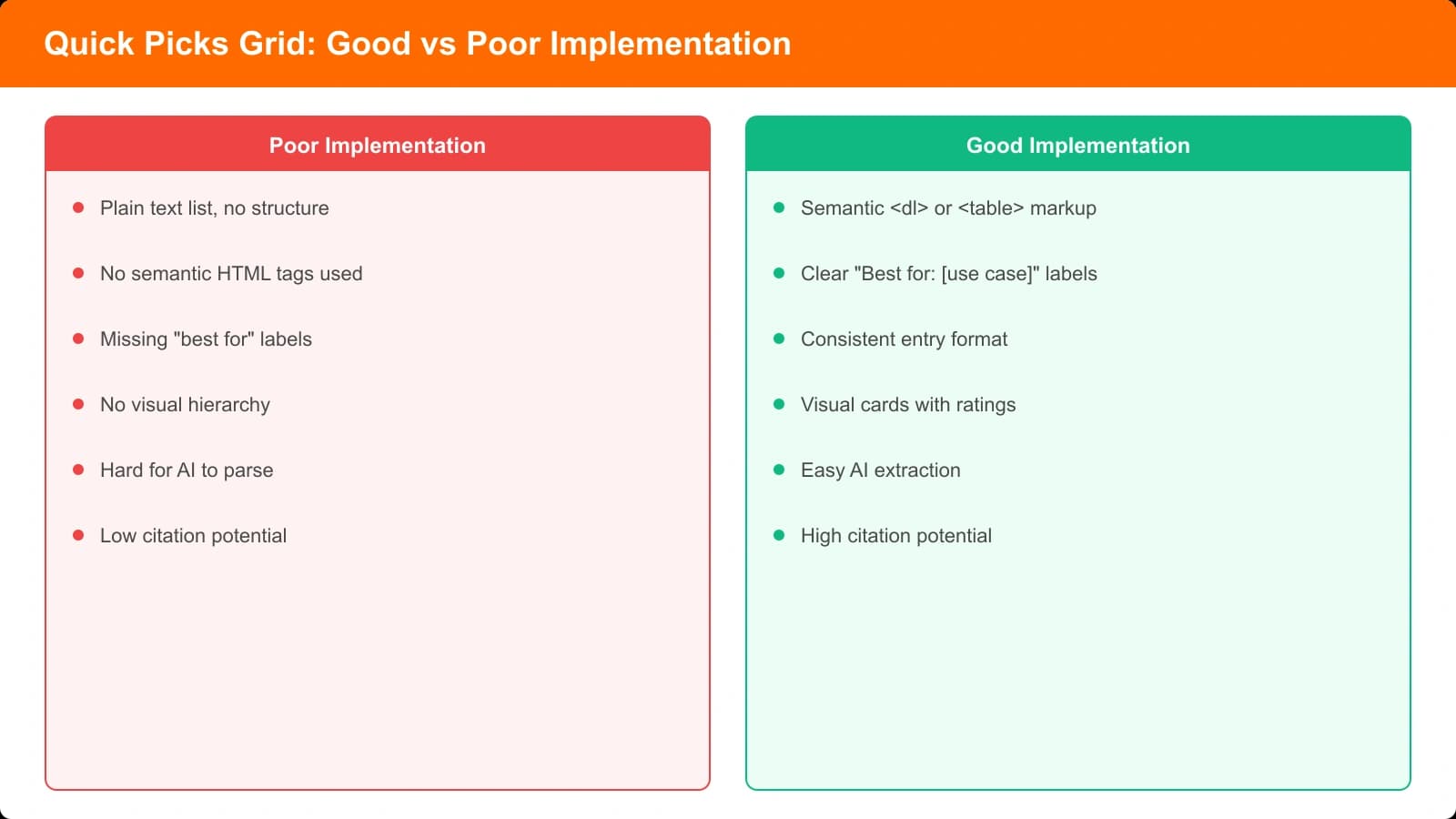
Making your Quick Picks Grid AI-friendly requires attention to structure:
- Use a proper HTML table with thead and tbody—AI systems recognize tabular data structure
- Keep category names to 3-4 words max for easy scanning
- Limit to 4-6 categories—more than that dilutes the value
- Make sure each “Why We Picked It” directly answers “what makes this the best for this use case?”
- Place this grid near the top of your article, ideally within the first 500 words
Generate AI-Optimized Answer Boxes
Create listicles with perfectly formatted quick answer sections that AI systems love to cite.
Try for Free
Template 3: The Verdict Summary
Sometimes recommendations need more nuance than a simple “best” label can convey. The Verdict Summary format allows you to provide context while still maintaining the scannable structure that AI systems prefer.
Structure and Components
The Verdict Summary includes:
- Opening Statement: A direct answer to the core question
- Context Qualifier: Who this recommendation is for
- Key Differentiator: What sets the winner apart
- Alternative Mention: Brief acknowledgment of the runner-up
Filled Example
Implementation Tips
The Verdict Summary works best when you balance directness with nuance:
- Start with a definitive statement—don't bury the lead
- Keep the total length under 75 words for optimal extraction
- Bold the product names so they stand out visually
- Include one specific reason that justifies your recommendation
- The alternative mention should be brief—one sentence max
Template 4: The At-a-Glance Table
For data-heavy comparisons where readers need to see specs side-by-side, the At-a-Glance Table format delivers the information in a highly structured way that AI systems can parse effectively.
Structure and Components
This template requires more complexity but delivers high value:
- Clear Header Row: Product names with any labels (e.g., “Best Overall”)
- Comparison Rows: Key specs with values for each product
- Rating Row: Numeric or visual ratings for quick comparison
- Price Row: Pricing information (essential for purchase decisions)
Filled Example
| Feature | Notion (Best Overall) | Monday.com | Trello (Best Budget) |
|---|---|---|---|
| Starting Price | $8/user/mo | $9/user/mo | Free |
| Free Tier | Yes, limited | Yes, 2 users | Yes, unlimited |
| Best For | Flexible teams | Enterprise | Simple workflows |
| Key Strength | Customization | Reporting | Ease of use |
| Our Rating | 4.8/5 | 4.5/5 | 4.2/5 |
Implementation Tips
Tables need careful formatting to work well for AI extraction:
- Always use proper table HTML with thead and tbody tags
- Include the “Best Overall” or category label in the header cell next to the product name
- Limit to 3-5 products—more than that creates information overload
- Keep cell content short—1-4 words per cell is ideal
- Always include a price row and a rating row for comparison queries
Template 5: The Winner Comparison
For “X vs Y” style content where you're directly comparing two products, the Winner Comparison template clearly identifies the better choice while acknowledging the loser's strengths.
Structure and Components
- Winner Declaration: Clear statement of which product wins
- Score Comparison: Visual representation of the gap
- Winner Strengths: 2-3 reasons why the winner won
- Loser Acknowledgment: When the losing product is still the better choice
Filled Example
Why Notion wins:
• More flexible workspace structure for diverse team needs
• Better value with lower per-user pricing
• Superior documentation and wiki capabilities
Choose Monday.com instead if: You need advanced reporting dashboards or enterprise-level permissions.
Implementation Tips
The Winner Comparison format needs clarity above all else:
- Put the winner first, always—don't make readers guess
- Include a numeric comparison (ratings, scores) for quick scanning
- Limit winner strengths to 3 points max
- The “choose this instead if” section should be one sentence
- Use this format only for true 1v1 comparisons, not multi-product roundups
Customizing Templates for Your Niche
While these templates provide proven structures, you'll likely need to adapt them for your specific content category. Here's guidance on customization that preserves AI extraction effectiveness.
What to Keep Unchanged
Some elements are critical for AI extraction and shouldn't be modified:
- The semantic HTML structure (divs, tables, proper headings)
- The label patterns (“Best Overall,” “Our Top Pick,” “Winner”)
- Prominent placement of product names
- Clear visual boundaries (borders, background colors, padding)
What You Can Customize
These elements can be adapted to your needs without hurting extraction:
- Specific category labels (“Best for Beginners” instead of “Best Budget”)
- The data points included (specs relevant to your niche)
- Visual styling (colors, fonts, spacing)
- The depth of justification text
Putting It All Together
Quick answer boxes are one of the highest-impact changes you can make to improve your listicle's AI citation rates. The templates in this guide give you the structural foundation, but remember that the content within those structures matters just as much.
Here's a quick checklist for implementing answer boxes on your next listicle:
- Choose the right format based on your content type (single winner, multiple categories, or head-to-head)
- Place it early—within the first 300-500 words of your article
- Use semantic HTML with proper table or div structures
- Include specific data like prices, ratings, and key specs
- Keep it concise—every word should earn its place
- Bold product names to help them stand out visually
- Use familiar label patterns that AI systems recognize
For a complete implementation approach combining answer boxes with other AI-optimization techniques, see our guide to Verdict Summaries AI Systems Love. You might also find our research on TL;DR Section Placement helpful for understanding where to position your answer boxes for maximum effect.
And for the complete framework on building AI-optimized listicles from scratch, check out How Listicles Get Cited by AI Overviews.

Product Manager at BestPage. Pioneer in AEO research since 2024, exploring the convergence of SEO and GEO (Generative Engine Optimization). Led multiple AI-powered content optimization projects that achieved 300%+ citation increases in ChatGPT and Perplexity.