
Here's the tension every B2B marketer faces with comparison content: your best listicles and comparison pages are also your highest-traffic SEO assets. You want leads from that traffic. But aggressive gating destroys the user experience, tanks engagement metrics, and—increasingly—gets your content deprioritized by search engines.
I've watched companies gate their entire “Best CRM Software” page behind a form and wonder why traffic plummeted. Google figured out years ago that gated content doesn't serve users well, and the signals are clear: thin visible content, high bounce rates, and low engagement all hurt rankings.
But that doesn't mean lead generation and listicle content are incompatible. The companies getting this right use strategic, value-additive approaches that enhance rather than interrupt the user experience. This guide shows you how to do it. For the broader context on listicle conversion, see our guide on CRO for listicle pages.
Why Traditional Gating Fails on Listicles
Before covering what works, let's understand why the obvious approach—gate the content—fails so badly.
The SEO Impact
Search engines need to see your content to rank it. When you gate a listicle:
- Thin content signals: Googlebot sees a form, not the valuable content behind it
- High bounce rates: Users hit the gate and leave, signaling poor content quality
- Low engagement time: No time-on-page means no engagement signals
- Poor Core Web Vitals: Modal popups and form overlays hurt page experience scores
According to Google's documentation, content behind paywalls or gates may be indexed differently, and user experience signals from gated pages are typically negative.
The User Experience Problem
Users searching for “best project management tools” want to compare options, not fill out a form. Forcing them to gate immediately:
- Creates friction at the highest-intent moment
- Generates low-quality leads (people give fake info)
- Damages brand perception (“just another company that wants my email”)
- Loses the opportunity to build trust through value
The Value-Additive Approach
The shift in thinking: instead of gating your main content, create supplementary content that's genuinely more valuable than the free version. Users who want the extra depth willingly provide information.
Lead Magnet Types That Work
These formats add value without interrupting the core listicle experience:
| Lead Magnet Type | Example | Why It Works |
|---|---|---|
| Expanded comparison PDF | “Full 50-point comparison spreadsheet” | Offers depth the web page can't match |
| Pricing calculator | “Get custom pricing estimates for your team size” | Personalized value worth the email |
| Vendor shortlist tool | “Answer 5 questions, get your top 3 matches” | Interactive utility beyond passive reading |
| Implementation checklist | “50-point CRM implementation checklist” | Next-step content for serious buyers |
| Negotiation guide | “How to negotiate enterprise SaaS contracts” | High-value content for bottom-funnel users |
Positioning the Offer
Where and how you present the lead magnet matters as much as what it is:
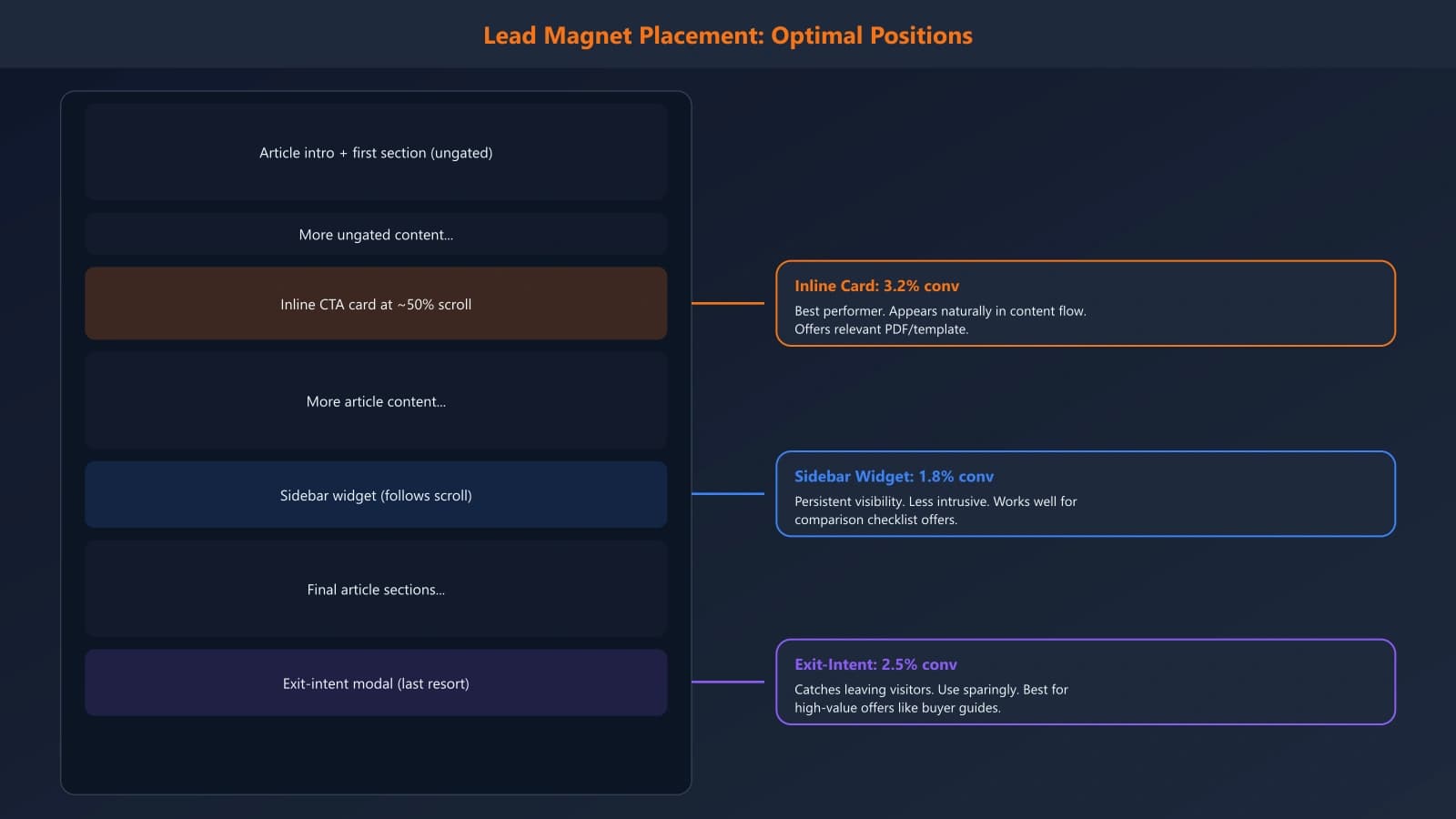
- After demonstrating value: Present the offer after 40-60% scroll depth
- Contextual placement: Position near relevant content (pricing guide near pricing section)
- Non-intrusive format: Inline cards or sidebar widgets, not modal popups
- Clear value proposition: Explain exactly what they get and why it's worth it
Timing Strategies That Convert
When you present a lead capture opportunity dramatically affects conversion. Here are the strategies that work.
Scroll-Depth Triggers
The most effective approach ties lead magnet presentation to engagement signals:
- 40% scroll: First subtle mention of supplementary resource
- 60% scroll: More prominent inline CTA
- 80% scroll: Clear offer positioned as “next step”
- End of content: Full lead capture form with value summary
This approach ensures users see the offer only after they've consumed enough content to find value—making them more likely to want more.
Exit Intent Done Right
Exit-intent popups have a bad reputation, but they can work if executed thoughtfully:
- One-time only: Never show more than once per session
- High-value offer: Something genuinely useful, not just “subscribe to our newsletter”
- Easy dismissal: Clear close button, esc key works, no dark patterns
- Contextual relevance: Offer something related to what they were reading
Progressive Profiling
Don't ask for everything upfront. Build the relationship over time:
- First touch: Just email for a useful resource
- Return visit: Offer additional content, ask for company name
- High-intent pages: Capture role/team size when they view pricing
- Demo request: Full qualification when they're ready
This respects the buyer journey rather than trying to extract maximum information at first contact.
UX Patterns That Don't Kill Engagement
The visual and interaction design of lead capture elements matters enormously. These patterns protect engagement while capturing leads.
Inline Content Cards
The highest-performing pattern for listicle lead gen is the inline content card:
- Appears as part of the content flow, not interrupting it
- Matches the page's visual design
- Clearly states what the user gets
- Minimal form fields (email only for first touch)
Sticky Sidebar Elements
A sidebar CTA that follows the user as they scroll can capture leads without interruption:
- Stays visible throughout reading
- Doesn't overlay content
- Compact design that doesn't distract
- Consistent offer with the inline version
For more on sticky elements and when they help vs. hurt, see our guide on sticky elements for listicle UX.
Patterns to Avoid
- Immediate modal popups: Kill engagement and trigger bounce
- Multiple form fields: Every field reduces conversion
- Gating core content: Never gate what users came for
- Aggressive countdown timers: Pressure tactics damage trust
- Newsletter-first asks: “Subscribe” is not a value proposition
Build Lead-Generating Listicles
Create comparison content that converts visitors to leads without sacrificing SEO or user experience.
Try for Free
SEO-Safe Implementation
Protecting your search rankings while adding lead generation requires attention to technical details.
Content Visibility Rules
Follow these rules to maintain SEO health:
- All core content visible: Everything in the main listicle is accessible without forms
- Lead magnets are supplementary: Extra value, not the main value
- No content swapping: Don't show Googlebot different content than users
- Modals load after content: Page speed isn't impacted by lead capture elements
Technical Form Implementation
Implement forms in ways that don't hurt page performance:
- Lazy-load form elements until scroll threshold
- Use lightweight form scripts (avoid heavy marketing automation embeds)
- Implement forms in a way that doesn't shift layout (CLS impact)
- Ensure forms work on mobile without horizontal scroll
Tracking Without Bloat
Track lead capture effectiveness without loading heavy scripts:
- Use server-side tracking where possible
- Load analytics scripts after critical content
- Implement conversion tracking via tag manager, not inline scripts
- Test page speed with all tracking enabled
Measuring What Matters
Lead capture on listicles requires different metrics than traditional landing pages.
Key Metrics to Track
| Metric | What It Tells You | Target Range |
|---|---|---|
| Lead capture rate | % of visitors who convert | 3-8% for B2B |
| Form abandonment | % who start but don't finish | Below 50% |
| Time to capture | Average time before conversion | 2-4 minutes |
| Engagement post-form | Continued reading after capture | 70%+ continue |
| Lead quality score | How leads perform downstream | Compare to other sources |
A/B Testing Framework
Run structured tests to optimize lead capture:
- Placement tests: Where in the content flow works best
- Offer tests: Which lead magnets generate most interest
- Copy tests: How to describe the value proposition
- Form field tests: Optimal number and type of fields
- Timing tests: When to show exit-intent or scroll triggers
Always measure both conversion rate AND lead quality. A 10% conversion rate with junk leads isn't a win.
Real-World Examples That Work
Let's look at patterns from companies successfully balancing lead gen with content quality.
The Comparison PDF Upgrade
Pattern: Full comparison visible on page, with downloadable “extended version” offered
- Web page shows top 10 products with key comparisons
- PDF offers 25 products with 50+ comparison criteria
- Inline CTA: “Get the full comparison with 15 more tools”
- Result: 6% conversion, high-quality leads already in evaluation mode
The Interactive Selection Tool
Pattern: Listicle content is free, personalized recommendation requires email
- Full listicle visible without any gate
- Widget: “Not sure which is right? Answer 5 questions”
- After questions, email required to see personalized results
- Result: 8% conversion, leads self-qualified by answering questions
The Implementation Template
Pattern: Content explains what, template provides how
- Listicle explains CRM evaluation criteria
- Offer: “Download our vendor evaluation scorecard template”
- Practical tool users actually need for their buying process
- Result: 5% conversion, leads actively in buying process
Balancing Lead Gen and User Value
The fundamental principle: lead capture should enhance the user experience, not detract from it. When you offer genuinely valuable supplementary content at the right moment, users willingly trade their information.
Key takeaways:
- Never gate core content: The listicle itself must be freely accessible
- Offer real value: Lead magnets should provide something worth the email
- Time it right: Present offers after demonstrating value
- Keep it subtle: Inline cards beat aggressive popups
- Protect SEO: Ensure all visible content is crawlable
- Measure quality: Conversion rate means nothing without lead quality
The companies winning at B2B content marketing have stopped thinking of lead capture as an interruption and started thinking of it as a natural next step for engaged readers. Build that into your listicle strategy and you'll generate leads while strengthening—not undermining—your content assets.
For the complete conversion framework, see our guide on CRO for listicles. And for building the underlying comparison content, explore our SaaS Comparison Page Playbook.

Product Manager at BestPage. Pioneer in AEO research since 2024, exploring the convergence of SEO and GEO (Generative Engine Optimization). Led multiple AI-powered content optimization projects that achieved 300%+ citation increases in ChatGPT and Perplexity.