
You know you should be A/B testing your comparison pages. But where do you start? With limited traffic spread across dozens of listicles, getting statistically significant results feels impossible. And when conversions are clicks to affiliate partners rather than completed purchases, standard testing advice doesn't quite fit.
Testing comparison pages requires adapted methodology. The fundamentals of experimentation apply, but the specific elements worth testing, the metrics that matter, and the approach to reaching significance differ from typical CRO contexts.
This guide provides a prioritized testing framework for listicle pages: what to test first, how to run valid experiments, and how to interpret results. For the broader conversion framework, see our CRO for Listicles guide.
Testing Fundamentals for Comparison Pages
Before diving into what to test, establish the fundamentals.
Defining Primary Metrics
What “conversion” means on comparison pages:
- Affiliate clicks: Clicks to partner sites (most common primary metric)
- CTA click rate: Percentage of visitors clicking any CTA
- First CTA clicks: Clicks on top-ranked product (often highest value)
- Email captures: Newsletter signups or comparison downloads
- Engagement: Scroll depth, time on page, interactions
Secondary Metrics to Track
- Bounce rate: Do changes increase or decrease bounces?
- Pages per session: Do users explore more content?
- Return rate: Do changes affect repeat visits?
- Revenue per click: If tracking conversions downstream
Traffic Reality Check
| Monthly Traffic | Testing Approach |
|---|---|
| <1,000/page | Aggregate testing across pages, longer test duration |
| 1,000-10,000/page | Individual page testing possible with patience |
| >10,000/page | Standard A/B testing with reasonable timelines |
Test Prioritization Framework
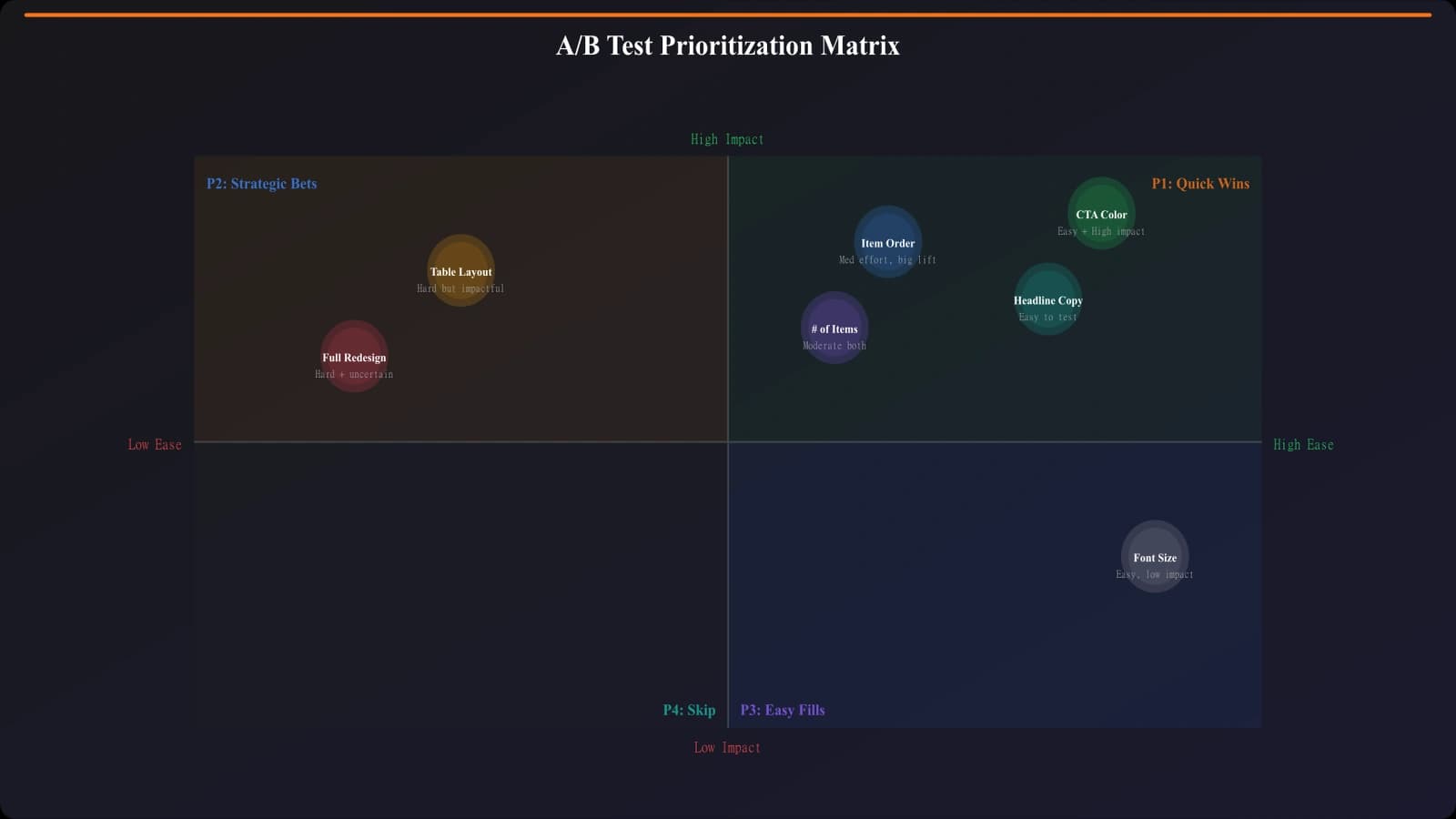
Not all tests are equal. Prioritize by impact potential and ease of testing.
High-Impact Tests (Start Here)
- Quick picks section: Present/absent, format, number of picks
- CTA design: Button text, color, size, placement
- Number of products: 5 vs. 10 vs. 15 products displayed
- Top pick emphasis: How prominently to feature #1 recommendation
- Above-fold content: What users see before scrolling
Medium-Impact Tests
- Product card layout: Horizontal vs. vertical, info density
- Social proof inclusion: With ratings vs. without
- Comparison table: Include vs. exclude, column selection
- Content length: Short descriptions vs. detailed coverage
- Sticky elements: Sticky CTA vs. no sticky
Lower-Impact Tests (After Fundamentals)
- Image treatments: Screenshots vs. logos vs. no images
- Typography: Font sizes, heading styles
- Color schemes: Beyond CTA color
- Micro-copy: Minor label changes
High-Impact Test Details
Deep dives into the tests most likely to move metrics.
Testing Quick Picks
Quick picks sections (top 3 recommendations above the fold) often have the biggest impact:
- Test A: No quick picks (straight to full list)
- Test B: 3-product quick picks section
- Test C: Single “Editor's Choice” highlight
What to measure: Overall CTA clicks, click distribution across products, scroll depth, bounce rate.
Testing CTA Design
CTA buttons are the conversion mechanism—test them carefully:
- Text variations: “Visit Site” vs. “Try [Product]” vs. “Get Started”
- Size: Standard button vs. larger prominent button
- Placement: End of card vs. always visible (sticky)
- Multiple CTAs: One per product vs. repeated CTAs
Testing Product Count
More products isn't always better:
- Test hypothesis: Fewer products = less choice overload = more clicks
- Counter-hypothesis: More products = more options = higher match rate
- Common finding: 7-10 products often optimal for most categories
- Measure: Total clicks AND click distribution
Build Optimized Listicles
Generate comparison pages with conversion-optimized layouts based on testing insights.
Try for Free
Running Statistically Valid Tests
Invalid tests lead to wrong conclusions. Here's how to test properly.
Sample Size Requirements
Before launching any test, calculate required sample:
- Current conversion rate (baseline)
- Minimum detectable effect (what improvement is meaningful?)
- Confidence level (typically 95%)
- Statistical power (typically 80%)
Use an online calculator to determine minimum visitors per variant.
Test Duration Guidelines
- Minimum: 1 full week to account for day-of-week variation
- Recommended: 2-4 weeks for most tests
- Maximum before concluding: 8 weeks (traffic patterns may have changed)
- Don't peek: Wait for full sample before drawing conclusions
Common Validity Pitfalls
| Pitfall | Problem | Solution |
|---|---|---|
| Stopping early on “win” | False positives | Pre-commit to sample size |
| Multiple tests simultaneously | Interaction effects | One test per page at a time |
| Small traffic pages | Never reach significance | Aggregate across similar pages |
| Seasonal traffic spikes | Biased samples | Exclude anomaly periods |
| Mobile/desktop split | Different effects per device | Segment analysis |
Aggregate Testing for Low-Traffic Pages
Most comparison sites have traffic distributed across many pages. Here's how to test anyway.
The Aggregate Approach
- Apply the same change across multiple similar pages
- Pool traffic and conversions for analysis
- Example: Test new CTA design on all “best [software]” pages
Grouping Pages for Testing
Group pages that share:
- Same template/layout
- Similar conversion rates
- Comparable traffic levels
- Related intent (all “best” pages vs. all “alternatives” pages)
Maintaining Validity
- Randomly assign pages to control vs. variant (not all low-traffic to one group)
- Ensure balanced traffic between groups
- Monitor individual page performance for outliers
- Run longer to account for page-level variation
Interpreting Test Results
Getting results is step one. Interpreting them correctly is step two.
Statistical Significance
- p-value < 0.05: Typically considered significant
- Confidence interval: Should not cross zero for meaningful results
- Effect size: Is the improvement practically meaningful?
Segment Analysis
Overall results may hide important segment differences:
- Device type: Desktop vs. mobile may respond differently
- Traffic source: Organic vs. social may have different intent
- New vs. returning: Returning visitors may respond differently
- Page category: B2B pages may differ from B2C
Handling Negative Results
- Confirm validity: Was the test run correctly?
- Check segments: Did it hurt some segments more than others?
- Learn anyway: A valid negative result is still learning
- Don't implement: If it didn't help, don't ship it
Tools for Listicle Testing
Choose tools appropriate for your traffic level and technical setup.
Tool Options by Situation
| Tool | Best For | Considerations |
|---|---|---|
| Google Optimize (legacy) | Simple tests, GA integration | Discontinued, migrate away |
| VWO | Visual editor, easy setup | Mid-range pricing |
| Optimizely | Enterprise, complex tests | Higher cost |
| PostHog | Product analytics + testing | Open source option |
| Statsig | Developer-friendly | Code-based implementation |
DIY Testing Approach
For simple tests without dedicated tools:
- Deploy variant as separate page/URL
- Split traffic via redirects or load balancer
- Track with GA4 events
- Analyze in spreadsheet with statistical calculator
Building a Testing Culture
One-off tests are less valuable than systematic testing programs.
Testing Cadence
- Monthly: At least one test running
- Quarterly: Review and prioritize next tests
- Annually: Major learnings synthesis
Documenting Tests
For each test, record:
- Hypothesis and expected outcome
- Test design and variants
- Sample size and duration
- Results and statistical significance
- Decision made and why
- Learnings for future tests
Compounding Learnings
- Winners become new baseline
- Losers inform what not to try
- Patterns emerge across tests
- Testing velocity increases as you learn
Testing for Continuous Improvement
A/B testing transforms opinion-based optimization into evidence-based improvement. For comparison pages, the specific approach differs from standard CRO, but the principle remains: test, measure, learn, repeat.
Key takeaways:
- Start high-impact: Quick picks, CTAs, and product count first
- Define metrics clearly: Know what “conversion” means for your pages
- Respect statistics: Sample size and duration matter
- Aggregate when needed: Pool traffic across similar pages
- Segment analysis: Overall results may hide important differences
- Document everything: Build institutional knowledge
- Test continuously: One-off testing is less valuable than programs
Pick your highest-impact test hypothesis. Calculate required sample size. Launch the test. Wait for valid results. Learn. Then pick the next test.
For the complete conversion optimization framework, see our CRO for Listicles guide. For specific elements to optimize, explore our guides on comparison tables and mobile optimization.

Product Manager at BestPage. Pioneer in AEO research since 2024, exploring the convergence of SEO and GEO (Generative Engine Optimization). Led multiple AI-powered content optimization projects that achieved 300%+ citation increases in ChatGPT and Perplexity.