
The rules for listicle success have fundamentally changed. Traditional SEO best practices—keyword optimization, internal linking, meta tag refinement—still matter for Google rankings. But if you want your content cited by ChatGPT, Perplexity, Google AI Overview, and the growing ecosystem of AI assistants, you need a different approach.
AI systems don't just read content the way Google's crawlers do. They're trying to understand it, extract specific information from it, and use it to answer user questions directly. This requires content structured for extraction—clear verdicts, organized data, predictable formatting, and semantic clarity that AI can parse reliably.
This template synthesizes everything we've learned about AI-optimized listicle creation into a single, actionable resource. You'll get the complete structure from title to conclusion, with detailed guidance on each section. Whether you're building SaaS comparisons, product roundups, local service guides, or any other “best of” content, this template adapts to your needs.
By the end of this guide, you'll have a repeatable framework for creating listicles that satisfy both traditional SEO requirements and the emerging demands of AI-driven discovery.
Template Overview
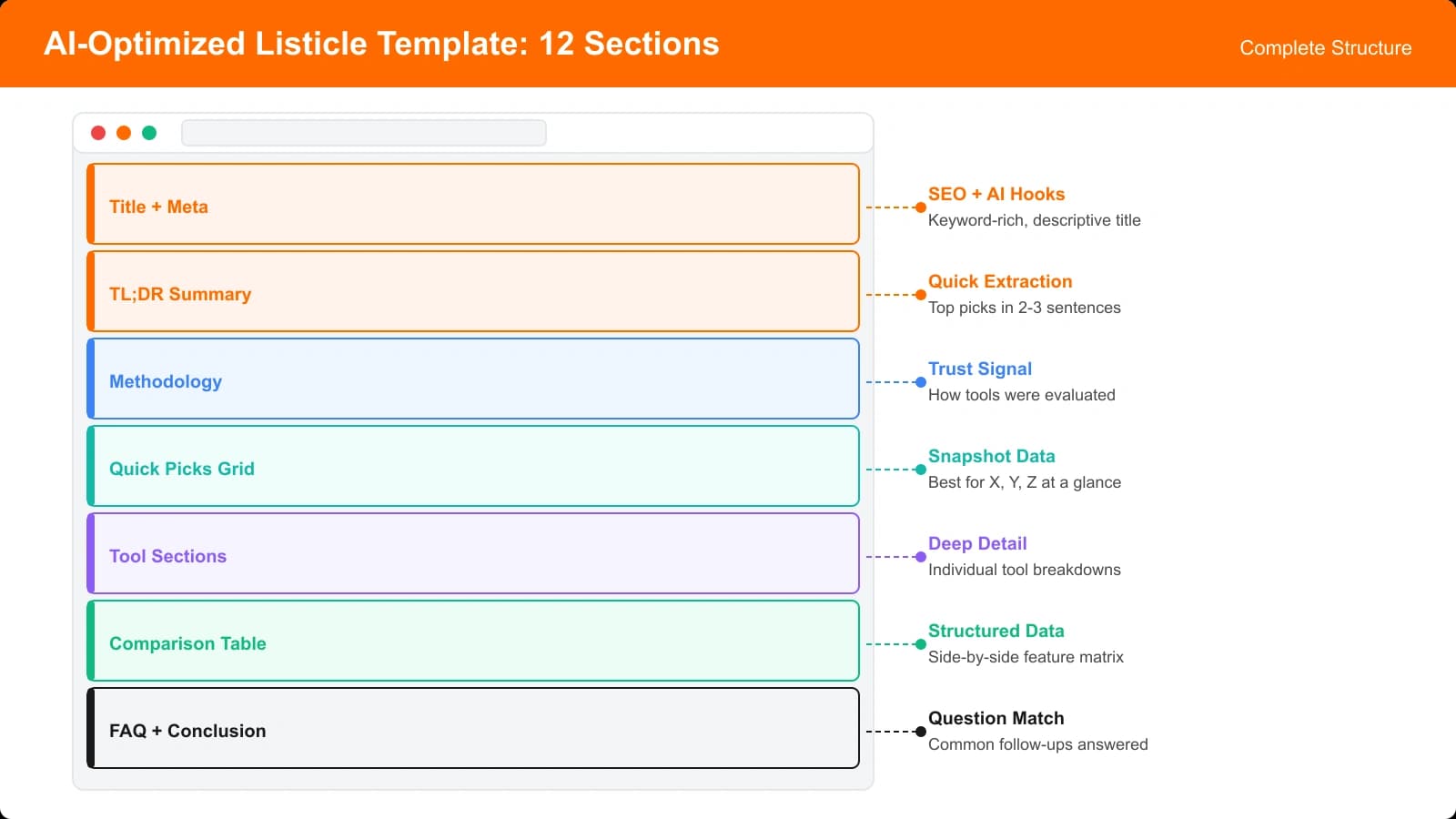
Before diving into the details, let's look at the complete template structure. Every section serves a specific purpose for either human readers, search engines, or AI systems—and most sections serve multiple purposes simultaneously.
The Complete Structure
An AI-optimized listicle contains these sections in order:
| Section | Purpose | Word Count | AI Priority |
|---|---|---|---|
| 1. Title & Meta | Search visibility, click-through | 60-70 chars | High |
| 2. TL;DR Box | Immediate value, AI extraction | 45-65 words | Critical |
| 3. Introduction | Context, authority setup | 100-150 words | Medium |
| 4. Quick Picks Summary | Fast answers, AI extraction | 75-125 words | Critical |
| 5. Methodology Section | E-E-A-T, trust building | 150-200 words | High |
| 6. Comparison Table | Data extraction, scannability | Variable | Critical |
| 7. Product Reviews (×N) | Detailed analysis, keywords | 200-350 each | Medium |
| 8. Verdict Sections | Clear recommendations | 25-50 each | Critical |
| 9. Use Case Guidance | Intent matching | 100-150 words | High |
| 10. FAQ Section | Long-tail queries, PAA | 150-250 words | High |
| 11. Conclusion | Final verdict, CTA | 75-100 words | Medium |
| 12. Schema Markup | Structured data | N/A | Critical |
Why This Order Matters
The section sequence isn't arbitrary. It follows a principle we call “progressive disclosure with extraction priority.” The sections most critical for AI extraction appear early, while sections that provide depth and context follow naturally.
This ordering serves three user types simultaneously:
- Skimmers get immediate value from TL;DR and Quick Picks without scrolling
- Researchers find methodology and detailed reviews for due diligence
- AI systems encounter extractable content early before potentially truncating retrieval
Now let's examine each section in detail with templates and examples.
Section 1: Title and Meta Description
Your title and meta description serve traditional SEO purposes, but they also affect how AI systems contextualize your content when citing it. Getting these right sets the foundation for everything else.
Title Formula
For AI-optimized listicles, use this title formula:
Examples:
• 8 Best Project Management Tools for Remote Teams in 2026
• 12 Best CRM Software for Small Businesses in 2026
• 7 Best Standing Desks for Home Offices in 2026
This formula works because it includes:
- A specific number (signals list format, sets expectations)
- The primary keyword (category/product type)
- Audience/use case qualifier (matches specific search intent)
- Currency indicator (year signals freshness)
Meta Description Formula
Meta descriptions should front-load your value proposition:
Example: We tested 15 project management tools to find the best options for remote teams. Notion wins for flexibility and value. See our complete comparison with pricing, features, and team ratings.
Notice how this meta description immediately provides the top pick. AI systems and Google's snippets both favor descriptions that deliver answers rather than tease them.
Section 2: The TL;DR Box
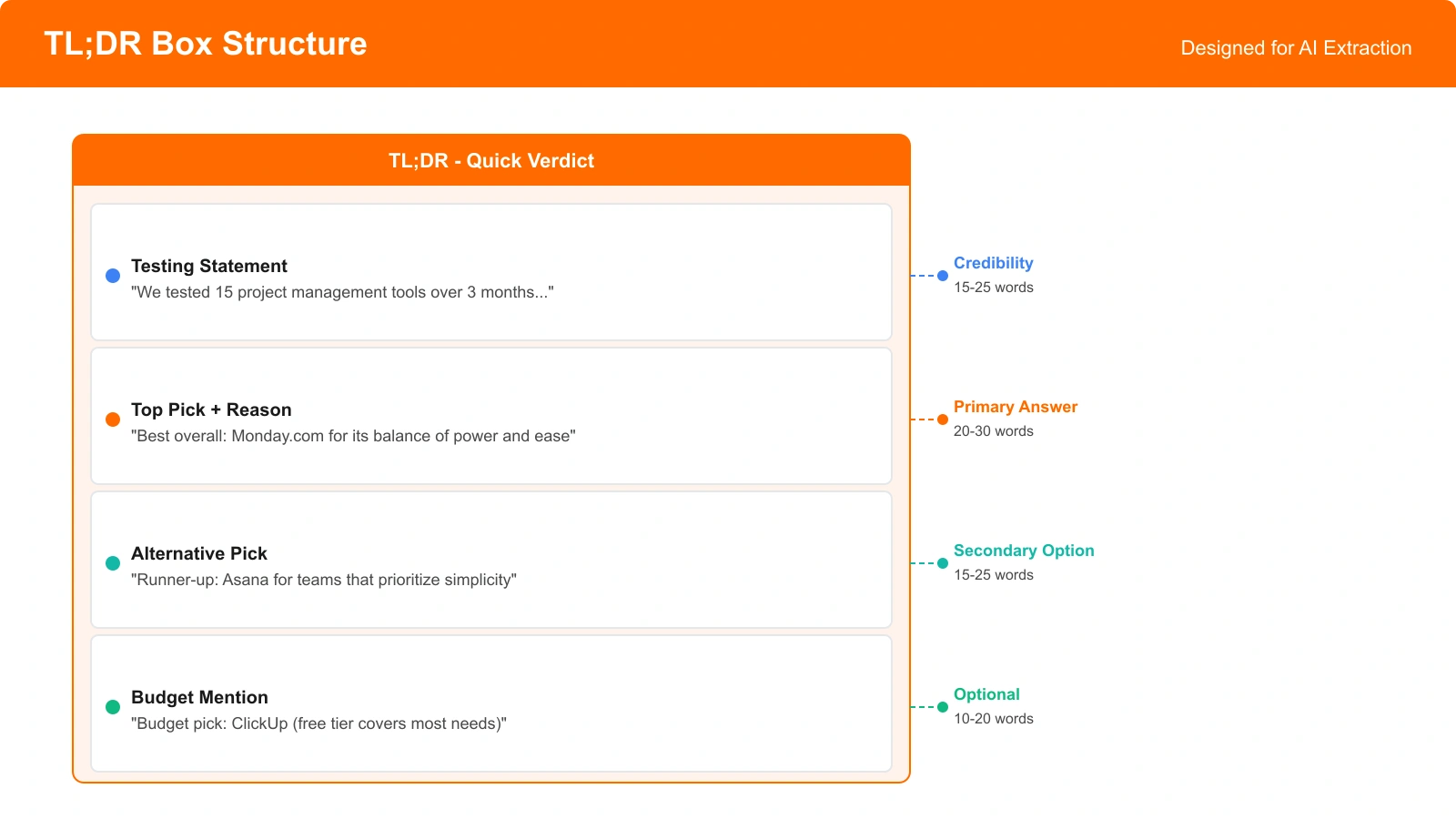
The TL;DR box is the single most important element for AI extraction. It should appear immediately after your H1 title, before any introductory text. This position maximizes extraction probability.
TL;DR Template
TL;DR Rules
- 45-65 words maximum. Any longer and AI extraction becomes less reliable.
- Name products explicitly. Bold product names for visual scannability.
- State the verdict first. Don't bury the lead with methodology.
- Include one specific reason. “Best for flexibility” beats “best overall.”
- Acknowledge alternatives. Shows nuance, covers more search intents.
Filled Example
This example is 58 words, names three products, provides specific reasons, and covers multiple user scenarios—all in a format AI systems can easily extract and cite.
Section 3: Introduction
The introduction provides context that helps readers (and AI) understand why this content exists and why your recommendations should be trusted. Keep it focused—100-150 words maximum.
Introduction Template
A strong introduction addresses three things:
- The problem or question: Why someone would be searching for this content
- The challenge: Why finding the right answer is difficult
- Your solution: What you did to help readers decide
Filled Example
“Finding the right project management tool shouldn't require a PhD in software evaluation. Yet with dozens of options ranging from simple kanban boards to enterprise platforms, choosing the wrong tool can cost your team months of productivity.
We spent three months testing the leading project management tools with real teams across different industries. We evaluated ease of use, collaboration features, integration capabilities, and value for the price. This guide distills what we learned into clear recommendations for different team types and budgets.”
This introduction is 91 words, establishes the problem, hints at methodology, and sets up the value proposition without being verbose.
Section 4: Quick Picks Summary
The Quick Picks section provides a scannable summary of your top recommendations by category. It serves impatient readers and gives AI multiple extraction points for different query types.
Quick Picks Template
| Category | Winner | Why |
|---|---|---|
| Best Overall | [Product Name] | [10-15 word reason] |
| Best for [Use Case 1] | [Product Name] | [10-15 word reason] |
| Best for [Use Case 2] | [Product Name] | [10-15 word reason] |
| Best Budget Option | [Product Name] | [10-15 word reason] |
Quick Picks Rules
- Include 3-6 categories maximum (more becomes overwhelming)
- Always include “Best Overall” and “Best Budget Option”
- Other categories should match common search modifiers in your niche
- Keep “Why” descriptions to one short sentence
- Use a proper HTML table for semantic structure
Section 5: Methodology Section
The methodology section builds E-E-A-T signals and establishes your credibility. It should explain how you evaluated products without becoming tediously long.
Methodology Template
A methodology section should cover:
- Scope: How many products you considered
- Criteria: What factors you evaluated (3-5 key criteria)
- Process: How you conducted the evaluation
- Transparency: Any limitations or potential biases
Filled Example
“We evaluated 15 project management tools over a three-month period. Our testing process involved:
- Setting up each tool with a real 10-person team
- Running identical project workflows across all platforms
- Tracking key metrics: setup time, learning curve, collaboration friction
- Gathering feedback from team members at different experience levels
We weighted our evaluation on five criteria: ease of use (30%), collaboration features (25%), integration capabilities (20%), value for price (15%), and mobile experience (10%). Full disclosure: some links in this article are affiliate links, but our rankings are based solely on our testing. We've rejected affiliate partnerships with products that didn't meet our standards.”
Generate AI-Optimized Listicles
Create comparison pages with this template structure automatically, ready for AI citation.
Try for Free
Section 6: Comparison Table
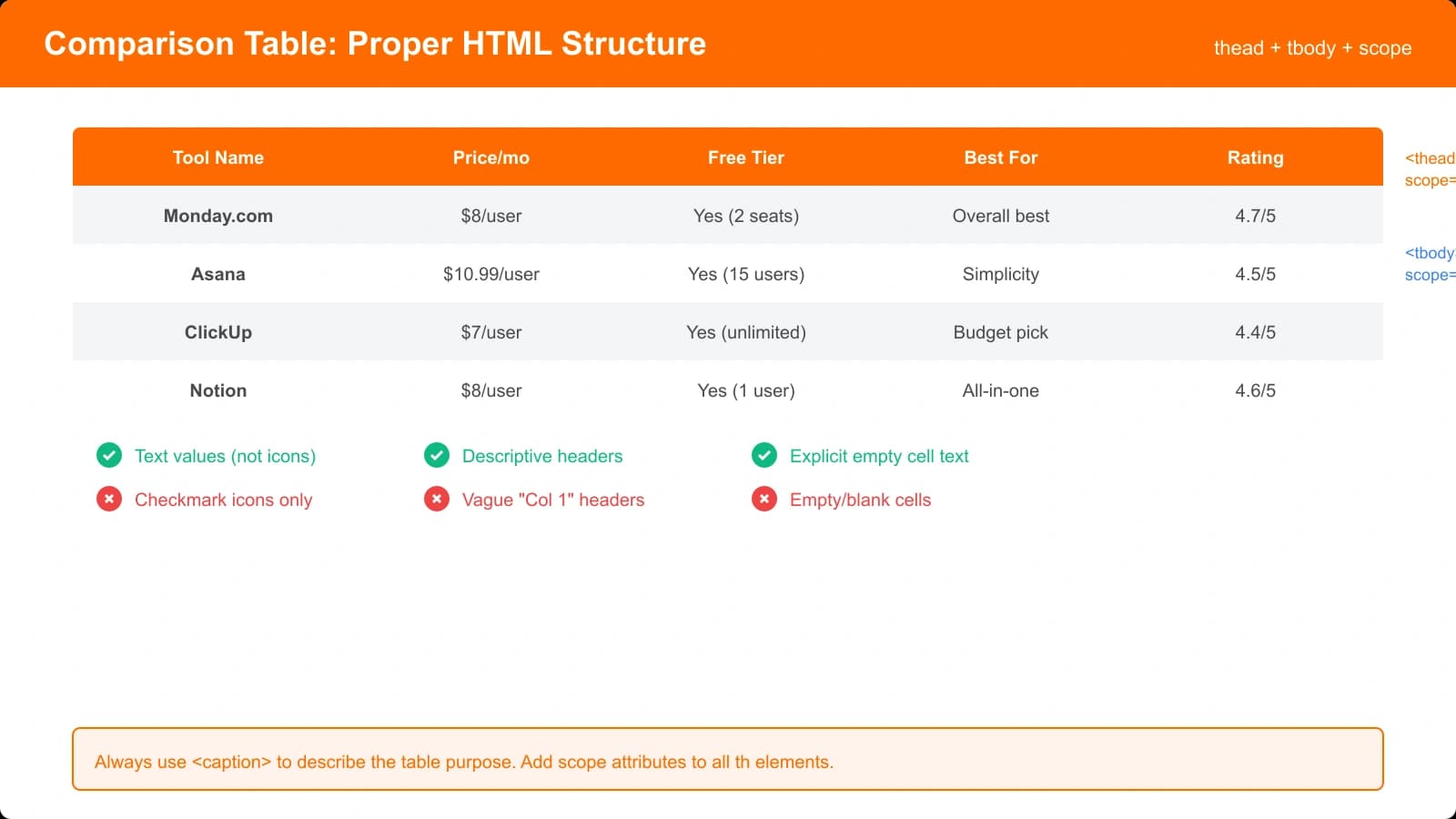
Comparison tables are critical for AI extraction. They present data in a structured format that AI systems can parse reliably. Every listicle should include at least one well-designed comparison table.
Table Structure
An effective comparison table needs these elements:
- Product column: Product names with any category labels (e.g., “Best Overall”)
- Price column: Clear pricing information (essential for purchase decisions)
- Key feature columns: 3-5 columns covering your evaluation criteria
- Rating column: Numeric scores for easy comparison
Filled Example
| Product | Best For | Starting Price | Free Tier | Key Strength | Rating |
|---|---|---|---|---|---|
| Notion (Best Overall) | Flexible teams | $8/user/mo | Yes | Customization | 4.8/5 |
| Monday.com (Best Enterprise) | Large orgs | $9/user/mo | Yes (2 users) | Reporting | 4.5/5 |
| Trello (Best Budget) | Simple workflows | Free | Generous | Ease of use | 4.2/5 |
| Asana | Marketing teams | $10.99/user/mo | Yes | Task management | 4.4/5 |
| Linear (Best for Devs) | Engineering teams | $8/user/mo | Yes | Speed | 4.7/5 |
Table Formatting Rules
- Always use semantic HTML tables with thead and tbody
- Include category labels (Best Overall, Best Budget) in the product name cell
- Keep cell content short (1-4 words per cell when possible)
- Include both price and free tier information (covers different queries)
- Use consistent rating scales (X/5 or X/10, not mixed)
- Limit to 5-8 products for scannability
Section 7: Individual Product Reviews
Product reviews provide the depth that establishes authority. Each product in your comparison should get its own section with consistent formatting.
Review Template Structure
Each product review should follow this structure:
- H2 heading: Product name with position number (e.g., “1. Notion—Best Overall for Flexible Teams”)
- Quick verdict paragraph: 2-3 sentences summarizing why this product ranked where it did
- Pros list: 3-5 bullet points highlighting strengths
- Cons list: 2-3 bullet points noting limitations
- Key details: Price, key features, notable integrations
- Best for statement: Clear statement of ideal user profile
Filled Example
1. Notion—Best Overall for Flexible Teams
Notion tops our list because it offers something rare in project management: true flexibility without overwhelming complexity. Whether you need a simple task board or a complex wiki with databases, Notion adapts to your workflow rather than forcing you into rigid structures.
Pros:
- Highly customizable workspace that adapts to any workflow
- Combines notes, docs, wikis, and project tracking in one tool
- Excellent template library for quick setup
- Strong free tier for small teams
- Regular feature updates and improvements
Cons:
- Learning curve can be steep for non-technical users
- Mobile app less capable than desktop
- No built-in time tracking
Pricing: Free for personal use, $8/user/month for teams, $15/user/month for business features.
Best for: Teams of 5-50 who value flexibility and want to consolidate multiple tools into one workspace.
Review Word Count Guidance
| Product Position | Recommended Length | Reasoning |
|---|---|---|
| Top 3 picks | 250-350 words each | Most likely to be searched, need full context |
| Positions 4-6 | 175-250 words each | Still important but less likely to be cited |
| Positions 7+ | 125-175 words each | Completeness matters, but depth less critical |
Section 8: Verdict Sections
Within each product review, include a clear verdict statement that AI can extract. This is separate from your TL;DR—it's a product-specific recommendation statement.
Verdict Formula
Example: Our Verdict: Notion is the right choice for teams who value flexibility over rigid structure. If you need advanced time tracking or resource management, consider Monday.com instead.
Verdict Placement
Place the verdict statement at the end of each product review section, immediately before the next product's H2 heading. This position makes it easy for AI to associate the verdict with the correct product.
Formatting the verdict consistently across all product reviews helps AI systems recognize the pattern. Use the same structure (“Our Verdict:” in bold) for every product.
Section 9: Use Case Guidance
After individual reviews, include a section that helps readers match their specific situation to the right product. This section targets long-tail queries like “best project management tool for agencies” or “project management for freelancers.”
Use Case Template
Structure this section as a series of conditional recommendations:
- If you're [situation/need], choose [Product] because [reason].
Filled Example
Which Tool Is Right for You?
If you're a small startup (under 10 people): Start with Notion. You'll get docs, project management, and a wiki in one tool, minimizing the number of subscriptions you need to manage.
If you're a marketing agency: Asana's task-focused approach handles client projects well, and the timeline view makes deadline management intuitive for non-technical teams.
If you're an engineering team: Linear is purpose-built for software development with keyboard-first design, excellent GitHub integration, and cycle-based planning that matches how dev teams actually work.
If you're budget-conscious: Trello's free tier is genuinely usable for small teams. You can run a five-person team indefinitely without paying a cent.
If you need enterprise features: Monday.com's reporting dashboards, permission systems, and dedicated support make it the best choice for organizations over 100 people.
This format works because each paragraph is a complete, extractable answer to a specific query. AI systems can pull “If you're an engineering team, Linear is purpose-built for software development” and use it to answer that exact query.
Section 10: FAQ Section
FAQ sections serve dual purposes: they target “People Also Ask” queries on Google and provide additional extraction opportunities for AI systems answering specific questions.
FAQ Template
Include 4-6 questions that match actual search queries. Research these using Google's PAA box, Perplexity suggestions, or keyword research tools.
Structure each FAQ item:
- H3 heading with the question (exactly as users would ask it)
- Direct answer in the first sentence
- Brief explanation or context (2-4 sentences total)
Filled Example
What is the best free project management tool?
Trello offers the best free project management experience for most teams. Its free tier includes unlimited boards, cards, and members—enough for small teams to operate indefinitely without paying. The only significant limitation is the number of Power-Ups (integrations), which you can work around with Zapier.
Is Notion better than Asana?
Notion is better than Asana for teams who need flexibility and want to combine project management with documentation. Asana is better for teams who need structured task management with timeline views and workload tracking. For pure project management, Asana is more focused; for an all-in-one workspace, Notion wins.
How much does Monday.com cost?
Monday.com starts at $9 per user per month when billed annually for the Basic plan. The Standard plan ($12/user/month) adds timeline and Gantt views. Most teams need at least Standard. There's a free tier for up to 2 users with limited features.
Section 11: Conclusion
The conclusion wraps up your content with a final recommendation and call-to-action. Keep it brief—75-100 words is sufficient.
Conclusion Template
A strong conclusion includes:
- Restatement of your top pick with primary reason
- Acknowledgment of alternatives for different needs
- Forward-looking statement or call-to-action
Filled Example
“After extensive testing, Notion remains our top recommendation for most teams seeking a project management solution. Its flexibility and all-in-one approach make it ideal for growing organizations that don't want to juggle multiple tools.
That said, your specific needs should drive your choice. Enterprise teams will find Monday.com's reporting capabilities worth the premium. Developers should seriously consider Linear's purpose-built approach. And budget-conscious teams can accomplish a lot with Trello's generous free tier.
Whichever tool you choose, the key is to commit and build your workflows around it. The best project management tool is the one your team actually uses.”
Section 12: Schema Markup
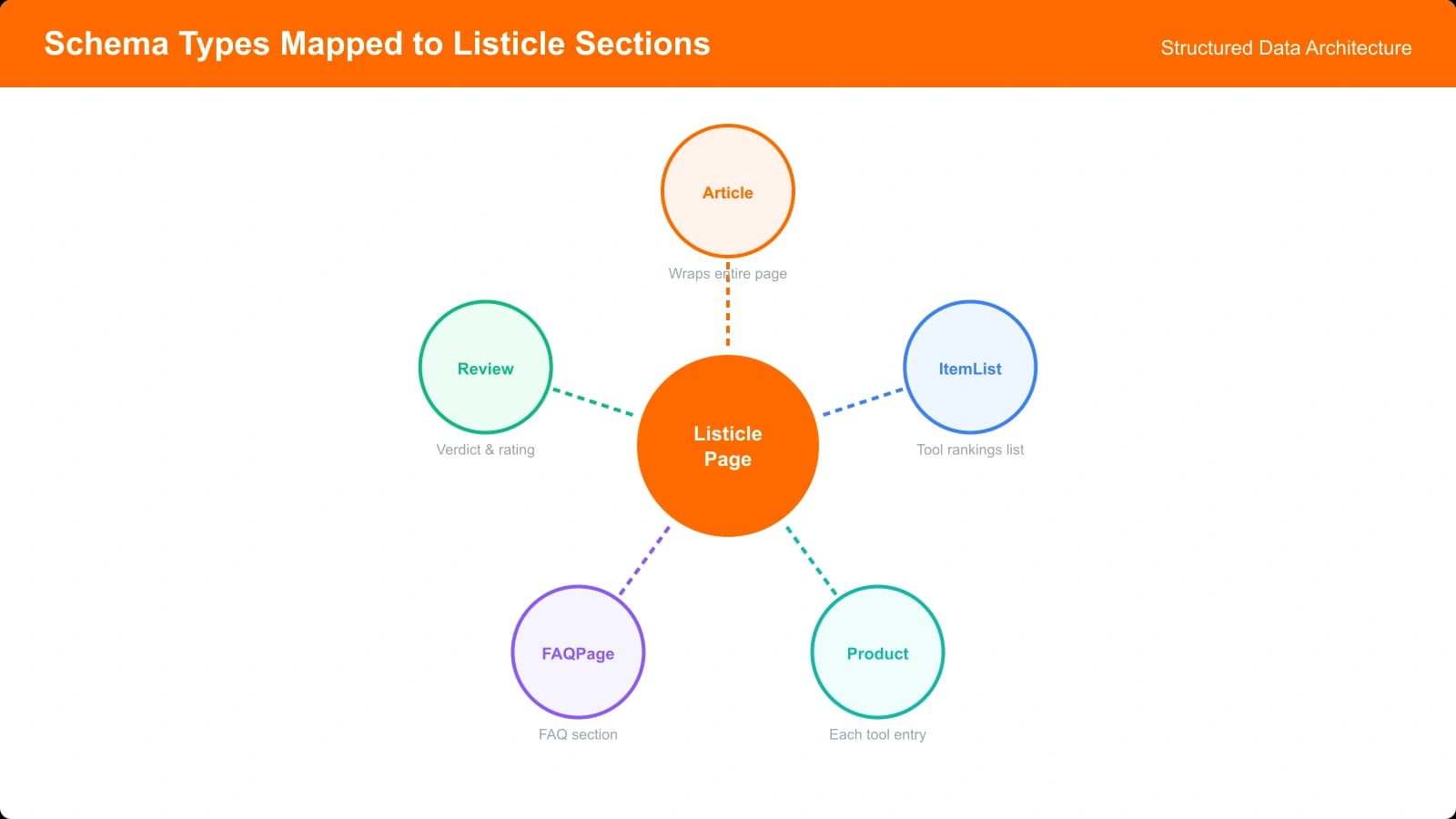
Schema markup provides structured data that both Google and AI systems can use to understand your content. For listicles, you should implement ItemList schema combined with Product or Review schema for individual items.
Recommended Schema Types
| Schema Type | Purpose | Priority |
|---|---|---|
| Article | Basic article metadata | Required |
| ItemList | Structured list of items | Highly recommended |
| Product + AggregateRating | Product details with ratings | Recommended |
| FAQPage | FAQ section markup | Recommended |
| Speakable | Voice assistant readability | Optional |
Basic ItemList Example
{
  "@context": "https://schema.org",
  "@type": "ItemList",
  "name": "Best Project Management Tools for Remote Teams",
  "itemListOrder": "https://schema.org/ItemListOrderDescending",
  "numberOfItems": 8,
  "itemListElement": [
    {
      "@type": "ListItem",
      "position": 1,
      "item": {
        "@type": "Product",
        "name": "Notion",
        "description": "Best overall project management tool for flexible teams",
        "aggregateRating": {
          "@type": "AggregateRating",
          "ratingValue": "4.8",
          "bestRating": "5",
          "reviewCount": "150"
        }
      }
    }
  ]
}
For comprehensive schema implementation, see our detailed guide on Structured Data for Listicles.
Customization Tips
This template provides a foundation, but you'll need to adapt it for your specific niche and content type. Here's guidance on customization that preserves AI optimization.
Customization by Content Type
SaaS comparisons: Emphasize pricing tables, integration lists, and use case matching. Include free trial information prominently.
Physical products: Add specification tables, shipping information, and warranty details. Include “where to buy” guidance.
Local services: Add location-specific context, pricing ranges (not exact prices), and trust signals like licensing and insurance.
Financial products: Include regulatory disclaimers, APR/fee transparency, and eligibility requirements. Be extra careful about accuracy.
What Not to Change
Some elements should remain constant regardless of niche:
- TL;DR placement and structure
- Quick Picks table format
- Semantic HTML structure (tables, headings, lists)
- Verdict statement format and placement
- FAQ direct-answer structure
Putting It All Together
Building AI-optimized listicles isn't about gaming the system—it's about presenting your expertise in a format that's easy for both humans and AI to understand and use. The template in this guide provides that structure.
Here's your implementation checklist:
- Craft a keyword-rich title using the formula: [Number] Best [Category] for [Audience] in [Year]
- Write a TL;DR box that delivers your verdict in 45-65 words
- Include a Quick Picks summary covering 3-6 category winners
- Add a methodology section that establishes your credibility
- Build a comparison table with pricing, key features, and ratings
- Write detailed product reviews with consistent structure and clear verdicts
- Add use case guidance for different reader situations
- Include an FAQ section targeting specific search queries
- Implement schema markup for structured data
Each element works together to create content that satisfies traditional SEO requirements while maximizing your chances of AI citation. The pages built with this structure consistently outperform unoptimized competitors in both Google rankings and AI visibility.
For related guidance, explore our articles on TL;DR Section Placement for AI Pickup, Quick Answer Boxes AI Systems Love, and How Listicles Get Cited by AI Overviews.
The future of search is hybrid—traditional rankings plus AI citations. Building for both isn't optional anymore. It's how you stay visible.

Product Manager at BestPage. Pioneer in AEO research since 2024, exploring the convergence of SEO and GEO (Generative Engine Optimization). Led multiple AI-powered content optimization projects that achieved 300%+ citation increases in ChatGPT and Perplexity.